Earlier this month, IKEA debuted a tiny NFC-enabled bed that's meant to help smartphone users cut down on nighttime usage. The small "Phone Sleep Collection" is modeled after an actual IKEA bed, and it uses the IKEA app to monitor scroll-free sleep time.
Users who hit seven hours of scroll-free time for a week straight are eligible for an IKEA voucher.
Every phone bed comes with built-in NFC tech, making sleep effortlessly rewarding. Here's how it works: - Download the IKEA UAE app. - (For iOS users) When prompted, allow Motion & Fitness tracking. - Place your phone on its bed and tap the notification to open the app. - That's it. Your sleep time will track in the background (no counter will appear). - Complete seven nights of seven-hour sleep, and earn your voucher.
Unfortunately, the tiny bed is only available in the United Arab Emirates, and it is a promotional item that IKEA is giving out when customers spend AED 750 or more in-person in IKEA, as long as the purchase includes an item from the company's Complete Sleep Collection.
IKEA's promotion has garnered quite a bit of attention, so it's possible that the company will expand the promotion to additional countries.
AT&T today launched a new ad campaign that goes after T-Mobile, calling out the "litany of misleading and deceiving claims in T-Mobile's marketing."
AT&T's new ad features actor Luke Wilson, with Wilson calling T-Mobile the "master of breaking promises." AT&T points out that the BBB's National Advertising Review Board has recommended T-Mobile change its advertising 16 times over the past four years, though AT&T fails to mention that the NARB also found that some claims were accurate.
Verizon, AT&T, and T-Mobile often ask the National Advertising Review Board to investigate the advertising claims that their competitors are making, and all three carriers are regularly asked to make various changes as a result.
AT&T says that it covers 300,000 more square miles than T-Mobile, and that it had the fewest dropped calls in recent tests. AT&T claims that it is the first and only network to offer a guarantee for its wireless and fiber networks, providing "transparent communication" and proactive bill credits during outages.
Apple said today that it might be "forced" to disable a key anti-ad tracking feature in the European Union, reports DPA International.
"Intense lobbying efforts in Germany, Italy and other countries in Europe may force us to withdraw this feature to the detriment of European consumers," Apple said in a statement to DPA.
Apple is referring to App Tracking Transparency (ATT), a feature that lets iPhone and iPad users decide whether to allow apps to track their activity across other apps and websites for advertising purposes. Users can choose to allow apps to ask for permission, or turn off tracking entirely.
The anti-tracking features were implemented in Apple's iOS 14 updates. ATT prevents apps from accessing the advertising identifier of an iPhone, iPad, or Apple TV without express permission, so apps can't track what users do on their devices and then use the information gleaned for ad targeting.
ATT has been unsurprisingly unpopular with advertisers and data brokers. Facebook rallied hard against App Tracking Transparency ahead of when it rolled out, positioning Apple as an enemy of small businesses and taking out multiple full-page newspaper ads.
Germany launched a probe into App Tracking Transparency back in 2022, and in February 2025, Germany's Federal Cartel Office preliminarily ruled that Apple abused its market power with ATT, giving itself preferential treatment, even though Apple says it does not collect data from third-party apps. The cartel said that Apple's restrictions made it "far more difficult" for app publishers to access user data relevant for advertising.
In March 2025, Apple was fined 150 million euros by France's Competition Authority. French regulators said that Apple complicated the process for users to opt out of tracking and unfairly disadvantaged third-party developers and ad providers. Apple is facing a similar investigation in Italy, with a ruling expected later this year.
Apple said that it has presented solutions to regulators in Europe, but it is facing complex solutions that would undermine App Tracking Transparency. Apple also said it will work to keep the feature available to Europeans. "We will continue to urge the relevant authorities in Germany, Italy and across Europe to allow Apple to continue providing this important privacy tool to our users."
Apple engaged in anticompetitive behavior by charging App Store developers "excessive and unfair prices" for app distribution services, the UK's Competition Appeal Tribunal (CAT) ruled today [PDF] (via Reuters).
The Tribunal found that Apple abused its market power by overcharging developers from October 2015 through the end of 2020. Developers were forced into using Apple's in-app purchase system and had no alternative to paying up to a 30 percent commission during that time period. The excessive fees ultimately led to higher prices for consumers.
According to the CAT, Apple had a monopoly over iOS app distribution and in-app payments. Apple's argument that Android and other platforms were viable alternatives for consumers and developers was rejected. The Tribunal also did not accept Apple's argument that its rules and fees were required for user security and privacy.
The end of 2020 in the UK's timeline corresponds with the launch of the App Store Small Business Program that saw Apple reduce App Store fees for independent developers and small business owners. The program reduced the commission that Apple collected from developers earning under $1 million per year to 15 percent, down from 30 percent. It's also when Apple began implementing other App Store changes in response to cases like Epic Games v. Apple.
The class action lawsuit was first filed in 2021 by Kings College London academic Dr. Rachael Kent, and the claim seeks up to £1.5 billion in damages. The period between 2015 and 2020 was selected in order to determine how much Apple will need to pay to UK consumers.
A damages trial is scheduled for November. Apple said it will appeal the ruling.
Note: Due to the political or social nature of the discussion regarding this topic, the discussion thread is located in our Political News forum. All forum members and site visitors are welcome to read and follow the thread, but posting is limited to forum members with at least 100 posts.
The standard iPhone 18 will be equipped with the A20 chip, while the iPhone 18 Pro models and Apple's long-rumored foldable iPhone will be equipped with an A20 Pro chip, the post said. However, the post did not mention which chip the entry-level iPhone 18e or second-generation iPhone Air would use, should there be such models.
Given there were A18 and A18 Pro chips, as well as A19 and A19 Pro chips, this rumor that Apple is allegedly planning both A20 and A20 Pro chips is not very surprising. But, it still helps to set expectations for the iPhone lineup moving forward.
A20 and A20 Pro chips are expected to be the first iPhone processors manufactured with TSMC's 2nm process, whereas the A17 Pro through A19 Pro chips were all fabricated with TSMC's series of 3nm processes. This would result in greater year-over-year performance improvements and power efficiency gains for iPhones than usual.
According to a previous rumor, at least some A20 chips will have RAM integrated directly onto the same wafer as the CPU, GPU, and Neural Engine, rather than being adjacent to the chip and connected via a silicon interposer. This design change may result in the chips being smaller, and it would likely contribute to improved efficiency.
The following new iPhone models are expected to be released in September 2026:
iPhone 18 Pro
iPhone 18 Pro Max
iPhone Fold
It is not entirely clear if there will be a second-generation iPhone Air, but if there is, that device would presumably also be released in September 2026.
The following models are expected to follow around March 2027:
iPhone 18e
iPhone 18
If so, the A20 Pro chip would be announced next year, and the A20 chip would follow in 2027.
Apple returned to court this week to argue that a federal judge exceeded their authority when they held the company in contempt and barred it from collecting any commission on external in-app transactions, Bloomberg reports.
Apple told the appeals court that a U.S. District Judge went further than their 2021 order allowed when they banned Apple from taking any commission on purchases made outside apps. Apple said the order only required it to allow links to outside payments, not to stop collecting fees entirely.
Apple argued that if the judge disagreed with its approach, they should have clarified the order instead of punishing the company for contempt. It told the judges that the contempt ruling was "punitive" and that Apple is entitled to "some compensation" when developers use its platform and ecosystem.
Epic told the court that Apple knowingly violated the order instead of asking for clarification. The company said Apple only started claiming it should be paid for external purchases after it was caught violating the injunction.
The case arises from Epic's 2020 decision to add an external payment link to Fortnite, which led to its removal from the App Store. In response to the 2021 order allowing alternative payments, Apple created a new 27% fee on external transactions. Epic argued this violated the spirit of the order. A judge later agreed and held Apple in contempt, banning any commission on external payments. Apple is now asking the Ninth Circuit to overturn that contempt ruling.
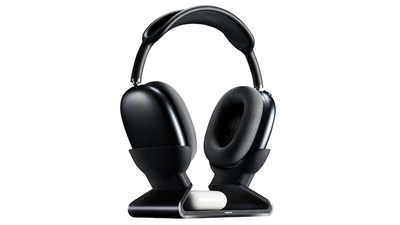
Last month, Mophie announced the launch of its Max Charging Stand. Aimed squarely at those with multiple sets of Apple's headphones, it can charge AirPods Max headphones plus a pair of AirPods or AirPods Pro at the same time.
Priced at $150, it immediately garnered criticism in our forum, largely over its price point compared to its functionality. But is it actually worth it? I've spent a few weeks with it to see.
Design and Build
The charging base is aluminum lined with smooth silicone along every surface that comes into contact with your devices. The bottom also has a large rectangular pad of this same silicone so that it doesn't slide easily on your desk. The Mophie logo is subtly stamped on the top just under the square indentation that shows you where to place your AirPods (or other Qi-enabled device) for charging.
At 15.7 ounces (445 g) on my kitchen scale, it's weighty enough to hold my AirPods Max without wobbling. But more on this later...
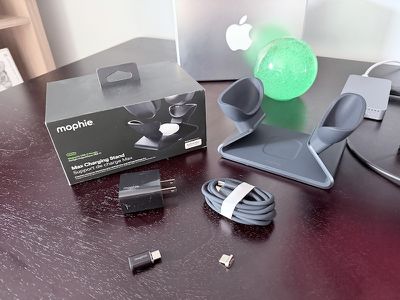
It comes with a decently long 5-foot USB-C cable coated with the same silicone that covers the stand, a 20W wall adapter, two magnetic charging dongles, and a pass-through adapter.
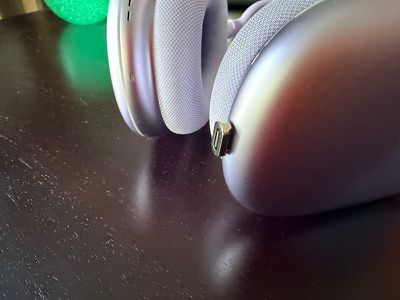
To use the stand, you insert one of the magnetic dongles into the USB-C port of the AirPods Max. This dongle then connects automatically to the charging port in the stand thanks to its magnetism. The second magnetic dongle included is a spare which is a nice touch, especially at this price point.
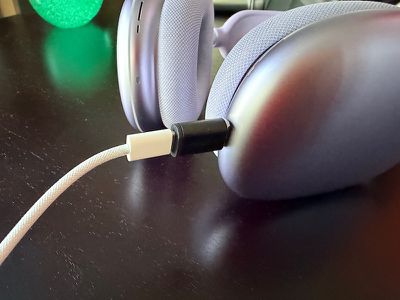
The pass-through adapter allows you to leave a charging dongle in the Max's charging port at all times so you can still charge it with a standard USB-C cable, avoiding wear and tear on the port with frequent removals and insertions. But on the other hand, this is another adapter to carry around and avoid losing. The pro tip here is to just leave this dongle attached to a USB-C cable you use to charge the headphones when you're away from home.
Using the included pass-through adapter to a USB-C cable
The charging dongle does not pass through audio, so if you use your AirPods Max with a cable for lossless audio or to connect to a 3.5mm analog device, you'll have to remove the dongle each time.
The magnetic dongle is the key feature of the stand and it isn't a new concept—charging stands that make use of a magnetic dongle have been released by smaller companies over the years (e.g., the Max Stand a few years ago) and Mophie's is a premium entry by one of the larger Apple accessory makers.
How It Works
When you place the AirPods Max on the stand, the white LED on the front of the stand illuminates for a few seconds and then turns off. Since you can't see the status light next to the USB-C port on the headphones themselves to verify charging while it's in the stand, it's a bit frustrating to not be able to see charging status after the stand's light turns off.
Additionally, since the stand places the headphones in sleep mode using magnets built into the ear cup holders, you can't even see its charge level on another Apple device in Control Center or the Battery widget unless you remove it from the stand. I'd rather this light stay on or pulse while the headphones are charging.
Removing the AirPods Max requires two hands since the stand, while weighing in at nearly a pound, is not heavy enough to overcome the magnetic force from the charging dongle. You must also use two hands to place the headphones into the stand since the ear cup holders are placed far enough apart that you need to stretch the headband wider.
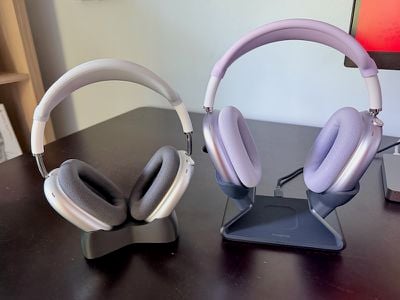
This ear cup holder placement does, however, allow the stand to accommodate AirPods or another Qi-enabled device in the center. I'd been using a simple 3D-printed AirPods Max stand with no charging capability where the ear cup holders are close enough together that it's easy to drop in and remove the AirPods Max with one hand, so this was an adjustment for me.
The center charger fits an AirPods Pro case easily and the indentation makes it easy to target where it should go. It's even large enough to accommodate the large case cover I use on mine. It also charged my iPhone 17 Pro although it takes a few seconds to line it up in the right spot.
The center charger is nice to have but seems like an addition meant to add value to the stand to justify the price. I'd like to see a version at a lower price point without this center charger that would also allow a narrower placement of the holders for the ear cups.
Next to my (non-charging) 3D-printed stand
In my charging tests, I saw no significant differences between charging my AirPods Max directly with Apple's USB-C cable to a 20W wall adapter, using the Max Stand, or using the USB-C cable with the pass-through adapter that Mophie includes. Apple states that a 5-minute charge adds 1.5 hours of listening but does not claim any fast-charging features beyond this, nor does Apple specifically recommend using a high-wattage wall adapter.
Per iFixit, the USB-C AirPods Max has the same battery cells as the original model released in 2020 with a total capacity of 664 mAh. AirPods Max automatically limits the amount of power drawn during charging and using a higher-wattage wall adapter doesn't increase charging speeds.
With this stand on my desk, I noticed that I was no longer ultra-careful about taking every opportunity to put my headphones into sleep mode to avoid draining the battery. I started leaving my AirPods Max around the house willy-nilly without a charging care in the world since I knew I could easily pop them on the stand for a quick charge anytime. Using a USB-C cable to charge them is not hard of course, but it takes more steps than just dropping the headphones into a stand.
The Big Question
Will Mophie offer a Lightning dongle that will allow the stand to work with older AirPods Max models that have Lightning ports? It seems like this would be an easy thing to do since the stand is only handling low power to the headphones and no data, and it would open up the consumer base greatly for Mophie to sell more of these. This is the most commonly-asked question on the stand's product page and there's no official answer from Mophie there at the time of this review, though there is someone who claims that Mophie responded to them directly and said no. We asked Mophie directly and they did not respond prior to publication of this review.
A closer view of the magnetic dongle
We presume that the official answer to this question is no. While disappointing, it's likely a licensing issue that's preventing a Lightning dongle. The Lightning connector is a proprietary one and Apple offers licensing of its use through its MFi program, while USB-C is not proprietary. If Mophie has done the math here, it must be that licensing a Lightning dongle is more costly than offering it, even if it means missing out on a potentially large user base of Lightning AirPods Max owners.
Who It's For
You use your AirPods Max frequently throughout the day at or near a desk and want an easy and quick way to charge them. Or you are out and about all day and want to drop your AirPods Max in a dock near the door when you get home to charge fully overnight before you grab them and go in the morning. And you have $150 to burn.
I was salty about the price when this was first announced, but I have appreciated this dock more and more and even find myself using my AirPods Max more because of it. Like much in life, making something easier has a large impact on how often it's used or done. So is it worth it? For me, the answer is yes.
Pros:
Solid, quality build
Aesthetically pleasing
Can charge two devices at once
Easy and convenient charging
Cons:
No at-a-glance charging status indicator
Need two hands to place and remove headphones
Stretches headband
Pass-through adapter is another thing to lose
Price
Note: Mophie provided MacRumors with a Max Stand for the purpose of this review. No other compensation was received. MacRumors is an affiliate partner with Mophie. When you click a link and make a purchase, we may receive a small payment, which helps us keep the site running.
In select U.S. states, residents can add their driver's license or state ID to the Wallet app on the iPhone and Apple Watch, providing a convenient and contactless way to display proof of identity or age at select airports and businesses, and in select apps.
Starting today, the feature is available to residents of West Virginia. To set it up, open the Wallet app and tap on the plus sign in the top-right corner. Next, select Driver's License and ID Cards and follow the on-screen steps.
Apple says the feature requires an iPhone 8 or later running iOS 16.5 or later, or an Apple Watch Series 4 or later running watchOS 9.5 or later.
Below, we have outlined information about the feature's availability.
Supported States
The following 12 states offer driver's licenses in the Wallet app:
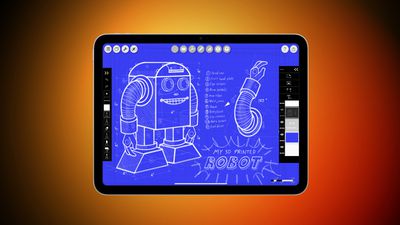
Amazon this week is taking $50 off Wi-Fi models of Apple's 11th generation iPad. Prices start at $299.00 for the 128GB Wi-Fi iPad, down from $349.00, a second-best price on this model.
Note: MacRumors is an affiliate partner with Amazon. When you click a link and make a purchase, we may receive a small payment, which helps us keep the site running.
Additionally, Amazon has the 256GB Wi-Fi iPad for $399.00 ($50 off) and the 512GB Wi-Fi iPad for $599.00 ($50 off). Free delivery estimates are placed around October 28 for most of these iPad models, but Prime members should be able to get same-day delivery in many locations.
If you're on the hunt for more discounts, be sure to visit our Apple Deals roundup where we recap the best Apple-related bargains of the past week.
Deals Newsletter
Interested in hearing more about the best deals you can find as we head into the holidays? Sign up for our Deals Newsletter and we'll keep you updated so you don't miss the biggest deals of the season!
Apple is interested in buying Warner Bros. Discovery's extensive back catalog of content for Apple TV, Bloomberg reports.
Warner Bros. Discovery owns HBO, CNN, Warner Bros., DC Entertainment, Discovery Channel, Cartoon Network, and many more brands. The media company is responsible for thousands of major TV shows and movies. Now, it is reportedly interested in being acquired by another big player like Paramount Skydance, or breaking up by selling assets like its streaming business.
According to two people said to be familiar with the discussions, Apple has apparently expressed interest in acquiring the company's extensive film and TV library, as well as production assets. Other parts of the business would have to be retained or sold to other suitors. Netflix, Comcast, and Amazon have also conveyed interest in the proposition.
If they proceed, the breakup could see Apple or another streamer significantly bolstering its content catalog. To date, Apple TV has generally focused on delivering original content, rather than acquiring or licensing properties from other studios. On "The Town" podcast, Apple services chief Eddy Cue responded to speculation about Apple buying other media companies like HBO:
I never say no to anything, but we're not actively looking at buying any company of any size. We like building things ourselves.
[...]
Look, we talk to a lot of folks, we like learning and talking and listening is a good way to learn. But again, I never say no to anything in the future, but it's not our approach. We like building things, we like doing things ourselves and creating them, and we think that that's how we can really stand out and do unique things.
When asked directly if Apple would buy Warner Bros., Cue said:
I would be surprised, but again, I never say no to anything because you never know what happens in the world.
Warner Bros. Discovery reportedly expects to begin asking potential bidders to sign nondisclosure agreements as early as this week. Last week, Apple announced a $700 million five-year partnership that brings all F1 races exclusively to Apple TV in the United States beginning next year.
Apple's new iPhone lineup launched in the fall of 2027 will be called the "iPhone 20" models, rather than the "iPhone 19," according to research firm Omdia.
Speaking at a conference in Seoul (via ETNews), Omdia Chief Researcher Heo Moo-yeol corroborated rumors that Apple plans to move the launch of its standard iPhone to the first half of the year and provided some additional clarity about what to expect through to the end of 2027.
In the first half of 2027, Apple will launch the "iPhone 18e" and "iPhone 18." Then, in the second half of the year, Apple will launch a next-generation iPhone Air, "iPhone 20 Pro," "iPhone 20 Pro Max," and second-generation foldable iPhone.
The move is said to be part of a broader attempt to reset the iPhone's naming system and revitalize the product lineup around the device's 20th anniversary. There is a strong argument that Apple will skip "iPhone 19" nomenclature. For the 10th anniversary of the iPhone in 2017, Apple skipped the "iPhone 9" and simply launched the iPhone X (roman numeral for 10) alongside the iPhone 8 and iPhone 8 Plus.
Apple's plan to push the release of its standard model to the first half of the year to launch alongside a new "e" model is now widely rumored. Omdia says that from next year, Apple is expecting reduced demand due to the change, with no "iPhone 18" launching in 2026, and will temporarily reduce iPhone panel orders by 20 million units as a result. In the long term, this is expected to be offset by shipments of foldable iPhones.
In August, ETNews reported that Apple had informed some of its suppliers that the iPhone 18 will not be part of the fall 2026 iPhone lineup. Instead, the company will unveil only higher-end models in the second half of next year.
Both The Information and Apple supply chain analyst Ming-Chi Kuo reported in May that Apple was considering moving to a biannual schedule to help sustain sales throughout the calendar year. By staging new device launches in both halves of the year, Apple could avoid the concentrated sales pattern that typically peaks in the fourth quarter following its September events and tap into periods that historically see weaker consumer demand. The iPhone 17 lineup is believed to be the last to have followed Apple's traditional release structure.
*Omdia initially calls this early 2027 model the "iPhone 20," but this is likely a mistake and refers to the iPhone 18, as it implies later in its report. The standard iPhone 20 will probably follow in the first half of 2028.
Back in 2012, an Apple retail employee named Sam Sung went viral because his name is similar to Samsung, one of Apple's main competitors. In a recent interview with Business Insider, he detailed that period in his life, how Apple responded, and he explained why he ultimately changed his name.
Someone posted an image of Sung's Apple business card on Reddit in 2012, and it spread rapidly. Apple called him and asked him if he was aware of the post, and he became paranoid that he would lose his job.
"I was so scared, and I just wanted to keep my head down and stay employed," he said.
After a reporter approached him while he was at work, Apple pulled Sung from the store floor, and employees were told not to identify him when customers came in and asked. Apple also took away his business cards. Sung pretended to be someone else when a customer asked, and eventually, the joke died off.
Sung ended up leaving Apple in 2013 because he wanted to move on from retail, and in 2014, he ended up auctioning off his old business cards and pieces of his former uniform for charity.
Sung didn't change his name until after he left Apple, but his decision to do so was a direct result of going viral. He said he "didn't want to be known for being an internet joke."
He ultimately decided to change his last name to Struan, which he says is the name of one of his favorite places in Scotland. Though he doesn't regret his name change, he says that he wishes he could tell his younger self to "see it as a funny thing" and not stress out about his job.
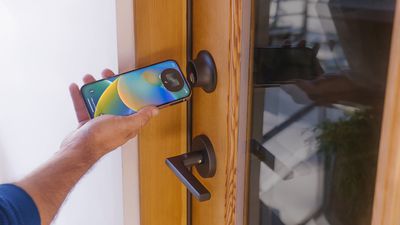
The NFC Forum announced NFC Certification Release 15 (CR15), introducing a change that boosts the potential read range of NFC devices. CR15 defines the certification program for compliance with the NFC Release 15 specification that was announced earlier this year.
CR15 allows devices to certify for a read range of up to 20mm, which is a meaningful improvement over the prior 5mm limit. The NFC Forum says that the range increase will improve the user experience by requiring less precise alignment for a connection.
Future Apple Watch and iPhone models could adopt the increased 20mm range, but existing devices won't benefit because the change requires updated NFC hardware.
For iPhone and Apple Watch users, the update could allow future Apple devices to activate hotel room doors, house doors, car doors, and other NFC-enabled devices from further away. NFC is used for short-range interactions, like unlocking a HomeKit-compatible door as the homeowner approaches or opening a hotel room door without a physical key. Apple technologies like HomeKit and hotel key wallet integration could be faster and more reliable with the change.
The 15mm increase means users won't have to align devices as precisely, but NFC will still be more secure than longer-range technologies like Bluetooth or Ultra Wideband. Devices that support the 20mm certification could be available in the coming months now that the testing and certification process is available.
Apple, Google, and other major tech companies are members of the NFC Forum, so Apple was likely involved in the specification upgrade.
Apple this week removed dating review apps Tea Dating Advice and TeaOnHer from the App Store for violating its content moderation policies.
The apps were pulled in all markets on October 21, and Apple told TechCrunch that the app developers did not meet requirements for moderation and user privacy, violating App Store guidelines 1.2, 5.1.2, and 5.6. Apple also saw an "excessive number of user complaints and negative reviews," including complaints that people were sharing the personal information of minors.
Rule 1.2 says that apps need to have reporting and blocking features, and should remove objectionable content. Rule 5.1.2 prohibits apps from sharing users' personal information without permission, and rule 5.6 says that excessive negative reviews violate Apple's Developer Code of Conduct.
Apple contacted the developers of each app before removing the apps, but they did not address the problems.
For background, Tea is an app designed to let women share details about the men they were dating, offering "red flag" and "green flag" ratings. The app launched in 2023, but it went viral earlier this year, and its popularity led to a data breach.
TeaOnHer is a separate app from a different developer that launched after Tea became popular, and it too had major security issues. Neither developer has commented on the situation.
Both apps are still available on Google Play, and on the App Store, TechCrunch has found multiple copycat apps.
Note: Due to the political or social nature of the discussion regarding this topic, the discussion thread is located in our Political News forum. All forum members and site visitors are welcome to read and follow the thread, but posting is limited to forum members with at least 100 posts.
Bird Buddy is a company known for its camera-equipped bird feeder, a product that started out on Kickstarter. Since debuting the original bird feeder in 2021, Bird Buddy has expanded its product lineup, giving people more ways to bring nature indoors.
I first reviewed the Bird Buddy last year, but I am revisiting my review because there's an upgraded camera that's now available, along with a hummingbird feeder and a stand.
Bird Buddy Pro Camera
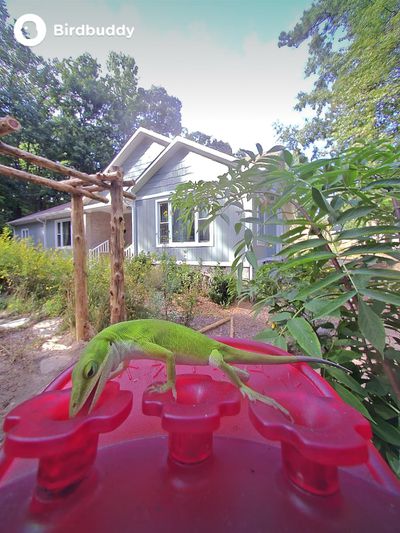
The Bird Buddy Pro is Bird Buddy's newest standard setup, and it comes with an improved camera that supports 2K video, HDR, and slow-motion video playback. It has a wider field of view, and better sensor, and the HDR is new. If you already have the Bird Buddy like I did, you can buy the camera on a standalone basis, because it is the same size as the original camera and the enclosure is the same.
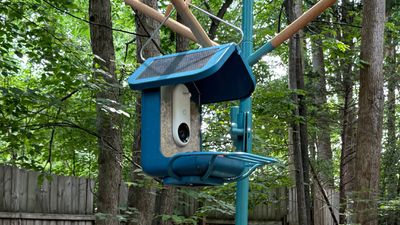
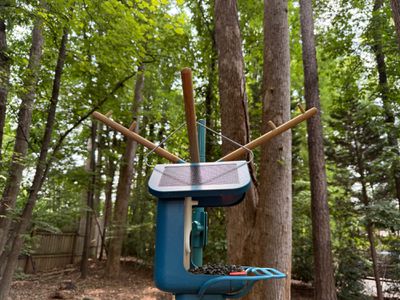
The Bird Buddy enclosure is made from a thick plastic material, and it has an optional solar roof add-on that keeps the camera charged up using the sun. I've had the Bird Buddy up and running for a year now, and it's held up well despite exposure to sun, rain, frost, and heat. The clear back panel that pulls out to clean the Bird Buddy has yellowed a bit, and my solar panel can pop loose a little bit at the top, but I otherwise haven't run into any issues with the integrity of the bird feeder. I'm able to pop the solar panel roof back down, and I haven't had problems with water intrusion or problems with charging.
When placed in an area that gets a small amount of sun a day, the Bird Buddy stays charged up, but in a shadier area, I've had to add supplemental charging. Right now, I've got the Bird Buddy in a forested spot next to my house, and it gets little to no direct sunlight. Unsurprisingly, that hasn't been enough to keep the battery charged. Without the solar roof powering the Bird Buddy, it needs to be charged about every week, so I do think the solar panel is worth the extra $50.
The camera pops right into the Bird Buddy enclosure, which is why it was easy for me to swap out the standard camera for the 2K model. The camera connects to the solar panel over USB-C, with the cable tucked away from the elements. Seed goes into the hopper behind the camera, and feeds into the tray where birds sit to eat.
With a better sensor and HDR support, there is a noticeable difference between the newer camera that Bird Buddy offers and the original model. Videos are a lot crisper, and I can see quite a bit more detail in each bird that visits.
The Pro camera also has the benefit of having an option for a close-up view or a view with a wider angle, and that solves a problem that I've sometimes had with the Bird Buddy. At times, birds will come to the edge of the Bird Buddy to eat rather than the front and so they can stay out of view. That doesn't happen with the wider-angle lens, though I still tend to prefer the shots that I get with the closer view.
I don't want to give the impression that the camera is perfect, because it still needs good lighting to get crisp shots. In the dark and in situations with odd backlighting or sunlight shining right on the camera, pictures don't come out the best. This isn't a DSLR by any means, but all pictures and videos are an improvement over the standard Nature Cam thanks to the hardware differences, even though the Nature Cam also has 2K video recording as an option and 5-megapixel photos. If you already have a Bird Buddy, enjoy it, and are considering the upgrade, I think it's worthwhile for the better quality pictures.
I bought the extended perch for my Bird Buddy, and I've been happy with it. The birds use it often, and it gives them more space. I also bought the suet ball and water dish add-on, but I've long since removed those. The suet ball was messy and it took up too much space, as did the water dish. I have a different water source for the birds, and I serve suet in a dedicated suet container just so I have less of a mess to clean up.
The Bird Buddy is by no means squirrel proof, and if you have local squirrels, they can and will get to it if it's in reach. I've had luck putting it further than a squirrel can jump. Hot seed also seems to be a good deterrent because birds don't mind the pepper taste, but squirrels can't stand it.
I've had all kinds of birds come to visit the Bird Buddy, and I sometimes get different visitors depending on what I put out. It can accommodate bigger birds like mourning doves, as well as tiny birds like finches and sparrows.
As long as squirrels aren't stealing food from the Bird Buddy, I can go around five days without needing to refill it. There are people that sell larger hoppers that attach to it, or plenty of 3D files for that purpose if you have a 3D printer. I do wish Bird Buddy sold add-on options like that. Seed is added through a little pulldown at the back of the hopper, and Bird Buddy does include a seed scooper that works well.
I clean the Bird Buddy every couple of weeks, and the app will send reminders to do so. I remove all remaining seed debris, take out the camera, and give everything a good rinse. I then sanitize with alcohol and give it another rinse before letting it dry and filling it back up. It's easy to take apart and clean, and it's a process that takes me only a few minutes. I clean all of my bird feeders regularly just to ensure that I'm not perpetuating any diseases to the local birds, like bird flu. I haven't seen an ill bird at my feeder, but checking on bird health and knowing if a cleaning is needed is one benefit of having a camera.
By default, the Bird Buddy comes with a hanger. I've used it on a hanger for the last year, but there is an option to purchase a pole mount. I think birds might prefer the stability of a pole mount, but they've still been regularly using it with the hanger even though it wobbles.
With the Pro camera and any Bird Buddy camera, you can pop it out from one enclosure and put it into another. So if you have a Bird Buddy and want to move the camera over to a Hummingbird Feeder, that's possible. The cameras are meant to work with Bird Buddy products, so if you just take it out of the enclosure or try to transfer it to a homemade enclosure, it doesn't work. You can, however, add a magnet to get the camera to function outside of a standard Bird Buddy feeder.
Even after a year, the Bird Buddy works as it did when I first received it. I've continued to use it, and I'm still a fan of it. The Bird Buddy feeders that I've gifted to others are also still in use.
Hummingbird Feeder Pro
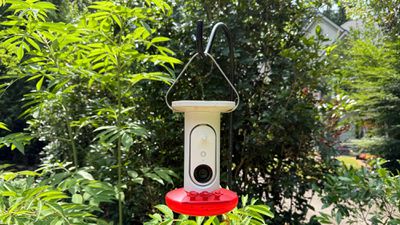
Bird Buddy makes a Hummingbird Feeder now, which I've been testing for a few months. Hummingbird feeders are tricker, because hummingbirds are seasonal birds. You're not going to start seeing them until right around April or May, because they migrate. They'll stick around until August or September, and then they head off again.
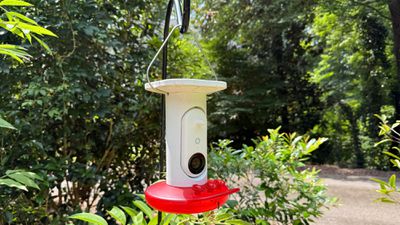
Before considering a hummingbird feeder of any kind, you need to make sure that you live in an area where hummingbird visits, and there's a whole website for that. As long as hummingbirds are near you, you can likely attract them to your yard. They're good at spotting anything red, which is why hummingbird feeders are red. The Bird Buddy Hummingbird Feeder looks a lot like traditional hummingbird feeders, and it has the same red flower-shaped nectar cups.
Like the standard Bird Buddy, the Hummingbird Feeder has a solar roof option. The solar roof is convenient, but because hummingbirds are seasonal and because the hummingbird food needs to be swapped out often, it's not quite as worth the extra cost as the solar panel for the Bird Buddy. It's still a good option if you want to be able to swap food and put the feeder right back out, and it prevents you from needing to pull out the camera to hook it up to a cable.
The Hummingbird Feeder unscrews from the bottom so you can pour sugar water inside, and then it screws back on. The feeder holds 1.5 cups of liquid, which seems about right for hummingbirds. Hummingbirds are probably the cheapest birds to feed, which is a benefit. You just need a big bag of sugar, and then you can make your own nectar. Bird Buddy recommends six tablespoons of sugar dissolved in 1.5 cups of water. I just make it with hot water from the sink and stir until the sugar is well-dissolved, but you can boil water and it may last a little longer. I don't boil because it changes the concentration of the sugar water mixture.
Sugar water doesn't last a particularly long time, so while it's a cheaper feeder to operate, it requires more maintenance. Bird Buddy recommends cleaning and refilling the feeder about every three days, because hummingbirds won't drink sugar water that's started to ferment. If your feeder is in the shade, you might be able to go a little longer, and if it's in hot sun, it might need to be swapped out more often.
I think the design of the Hummingbird Feeder works, though it does get ants because there isn't an ant moat. Hummingbirds have been using it, but I'm not getting a huge variety because it's mostly ruby-throated hummingbirds in my area, and they're territorial. Hummingbird feeders need to be in an area where the hummingbird has shelter, and it's not recommended to keep them near bird feeders for larger birds. I had mixed luck with hummingbirds in the early months of the year, but as summer turned to fall, visits picked up.
My one complaint about the Hummingbird Feeder is the hook for it. It slots into two divots on the side of the feeder, but it doesn't stay in place, and I always have to fix it. I've also noticed that the flowers are straight down and can't be angled at all, which is different from other hummingbird feeders I've had.
I do wish that Bird Buddy sold the Hummingbird Feeder with another enclosure, because it's not useful for most people several months out of the year. I packed mine up in late September.
Bird Buddy App
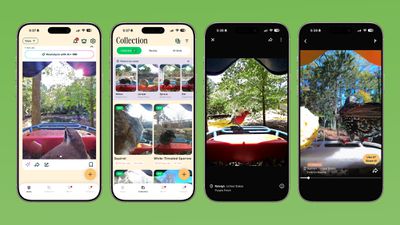
The Bird Buddy app is the key part of the Bird Buddy system. The cameras in the bird feeders snap photos that are sent to you as "postcards" in the Bird Buddy app. Not every visit is recorded, with Bird Buddy choosing the best images and visits to preserve battery life.
Receiving postcards from visiting birds is free, as is the identification that the app offers. You can use the Bird Buddy without paying any kind of additional fees for the app.
The app has changed a lot over the last couple of years, and sometimes, I think the addition of new AI features made detection worse. It's accurate about what bird has visited about 80 percent of the time, but the other 20 percent, it can be way off or unable to detect a bird at all. I don't mind too much because I can see what the bird is and I typically know the ones around me, but it can be problematic for people who are trying to use the app to learn more about birds. I do sometimes find myself having to look up a particular bird to figure out what it actually is, but there are in-app features for reporting misidentified birds, so I hope the detection is going to improve over time.
There is a subscription that adds premium features, but it's not mandatory, does not include any of the core features, and it is opt-in.
The subscription lets you share live stream access with more people, it unlocks 2K Ultra resolution, adds more cloud storage, and it lets you watch more remote feeders from around the world. There are also options to name frequent visitors, get tips if you come across a sick bird, chat with AI for bird info, and identify birds by sound with your iPhone.
Nature Station
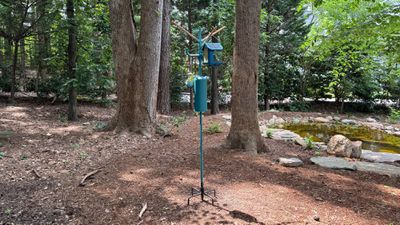
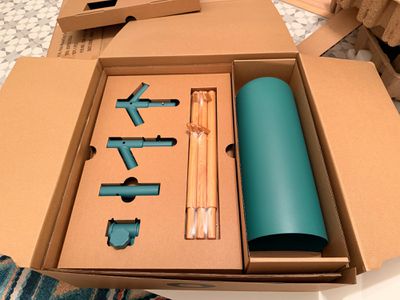
Bird Buddy has a Nature Station, which is basically a pole system for the different Bird Buddy bird feeders and products. It's $349, so it's expensive for a pole, but it is the most premium pole that I've seen.
I've had the Nature Station outside in the full sun and rain for about six months now, and it still looks new. The light blue powder coating hasn't chipped or degraded at all, and it's stable in the soil. There are three larch wood arms with prongs, and each arm can hold multiple feeders. There are also add-on arms for bird houses and the Bird Buddy bath. At the bottom, there's an optional pollinator planter where you can put flowers to attract additional birds and butterflies. I don't have this, but it's essentially just a pot with drainage holes and a slot for the pole to go into.
The baffle design does work, and I haven't had a squirrel that's able to climb it. Squirrels are crafty creatures, so you do need to make sure that it's out of range of anywhere a squirrel can jump from. Raccoons also aren't able to skirt the baffle. The ground stakes are secure, and I've been happy with its performance even in an area that can get fairly wet.
The Nature Station is around 90 inches tall, but if you want it to be shorter you can leave out a pole segment. I don't have anything negative to say about the Nature Station other than pointing out that it's probably more than most people are going to want to pay for a pole system. I have seen some reviews about the plastic arms snapping off, but my review unit did not have those arms so I am unable to comment on them. I just have the three branches, which have worked fine for holding feeders.
I have a fairly expensive pole setup from Wild Birds Unlimited as well, and Bird Buddy's version is sturdier and better looking. My Wild Birds Unlimited pole has many of the same components, but the base isn't as stable and I have a harder time keeping it upright.
Upcoming Products
Bird Buddy recently announced the Bird Buddy 2. It has an upgraded dual solar panel that provides more power, it's faster at detection, it can identify birds with sound, and it holds more seed, so it's definitely worth considering if you're thinking about getting a Bird Buddy. I haven't had a chance to try the Bird Buddy 2 yet, but I'll share a review in the future if I'm able to test it.
Bird Buddy also has a Bird Bath option that doesn't seem to be widely available yet, and I'm not sure how to get one.
Finally, there's a Kickstarter project for a "Wonder" camera that can be put anywhere and can identify bugs, birds, and other critters. It's coming in June 2026. I backed this one, so I should be able to share a review when it comes out.
Bottom Line
Two years in, I still like getting notifications from the Bird Buddy and seeing what birds are coming to the feeder, even if they're the same birds I'm seeing all the time. What visits does change with the seasons, and sometimes I get special visitors that are out of the ordinary.
I have not had issues with the Bird Buddy feeders, and they are still functioning with no issue. The app can be a little hit or miss, but it's still fun to receive bird postcards and browse through my visitors each day. I've bought the Bird Buddy as gifts, and it's still my favorite thing to give people that are hard to shop for. If you don't mind getting into the habit of refilling and maintaining bird feeders, the Bird Buddy is a fun and family friendly way to bring some nature indoors.
Note: Bird Buddy provided MacRumors with a Hummingbird Feeder Pro and Nature Station for the purpose of this review. No other compensation was received.
Apple's updated 14-inch M5 MacBook Pro launched today, and we picked one up to compare it to the prior-generation M4 model to see how performance has changed year over year.
The M4 MacBook Pro and the M5 MacBook Pro models are identical, and there are no changes to the design. Everything new is inside, and even that's limited.
There's an M5 chip with a 10-core CPU and 10-core GPU inside, and it's built on a newer 3-nanometer technology than the equivalent M4 chip in the prior-generation machine.
On Geekbench 6 tests, the M5 MacBook Pro earned a single-core score of 4220 and a multi-core score of 16781, while the M4 MacBook Pro earned a single-core score of 3834 and a multi-core score of 15453. Apple says that M5 CPU speeds are up to 15 percent faster than M4 speeds.
As for the GPU, the M5 earned an OpenCL score of 48101 and a Metal score of 75536, while the M4 earned a score of 38023 and a Metal Score of 57822. Apple says that GPU speeds are up to 30 percent faster.
SSD speeds have also improved, and Apple says it's up to 2x faster. That proved to be correct in our Blackmagic disk speed tests.
In day to day use, you're not going to see much of a difference between the M4 and the M5 unless you're doing something that maxes out the chip like video editing or 3D rendering. Even then, it's a modest improvement.
There's no reason to upgrade to the M5 from the M4, but if you have an older M-series MacBook Pro or even an Intel machine, the performance improvement with the M5 will be night and day.
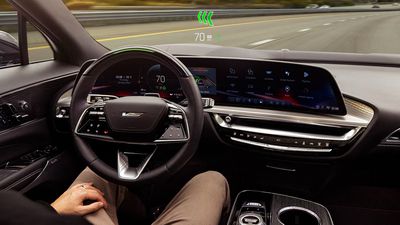
General Motors began phasing out support for CarPlay in its electric vehicles back in 2023, leading to complaints from iPhone users, but the company has no plans to back down.
In fact, GM is going further and plans to remove CarPlay from all future gas vehicles, too. In an interview with The Verge, GM CEO Mary Barra said that the company opted to prioritize its platform for EVs, but the change will eventually expand across the entire GM portfolio.
A lot of it depends on when you do an update to that vehicle. When you look at the fact that we have over 40 models across our portfolio, you don't just do this and they all update. As we move forward with each new vehicle and major new vehicle launch, I think you're going to see us consistent on that. We made a decision to prioritize our EV vehicles during this timeframe, and as we go forward, we'll continue across the portfolio.
When asked if users should expect that new gas cars will not support "smartphone projection" for CarPlay or Android Auto, Barra said "I think that's the right expectation. Yes."
GM Chief Product Officer Sterling Anderson suggested that GM's decision to embrace its own system is a "very Jobsian approach to things" that he likened to phasing out the disk drive.
But frankly, it's a very Jobsian approach to things. The removal of the disk drive, nobody liked that, everybody on the forums and Facebook was complaining about it, but to that he said, "Look, guys, flash storage really is the future. Get on board, you'll see that." That's kind of what we're saying here, in fact that's exactly what we're saying.
Anderson said that GM's in-house infotainment option offers a "much more immersive environment" and can "do so many more things" than CarPlay.
In EVs, General Motors transitioned to an infotainment system that it previously called "Ultifi." GM said that eliminating Apple CarPlay gave it access to direct integrations and information that it needed for its electric vehicle line, plus the company claimed that an in-house unified solution was the better option for consumers.
Starting with the 2028 Cadillac Escalade IQ, GM is rolling out a centralized vehicle computing system that it says will overhaul how GM vehicles are built and how they can be updated over time. GM will share software across its portfolio, including all electric and gas-powered vehicles produced by its GMC, Chevrolet, Buick, and Cadillac brands.
Update: In a statement to MacRumors, a GM spokesperson said that CarPlay and Android Auto will still be available in gas-powered vehicles for the "foreseeable future," but confirmed that GM will eventually move to a more deeply integrated experience.
We are not making any changes to existing vehicles. If your car supports Apple CarPlay or Android Auto, that will continue. Both will remain available in all GM gas-powered vehicles for the foreseeable future. As we advance toward our centralized computing platform, we’ll gradually move to a better, more deeply integrated experience — a direction the broader industry is taking as vehicles become more software-defined. This will happen over time, not overnight. We value our collaboration with Apple and Google and remain focused on delivering experiences customers love.
iPhone Air demand failed to meet Apple's expectations and the company's supply chain is scaling back shipments and production, reports Apple analyst Ming-Chi Kuo.
Suppliers are expected to reduce capacity by more than 80 percent between now and the first quarter of 2026, and some components with longer lead times will be discontinued by the end of 2025.
According to Kuo, the iPhone Air's poor performance suggests that the iPhone 17 and 17 Pro models already "cover the majority of high-end user demand," so there is little room for new market segments.
There have been multiple reports suggesting the iPhone Air has failed to catch on with consumers. Last week, Japan's Mizuho Securities said that Apple would reduce iPhone Air production by a million units because of underwhelming sales performance, and earlier today, Nikkei said that there is "virtually no demand" for the iPhone Air, and that Apple would "drastically" cut production.
Apple competitor Samsung is apparently seeing the same response to its super thin smartphone, the Galaxy S25 Edge. Reports suggest that Samsung canceled development of a next-generation model after disappointing sales.
Apple's standard iPhone and Pro iPhone models have consistently performed well, but it has struggled with its fourth wildcard spot in the iPhone lineup. Apple experimented with a smaller 5.4-inch iPhone mini that did not sell well, and then moved to a larger iPhone Plus that served as a more affordable version of the large-sized Pro Max. That too failed, leading Apple to try a 5.6mm build that compromised on features for a lightweight and thin design.
We could get yet another new form factor as soon as 2026, with rumors suggesting that Apple will debut a foldable iPhone as part of the iPhone 18 lineup.



 Using the included pass-through adapter to a USB-C cable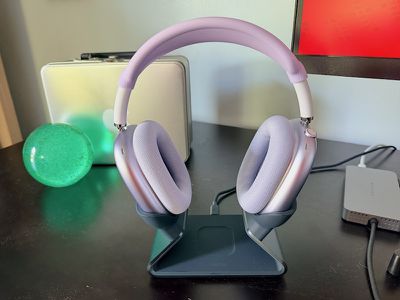
 Next to my (non-charging) 3D-printed stand
 A closer view of the magnetic dongle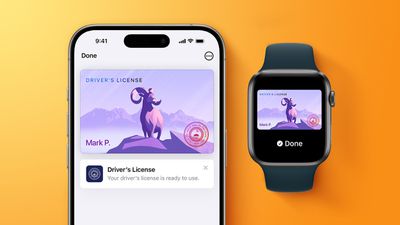


 Note: MacRumors is an affiliate partner with Amazon. When you click a link and make a purchase, we may receive a small payment, which helps us keep the site running.