iOS 26: Switch Back to the Classic Phone App Layout - MacRumors
Skip to Content

iOS 26: Switch Back to the Classic Phone App Layout

by

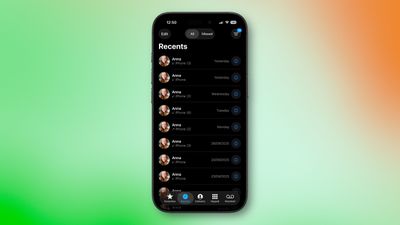
Apple's redesigned Phone app in iOS 26 introduces a unified view that combines recents, favorite contacts, and search on a single screen. But if you prefer the familiar tabbed interface from iOS 18, you can easily switch back to the classic layout.
phone app classic

The Classic Phone app layout in iOS 26

What's Different in iOS 26

The new unified design consolidates recent phone activity into one streamlined view in which your favorite contacts appear at the top for quick access. You can navigate to Contacts, Keypad, and Search through the bottom tab bar, while screens for voicemail and missed calls can be accessed via the three-line icon in the top-right corner.

Switching Back to the Classic View

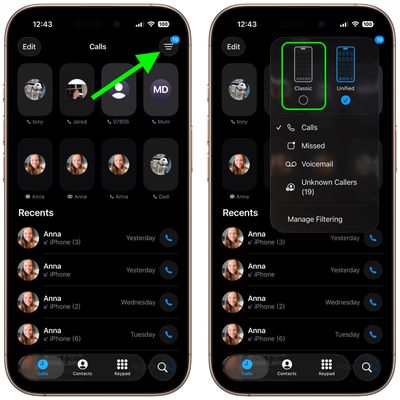
If you don't get on with the new look in iOS 26, here's how to revert to the traditional Phone app layout:

  1. Open the Phone app on your iPhone.
  2. Tap the three-line icon in the upper right corner of the screen.
  3. Select Classic from the popup menu that appears.
ios revert phone app classic

Your Phone app will immediately switch to the original iOS 18 design, with separate tabs for Recents, Contacts, Keypad, and Voicemail along the bottom.

Switching Back to the Unified View

Changed your mind? You can return to the new unified layout at any time in the following way:

  1. Tap the three-line icon in the upper right corner of the Phone app.
  2. Select Unified from the popup menu.

The unified view becomes your new default until you switch back again. Your preference persists across app launches, so you won't need to change it every time you open the Phone app.

Popular Stories

iOS 27 on iPhone 17 1

iOS 27 Will Add These New Features to Your iPhone

Saturday May 2, 2026 8:43 am PDT by
Apple is expected to unveil iOS 27 during its WWDC 2026 keynote on June 8, and there are already many rumored features and changes for iPhones. The first developer beta of iOS 27 will likely be available immediately following the keynote, and a public beta typically follows in July. Following beta testing, the software update should be released to all users with a compatible iPhone in...

Apple MacBook Pro M4 hero

Why You Might Want to Wait to Buy a MacBook Pro

Friday May 1, 2026 3:43 pm PDT by
Apple refreshed the 14-inch and 16-inch MacBook Pro with M5 Pro and M5 Max models in March 2026, but depending on your needs and interests, you might want to skip this generation because there's something better in the works. The M5 Pro and M5 Max MacBook Pro models have faster chips, but the same design that Apple has used since 2021. An updated design with new display technology and faster ...
macOS 27 on MacBook Pro

Apple to Unveil macOS 27 Next Month With These New Features

Friday May 1, 2026 1:21 pm PDT by
Apple will unveil its latest software platforms during its WWDC 2026 keynote on Monday, June 8, and one of them will be macOS 27 for the Mac. The first developer beta of macOS 27 will likely be available immediately following the keynote, and a public beta typically follows in July. Following beta testing, the software update should be released to all users in September. macOS 26 is known ...