iOS 26.1 Features: Everything New in iOS 26.1

iOS 26.1 is the first major update to the iOS 26 software that came out in September, and it's now available for everyone. There are some useful new features in iOS 26.1 that address complaints about Liquid Glass and fix a longtime Lock Screen irritation.


We've complied a list of all of the new features in iOS 26.1, down to the tiniest interface change.

Liquid Glass Transparency Toggle

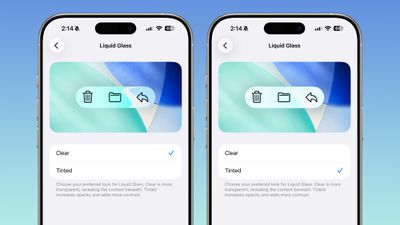
There is a new setting for customizing the look of Liquid Glass. You can now opt for a more tinted look that adds opacity.
ios 26 1 liquid glass opaque
Under Settings > Display and Brightness, there's a new option to switch between Clear or Tinted settings. Clear is more transparent and is the standard version of Liquid Glass that displays the background underneath buttons, menu bars, and other interface elements, while Tinted increases the opacity of Liquid Glass to improve contrast.

You'll see the most noticeable difference in apps and with Lock Screen notifications when Tinted mode is enabled.

Lock Screen Camera Swipe

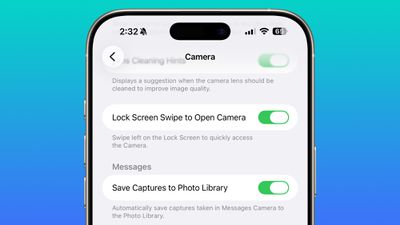
Apple finally added a way to turn off the Lock Screen gesture that opens the Camera app, which means no more accidentally turning on the camera when your iPhone is in your pocket.
lock screen swipe disable camera
In the Camera section of the Settings app, there's a Lock Screen Swipe to Open Camera setting, and turning it off disables the left swipe that opens the Camera app.

There was previously no way to turn off Lock Screen camera activation without disabling the camera app entirely.

Phone Haptics

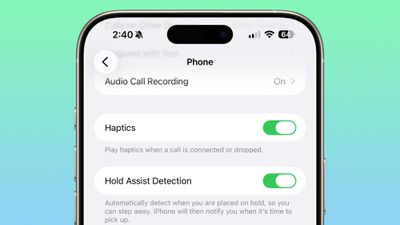
The Phone app includes a toggle to turn off haptic feedback when a call is connected or dropped, so if you find that little buzz irritating, you can now disable it.
ios 26 1 phone haptics

Alarms and Timers

Apple updated the interface of alarms and timers in iOS 26.1. There's now a Slide to Stop bar on the Lock Screen instead of a tap to stop button.

ios 26 1 slide to stop

You can still snooze an alarm with a tap on the oversized button, but to turn it off entirely, you need to use a slide gesture that requires more dexterity.

If you've accidentally dismissed an alarm while trying to tap the snooze button and then overslept, this will be a welcome change. Unfortunately, there is no option to choose to stick with the tap to stop button.

New Apple Intelligence Languages

Apple Intelligence is now available in Danish, Dutch, Norwegian, Portuguese (Portugal), Swedish, Turkish, Chinese (Traditional), and Vietnamese.

The new languages join English, French, German, Italian, Portuguese (Brazil), Spanish, Chinese (Simplified), Japanese, and Korean, opening up ‌Apple Intelligence‌ to more people.

AirPods Live Translation Languages

AirPods Live Translation works with additional languages in iOS 26.1, including Japanese, Korean, Italian, and Chinese (both Mandarin Traditional and Simplified).

At launch, Live Translation was limited to English (US, UK), French (France), German, Portuguese (Brazil), and Spanish (Spain).

You can translate to and from all of the above languages with the AirPods Pro 2, AirPods Pro 3, or AirPods 4 with ANC.

Apple Music

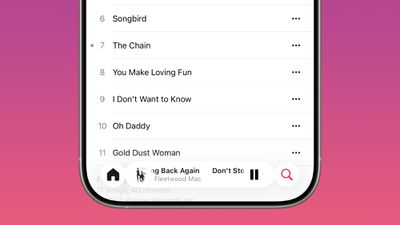
There's a hidden Apple Music gesture in iOS 26.1. You can swipe on the music player in the ‌Apple Music‌ app to switch songs. Just slide a finger over where the song title is listed, and it'll go to the next song or back to the previous song.
ios 26 1 apple music swipe

AirPlay

‌Apple Music‌ AutoMix now works over AirPlay, so you'll hear AutoMix transitions when playing music over ‌AirPlay‌ 2-compatible speakers.

Apple TV App

The Apple TV app has a new, more colorful icon that adopts the Liquid Glass aesthetic. The redesign coincides with Apple's decision to drop the "Plus" from its ‌Apple TV‌ streaming service. ‌Apple TV‌+ is now called ‌Apple TV‌ in the ‌Apple TV‌ app.

apple tv rebrand icon

Fitness App

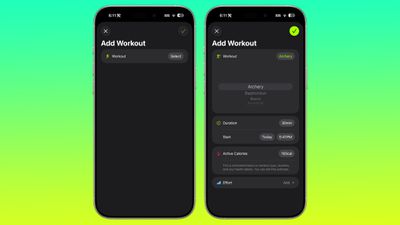
You can now create fully custom workouts in the Fitness app on ‌iPhone‌. There are options for selecting workout type, estimated Active Calories, effort, duration, and start time.
ios 26 1 custom workout

There were workout creation options before, but they were more structured than the open, custom creation options that are in iOS 26.1.

Settings App

Apple changed the alignment of icons and text in the Settings app. All settings with headers that feature text now have that text aligned to the left instead of center aligned. It's a small change that makes a big visual difference.
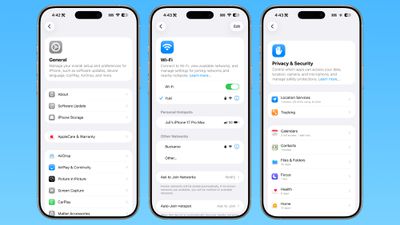
ios 26 1 left aligned settings
This includes General, Bluetooth, Wi-Fi, Cellular, Personal Hotspot, Accessibility, ‌Apple Intelligence‌, and more.

Home Screen Folders

When you tap into a folder on the Home Screen, the name of the folder at the top is left aligned instead of center aligned, matching the changes made in the Settings app.
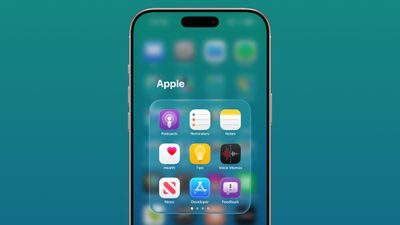
ios 26 1 folder alignment

Phone

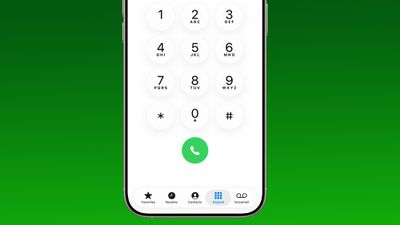
The Phone keypad now uses Liquid Glass for the numbers, fixing a visual issue present in ‌iOS 26‌.

ios 26 1 phone app keypad

Photos

The slider for scrubbing through videos in the Photos app has a new look.
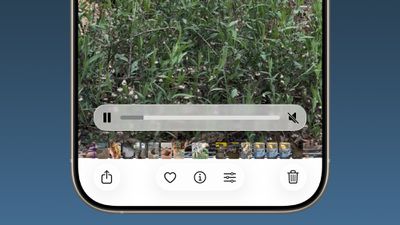
ios 26 1 photos app video

The ‌Photos‌ app navigation bar has a slightly more frosted look that makes it easier to see on light backgrounds.
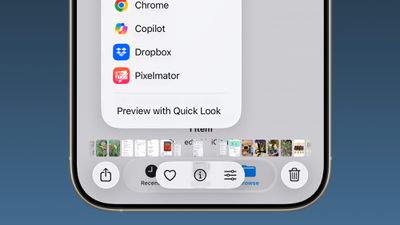
ios 26
The interface for managing multiple photos that you've selected has been tweaked slightly. Play as Slideshow, Favorite, and Hide have been relocated to the top of the menu.
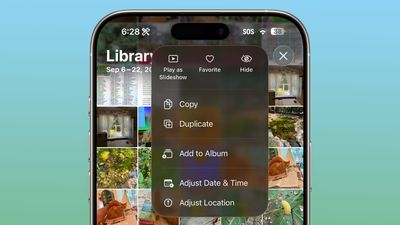
ios 26 1 photos app

Safari

The Tab Bar (Bottom) in Safari is wider with less padding around the edges, so there's less wasted space. In Reduce Transparency mode, there's more padding, so it no longer looks odd.
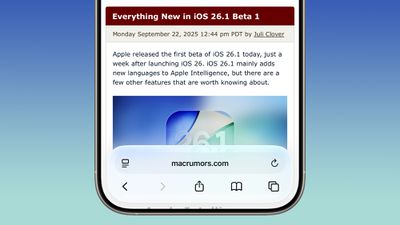
ios 26 1 safari bar

Background Security Improvements

The Privacy and Security section of the Settings app has a toggle to automatically download and install security improvements. It's a revamp of the prior Rapid Security Responses feature that allows Apple to provide security updates without having to offer a full new version of iOS.
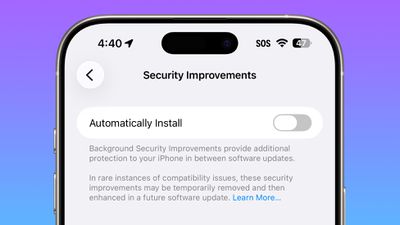
ios 26 1 security improvements

Display Settings

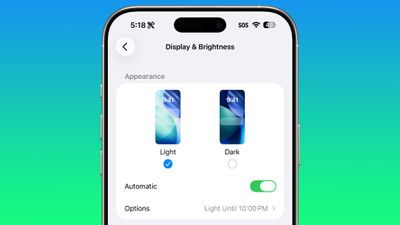
The Display section of the Settings app now has iOS 26-themed wallpaper instead of iOS 18 wallpaper, fixing an ‌iOS 26‌ oversight.

display brightness setting ios 26 1

Liquid Glass

The light refraction effect around apps is now more subtle with darker icon colors and background colors. It's a subtle change that most might not notice.

Wallpaper

When setting a wallpaper on the Lock Screen, instructions like Pinch to Crop show up momentarily and then disappear rather than being shown all the time, which gives a better view of your wallpaper when you're choosing how you want it to appear.
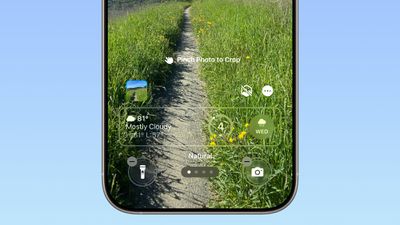
ios 26 1 wallpaper crop

Display Accessibility

Under the Display and Text Size section in the Accessibility settings, there is a "Display Borders" toggle. It adds a border to all buttons, and replaces the prior "Button Shapes" setting.

Local Capture Settings

There's an option to set a location in the Files app for audio and video recordings from calls. It's available by going to Settings > General > Local Capture.

External Microphones

There's an option to adjust input gain when using an external microphone with local capture.

FaceTime

FaceTime now supports improved audio quality in low-bandwidth conditions.

Communication Safety

Communication Safety and Web content filters that limit access to adult websites are not enabled by default for existing child accounts for ages 13-17.

iPadOS 26.1 - Slide Over

Many of the changes above are in iPadOS 26.1 too, and iPadOS 26.1 also includes major changes to multitasking. With iPadOS 26.1, Apple reintroduced Slide Over. Slide Over works alongside the window-based iPadOS 26 multitasking functionality, so you can have multiple windows open and still swipe over to quickly access a Slide Over app.

ipados 26 1 slide over
You can only have one Slide Over app at a time in iPadOS 26.1, and you can use the feature by tapping on the green window resizing button and toggling on Enter Slide Over.

The iPadOS 26.1 update also brings a Vision Pro app to the iPad.

Download iOS 26.1

You can get the update by opening up the Settings app, choosing the General section, and tapping on Software Update.

Compatibility

iOS 26.1 is available on all devices that are able to run ‌iOS 26‌, which includes the ‌iPhone‌ 11 and later along with the ‌iPhone‌ SE 2.

iPadOS 26.1 is available on all iPads able to run ‌iPadOS 26‌.

Related Roundups: iOS 26, iPadOS 26
Related Forum: iOS 26

Popular Stories

m1 chip slide

Five Years of Apple Silicon: M1 to M5 Performance Comparison

Monday November 10, 2025 1:08 pm PST by
Today marks the fifth anniversary of the Apple silicon chip that replaced Intel chips in Apple's Mac lineup. The first Apple silicon chip, the M1, was unveiled on November 10, 2020. The M1 debuted in the MacBook Air, Mac mini, and 13-inch MacBook Pro. The M1 chip was impressive when it launched, featuring the "world's fastest CPU core" and industry-leading performance per watt, and it's only ...
All Screen iPhone 2027 Feature 1

Apple to Hide Selfie Camera Under Display of 20th Anniversary iPhone

Monday November 10, 2025 1:55 am PST by
Apple will conceal the front-facing camera under the screen of its 2027 iPhone, a Chinese leaker said today, corroborating reports that Apple's 20th anniversary iPhone will have no visible cutouts in the display. Weibo-based account Digital Chat Station said Apple's development of under-screen camera technology was progressing as planned for adoption in 2027, one year after it will...
Early Black Friday Deals 1

The Best Early Black Friday Apple Deals on AirPods, Apple Watch, iPad, and More

Saturday November 8, 2025 6:16 am PST by
We're officially in the month of Black Friday, which will take place on Friday, November 28 in 2025. As always, this will be the best time of the year to shop for great deals, including popular Apple products like AirPods, iPad, Apple Watch, and more. In this article, the majority of the discounts will be found on Amazon. Note: MacRumors is an affiliate partner with some of these vendors. When ...
iphone air thinness

iPhone Air Sales Are So Bad That Apple's Delaying the Next-Generation Version

Monday November 10, 2025 11:41 am PST by
The thin, light iPhone Air sold so poorly that Apple has decided to delay the launch of the next-generation iPhone Air that was scheduled to come out alongside the iPhone 18 Pro, reports The Information. Apple initially planned to release a new iPhone Air in fall 2026, but now that's not going to happen. Since the iPhone Air launched in September, there have been reports of poor sales...
2024 iPhone Boxes Feature

Apple Adjusts Trade-In Values for iPhones, iPads, Macs, and More

Thursday November 6, 2025 11:12 am PST by
Apple today updated its trade-in values for select iPhone, iPad, Mac, and Apple Watch models. Trade-ins can be completed on Apple's website, or at an Apple Store. The charts below provide an overview of Apple's current and previous trade-in values in the U.S., according to its website. Maximum values for most devices either decreased or saw no change, but the iPad Air received a slight bump. ...
iphone pocket%402x

Apple Debuts iPhone Pocket, a Limited Edition iPod Sock-Style Accessory

Tuesday November 11, 2025 1:23 am PST by
Apple has teamed up with Japanese fashion house ISSEY MIYAKE to launch iPhone Pocket, a 3D-knitted limited edition accessory designed to carry an iPhone, AirPods, and other everyday items. The accessory is like a stretchy pocket, not unlike an iPod Sock, but elongated to form a strap made of a ribbed, elastic textile that fully encloses an iPhone yet allows you to glimpse the display...
Apple fitness plus feature

Future of Apple Fitness+ 'Under Review'

Sunday November 9, 2025 5:30 am PST by
The future of Apple Fitness+ is "under review" amid a reorganization of the service, according to Bloomberg's Mark Gurman. In the latest edition of his "Power On" newsletter, Gurman said that Apple Fitness+ remains one of the company's "weakest digital offerings." The service apparently suffers from high churn and little revenue. Nevertheless, Fitness+ has a small, loyal fanbase that...
homepod mini colors

New HomePod Mini Coming Soon With These Features

Tuesday November 11, 2025 7:30 am PST by
Apple is expected to announce a new HomePod mini imminently, headlining with new chips. Here are all of the new features we're expecting. The second-generation HomePod mini is highly likely to contain a more up-to-date chip for more advanced computational audio and improved responsiveness. The current HomePod mini is equipped with the Apple Watch Series 5's S5 chip from 2019. Apple is likely ...
iOS 26

iOS 26.2 Available Next Month With These 8 New Features

Tuesday November 11, 2025 9:48 am PST by
Apple released the first iOS 26.2 beta last week. The upcoming update includes a handful of new features and changes on the iPhone, including a new Liquid Glass slider for the Lock Screen's clock, offline lyrics in Apple Music, and more. In a recent press release, Apple confirmed that iOS 26.2 will be released to all users in December, but it did not provide a specific release date....
iphone black friday gold

The Best Early Black Friday iPhone Deals

Monday November 10, 2025 10:18 am PST by
Cellular carriers have always offered big savings on the newest iPhone models during the holidays, and Black Friday 2025 sales have kicked off at AT&T, Verizon, T-Mobile, and more. Right now we're tracking notable offers on the iPhone 17, iPhone 17 Pro, iPhone 17 Pro Max, and iPhone Air. For even more savings, keep an eye on older models during the holiday shopping season. Note: MacRumors is...

Top Rated Comments

sniffies Avatar
1 week ago
Nice changes, but I desperately need an option to make it super hard to trigger Home Screen edit wiggle mode.

Every time I handle my iPhone, it's somehow in the wiggle mode. Lost count of how many times I've accidentally rearranged or nearly deleted apps.

?

P.S. Lock Screen, too.
Score: 25 Votes (Like | Disagree)
bmark Avatar
1 week ago

This may shock you but implementing AI across 5 product lines and 2 dozen or so devices may be a process that takes a few years.

What people don't seem to understand is that Apple HAS shipped a ton of work on Apple Intelligence. The problem is almost none of it is user facing, and the stuff that is directly usable by end users is pretty lame. Now over the next few years they will build on that foundation and hopefully come up with something that's pretty good.
This may not shock you but Apple has failed for decades regarding Siri implementation across all their product lines. No once cares for their excuses. They are a 4 trillion dollar company for goodness sakes!
Score: 17 Votes (Like | Disagree)
bmark Avatar
1 week ago
iOS 26.1 is a cluster**** like usual! Apple should be embarrassed how bad their software development team has become.
Score: 12 Votes (Like | Disagree)
honus Avatar
1 week ago

If you've accidentally dismissed an alarm while trying to tap the snooze button and then overslept, this will be a welcome change. Unfortunately, there is no option to choose to stick with the tap to stop button.

Take a look at Settings -> Accessibility -> Touch -> Prefer Single-Touch Actions
Score: 11 Votes (Like | Disagree)
Dredd67 Avatar
1 week ago
This screen shows you everything that is currently wrong with the glass design. It's a visual mess.

Who thought this was a good interface? Even when approached objectively, it’s hard to read, difficult to understand, and a real pain to use.

Icons overlap, text is truncated, documents appear as nanoscopic miniatures, and the branding is obscure and unnecessary. What the hell is Quick Look, and why do I need to know about it? Wouldn’t “preview” suffice?

Trying to solve the problem of limited screen space by layering multiple UI levels on top of each other makes no sense on a 2D display. It might work in a VR device like the Vision Pro, but even then the random apps, commands, and icons create pointless clutter.

It’s time Apple looks beyond its bubble and acknowledges the growing disconnect between its products and users.

Attachment Image
Score: 11 Votes (Like | Disagree)
Zman5225 Avatar
1 week ago
Got super excited for a minute when I saw Liquid Glass toggle. I was hoping it was a toggle to turn it off completely.
Score: 9 Votes (Like | Disagree)