Apple Maps in iOS 26: Track Your Location History and Get Smarter Route Alerts

The Apple Maps app in iOS 26 includes some useful new features for keeping track of where you've been and getting alerts if there are any delays that will impact your daily commute. In this guide, we've rounded up a list of everything new with Maps.

iOS 26 Maps Glass

Visited Places

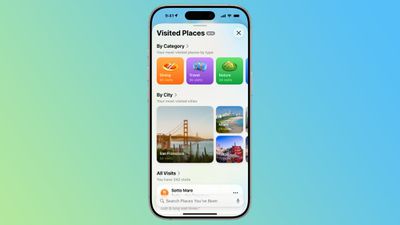
‌Apple Maps‌ is able to keep track of the places that you've visited, either in your hometown or while traveling. It can track the restaurants, shops, parks, and landmarks that you go to, so you can look back and remember where you've been.
ios 26 visited places
Google has long offered a timeline that automatically saves visits to places, and Apple's new Visited Places option matches the functionality available in the Google Maps Timeline.

After you upgrade to ‌iOS 26‌, the Maps app pops up an alert letting you know about the new feature, so that you can opt in or opt out.

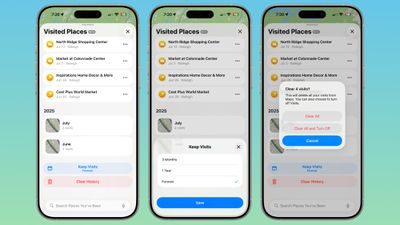
You can see your Visited Places by opening up the Maps app, tapping on your profile picture, tapping on Places, and then tapping into Visited Places. In this interface, the locations that you've visited are listed by month, plus there's a search option.

There are options to change how long visits are kept (three months, one year, and forever), and to clear your current history. You can also remove locations one-by-one by tapping on them, and report incorrect location readings. When you clear your history, ‌Apple Maps‌ pops up an option that lets you clear everything or clear everything and turn off Visited Places entirely.
ios 26 maps app visited places overview
If you want to turn Visited Places off or enable it at a later date, you can do so by going to Settings > Apps > Maps > Location. From there, toggle off Visited Places. You can also access the toggle by going to Privacy and Security > Location Services > Maps.

Precise Location needs to be toggled on for Visited Places to work, and places that you've been are stored on-device. The information is not uploaded to Apple's servers.

Preferred Routes

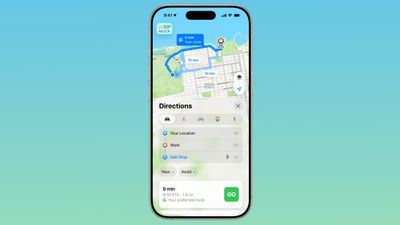
Using on-device intelligence, ‌Apple Maps‌ is able to learn the routes that you prefer to take to locations that you visit frequently, such as work, home, and school, and it keeps track of when you typically visit those places.
ios 26 maps app preferred route
If there's a road closure or traffic that's going to impact your commute, the Maps app is able to alert you about the issue and offer up an alternative route so you can get there on time.

A Maps Suggestions Home Screen widget shows the same information if there are any route issues. This is an under-the-hood feature that only shows up when it's needed, so if you have a short commute that doesn't involve roads that frequently see traffic, you might not have it pop up.

You can turn it on or off by going to Settings > Maps > Location and toggling off the "Preferred Routes and Predicted Destinations" setting.

Liquid Glass Redesign

The Maps app has adopted Apple's Liquid Glass redesign, and it brings some subtle interface changes. The search bar and navigation menu are translucent so you can see some of the Maps background behind it, and place icons are larger than before.
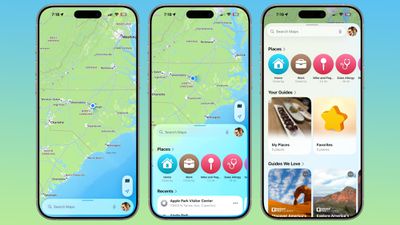
ios 26 maps app interface
Icons have the layered glass look, and the various menus, cards, and buttons are more rounded than before. The Share Sheet has a popover design and it too is transparent.

The Library tab that was accessible when you tap your profile picture is now called Places, and it has improved spacing and a new Visited Places section.

Turn-by-turn directions are in a smaller pop-up bar rather than taking up the top of the Maps display, and time of arrival, length of travel, and distance are shown more prominently.

Voice Controls

The Voice Volume section in the Maps app is now Voice Controls, and there are added toggles for Muted, Alerts Only, or Unmuted so adjusting how turn-by-turn directions are communicated is more intuitive.
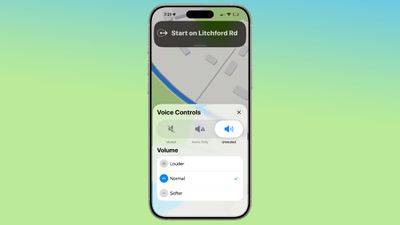
ios 26 maps voice control
These controls did exist in iOS 18, but only as toggles that had no explanation on the right side of the display when turn-by-turn directions are in progress.

Place Information

When you tap into or type a location on the Maps app, the Call, Menu, and Website buttons are now more prominently listed at the top of the interface, as are the location's hours and the order option if one is available. There's now a floating button to get directions to a place, and it's always available at the bottom right of the app.
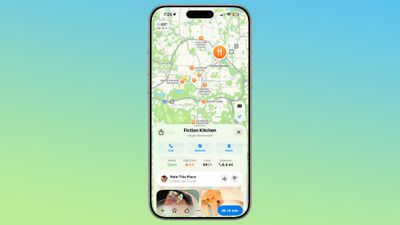
ios 26 maps place interface

Improved Incident Reports

It's easier to report an incident like a crash with a new incident button that's located on the right side of the iPhone when getting turn-by-turn directions, and more incident types have been added.
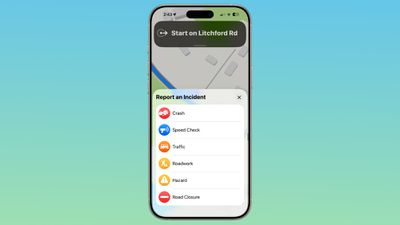
ios 26 maps report incident
You can report a crash, speed check, traffic, roadwork, hazard, or road closure. In iOS 18, options are limited to crash, speed check, and hazard.

Read More

We have a dedicated iOS 26 roundup that goes into detail on all of the new features that are available in the update.


Related Roundups: iOS 26, iPadOS 26
Related Forum: iOS 26

Popular Stories

2024 iPhone Boxes Feature

Apple Adjusts Trade-In Values for iPhones, iPads, Macs, and More

Thursday November 6, 2025 11:12 am PST by
Apple today updated its trade-in values for select iPhone, iPad, Mac, and Apple Watch models. Trade-ins can be completed on Apple's website, or at an Apple Store. The charts below provide an overview of Apple's current and previous trade-in values in the U.S., according to its website. Maximum values for most devices either decreased or saw no change, but the iPad Air received a slight bump. ...
Liquid Glass General Feature

Apple Shares Liquid Glass Design Gallery

Thursday November 6, 2025 2:45 pm PST by
Apple is promoting the new Liquid Glass design in iOS 26, showing off the ways that third-party developers are embracing the aesthetic in their apps. On its developer website, Apple is featuring a visual gallery that demonstrates how "teams of all sizes" are creating Liquid Glass experiences. The gallery features examples of Liquid Glass in apps for iPhone, iPad, Apple Watch, and Mac. Apple...
airtag purple

Apple's Website Lists AirTag 4-Pack at Shockingly Low Price [Updated]

Friday November 7, 2025 6:40 am PST by
Apple's online store in the U.S. is suddenly offering a pack of four AirTags for just $29, which is the same price as a single AirTag. This is likely a pricing error, and it is unclear if orders will be fulfilled. Apple has not discounted the AirTag four-pack in any other countries that we checked. Delivery estimates are already pushing into late November to early December, suggesting...
Early Black Friday Deals 1

The Best Early Black Friday Apple Deals on AirPods, Apple Watch, iPad, and More

Saturday November 8, 2025 6:16 am PST by
We're officially in the month of Black Friday, which will take place on Friday, November 28 in 2025. As always, this will be the best time of the year to shop for great deals, including popular Apple products like AirPods, iPad, Apple Watch, and more. In this article, the majority of the discounts will be found on Amazon. Note: MacRumors is an affiliate partner with some of these vendors. When ...
iOS 26

iOS 26.1 Available Now With These 8 New Features

Monday November 3, 2025 5:54 am PST by
Following more than a month of beta testing, Apple released iOS 26.1 on Monday, November 3. The update includes a handful of new features and changes, including the ability to adjust the look of Liquid Glass and more. Below, we outline iOS 26.1's key new features. Liquid Glass Toggle iOS 26.1 lets you choose your preferred look for Liquid Glass. In the Settings app, under Display...
ikea smart home devices

IKEA Debuts 21 HomeKit-Compatible Smart Bulbs, Sensors, and Controls

Thursday November 6, 2025 4:08 pm PST by
IKEA today announced the upcoming launch of 21 new Matter-compatible smart home products that will be able to interface with HomeKit and the Apple Home app. There are sensors, lights, and control options, all of which will be reasonably priced. Some of the products are new, while some are updates to existing lines that IKEA previously offered. There are a series of new smart bulbs that are...
Apple fitness plus feature

Future of Apple Fitness+ 'Under Review'

Sunday November 9, 2025 5:30 am PST by
The future of Apple Fitness+ is "under review" amid a reorganization of the service, according to Bloomberg's Mark Gurman. In the latest edition of his "Power On" newsletter, Gurman said that Apple Fitness+ remains one of the company's "weakest digital offerings." The service apparently suffers from high churn and little revenue. Nevertheless, Fitness+ has a small, loyal fanbase that...
All Screen iPhone 2027 Feature 1

Apple to Hide Selfie Camera Under Display of 20th Anniversary iPhone

Monday November 10, 2025 1:55 am PST by
Apple will conceal the front-facing camera under the screen of its 2027 iPhone, a Chinese leaker said today, corroborating reports that Apple's 20th anniversary iPhone will have no visible cutouts in the display. Weibo-based account Digital Chat Station said Apple's development of under-screen camera technology was progressing as planned for adoption in 2027, one year after it will...
maxresdefault

In-Depth iPhone Battery Experiment Pits Slow Charging Against Fast Charging

Friday November 7, 2025 1:19 pm PST by
HTX Studio this week shared the results from a six-month battery test that compared how fast charging and slow charging can affect battery life over time. Using six iPhone 12 models, the channel set up a system to drain the batteries from five percent and charge them to 100 percent over and over again. Three were fast charged, and three were slow charged. Another set of iPhones underwent...

Top Rated Comments

Killbill2 Avatar
16 weeks ago

Jealous spouses will appreciate this feature!
Coldplay concerts be damned.
Score: 17 Votes (Like | Disagree)

jz0309 Avatar
16 weeks ago

After you upgrade to iOS 26, the Maps app pops up an alert letting you know about the new feature, so that you can opt in or opt out
Good, I'll be opting out.

I remember a co-worker with an Android phone "discovering" this and how excited he was about it. I found it creepy back then and still today, don't want this.
Glad it's an option.
Score: 11 Votes (Like | Disagree)
JohnC1959 Avatar
16 weeks ago

Um... This is navigation 101, and something that TomTom were doing a decade or more ago. I see spouting this as embarrassing given it should have been doing this since Jesus was a boy.
I believe the point of this new feature is that Apple Maps will proactively alert you before you even get in your car. You may be eating breakfast before work and get an alert that you may want to leave early and take another route. That's how I read it anyway.
Score: 9 Votes (Like | Disagree)
springsup Avatar
16 weeks ago


This is a perfect image for iOS 26.
Score: 7 Votes (Like | Disagree)
Telemakhos Avatar
16 weeks ago

Apple Maps is able to keep track of the places that you've visited, either in your hometown or while traveling. It can track the restaurants, shops, parks, and landmarks that you go to, so you can look back and remember where you've been.
Jealous spouses will appreciate this feature!
Score: 6 Votes (Like | Disagree)
etichi Avatar
16 weeks ago
Get in the car with your wife and siri immediately recommends it’s time for you to go to that massage parlor you like to frequent.
Score: 6 Votes (Like | Disagree)