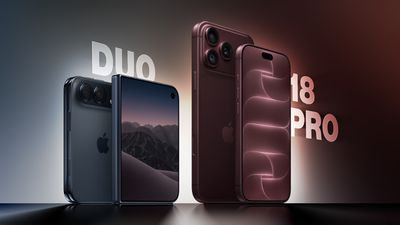

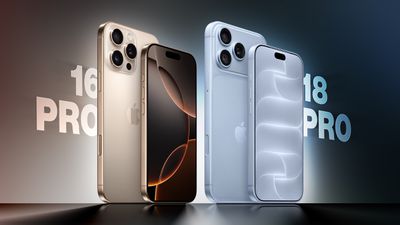




Apple announced the iPhone 18 Pro and iPhone 18 Pro Max earlier this month, arriving three years after the iPhone 15 Pro and iPhone 15 Pro Max. Three generations of changes make for a substantial upgrade, bringing larger displays, an all-new design, improvements to every camera, significantly longer battery life, and faster charging.
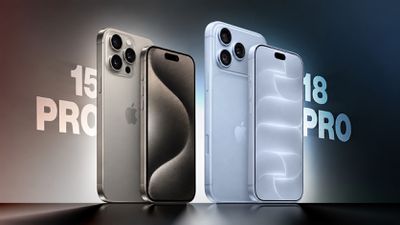
The iPhone 16 Pro introduced larger displays with thinner borders, the Camera Control, a 48-megapixel Ultra Wide camera, and improved video and audio recording. The iPhone 17 Pro replaced the titanium frame and glass back with an aluminum unibody, added vapor chamber cooling and Ceramic Shield 2, and upgraded both the telephoto and front-facing cameras. This year's refresh centers on the A20 Pro chip, a variable-aperture Main camera, a smaller Dynamic Island, and a further increase in battery capacity. For iPhone 15 Pro owners, all three sets of changes accumulate.
The iPhone 18 Pro starts at $1,199 for 256GB, $200 more than the iPhone 15 Pro's $999 launch price, although the entry storage tier has doubled from 128GB. The iPhone 18 Pro Max starts at $1,299, $100 more than the iPhone 15 Pro Max's equivalent starting configuration. Here are the key differences between the iPhone 15 Pro and iPhone 18 Pro:
Design and Display
| iPhone 15 Pro (2023) | iPhone 18 Pro (2026) |
|---|---|
| Brushed titanium frame with full glass back | Aluminum unibody with partial Ceramic Shield back, improving heat dissipation |
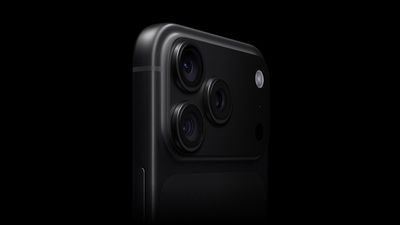
| Glass rounded square camera bump | Full-width rounded rectangle aluminum camera plateau |
| iPhone 15 Pro: 6.1-inch display iPhone 15 Pro Max: 6.7-inch display |
iPhone 18 Pro: 6.3-inch display iPhone 18 Pro Max: 6.9-inch display |
| iPhone 15 Pro: 2,556-by-1,179-pixel resolution iPhone 15 Pro Max: 2,796-by-1,290-pixel resolution |
iPhone 18 Pro: 2,622-by-1,206-pixel resolution iPhone 18 Pro Max: 2,868-by-1,320-pixel resolution |
| Wider borders around the display | Thinner borders, with the initial reduction of 30% introduced on the iPhone 16 Pro |
| Approximately 2-4 nits minimum display brightness | 1 nit minimum display brightness |
| More power-efficient display | |
| Ceramic Shield front | Ceramic Shield 2 front, with Apple claiming 3x better scratch resistance than the iPhone 16 Pro |
| Fingerprint-resistant oleophobic coating only | Fingerprint-resistant oleophobic coating and Apple-designed anti-reflective coating to reduce glare |
| 2,000 nits peak display brightness (outdoor) | 3,000 nits peak display brightness (outdoor), a 50% increase |
| 2x better outdoor contrast, as stated in the iPhone 16 Pro comparison | |
| Dynamic Island supports up to two simultaneous Live Activities | Smaller Dynamic Island, supports up to three simultaneous Live Activities |
| Camera Control capacitive button with sapphire crystal cover | |
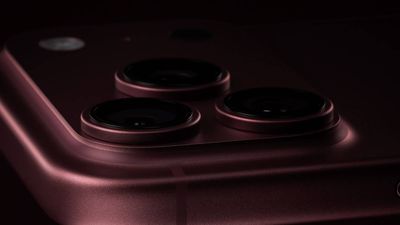
| Available in Black Titanium, White Titanium, Natural Titanium, and Blue Titanium | Available in Silver, Black, Glacier, and Burgundy |
| 99% or more fiber-based packaging | 100% fiber-based packaging, suitable for recycling |
Dimensions and Weight
| iPhone 15 Pro (2023) | iPhone 18 Pro (2026) | |
|---|---|---|
| Height | iPhone 15 Pro: 146.6mm (5.77 inches) iPhone 15 Pro Max: 159.9mm (6.29 inches) |
iPhone 18 Pro: 150.0mm (5.91 inches) iPhone 18 Pro Max: 163.4mm (6.43 inches) |
| Width | iPhone 15 Pro: 70.6mm (2.78 inches) iPhone 15 Pro Max: 76.7mm (3.02 inches) |
iPhone 18 Pro: 71.9mm (2.83 inches) iPhone 18 Pro Max: 78.0mm (3.07 inches) |
| Thickness | 8.25mm (0.32 inches) | 8.75mm (0.34 inches) |
| Weight | iPhone 15 Pro: 187 grams (6.60 ounces) iPhone 15 Pro Max: 221 grams (7.81 ounces) |
iPhone 18 Pro: 211 grams (7.44 ounces), an increase of 24 grams iPhone 18 Pro Max: 249 grams (8.78 ounces), an increase of 28 grams |
Chip, Performance, and Connectivity
| iPhone 15 Pro (2023) | iPhone 18 Pro (2026) |
|---|---|
| A17 Pro chip | A20 Pro chip |
| Built with TSMC's N3B process (first-generation 3nm) | Built with TSMC's N2 process (2nm), Apple's first 2nm smartphone chip |
| 6-core CPU with 2 performance cores and 4 efficiency cores | 6-core CPU with 2 super cores and 4 efficiency cores |
| 8GB LPDDR5 RAM | 12GB LPDDR5X RAM |
| 51.2Gb/s memory bandwidth< | 115GB/s memory bandwidth |
| 6-core GPU | 7-core GPU with Neural Accelerators |
| First-generation hardware-accelerated ray tracing | Faster hardware-accelerated ray tracing |
| 16-core Neural Engine | Dual 16-core Neural Engine (32 total cores) |
| Vapor chamber cooling with 3x more surface area than the iPhone 17 Pro | |
| New chip packaging that places silicon die beside memory, allowing it to attach directly to the vapor chamber | |
| Earlier video encoding hardware | Enhanced video encoding hardware supporting higher-frame-rate recording and additional professional formats |
| Qualcomm Snapdragon X70 modem | iPhone 18 Pro: Apple C2 modem in all countries iPhone 18 Pro Max: Apple C2 modem in all countries except the U.S., where it uses a Qualcomm modem |
| Broadcom Wi-Fi and Bluetooth chip | Apple N1 chip for Wi-Fi, Bluetooth, and Thread |
| Wi-Fi 6E (802.11ax) | Wi-Fi 7 (802.11be) |
| Bluetooth 5.3 connectivity | Bluetooth 6 connectivity |
Rear Camera
| iPhone 15 Pro (2023) | iPhone 18 Pro (2026) |
|---|---|
| First-generation quad-pixel sensor | Newer sensor and computational imaging pipeline, building on the faster readout speeds and zero shutter lag introduced with the iPhone 16 Pro |
| Fixed ƒ/1.78 aperture on the Main camera | Variable aperture with four stops: ƒ/1.48, ƒ/1.8, ƒ/2.8, and ƒ/4.0, using six laser-cut blades |
| API available for developers to control the aperture range within their own apps | |
| Night mode | Faster Night mode, tied to the new variable-aperture lens |
| Around 50% better Main camera low-light performance than the iPhone 16 Pro, with more detail in the back of group photos | |
| Pro controls in the Camera app: manual lens aperture, shutter speed, white balance, and histogram | |
| 12-megapixel Ultra Wide camera | 48-megapixel Fusion Ultra Wide camera |
| 12-megapixel Telephoto camera | 48-megapixel Fusion Telephoto camera |
| iPhone 15 Pro: 3x Telephoto camera, with 77mm focal length iPhone 15 Pro Max: 5x Telephoto camera, with 120mm focal length |
4x Telephoto camera, with 100mm focal length, also enabling 12-megapixel optical-quality 8x shots at 200mm |
| iPhone 15 Pro: 0.5x, 1x, 2x, and 3x zoom options, with optical-quality 2x derived from the Main camera iPhone 15 Pro Max: 0.5x, 1x, 2x, and 5x zoom options, with optical-quality 2x derived from the Main camera |
0.5x, 1x, 2x, 4x, and 8x zoom options, with optical-quality 2x and 8x derived from the Main and Telephoto cameras |
| Macro photography | 48-megapixel macro photography |
| Support for JPEG-XL format | |
| First-generation Photographic Styles | Photographic Styles 3, with tone, color, texture, and grain controls |
| Depth mapping for AR and portrait photography | Enhanced depth mapping for AR and portrait photography, with more accurate background and subject separation and more realistic bokeh |
| Smart focus tracking | |
| Apple Reference Image (Main camera only) |
Camera Control
The iPhone 15 Pro already has an Action button that can launch the camera or Visual Intelligence, but it lacks the dedicated Camera Control introduced with the iPhone 16 lineup. The iPhone 18 Pro's Camera Control provides the following additional functions:
- Press Camera Control to launch the Camera app
- Press to capture a photo or press and hold to record video
- Light press to lock focus and exposure before reframing
- Slide across the capacitive surface to adjust settings such as zoom, exposure, styles, and tone
- Light-press controls overlay for quick access to camera settings
- Integration with supported third-party camera apps
- Press and hold to activate Visual Intelligence
Video Recording
| iPhone 15 Pro (2023) | iPhone 18 Pro (2026) |
|---|---|
| 4K video recording at 24 fps, 25 fps, 30 fps, or 60 fps, with Dolby Vision HDR up to 60 fps | 4K Dolby Vision video recording at 24 fps, 25 fps, 30 fps, 60 fps, 100 fps (Fusion Main), or 120 fps (Fusion Main) |
| 1080p HD video recording at 25 fps, 30 fps, or 60 fps | 1080p Dolby Vision video recording at 25 fps, 30 fps, 60 fps, or 120 fps (Fusion Main) |
| ProRes video recording up to 4K at 60 fps with external recording | ProRes video recording up to 4K at 120 fps with external recording |
| Slo-mo video support for 1080p at 120 fps or 240 fps | Slo-mo video support for 1080p up to 240 fps and 4K Dolby Vision up to 120 fps (Fusion Main) |
| Cinematic mode recording up to 4K HDR at 30 fps | Cinematic mode recording up to 4K Dolby Vision at 60 fps |
| Cinematic mode effects can be applied after capture to Fusion Main video shot at up to 60 fps | |
| Pro controls for lens aperture, shutter speed, white balance, and histogram | |
| Smart focus tracking | |
| Improved low-light video at 1080p | |
| Time-lapse video recording with stabilization | Time-lapse video recording with stabilization, up to 4K Dolby Vision |
| QuickTake video | QuickTake video up to 4K Dolby Vision at 60 fps |
| Apple Log | Apple Log 2 |
| ProRes RAW capture support | |
| Genlock support | |
| Dual Capture up to 4K Dolby Vision at 30 fps |
Front Camera
| iPhone 15 Pro (2023) | iPhone 18 Pro (2026) |
|---|---|
| 12-megapixel TrueDepth camera with conventional rectangular sensor | 18-megapixel Center Stage camera with square sensor and TrueDepth technology |
| Tap to zoom | Tap to zoom and rotate, allowing portrait and landscape framing without rotating the iPhone |
| Center Stage for photos and video calls | |
| Ultra-stabilized video | |
| Dual Capture, recording the front and rear cameras simultaneously at up to 4K Dolby Vision at 30 fps | |
| First-generation Photographic Styles | Photographic Styles 3, with tone, color, texture, and grain controls |
| Smart focus tracking, as described in the supplied comparison | |
| Pro controls for shutter speed, white balance, and histogram | |
| 4K video recording at 24 fps, 25 fps, 30 fps, or 60 fps, with Dolby Vision HDR up to 60 fps | 4K Dolby Vision video recording at 24 fps, 25 fps, 30 fps, or 60 fps |
| 1080p HD video recording at 25 fps, 30 fps, or 60 fps | 1080p Dolby Vision video recording at 25 fps, 30 fps, or 60 fps |
| Cinematic mode up to 4K HDR at 30 fps | Cinematic mode up to 4K Dolby Vision at 30 fps |
| Cinematic mode effects can be applied after capture | |
| Improved low-light video at 1080p | |
| Time-lapse video recording with stabilization | Time-lapse video recording with stabilization, up to 4K Dolby Vision |
| QuickTake video | QuickTake video up to 4K at 60 fps in Dolby Vision |
| Apple Log | Apple Log 2 |
| ProRes RAW capture support |
Audio Recording
| iPhone 15 Pro (2023) | iPhone 18 Pro (2026) |
|---|---|
| Stereo recording | Spatial Audio and stereo recording |
| Studio-quality four-mic array | |
| Wind noise reduction | |
| Audio Mix with algorithms for higher-quality voices and the ability to isolate music |
Battery and Charging
| iPhone 15 Pro (2023) | iPhone 18 Pro (2026) |
|---|---|
| iPhone 15 Pro: 3,274 mAh battery iPhone 15 Pro Max: 4,422 mAh battery |
iPhone 18 Pro: 4,056 mAh battery (SIM-tray models); 4,288 mAh battery (eSIM-only models) iPhone 18 Pro Max: 5,391 mAh battery (SIM-tray models); 5,567 mAh battery (eSIM-only models) |
| iPhone 15 Pro: Up to 23 hours of video playback iPhone 15 Pro Max: Up to 29 hours of video playback |
iPhone 18 Pro: Up to 36 hours of video playback iPhone 18 Pro Max: Up to 45 hours of video playback |
| iPhone 15 Pro: Up to 20 hours of streamed video playback iPhone 15 Pro Max: Up to 25 hours of streamed video playback |
iPhone 18 Pro: Up to 33 hours of streamed video playback iPhone 18 Pro Max: Up to 40 hours of streamed video playback |
| Up to 50% charge in around 30 minutes with a 20W adapter or higher | Up to 50% charge in around 15 minutes with a 60W-capable adapter or higher supporting Adjustable Voltage Supply |
| MagSafe wireless charging up to 15W with a 20W adapter or higher | MagSafe wireless charging up to 25W, reaching 50% charge in 30 minutes with a 35W adapter or higher |
| Qi2 wireless charging up to 15W | Qi2 wireless charging up to 25W |
Storage and Pricing
| iPhone 15 Pro (2023) | iPhone 18 Pro (2026) |
|---|---|
| iPhone 15 Pro: Available with 128GB, 256GB, 512GB, or 1TB storage iPhone 15 Pro Max: Available with 256GB, 512GB, or 1TB storage |
Available with 256GB, 512GB, 1TB, or 2TB storage |
| iPhone 15 Pro: Launched at $999 (128GB), $1,099 (256GB), $1,299 (512GB), $1,499 (1TB) iPhone 15 Pro Max: Launched at $1,199 (256GB), $1,399 (512GB), $1,599 (1TB) |
iPhone 18 Pro: $1,199 (256GB), $1,399 (512GB), $1,799 (1TB), $2,399 (2TB) iPhone 18 Pro Max: $1,299 (256GB), $1,499 (512GB), $1,899 (1TB), $2,499 (2TB) |
| Now discontinued | Sold directly by Apple |
| Current purchase prices depend on third-party stock, condition, and warranty | iPhone 18 Pro: From $49.95 a month for 24 months via Apple Upgrade iPhone 18 Pro Max: From $54.12 a month for 24 months via Apple Upgrade |
Which to Choose?
For iPhone 15 Pro and iPhone 15 Pro Max owners considering a replacement, the iPhone 18 Pro is a worthwhile upgrade. Three generations of changes bring improvements to the display, each camera on the device, battery life, charging, and sustained performance. Battery life is likely to be the strongest argument for most users, particularly if their current device no longer comfortably lasts through the day, while faster wired charging makes brief charging stops more useful.
The camera upgrade is especially compelling for anyone who regularly takes photos or records video. Higher-resolution Ultra Wide and Telephoto cameras expand the options beyond the Main camera, while the variable aperture and Pro controls provide additional creative flexibility. The Camera Control also offers a dedicated way to launch the camera and adjust settings, although its value will depend on whether you prefer physical controls to the touchscreen.
Owners of the smaller iPhone 15 Pro gain more native telephoto reach, moving from 3x to 4x, as well as the optical-quality 8x option. For iPhone 15 Pro Max owners, the camera moves from 5x to 4x, with the higher-resolution sensor enabling the additional 8x crop.
For video creators, the accumulated changes are more consequential still. Higher-frame-rate 4K recording, ProRes RAW, Genlock, Apple Log 2, Dual Capture, and improved audio tools expand the range of work that can be completed on the device. The square front-camera sensor also makes landscape framing easier without rotating the phone, while Center Stage improves flexibility for group photos and video calls.
The A20 Pro and vapor chamber cooling make the strongest performance case for users who play demanding games, record long video clips, or regularly push their device through sustained workloads. More RAM and additional AI processing hardware provide greater headroom for supported on-device tasks. For messaging, browsing, and other everyday activities, the A17 Pro remains capable, and access to iOS 27, Apple Intelligence, or Visual Intelligence alone does not require replacing it.
There are physical trade-offs to consider. Both newer models are larger and thicker, with weight increasing by 24 grams on the Pro and 28 grams on the Pro Max. The aluminum enclosure improves heat flow, but it may show dents and scratches more readily than the titanium frame. Users who chose the iPhone 15 Pro for its relatively compact size and light weight may find those changes less appealing, even with the improvements in screen size and battery life.
If your iPhone 15 Pro still meets your needs and comfortably lasts through the day, there is not am urgent reason to replace it. It is still a capable device with support for iOS 27, Apple Intelligence, and Siri AI. A battery replacement may be worth considering if reduced health is your main complaint and you would otherwise be happy to keep the device. The upgrade becomes much easier to recommend when battery limitations coincide with a desire for the newer cameras, larger display, or improved performance.
A discounted iPhone 17 Pro is another option if your priorities are the aluminum design, higher-resolution telephoto camera, square front-camera sensor, and vapor chamber cooling. Those upgrades arrived before this year's model. Paying more for the iPhone 18 Pro makes the clearest sense when you also want the variable aperture, Pro controls, A20 Pro, smaller Dynamic Island, and further improvements to battery life and charging.
Pre-orders for the iPhone 18 Pro and iPhone 18 Pro Max opened on Saturday, September 12, with availability beginning Friday, September 18.