iOS 26.1 to iOS 26.4: Here Are 5 New Features to Expect on Your iPhone - MacRumors
Skip to Content

iOS 26.1 to iOS 26.4: Here Are 5 New Features to Expect on Your iPhone

iOS 26 was finally released on Monday, but the software train never stops, and the first developer beta of iOS 26.1 will likely be released soon.
iOS 26
iOS 18.1 was an anomaly, as the first developer beta of that version was released in late July last year, to allow for early testing of Apple Intelligence features. The first betas of iOS 15.1, iOS 16.1, and iOS 17.1 were all released in the second half of September, so it is likely the iOS 26.1 beta cycle will begin this month.

The following new features are expected to be added in future updates, ranging from iOS 26.1 to iOS 26.4. These are only the features that are known about so far, so there will obviously be many others added over the course of the next year.

Digital Passport
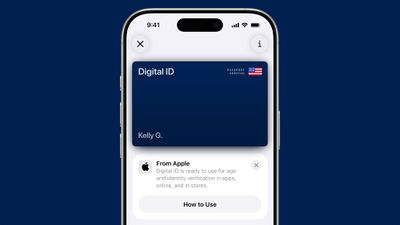
ios 26 digital id passport wallet
A future version of iOS 26 will let you add a digital version of your U.S. passport to Apple's Wallet app. Unfortunately, the feature has been delayed.

The so-called "Digital ID" feature for U.S. passports will be available in a "software update," according to Apple's fine print on its iOS 26 page. Apple did not mention a specific version, but hopefully it arrives in iOS 26.1 or iOS 26.2.

After creating a Digital ID in the Wallet app, you will be able to present it in person at TSA checkpoints in select U.S. airports for identity verification purposes during domestic travel. However, Apple says it is not a replacement for a physical passport, and it cannot be used for international travel and border crossing purposes.

Apple says the Digital ID feature is secure, private, and compliant with REAL ID.

It will also be possible to use the Digital ID feature for age and identity verification in apps, online, and in stores, according to Apple.

RCS Upgrades
ten messages features
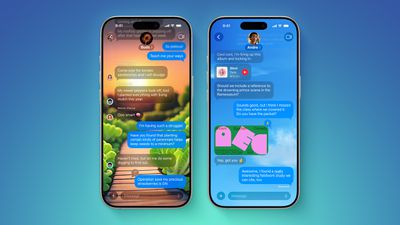
Earlier this year, Apple said it planned to add support for end-to-end encrypted RCS messages to the Messages app in future iOS, iPadOS, macOS, and watchOS software updates, and we are still waiting for that to happen. As of the first official version of iOS 26 released this week, the upgrade has yet to be implemented on iPhones.

End-to-end encryption for RCS was announced in March, as part of version 3.0 of the RCS Universal Profile, a global standard for RCS features and specifications. This means that Apple has indirectly confirmed that it will support RCS Universal Profile 3.0, which includes not only end-to-end encryption for RCS, but several other iMessage-like enhancements for RCS that were originally introduced in RCS‌ Universal Profile 2.7.

Apple has to wait on carriers to implement RCS Universal Profile 3.0 too, so it is understandable why the process is taking time.

Here are five new capabilities to expect for RCS conversations on the iPhone, iPad, and Mac, once Apple rolls out support for RCS Universal Profile 3.0:

  • End-to-end encryption, which will prevent Apple and any other third party from being able to read messages and attachments while they are being sent between devices, as has always been the case with iMessage
  • In-line replies
  • Edit messages
  • Unsend messages
  • Full-fledged Tapback support for RCS messages, with no special workarounds

RCS support as a whole was added to the iPhone with iOS 18, which supports ‌RCS‌ Universal Profile 2.4. It is effectively a modernized version of the SMS standard, which remains available as a fallback option for text messages over a cellular network.

RCS will be playing catch up with iMessage in many ways. iMessage conversations with blue bubbles have already supported end-to-end encryption by default since iOS 5. In addition, iMessage has supported in-line replies since iOS 14, while the options to edit and unsend iMessages were introduced with iOS 16.

It seems likely that Apple will roll out these RCS upgrades at some point during the iOS 26, iPadOS 26, macOS 26, and watchOS 26 software cycle.

Personalized Siri
iOS 18 Siri Personal Context
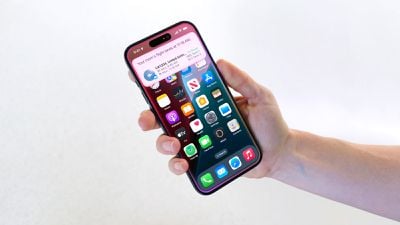
In late July, Apple CEO Tim Cook said his company was making "good progress" on a more personalized version of Siri, and he reiterated the features were on track to launch next year. Bloomberg's Mark Gurman expects the new Siri to launch in the U.S. in spring 2026, so Apple is likely aiming for an iOS 26.4 launch.

Apple first announced the personalized Siri features during its WWDC 2024 keynote, but in March it announced that they were delayed. The new capabilities will include better understanding of a user's personal context, on-screen awareness, and deeper per-app controls. For example, Apple showed an iPhone user asking Siri about their mother's flight and lunch reservation plans based on info from the Mail and Messages apps.

Weather via Satellite
iPhone Satellite Feature
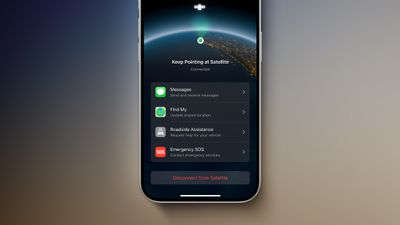
A little more than three months ago, MacRumors contributor Aaron Perris discovered references to an unreleased "Weather via satellite" feature in the code for the first iOS 26 developer beta. However, the feature has yet to be released or even announced by Apple, so it is unclear if it is still coming or if it was scrapped.

The references have not been removed from the code, as of the iOS 26 Release Candidate, so it is possible that Apple will introduce the feature eventually. Perhaps the feature will be added in a follow-up update, such as iOS 26.1 or iOS 26.2.

The feature would let you view the forecast and other weather information in the Weather app, in supported areas without Wi-Fi and cellular range. Apple's other satellite features include Emergency SOS via satellite, Messages via satellite, Find My via satellite, and Roadside Assistance via satellite, with availability varying by country.

Apple has yet to charge a fee for any of its satellite features. Last week, the company announced it is providing existing iPhone 14 and iPhone 15 users with an additional year of free access to the entire suite of satellite features on those devices.

New Emoji
iOS 26 Emoji Feature
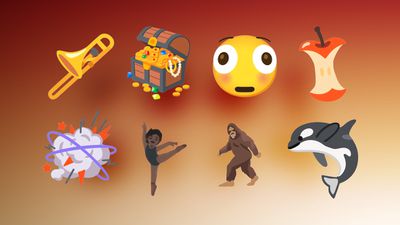
iOS 26.4 will likely add new built-in emoji to the iPhone.

In celebration of World Emoji Day on July 17, the Unicode Consortium previewed some of the new emoji that will be coming with Unicode 17.0.

Here are some of the new emoji:

  • Trombone
  • Treasure Chest
  • Distorted Face
  • Hairy Creature (Bigfoot/Sasquatch)
  • Fight Cloud
  • Apple Core
  • Orca
  • Ballet Dancers
  • Landslide

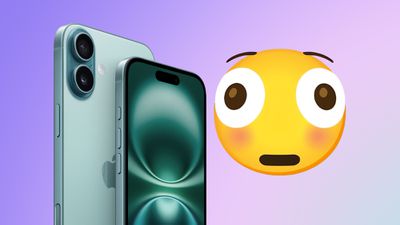
Notably, Distorted Face is a popular emoji in Discord servers. It is essentially a distorted version of the embarassed face emoji, also known as Flushed Face.
iPhone Floshed Feature alt
It typically takes Apple several months to design new emoji in its own style, so the emoji listed above will likely be added to the iPhone in iOS 26.4.

Apple most recently added new emoji to the iPhone with iOS 18.4, an update that came out in late March. iOS 17.4, iOS 16.4, and iOS 15.4 also introduced new emoji over the years, so the timing has become predictable by this point if it holds up.


Related Roundups: iOS 26, iPadOS 26
Related Forum: iOS 26

Popular Stories

iOS 27 Feature Dark

Apple Now Pushing iPhone Users Still on iOS 26 to Install iOS 27

Thursday October 8, 2026 1:17 pm PDT by
Starting today, iPhone users still running iOS 26 will see iOS 27.0.1 as the prominent software update in the Settings app under General → Software Update, with iOS 26.7.1 now relegated to a smaller "Also Available" section at the bottom. iOS 27 was released on September 14, but until now that update and later iOS 27.0.1 were shown under the "Also Available" section, with iOS 26.7 and...
bug security vulnerability issue fix larry

Apple Fixes Possibly Exploited CoreGraphics Flaw on Older iPhones

Tuesday October 27, 2026 5:16 am PDT by
Among the flurry of iOS 27.2 releases on Monday, Apple also pushed a wave of software updates for its older operating systems, including a fix for a CoreGraphics vulnerability that Apple says may have been exploited in targeted attacks. The releases include iOS 26.7.2, iPadOS 26.7.2, iOS 18.7.11, iPadOS 18.7.11, macOS Tahoe 26.7.2, macOS Sequoia 15.8.2, and tvOS 26.6.1. iOS 18.7.11 and...
iphone duo screen crack

Apple Responds to iPhone Duo Display Cracking Reports

Monday October 26, 2026 10:20 am PDT by
Shortly after the iPhone Duo launched, a few users reported hinge issues that were causing cracks in the inner display. Apple has now responded to the reports in a statement to MacRumors, saying a small number of units are affected. The response to iPhone Duo from early users has been incredibly positive, and we are seeing exciting things from developers who are rapidly updating their apps...

Top Rated Comments

wanha Avatar
15 months ago
So for someone in Finland on iPhone 13 Pro the only new feature that applies is... new emojis

Any proven tips on how to deal with all this excitement?
Score: 22 Votes (Like | Disagree)

15 months ago
No new emojis is just unacceptable. Apple has fallen. (yes, this is sarcasm)
Score: 9 Votes (Like | Disagree)
15 months ago
You know the iOS is pathetic when they are already excited about iOS 26.4! You can't put lipstick on a pig and make it better.
Score: 8 Votes (Like | Disagree)
sjsharksfan12 Avatar
15 months ago
I want a feature to turn off Liquid glass. So basically run 18.7 and the security updates that are lower tier from 26 and just bring them all into 26 OS.
Score: 7 Votes (Like | Disagree)
15 months ago
How about better control over transparency and contrast to be applied to certain things. For example, in iOS26, if you long press on a key (say a 0 to get the degree symbol or the O to get Ö and other variations), you can't see the available characters because the pop-up menu doesn't have enough contrast to see the characters in there (see video) - matter of fact when doing the long press on the O the top row isn't even visible unless you scroll through over the characters. You have to turn Transparency off completely. And in that case, what good is the Liquid UI? Sloppy design and implementation

[Click to view video attachment]
Score: 6 Votes (Like | Disagree)
15 months ago

How about better control over transparency and contrast to be applied to certain things. For example, in iOS26, if you long press on a key (say a 0 to get the degree symbol or the O to get Ö and other variations), you can't see the available characters because the pop-up menu doesn't have enough contrast to see the characters in there (see video) - matter of fact when doing the long press on the O the top row isn't even visible unless you scroll through over the characters. You have to turn Transparency off completely. And in that case, what good is the Liquid UI? Sloppy design and implementation


The entire thing feels like the intern designed it and pressed publish without asking anyone.

Attachment Image

Attachment Image
Score: 5 Votes (Like | Disagree)
Latest Stories
Best Buy Opens Pre-Orders for PROLED XDR MacBook Pro With $100 Bonus Gift Cards
3 hours ago
Here's Everything Apple Announced This Week
3 hours ago
Here's a Real-World Look at the New MacBook Pro's Glowing Apple Logo
3 hours ago
How Accurate Were Rumors About Apple's OLED Touchscreen MacBook Pro?
4 hours ago
Apple Has 8 New Products Available for Pre-Order
5 hours ago
iPhone Duo: Turn the Hinge Into an App Launcher
5 hours ago
OLED MacBook Pro vs. Mini-LED MacBook Pro: Size and Weight Compared
6 hours ago
Best Buy Offering Up to $100 Gift Cards With iPad Mini 8 and M6 MacBook Pro Pre-Orders
6 hours ago
Adding Touch Didn't Cost the MacBook Pro Any Battery Life
7 hours ago
Apple Releases Redesigned Mac Chargers and 'World Travel Adapter Kit'
7 hours ago
Apple Executives Explain Why the MacBook Pro Finally Has a Touch Screen
7 hours ago
New MacBook Pro Features Deeper Bass and Improved Closed-Lid Audio
8 hours ago
New MacBook Pro Offers Up to 16TB of Storage, Double Previous Limit
8 hours ago
Apple's New Touchscreen MacBook Pro Costs Up to $14,549
8 hours ago
Apple Brings Dynamic Island to Mac for the First Time
8 hours ago
Mac Studio With M5 Ultra Now Available With 512GB RAM for $22,299
8 hours ago
Illuminated Apple Logo Returns to MacBook Pro After 10 Years
8 hours ago
Apple Announces OLED MacBook Pro With Touch Display
9 hours ago
Apple Store Down Ahead of 'Pro and Tell' Launch Today
9 hours ago
South Korea Rules Against Apple Over App Store Payment Rules
10 hours ago
iOS 27.2 Adds Selfie-Based Age Verification
11 hours ago
Beats 360 Get First Price Drop Alongside Return of Record Low for AirPods 4
11 hours ago
Apple Raises MacBook Neo's Starting Price to $649 on Education Store
12 hours ago
MacBook Studio?
MacBook Studio?
12 hours ago
Apple CEO John Ternus Teases Touchscreen MacBook Pro: 12 Final Rumors
12 hours ago
Touchscreen MacBook Pro's New Hinge Linked to iPhone Duo 2
13 hours ago
macOS 27 Assets Hint at Dynamic Island for MacBook Pro
14 hours ago
Touchscreen MacBook Pro to Debut Today With These 5 Features
15 hours ago
Apple to Open Pre-Orders for Five New Products Today
16 hours ago
MacPaw Launches 'Eney' AI Assistant for Mac and iPhone
19 hours ago