iOS 26: 10+ Features Coming to the Phone App - MacRumors
Skip to Content

iOS 26: 10+ Features Coming to the Phone App

The Phone app doesn't often get a lot of attention with iOS updates, but that's changing in iOS 26. There are multiple new features to prevent unwanted calls and to save you time.

iOS 26 Phone App Features

Unified Design

The Phone app has a new unified design, but there is an option to use the original iOS 18 layout as well. The unified design puts recent calls, missed calls, and voicemails on a single screen.

ios 26 phone app unified
Favorite contacts remain at the top of the interface, and there's still a tab for swapping over to contacts and the keypad. You can turn the unified view on or off by tapping on the icon with three lines in the upper right corner of the display.

Call Screening

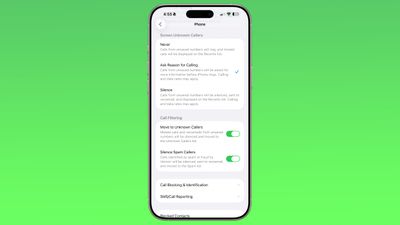
Apple has expanded call screening functionality in ‌iOS 26‌. There is an option to ask unknown callers (aka people who you don't have saved in your Contacts list) for their name and reason for calling. When enabled, this is an automated process.
ios 26 beta 4 call screening
The iPhone intercepts an incoming call, and requests the person's name and a short reason for calling. The information is transcribed to text and relayed to you, and you can decide whether to ask for more information, accept the call, or decline the call.

The person on the other end of the call receives an automated response similar to a voicemail asking for more information, and they are placed on hold while you make a decision on accepting or declining the call.

To use this feature, toggle on "Ask Reason for Calling" in the Phone section of the Settings app.

Silence Unknown Callers

Rather than asking for more information from unknown callers, there is still a silence unknown caller option that can be turned on instead. As in iOS 18, toggling this on silences calls from unsaved numbers, sending them to voicemail automatically. Calls that are silenced will show up on the Recents list, and you will also see the voicemail for information about why someone was calling.

If you don't want to use silence unknown callers or the ask reason for calling feature, you can set the Screen Unknown Callers option to "Never." With this setting, calls from unsaved numbers ring as normal, and missed calls are shown on the Recents list.

Call Filtering

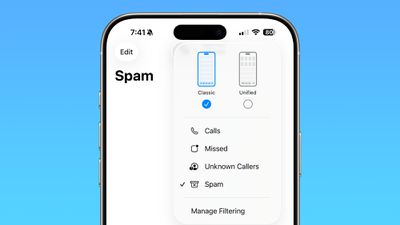
In addition to improved call screening, ‌iOS 26‌ has new call filtering features. There is an option to move missed calls and voicemails from unsaved numbers to a dedicated Unknown Callers list, hiding them from the main view.
ios 26 call filtering
There's also a toggle to automatically silence calls that are marked as spam by a carrier. If you have Verizon, for example, Verizon automatically marks some numbers as spam, and the iPhone can automatically send those calls to voicemail and move the calls to the Spam list. This setting will vary by carrier.

With these options turned on, you can tap on the icon in the upper right of the phone app to see calls that have been moved to the Unknown Caller section or marked as spam.

Spam Voicemails

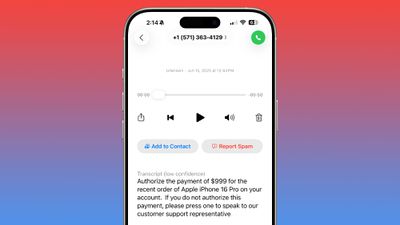
When you tap into a voicemail from an unknown number, there's now a "Report Spam" button. Tapping on it sends the voicemail to Apple, and you can either report the message as spam and keep it, or report it and delete it. Deleting a voicemail from an unknown number also brings up the option to report it as spam, and there is an option to report spam right when listening to an incoming voicemail as well.
ios 26 voicemail report spam
Reporting a voicemail as spam does not block the caller, and that needs to be done with a separate step. Tap on the "i" button, scroll down on the contact card, and tap on Block Contact to block a spammer.

Hold Assist

If you make a call and are placed on hold, there's a feature in ‌iOS 26‌ that will wait for you so you can do other things. It listens for hold music playing, and then alerts you when a person comes on the line so you can pick up the call.
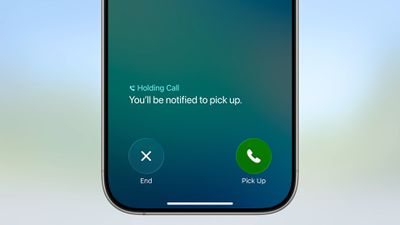
iOS 26 Hold Assist
You can turn on Hold Assist on any call by placing the call, then tapping on the "..." button once the call has connected. Your phone will ring and you will be alerted to pick up when a person is on the line. If the iPhone detects hold music, it may also automatically prompt you to turn on Hold Assist.

Since the feature works by detecting hold music, it can be imperfect when a number has a voice-based automation reminding you to stay on the line, or if there's music with distinct lyrics. You will see a transcript of any spoken words, so you can determine when a person is actually on the line.

Live Translation

Live Translation is a feature that can translate incoming phone calls from one language to another. When a call is in progress, tap on the "..." button and then tap on Live Translation to use the feature.
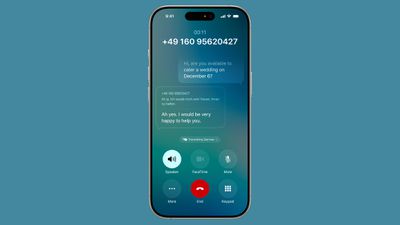
ios 26 phone live translation
You can then select the language that you want to translate from (the language spoken by the person you're talking to) and the language that you want to translate to (your language). As of now, Live Translation for the Phone app supports English, French, German, Portuguese, and Spanish.

When a translation is in progress, you'll see a small notice at the bottom of the phone app that says "Translating [Language]" and there will be a live transcript of the call. An AI voiceover will audibly translate what's said from one language to another, with a slight delay while this is happening.

Live Translation works on the iPhone to translate what you're hearing and what you're saying, so the person on the other end does not need to have an iPhone or even a smartphone at all.

Call History

There is an extended call history available for each of your contacts in ‌iOS 26‌. In the Phone app, tap on the "i" next to any name or number, and then tap on the "Call History" option. From there, you can see every time you've spoken with that person, dating years back.
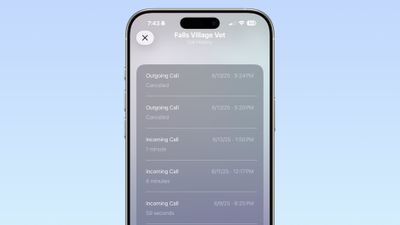
ios 26 call history

Type to Siri

While on a phone call, you can now use the Type to Siri feature to ask ‌Siri‌ questions or to complete a task.

Screen Sharing and SharePlay

Apple added SharePlay and screen sharing support to the Phone app in ‌iOS 26‌. When on a call with a person that has a compatible device, tap on the "..." button and then choose either SharePlay or Screen Sharing to access the features.

When using SharePlay, you're able to select an app to use with the feature, such as Apple TV or Apple Music.

With screen sharing, you can ask for remote access to a device, which is useful for helping troubleshoot tech problems.

Both participants need to be using a device with ‌iOS 26‌, iPadOS 26, or macOS Tahoe to use screen sharing and SharePlay with the Phone app.

eSIM Improvements

If you need to transfer an eSIM to Android or an Android eSIM to an iPhone, the process has been streamlined in ‌iOS 26‌. In the iPhone's cellular settings, there is a "Transfer to Android" option for an existing SIM, as well as an option to "Transfer From Android" when adding a new SIM to an iPhone.
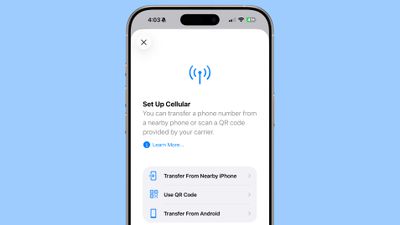
ios 26 android transfer esim

Phone App for iPad and Mac

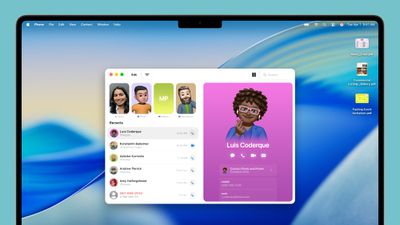
The Phone app has expanded to the iPad in ‌iPadOS 26‌ and the Mac in ‌macOS Tahoe‌. All of the features like Call Screening, Hold Assist, and Live Translation also work on the ‌iPad‌ and the Mac.

mac phone app
To use the Phone app on ‌iPad‌ or Mac, you do need an iPhone on the same Apple Account, and you need to activate Wi-Fi Calling so that calls can be accepted on other devices.

Read More

More on the features that are available in ‌iOS 26‌ can be found in our iOS 26 roundup.

Related Roundups: iOS 26, iPadOS 26
Related Forum: iOS 26

Popular Stories

iOS 27 Feature Dark

Apple Now Pushing iPhone Users Still on iOS 26 to Install iOS 27

Thursday October 8, 2026 1:17 pm PDT by
Starting today, iPhone users still running iOS 26 will see iOS 27.0.1 as the prominent software update in the Settings app under General → Software Update, with iOS 26.7.1 now relegated to a smaller "Also Available" section at the bottom. iOS 27 was released on September 14, but until now that update and later iOS 27.0.1 were shown under the "Also Available" section, with iOS 26.7 and...

bug security vulnerability issue fix larry

Apple Fixes Possibly Exploited CoreGraphics Flaw on Older iPhones

Tuesday October 27, 2026 5:16 am PDT by
Among the flurry of iOS 27.2 releases on Monday, Apple also pushed a wave of software updates for its older operating systems, including a fix for a CoreGraphics vulnerability that Apple says may have been exploited in targeted attacks. The releases include iOS 26.7.2, iPadOS 26.7.2, iOS 18.7.11, iPadOS 18.7.11, macOS Tahoe 26.7.2, macOS Sequoia 15.8.2, and tvOS 26.6.1. iOS 18.7.11 and...
Apple MacBook Pro with PROLED XDR Display family lineup feature

Apple Announces OLED MacBook Pro With Touch Display

Wednesday October 28, 2026 10:11 am PDT by
Apple today announced a new high-end MacBook Pro, which is available in 14-inch and 16-inch sizes. The new device has a PROLED XDR display that supports touch gestures, and a glowing rear Apple logo. Pricing on the MacBook Pro starts at $2,899 for the 14-inch model and $3,399 for the 16-inch model. Apple says the MacBook Pro has the "world's best display in a pro laptop." The PROLED...

Top Rated Comments

Justin Cymbal Avatar
16 months ago

You can turn the unified view on or off by tapping on the icon with three lines in the upper right corner of the display
I’m glad that Apple is giving users the option of either enabling or disabling this new feature

Hopefully, Apple gives users more options on settings like this in the future
Score: 14 Votes (Like | Disagree)
Rafagon Avatar
16 months ago
What if I want to ask the reason for calling even if they are on my contacts list? I like this feature and the potential benefits like using it to discourage people from calling me and force them to text me instead.
Score: 12 Votes (Like | Disagree)
alexandr Avatar
16 months ago
Call screening is great, unless you opt in for a call back — need to disable it then.
Hold assist is great, but so far it failed on several calls during the "all of our representatives are ass"

Great features nonetheless, but need some fine-tuning and getting used to.
Score: 9 Votes (Like | Disagree)
jz0309 Avatar
16 months ago
good improvements and Thanks again MR for putting this together
Score: 7 Votes (Like | Disagree)
16 months ago
Call screening and hold assist will be very useful. Would like to see live translation support more languages in the future.
Score: 5 Votes (Like | Disagree)
EM2013 Avatar
16 months ago
I wish there was a way to prevent spam calls from leaving a voicemail. Annoying to get constant notifications about voicemails from spam
Score: 4 Votes (Like | Disagree)
Latest Stories
Apple Watch Ultra 4 Hits All-Time Low Price With Amazon's $99 Discount
25 minutes ago
Reminder: Apple's Big Discount on Beats 360 Ear Cushions Ends Today
30 minutes ago
Here's a New Tour of Apple's HomeView Software
32 minutes ago
Apple Reveals New iPad Mini's Battery Capacity
2 hours ago
Top Stories: Apple's Big MacBook Pro, iPad mini and iMac Updates
3 hours ago
'Pluribus' Season 2 Reportedly Starts Production Today
10 hours ago
iPhone 18 Pro Sales Surge in China, Offsetting Decline in U.S. and Japan
10 hours ago
HomeView Software 27.2: Wallpapers, Control Center, and More
17 hours ago
Apple Alerts Stores to iPhone Duo's Display Cracking Issue
18 hours ago
iOS 27.3 Will Enable These Apple Intelligence Features in China
19 hours ago
Apple Says iOS 27.3 Beta Coming Next Week
19 hours ago
Apple's Flash Storage Suppliers Are Finally 'Getting Their Revenge'
20 hours ago
14 New Things Your iPhone Can Do in iOS 27.2
21 hours ago
iPhone Duo Review: One Week Later
22 hours ago
Samsung Mocks iPhone Duo Display Cracks in New Ad Campaign
23 hours ago
The MacRumors Show: OLED MacBook Pro, iPad Mini 8, and More
23 hours ago
MacBook Pro With Touch Display: 15 More Details Revealed
1 day ago
Russia Places Apple on State Surveillance Registry
1 day ago
Halloween Weekend Brings Discounts on Apple Accessories and Pre-Orders
1 day ago
Apple Has Released More Than 25 New Products in the Past Two Months
1 day ago
Local Code Launches as Free, Private AI Assistant Tool for Mac
1 day ago
Apple Acquires Ascend.io
1 day ago
HomePod Mini 2 Launches Today: All the New Features
1 day ago
AirTag 2 4-Pack Drops to New Low Price of $69.99
1 day ago
Rian Johnson's iPhone Camera App Goes Viral
1 day ago
Where Did All the iPhone Duos Go? Mostly to Apple's Stores
1 day ago
Apple's Touchscreen MacBook Pro Could Ship 1.5M Units in 2027
1 day ago
New Apple TV 4K and iPad Mini: RAM Amounts Revealed
2 days ago
Apple Executive Comments on New iPad Mini Lacking 120Hz Display
2 days ago
Here's a Hands-On Look at HomePod Mini 2's New Two-Tone Colors
2 days ago