If you've just downloaded the iOS 26 public beta on your iPhone, the first thing you'll notice is the new Liquid Glass design overhaul, which adopts translucent elements throughout the system interface and in stock apps.

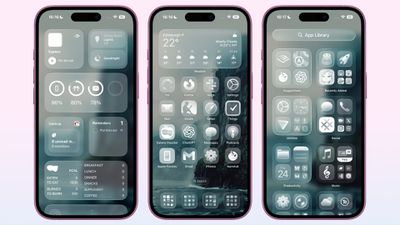
On the Home Screen, the search bar, dock, and app folders are translucent. By default, app icons have a new layered glass look that gives them dimension, but there's also a new option for "Clear" glass-like icons. This setting turns your app icons transparent, and widgets too. So if you want the full glass effect, read on.
clear app icon style ios
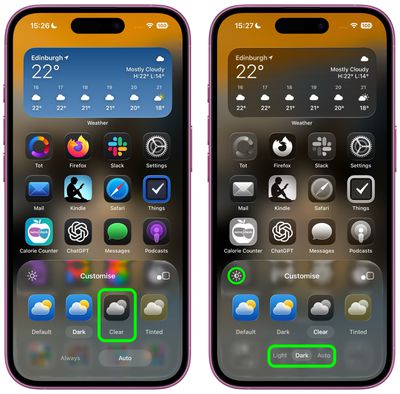
In iOS 18, Apple introduced Dark Mode and Tinted app icons. With iOS 26 and iPadOS 26, Apple adds a third visual style – Clear – that removes the color from app icons and widgets, and applies reflective, translucent effects to make them appear see-through.

There are two versions of the new Clear style. In Light mode, app icons appear semi-transparent, subtly darkening the wallpaper beneath them. Both icons and widgets resemble glass-like panels with layered text and images. In Dark mode, icons retain some transparency but feature a darker background, making them more pronounced while preserving the layered, translucent aesthetic.

Apple also includes an Auto option that dynamically adapts to the Appearance setting of your iPhone.

How to Get Clear App Icons in iOS 26

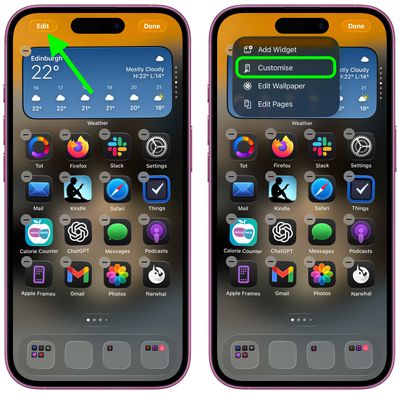
  1. On your iPhone's Home Screen, long press an empty space until it enters jiggle mode.
  2. Tap Edit in the top-left corner, then tap Customize in the pop-up menu.
    make home screen app icons clear ios1

  3. Select Clear in the panel that appears at the bottom.
  4. Choose Light, Dark, or Auto mode. If a mode makes icons or app labels hard to see, tap the sun icon in the top-left of the Customize panel to dim the wallpaper.
    make home screen app icons clear ios

Accessibility Settings

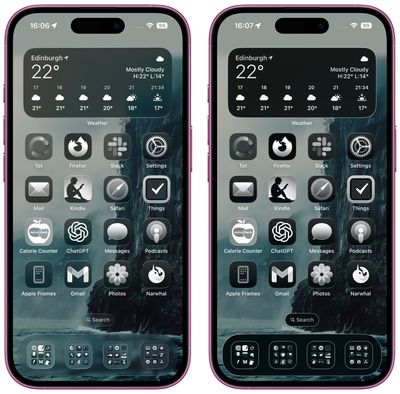
If legibility is a problem, there are two toggles in Settings ➝ Accessibility ➝ Display & Text Size that impact the look of the Clear style of icons. Try playing with Reduce Transparency and Increase Contrast – just note that toggling on both settings will cause the icons to lose most of their translucency.
accessibility

Clear icon style in Dark mode (left) vs. Accessibility setting toggles

Liquid Glass extends to iPadOS 26, macOS 26, watchOS 26, and tvOS 26. ‌iPadOS 26‌ looks a lot like ‌iOS 26‌, and macOS 26 has a translucent menu bar and dock background, plus it uses Liquid Glass for buttons, side bars, navigation bars, and the Control Center. What do you think of the new Clear style and the Liquid Glass redesign of iOS 26 more broadly? Let us know in the comments.

Popular Stories

iOS 26

iOS 26.1 Available Now With These 8 New Features

Monday November 3, 2025 5:54 am PST by
Following more than a month of beta testing, Apple released iOS 26.1 on Monday, November 3. The update includes a handful of new features and changes, including the ability to adjust the look of Liquid Glass and more. Below, we outline iOS 26.1's key new features. Liquid Glass Toggle iOS 26.1 lets you choose your preferred look for Liquid Glass. In the Settings app, under Display...
Finder Siri Feature

Apple's New Siri Will Be Powered By Google Gemini

Wednesday November 5, 2025 11:57 am PST by
The smarter, more capable version of Siri that Apple is developing will be powered by Google Gemini, reports Bloomberg. Apple will pay Google approximately $1 billion per year for a 1.2 trillion parameter artificial intelligence model that was developed by Google. For context, parameters are a measure of how a model understands and responds to queries. More parameters generally means more...
Apple Logo Spotlight

Report: Apple to Launch These New Products in 2026

Sunday November 2, 2025 5:34 am PST by
Apple is planning to launch at least 15 new products in 2026, according to Bloomberg's Mark Gurman. Gurman outlined what to expect from Apple in 2026 in the latest edition of his "Power On" newsletter. He said the company is heading "into one of its most pivotal years in recent memory," with the rollout of major new Apple Intelligence features, intense regulatory pressure on the App Store,...

iOS 26

Apple Releases iOS 26.1 With Liquid Glass Toggle, Slide to Stop Alarm, New Apple Intelligence Languages and More

Monday November 3, 2025 1:11 pm PST by
Apple today released iOS 26.1, the first major update to the iOS 26 operating system that came out in September, iOS 26.1 comes over a month after iOS 26 launched. ‌iOS 26‌.1 is compatible with the ‌iPhone‌ 11 series and later, as well as the second-generation ‌iPhone‌ SE. The new software can be downloaded on eligible iPhones over-the-air by going to Settings > General >...
2024 iPhone Boxes Feature

Apple Adjusts Trade-In Values for iPhones, iPads, Macs, and More

Thursday November 6, 2025 11:12 am PST by
Apple today updated its trade-in values for select iPhone, iPad, Mac, and Apple Watch models. Trade-ins can be completed on Apple's website, or at an Apple Store. The charts below provide an overview of Apple's current and previous trade-in values in the U.S., according to its website. Maximum values for most devices either decreased or saw no change, but the iPad Air received a slight bump. ...
Early Black Friday Deals 2

The Best Early Black Friday Apple Deals

Sunday November 2, 2025 10:04 am PST by
We're officially in the month of Black Friday, which will take place on Friday, November 28 in 2025. As always, this will be the best time of the year to shop for great deals, including popular Apple products like AirPods, iPad, Apple Watch, and more. In this article, the majority of the discounts will be found on Amazon. Note: MacRumors is an affiliate partner with some of these vendors. When ...
tvOS 26 Feature

Apple Releases tvOS 26.1

Monday November 3, 2025 1:07 pm PST by
Apple today released tvOS 26.1, an update to the tvOS 26 operating system that came out in September. tvOS 26.1 is available on the Apple TV 4K and the Apple TV HD models, but Liquid Glass is only available on the second-generation Apple TV 4K or later. tvOS 26 can be downloaded using the Settings app on the ‌‌Apple TV‌‌. Open up Settings and go to System > Software Update to get the ...



apple one  cpqesecbv342 upscaled feature

Apple One Gets New Colorful Logo Following Apple TV Rebrand [Updated]

Monday November 3, 2025 3:22 pm PST by
Apple updated the logo and name for its Apple TV streaming service today, and it looks like Apple One might be next. On the revamped Apple TV website, there's a new, more colorful Apple One logo available. The logo features an Apple icon that's split into six slices, and each slice includes the color that Apple uses for one of the services included in Apple One Premium. Apple One is...