Hard Reset or Force Restart Your iPhone 17 or iPhone Air - MacRumors
Skip to Content

Hard Reset or Force Restart Your iPhone 17 or iPhone Air

by

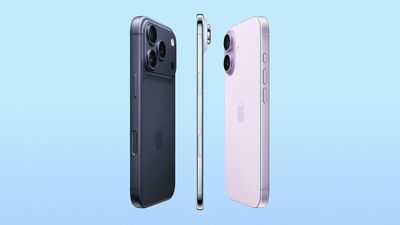
Apple's new iPhone 17 has a bigger screen than its predecessor at 6.3 inches, while the iPhone 17 Pro and ‌‌iPhone 17 Pro‌‌ Max come in the same sizes as 2024's equivalents. Meanwhile, the all-new ultra-thin iPhone Air replaces last year's Plus model in Apple's lineup. What's common among these new models is that they come with an all-screen design, Dynamic Island, an Action button, and Camera Control.
better iphone 17 lineup
As such, the method of hard resetting or force restarting hasn't changed from the previous series. Still, if you're upgrading from a device with a Home button, keep reading to learn how to hard reset or force reset your iPhone 17 or iPhone Air, as the process can come in handy if your device bugs out or stops responding for any reason.

How to Hard Reset iPhone 17 Models (Incl. iPhone Air)

  1. Quickly press and release the Volume Up button.
    force restart iphone 14

  2. Quickly press and release the Volume Down button.
  3. Press and hold the Side button until the Apple logo appears, then release the Side button.
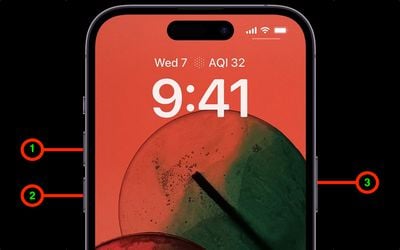
During this process, you will see a slider to power off the iPhone. You're going to want to ignore it and continue holding down the Side button until the screen goes black. At that point, the Apple logo will pop up, and after the restart is complete, the screen will activate once again.

Using the force restart process prevents you from having to shut the iPhone down entirely, which takes a few more steps and takes longer to boot up again.

If you do want to shut the iPhone down, you can do so by going to the General section of the Settings app, scrolling down to the bottom, and choosing the Shut Down option.
Related Roundups: iPhone 17, iPhone 17 Pro, iPhone Air
Related Forum: iPhone

Popular Stories

pixelmator pro

Apple's Pixelmator Pro Update Brings iPhone 17 Mockups, Keyboard Shortcuts, and Expanded Camera Support

Thursday April 9, 2026 11:05 am PDT by
Apple today updated Pixelmator Pro, the popular image editing app that it purchased in 2024. Pixelmator Pro includes RAW image support for more cameras, new templates, improved support for SVG file exports, new keyboard shortcuts, and more. Some of the features like the keyboard shortcuts are limited to the Creator Studio version of Pixelmator Pro. Pixelmator Pro has a template and mockup...

astropad fresh coat comparison 4 feature

MacRumors Giveaway: Win an iPhone 17 and Astropad Fresh Coat Anti-Reflective Screen Protector

Friday April 10, 2026 10:50 am PDT by
For this week's giveaway, we've teamed up with Astropad to offer MacRumors readers a chance to win one of Apple's iPhone 17 models and a Fresh Coat anti-reflective screen protector from Astropad to use with it. Fresh Coat is a screen protector with an optical-grade anti-reflective coating to minimize glare and provide a better iPhone viewing experience. The technology reduces reflections by ...
better iphone 17 lineup

iPhone 17 Is Apple's Most Popular Lineup Ever

Thursday April 30, 2026 2:01 pm PDT by
Apple's iPhone 17 models are its most popular iPhones to date, Apple CFO Kevan Parekh told the Financial Times. Both Parekh and Apple CEO Tim Cook attributed Apple's stellar Q2 2026 performance to iPhone sales. "The iPhone 17 family is now the most popular line-up in our history... we believe we gained market share during the quarter," said Parekh. Cook told Reuters that iPhone demand was...