Resize the Clock Display on Your iPhone Lock Screen - MacRumors
Skip to Content

Resize the Clock Display on Your iPhone Lock Screen

by

When Apple released iOS 26, it switched up the Lock Screen so that the clock can be expanded to fill more of the display, making it easier to read. This can be done in Customize mode thanks to a drag handle on the bottom-right corner of the selection frame around the time.
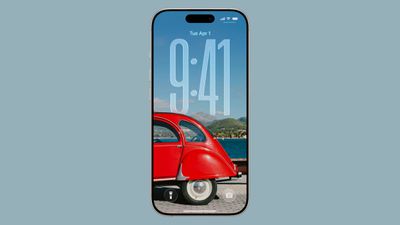
ios 26 lock screen time
You can make the digits take up half of the screen, though if you have any widgets, they will slide down to the bottom of the display. In addition, if you have a depth effect applied to a photo and pinch to crop, the time will automatically adjust to accommodate the subject. Bear in mind that the ability to expand the time depends on the selected photo – if there's no space above the photo's subject, the drag handle won't appear.

How to Resize iPhone Lock Screen Clock

  1. Long press anywhere on the Lock Screen, then tap Customize.
  2. Rest your finger on the drag handle located at the bottom-right of the clock frame.
  3. Drag down to resize the clock, then up to adjust if it's too big.
  4. Make any other desired changes to the Lock Screen, then tap Done to finish.
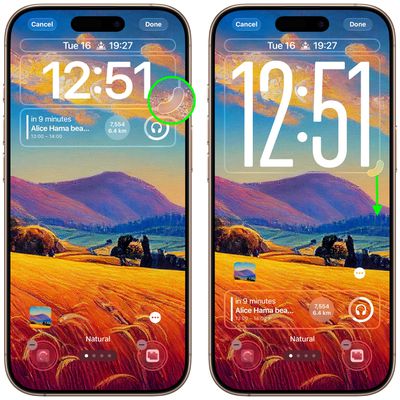
resze lock screen clock ios

If you're new to iPhone or iOS 26, there are several more iPhone Lock Screen customizations that you may want to check out in our dedicated roundup.


Popular Stories

Apple Event Logo

Apple to Release These 15 New Products Later This Year

Friday June 12, 2026 7:45 am PDT by
Apple's annual WWDC developers conference is drawing to a close, but there is still a lot to look forward to in the second half of the year. Apple is expected to release at least 15 more products later this year. Now that the more intelligent and personal version of Siri has finally arrived in beta, a full two years after Apple first previewed it at WWDC 2024, we should begin to see some new ...
iCloud iPhone 17 Pro

iPhone Users Who Pay for iCloud Storage Get Two New Perks on iOS 27

Tuesday June 9, 2026 11:29 am PDT by
If you pay for extra iCloud storage on your iPhone, beyond the 5GB included for free, you might receive two more perks on iOS 27 at no additional cost. First, Apple said there will be daily usage limits for some of the new and enhanced Apple Intelligence features on iOS 27, including image generation. However, the company noted that "increased access" is available with "most" iCloud+ storage ...
Apple Logo Top Half

Have One of These 16 Apple Devices? Software Support Ends This Fall

Saturday June 13, 2026 8:00 am PDT by
Apple will end software support for 16 devices this fall across four product lines, with the Apple Watch seeing the most sweeping cull in the product's history. The full extent of this year's software drops became clear with the announcements of macOS 27 Golden Gate, iPadOS 27, tvOS 27, and watchOS 27 at WWDC this week. The one bright spot is that iOS 27 features identical device support to...