Skip to Content

iOS 26: Set a Custom iPhone Ringtone in Seconds

by

Setting custom ringtones on your iPhone is dramatically easier in iOS 26. Apple has eliminated the need for the cumbersome process of exporting a track from the GarageBand app, and now provides a simple four-step process that works directly from the Files app.
iOS 18
The new streamlined approach means you can transform any MP3 or M4A audio file that's less than 30 seconds into a personalized ringtone in a just a few taps. Whether it's a favorite song snippet, a voice memo, or a sound effect you've downloaded, the process is now as straightforward as sharing a photo. Here's how to set up your custom ringtone without opening an additional app in iOS 26 (currently in beta).

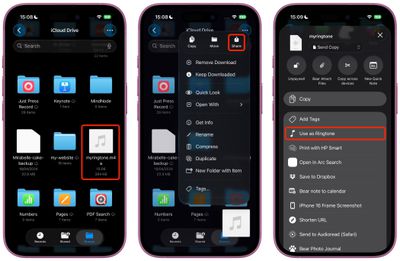
  1. Open the Files app on your iPhone.
  2. Long press an MP3 or M4A audio file that's less than 30 seconds long.
  3. Tap Share in the pop-up menu.
  4. Scroll down to the actions menu and choose Use as Ringtone.
ios use as ringtone

The change will be made immediately. You'll be sent to Settings ➝ Sounds & Haptics ➝ Ringtone, where you'll see the custom ringtone selected. From here, you can delete the ringtone (swipe left, then tap Delete) or choose another one in the default ringtones that's more to your liking.

Note that the Use as Ringtone option also appears for audio files in select other apps, including Voice Memos. Unfortunately, it's not possible to set Apple Music songs as custom ringtones for free, even with a subscription. Apple still sells 30-second song ringtones for $1.29 each through the iTunes Store app.


Popular Stories

iOS 27 Mock Quick

iOS 27 Will Reportedly Be Like Mac OS X Snow Leopard

Sunday March 15, 2026 9:42 am PDT by
In his Power On newsletter today, Bloomberg's Mark Gurman reiterated that iOS 27 will be similar to 2009's Mac OS X Snow Leopard, in the sense that one of Apple's biggest priorities is bug fixes for improved performance and stability. During WWDC 2008's State of the Union, Apple showed a slide that said Mac OS X Snow Leopard had "0 new features," as it opted to focus on performance and...

AirPods Max 2 Feature

Apple Announces AirPods Max 2 With H2 Chip and More

Monday March 16, 2026 6:12 am PDT by
Apple today unveiled AirPods Max 2, with key upgrades including the H2 chip, increased active noise cancellation, improved sound quality, and features such as Adaptive Audio, Conversation Awareness, Voice Isolation, and Live Translation. The new AirPods Max have the same overall design as the previous generation, with most of the new features coming from the upgrade to the H2 chip:- Adaptive ...
iOS 27 Mock Quick

10+ New Features Coming in iOS 27

Friday March 13, 2026 2:13 pm PDT by
We're only three months away from Apple's WWDC 2026 event, which will see the company unveil iOS 27. With the fully revamped version of Siri possibly delayed until September, iOS 27 is shaping up to be the update we wanted iOS 26 to be. There will be new Apple Intelligence features, updates for the iPhone Fold, and more, with the latest rumors summarized below. Foldable iPhone Features...