iOS 26: Use Folders to Manage Playlists in Apple Music - MacRumors
Skip to Content

iOS 26: Use Folders to Manage Playlists in Apple Music

by

In iOS 26, Apple Music introduces playlist folders, bringing the same organizational power that's long been available for photos and notes to your music collection. Whether you're juggling workout mixes, seasonal soundtracks, or genre-specific selections, folders should be a welcome management tool for your most favored collections.
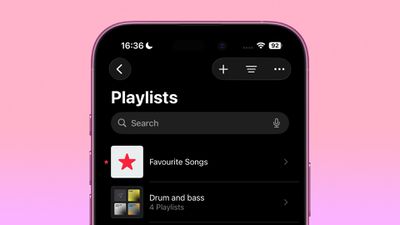
music playlist folders
The feature works exactly as you'd expect – simply create the folder, rename it to suit the intended content, and you'll be navigating your music library with newfound efficiency in no time. You can even nest playlist folders by mood, activity, artist, or whatever system that makes sense for how you actually listen to music.

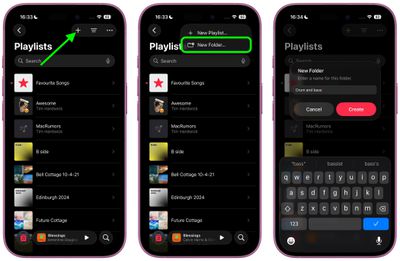
How to Create a New Folder

Here's how to create a playlist folder in the Music app:

  1. In the Playlist section, tap the + icon at the top.
  2. Choose New Folder... from the popup menu.
  3. Give your new folder a name, then tap Create.
music

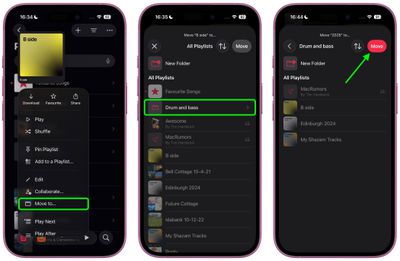
Move Playlists into a Folder

With your folder created, move in some playlists like so:

  1. Long press on a playlist.
  2. Choose Move to... from the popup menu.
  3. Select the folder from All Playlists.
  4. Tap the red Move button.

music

That's all there is to it. Finally, iOS 26 and iPadOS 26 bring a little more feature parity with the Music app on Mac.

Don't forget, iOS 26 also introduces Music pins, allowing you to pin your most frequently accessed songs, playlists, albums, and artists directly to the top of your Library tab. iOS 26 is currently in beta, with a general release expected in September.

Top Rated Comments

Slix Avatar
14 months ago
Really happy that iOS is finally getting parity with the Music app on the Mac, but this is crazy that it took this long to create folder on iOS. iTunes had folder support with version 5 in 2005, and iOS got playlist creation in iOS 4 in 2010.

Still hoping we'll get the ability to make and edit Smart Playlists on the go eventually...
Score: 8 Votes (Like | Disagree)
Justin Cymbal Avatar
14 months ago

In iOS 26, Apple Music introduces playlist folders, bringing the same organizational power that's long been available for photos and notes to your music collection
It would be nice if Apple added this capability to both the Wallet app (and the messages app as well)

So that you would be able to put different credit cards within folders (within the Wallet app) such as retail store credit cards in one folder and regular everyday 2-3% cashback cards another folders - airline (and travel credit cards) in a separate folder as well

Within the messages app, it would be nice to be able to put different contacts within separate folders so your family or friends text threads could be organized and separated into different sections of the messages app
Score: 8 Votes (Like | Disagree)
yeahtyeaht Avatar
14 months ago
You can already do this prior the 26 updates on your Mac. The folders will also be visible on your iPhone.
Score: 7 Votes (Like | Disagree)
Arran Avatar
14 months ago

You can already do this prior the 26 updates on your Mac. The folders will also be visible on your iPhone.
Yes. I started using playlist folders back in the iPod/iTunes days.

The new features for iOS 26 are the ability to create a new folder and move playlists between folders on the phone.
Score: 5 Votes (Like | Disagree)
roland.g Avatar
14 months ago
Oooooh. Folders.

How about allowing Apple Music subscribers to make Playlists with music from Apple Music combined with their own libraries without forcing Apple Music Library Match upon the user. Just because I might have the same song in my library as in the Apple Music catalog, the Library Match is broken and flawed.

Score: 4 Votes (Like | Disagree)
14 months ago
Music on iPadOS opens folder playlists expanded by default, and doesn't remember your settings. Annoying and it shows that Apple engineers don't use their products.
Score: 4 Votes (Like | Disagree)

Popular Stories

apple music

Apple Music to Label AI-Generated Songs

Thursday August 20, 2026 4:41 pm PDT by
Apple sent emails to its music industry partners about the upcoming launch of a Made With AI label that Apple will apply to AI-generated content (via The Hollywood Reporter). Content tagged as being "materially generated using AI" will have a label visible to all Apple Music users. In March, Apple announced Transparency Tags, a system that lets music creators disclose when AI has been...
All Screen iPhone 2030 Feature Sans Text

iPhone 18 Pro: Nine Reasons Not to Upgrade This Year

Monday September 7, 2026 5:01 am PDT by
Apple is set to unveil new iPhone 18 Pro and iPhone 18 Pro Max models on Wednesday, September 9, and the devices are expected to feature a design that's largely similar to the iPhone 17 Pro models, with a peppering of enhancements inside. Major changes are not expected until next year, when Apple is expected to introduce a radically redesigned 20th-anniversary iPhone. If you're thinking of...
iPhone 18 Pro Dark Cherry Feature

iPhone 18 Pro Reportedly Starts With 256GB of Storage

Thursday September 3, 2026 9:22 am PDT by
While the iPhone 17 Pro has double the base storage compared to the iPhone 16 Pro, there will apparently be no further increase this year. Taiwanese research firm TrendForce today again reported that the iPhone 18 Pro models will start with 256GB of storage, like the iPhone 17 Pro models. Minimum storage capacities by model:iPhone 16 Pro: 128GB iPhone 17 Pro: 256GB iPhone 18 Pro...