

iOS 26: Remove Conversation Backgrounds in Messages - MacRumors
Skip to Content

iOS 26: Remove Conversation Backgrounds in Messages

by

In iOS 26, Apple introduces conversation backgrounds to its Messages app for the first time. Custom backgrounds can help users better organize their conversations at a glance, and they also serve to add a personal touch to important chats, but they can feel like an imposition for other users.
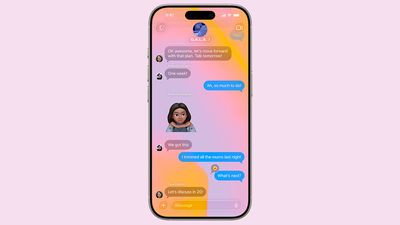
ios 26 messages backgrounds
The ability to apply custom backgrounds to Messages conversations in ‌iOS 26‌ will be welcomed by many users – especially anyone coming from WhatsApp, which has offered custom chat wallpapers for some time. The only problem with Messages is that when a background is changed by someone, everyone in the conversation also sees it.

It's undeniably a neat feature if you're the person who chose the custom background, but if the picture or pattern has been set by somebody else, you might find that it makes the conversation harder to follow.

How to Turn Off Conversation Backgrounds

Thankfully, disabling the new chat backgrounds for Messages is straightforward.

  1. Open Settings on your iPhone.
  2. Tap Apps.
  3. Select Messages.
  4. Toggle off the switch next to Conversation Backgrounds.
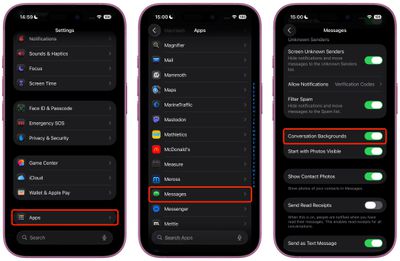
settings

That's all there is to it. Your Messages app will now display conversations against the familiar clean background found in previous iOS versions, ignoring any custom backgrounds that may have been chosen.

Re-Enable Messages Conversation Backgrounds

To re-enable the feature, simply return to Settings ➝ Apps ➝ Messages and toggle the Conversation Backgrounds switch back on. Your chats will immediately return to displaying the contextual background themes, regardless of whether you chose them or someone else did.


Popular Stories

ios 27 messages

Apple Intelligence Introduces Contextual Call and Messages Features

Monday June 8, 2026 12:49 pm PDT by
Apple today announced a set of new communication-focused Apple Intelligence features, including contextual suggestions in Messages and a Call Context tool that surfaces relevant information from Mail when a user phones a business. The new Messages features offer one-tap suggestions based on the content of a conversation. If a contact asks for photos, Messages can surface a suggestion to...

ios 27 messages

14 Ways Apple Is Improving Messages in iOS 27

Wednesday June 10, 2026 4:01 am PDT by
Apple at this year's WWDC emphasized that its approach to iOS 27 development was to add fewer newer features and instead make existing features better. Examples of that approach can be seen across the operating system, but it is arguably most obvious in the changes coming to Messages. That's not to say there's nothing original coming to Messages in iOS 27. For instance, one new Apple...
iphone 17 ceramic shield

iPhone 18 With 9GB RAM Still Won't Support Two New iOS 27 Features

Friday July 3, 2026 12:10 pm PDT by
The lower-end iPhone 18 and iPhone 18e will be equipped with 9GB of RAM, up from 8GB in the iPhone 17 and iPhone 17e, according to supply chain analyst Ming-Chi Kuo. In a social media post, Kuo said the 1GB increase in RAM will ensure that Apple Intelligence features continue to run smoothly on the pair of devices. The higher-end iPhone 18 Pro, iPhone 18 Pro Max, and foldable "iPhone Ultra...










































