

iOS 26: Add New Reminders Faster Than Ever - MacRumors
Skip to Content

iOS 26: Add New Reminders Faster Than Ever

by

In iOS 26, currently in beta, creating a new task for Apple's Reminders app is now a much faster process, thanks to the introduction of a "New Reminder" control that lets you create tasks without ever opening the app.
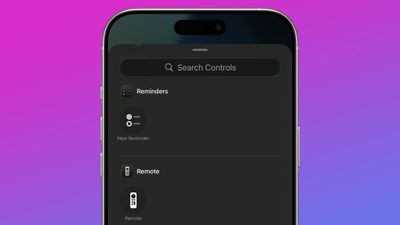
ios 26 reminders app control center
Whether you assign it to Control Center, your Lock Screen, or the Action button (on iPhone 15 Pro models and newer), this simple addition should make it a lot easier to record your reminders.

How the New Reminder Control Works

When you activate the New Reminder control, the Reminders app isn't actually opened. Instead, iOS 26 displays a compact popup panel that includes everything you need to create a task: you can select the Reminders List, add a note, the date, location, and a flag.
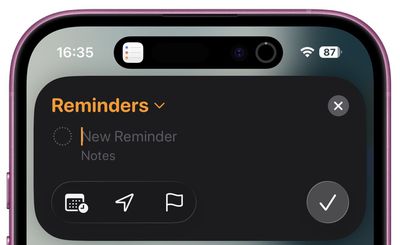
reminders popup ios
The interface also recognizes natural language for adding a due date, so you can append your reminder with "tomorrow at 3pm," and iOS will recognize it and suggest the appropriate reminder time in the Siri suggestions bar above the keyboard.

Basically, you can create detailed reminders containing all the necessary info without navigating through multiple screens in the full Reminders app.

Adding the Control to Control Center

To add the New Reminder control to Control Center, swipe down from the corner of the screen, long press a blank space, then tap Add Control. You'll find it in the Reminders section (it's the only control there).

Setting Up Lock Screen Access

For Lock Screen access, touch and hold your Lock Screen, tap Customize, then remove one of the two Lock Screen controls by tapping it. Tap the plus button left in its place, then select New Reminder from the available controls.

Assigning to the Action Button

If you have an iPhone 15 Pro or newer, the Action button provides the fastest access to new reminders. To set it up:

  1. Open Settings.
  2. Tap Action Button.
  3. Swipe to Controls and choose New Reminder from the list of available actions.
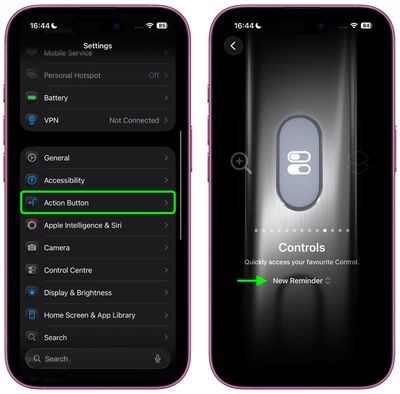
settings

That's all there is to it. Granted, it's an extremely simple addition, but the New Reminder control goes a long way to eliminate the friction usually involved in creating a task. Apple is expected to roll out iOS 26 to supported iPhones in September.


Top Rated Comments

13 months ago
That's actually one of the few instances when I use Siri.
Score: 9 Votes (Like | Disagree)
13 months ago

How do I get a reminder for MacRumors to share this article again once I am running ios26 this fall 🤣
You laugh but creating a reminder or action from arbitrary content or not so arbitary content like i dunno an email or a webpage is a HUGE gap missing from the reminders/calender app. It makes them useless for me since 99% of the time i want reminded aboit something i have just been sent or something i have just read.
Score: 3 Votes (Like | Disagree)
McWetty Avatar
13 months ago
I just use Siri. It’s one of the very few things she gets right 90%+ of the time.
Score: 3 Votes (Like | Disagree)
Mac Fly (film) Avatar
13 months ago
Apple added reminders to Calendar, next up they should improve the feature and find a way to eliminate the Reminds app, in my opinion. Reminders is a feature not an app. And improve the Alarm Clock feature allowing Alarms to be set for future dates in addition to days, manually, and using Siri.

“Set an alarm for Jan 5, take down tree”

“Do you want it as a once-off alarm in Clock or a yearly reminder in Calendar?”

Just one alarm | Remind me yearly

Two choices, pick one. Simplicity and function.
Score: 3 Votes (Like | Disagree)
frosty001 Avatar
13 months ago

You assume that all the tasks in the list have a specific date. I use reminders for tons of general to-do tasks with nonspecific timeframes.
Yes. the problem is with me. I have not get my head round how best to use all of the options. I find when I use Siri (talk to the phone), I will say 'set a reminder to....' but if I am tying and want to set some tasks or things to do, then I am typically opening Notes.

I might be in the minority, but I think it's something that Apple could help with (streamlining). I am not VERY clear on what app is designed to be the best for what, etc.
Score: 2 Votes (Like | Disagree)
CapitalIdea Avatar
13 months ago

Apple added reminders to Calendar, next up they should improve the feature and find a way to eliminate the Reminds app, in my opinion. Reminders is a feature not an app. And improve the Alarm Clock feature allowing Alarms to be set for a future dates in addition to days, manually, and using Siri.

“Set an alarm for Jan 5, take down tree”

“Do you want it as a once-off alarm in Clock or a yearly reminder in Calendar?”

Just one alarm | Remind me yearly

Two choices, pick one. Simplicity and function.
You assume that all the tasks in the list have a specific date. I use reminders for tons of general to-do tasks with nonspecific timeframes.
Score: 2 Votes (Like | Disagree)

Popular Stories

iPhone 18 Pro Deep Red Feature

iPhone 18 Pro Launching Next Month With These 12 New Features

Thursday August 6, 2026 7:03 am PDT by
It is now August, and that means the iPhone 18 Pro and iPhone 18 Pro Max are just a month away. The devices are expected to look similar to the iPhone 17 Pro and iPhone 17 Pro Max, but there will still be many year-over-year changes, with rumored features including a smaller Dynamic Island, 5G via satellite, and more. Apple is expected to unveil the iPhone 18 Pro, iPhone 18 Pro Max, and a...
iPhone 18 Pro Deep Red Feature

iPhone 18 Pro Launching Next Month With These 12 New Features

Sunday August 2, 2026 7:21 pm PDT by
It is now August, and that means the iPhone 18 Pro and iPhone 18 Pro Max should be launching next month. The devices are expected to look similar to the iPhone 17 Pro and iPhone 17 Pro Max, but there will still be many year-over-year changes, with rumored features including a smaller Dynamic Island, 5G via satellite, and more. Apple is expected to unveil the iPhone 18 Pro, iPhone 18 Pro Max, ...
Four iPhone 18 Pro Colors Mock Feature

iPhone 18 Pro and iPhone Ultra: Pre-Orders and Release Date

Sunday August 2, 2026 7:32 pm PDT by
Apple has yet to reveal when the iPhone 18 Pro and iPhone Ultra will be announced and released, but the dates usually follow a familiar pattern. Labor Day is September 7 this year. The last time the holiday fell on that day was in 2020, but the iPhone event that year was delayed until October due to the COVID-19 pandemic. So, the last time Labor Day was on September 7 in a normal year was in ...











































