

iOS 26: How to Use the New Music Pins Feature - MacRumors
Skip to Content

iOS 26: How to Use the New Music Pins Feature

by

If you've ever found yourself scrolling endlessly through your iPhone's music library to find that one album you play every morning or the workout playlist that gets you pumped, then you should find iOS 26's new Music pins feature a welcome addition to the app.

pin apple music app ios
Basically, Apple Music lets you pin your most frequently accessed songs, playlists, albums, and artists directly to the top of your Library tab, making them readily accessible with a single tap.

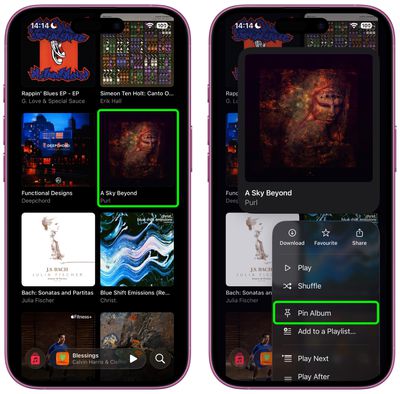
Pinning keeps your musical essentials within easy reach, and it couldn't be easier to use. In the Music app, simply navigate to the song, album, artist, or playlist that you want to pin, then long press on the item and choose the Pin option from the popup menu.
music
To unpin an item from the top of your Library tab, it's pretty much the same action – long press it and choose the Unpin option from the popup menu.

Download Pinned Items?

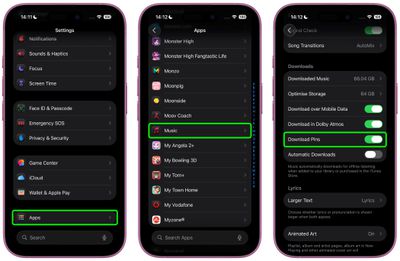
The first time you use Music pins, iOS 26 will ask if you want to download pinned items automatically for offline listening. You can adjust this setting anytime by navigating to Settings ➝ Apps ➝ Music and toggling Download Pins.
settings
Music pins aren't the only new Music addition in iOS 26. The app now has an AutoMix feature to create seamless DJ-style transitions between songs, plus there's also lyrics translation and lyrics pronunciation, making it easier to appreciate music from all over the world. Note that iOS 26 is currently in beta and will be released in the fall.

Top Rated Comments

16 months ago
Neat.

Now let me add songs to Music from the Files app.
Score: 11 Votes (Like | Disagree)
16 months ago
Nice. I hope it appears in CarPlay as well. I can generally find a moment to root through my phone generally for stuff to listen to, but in the car I need very quick access to key playlists/etc.


Score: 11 Votes (Like | Disagree)
RUQRU Avatar
16 months ago
I would be nice if it allowed Radio Stations to be pinned also.
Score: 5 Votes (Like | Disagree)
bradriley Avatar
16 months ago

I would be nice if it allowed Radio Stations to be pinned also.
It’s baffling you can’t even pin the Apple’s own Apple Music stations. Do Apple employees even use their own platforms???
Score: 4 Votes (Like | Disagree)
jamie j. Avatar
16 months ago
Sadly this is useless to me because it requires you to turn on library sync. The last time I did this, it deleted all of the high quality recordings I had out of my iTunes. Had to turn it off and then do a restore from a backup. I refuse to turn on library sync. Also, why do I have to? I just want the pinned playlists on my iPhone. It doesn't need to sync with anything else.

If anyone has a workaround for this, I'd love to hear it.
Score: 4 Votes (Like | Disagree)
16 months ago
The post should mention that you can control what happens when you tap a pinned item as well in the app and in the widget. You long press the icon in the Pinned section and select Tap Action where you can pick to play, shuffle or go to the playlist.

Attachment Image
Score: 3 Votes (Like | Disagree)

Popular Stories

Apple Music iPod Page Not Found

Apple Music Has a Hidden iPod You Can Play With

Friday October 23, 2026 7:11 am PDT by
Apple Music has a 404 page easter egg on the web: a functional iPod that appears when you load a page that does not exist, such as music.apple.com/macrumors. "Page Not Found," says Apple. "Give this a spin instead." Apple is clever with this. If you navigate to music.apple.com/ipod instead, the page says "Looking for something?" instead of "Page Not Found." The easter egg is only...
Apple Music New Branding

Apple Music's New Look Officially Announced

Wednesday October 21, 2026 9:06 am PDT by
Following the introduction of a new Apple Music logo and app icon earlier this month, Apple today officially introduced Apple Music's new brand identity. In a YouTube video shared today, Apple said the new Apple Music visuals were "made by sound." More specifically, Apple said it played a sound through a container of water, resulting in the liquid moving at the frequency of the notes. Apple...
apple music new logo red

Apple Music Is Getting a New Logo

Tuesday October 6, 2026 4:06 am PDT by
Apple appears to be rolling out a new logo for Apple Music in its upcoming set of software updates. The logo has been spotted in both macOS 27.2 beta 3 and iOS 27.2 beta 3, and it's identical to the one that Apple used in its Apple Music Hall announcement last month. When Apple used the logo in the venue's press materials and on its new official website, it wasn't clear if this was a one-off ...
Latest Stories
'Pluribus' Season 2 Reportedly Starts Production Today
4 hours ago
iPhone 18 Pro Sales Surge in China, Offsetting Decline in U.S. and Japan
4 hours ago
HomeView Software 27.2: Wallpapers, Control Center, and More
11 hours ago
Apple Alerts Stores to iPhone Duo's Display Cracking Issue
12 hours ago
iOS 27.3 Will Enable These Apple Intelligence Features in China
13 hours ago
Apple Says iOS 27.3 Beta Coming Next Week
13 hours ago
Apple's Flash Storage Suppliers Are Finally 'Getting Their Revenge'
14 hours ago
14 New Things Your iPhone Can Do in iOS 27.2
15 hours ago
iPhone Duo Review: One Week Later
16 hours ago
Samsung Mocks iPhone Duo Display Cracks in New Ad Campaign
17 hours ago
The MacRumors Show: OLED MacBook Pro, iPad Mini 8, and More
17 hours ago
MacBook Pro With Touch Display: 15 More Details Revealed
18 hours ago
Russia Places Apple on State Surveillance Registry
19 hours ago
Halloween Weekend Brings Discounts on Apple Accessories and Pre-Orders
20 hours ago
Apple Has Released More Than 25 New Products in the Past Two Months
20 hours ago
Local Code Launches as Free, Private AI Assistant Tool for Mac
21 hours ago
Apple Acquires Ascend.io
21 hours ago
HomePod Mini 2 Launches Today: All the New Features
22 hours ago
AirTag 2 4-Pack Drops to New Low Price of $69.99
22 hours ago
Rian Johnson's iPhone Camera App Goes Viral
22 hours ago
Where Did All the iPhone Duos Go? Mostly to Apple's Stores
1 day ago
Apple's Touchscreen MacBook Pro Could Ship 1.5M Units in 2027
1 day ago
New Apple TV 4K and iPad Mini: RAM Amounts Revealed
1 day ago
Apple Executive Comments on New iPad Mini Lacking 120Hz Display
2 days ago
Here's a Hands-On Look at HomePod Mini 2's New Two-Tone Colors
2 days ago
Apple Lowers App Store Fees in Taiwan Starting October 31
2 days ago
HomeView Pre-Order Returns to $289.99 on Amazon
2 days ago
Apple Avoids Showing Pinched Fingers on iPad Mini Page in South Korea
2 days ago
Old 'Popcorn Time' App Left Hundreds of Thousands of Macs at Risk
2 days ago
You Can Turn Off the New MacBook Pro's Touchscreen Functionality
2 days ago










































