

In iOS 26, your iPhone gains a handy new charging feature that takes the guesswork out of knowing when your device will be fully powered up. Instead of waiting around or checking your battery percentage every few minutes, you can now see exactly how much time remains until your device reaches 100%.
A real-time estimate appears right in your Battery settings while your iPhone is plugged in, making it ideal for planning your day around charging cycles or working out if you have enough time for a quick top-up before heading out.
How to Check Remaining Charge Time
The process is pretty straightforward once you know where to look:
- Open Settings on your iPhone.
- Tap Battery.
- Look for the time estimate displayed next to the charging indicator (shown as "XXm").
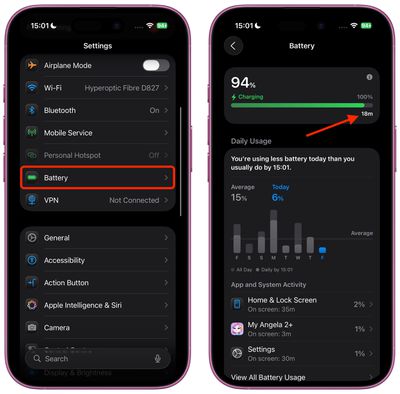
The estimate appears as a simple readout like "18m" or "45m," giving you an immediate answer to how long you'll need to wait for a full charge.
The feature is particularly handy if you switch between using different charging methods. For example, you can confirm if you're using a fast charger since you'll see a shorter wait time than if you were using a sub-standard adapter.
Not only that, if you check the same Battery menu after charging is finished and your device is unplugged, it will tell you how long it's been since your iPhone was charged and to what percentage.
Additional Charging Information on Lock Screen
iOS 26 also provides charging details directly on your Lock Screen. When your iPhone is charging from a low battery percentage, the Lock Screen displays how long it will take to reach at least 80% charge.
And if you're using a slower charging adapter, your Lock Screen will inform you of this as well, which should help you understand why charging might be taking longer than expected.
















































