All of Apple's communication apps received updates with iOS 26, including FaceTime. There's a redesigned interface that puts more emphasis on your contacts, new translation features, and more.

Live Translation
Along with the Phone and Messages apps, FaceTime supports Live Translation as long as you have a phone that works with Apple Intelligence.

With Live Translation, you can video chat with someone who speaks a different language than you do. The FaceTime app displays live captions that are translated into your language as the person speaks. Your response can also be translated back into their language as long as they also have a device that supports Apple Intelligence and runs iOS 26, iPadOS 26, or macOS 26.
You'll need to download language packs to use Live Translation, and it works with a limited number of languages. FaceTime's Live Translation feature works with English, French, German, Portuguese (Brazil), and Spanish (Spain).
To use Live Translation on a FaceTime call, initiate the call and then tap on the button with three dots. From there, tap on the Live Translation option and select the to and from languages. Everything spoken will be translated and displayed in the same way Live Captions are displayed. To stop a translation, just tap on the Stop button.
Interface Updates
Apple updated the FaceTime interface in iOS 26. Rather than a list of names of recent and suggested contacts, you'll see a card-style view that includes a full image of your contact that they've shared, if one is available. If they've sent you a video message, that will automatically play in the background as you scroll for an animated look. You can tap on one of the cards to place a FaceTime Audio or FaceTime Video call, depending on how you last contacted them.
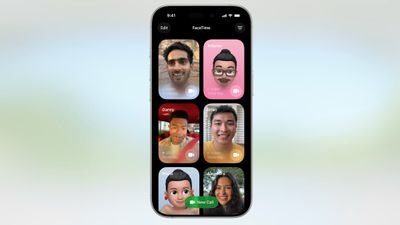
Long pressing on a card brings up an option to delete it.
The "New Call" button is at the bottom of the FaceTime app rather than at the top, and filtering options can be accessed by tapping on the menu button at the top right. When you're on a call, the buttons are now at the bottom right of the display.
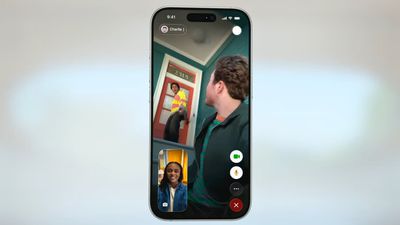
Like all of Apple's other apps, FaceTime adopts the Liquid Glass aesthetic. Contact cards feature rounded corners, buttons have a rounded design, and the New Call button and some of the other interface buttons have a glass-like design.
Call Screening
Like the Phone app, FaceTime has new call filtering options. There's still a Silence Unknown Callers toggle, but missed calls and voicemails from unsaved numbers will now be sorted into an Unknown Callers list that's hidden from view unless you select it.
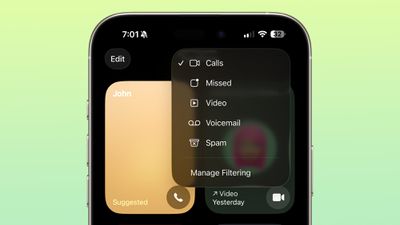
Calls that are identified as spam will be silenced and automatically added to a new Spam list.
Call filtering is opt-in, so if you often get calls from unknown numbers, you can turn it on. If you don't want to miss any calls, you can leave it off. The toggle for spam and unknown callers can be found in the FaceTime section of the Settings app under Call Filtering.
In the FaceTime app, you can get to the different filtered sections by tapping on the menu button in the upper right of the app. Sections include Calls, Missed, Video, Voicemail, Unknown Callers, and Spam.
Sensitive Content Blocking
In iOS 26, the Sensitive Content Warning and Communication Safety features are available for FaceTime video calls. When nudity is detected, the FaceTime video will pause and a warning about nude content will be displayed.
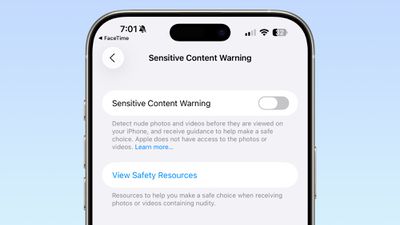
Communication Safety is a feature that is designed for the accounts of children and teens, and it provides warnings if images and videos of nudity are detected. Communication Safety is on by default for accounts created for children up to age 17.
Adults can use Communication Safety features too, in the form of Sensitive Content Warnings. Sensitive Content Warnings are an opt-in feature that prevents users of all ages from being subject to unwanted nude photos and videos.
Both options blur nudity in the Messages app and pause video in FaceTime. There is no situation where an adult will see their FaceTime calls paused for nudity unless they have turned on the Sensitive Content Warning feature.
Sensitive Content Warnings can be turned on in the Privacy and Security section of the Settings app. Adults can also opt to turn on Communication Safety in the Screen Time section of the Settings app.
Sensitive Content Warnings and Communication Safety use on-device machine learning to analyze photos and videos. Apple does not receive an alert that nudity was detected, and does not have access to any photos or videos.
Read More
We have a dedicated iOS 26 roundup that goes into detail on all of the new features that are available in the update.