iOS 26 Camera App: New Features and Design Changes

The Camera app received some of the most noticeable design updates in iOS 26, with Apple simplifying the interface to make it easier to get to various controls. Most of what's new focuses on design, but there are a couple other notable changes.
iOS 26 Camera Features

Liquid Glass Design

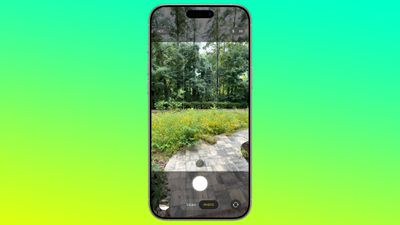
Like all of the ‌iOS 26‌ apps, the Camera app has adopted the Liquid Glass look. Buttons are more rounded and "float" over the background of the app thanks to a new depth effect.
ios 26 camera app
The area behind the camera shutter and control buttons is a touch more see-through than before, so you can see the areas outside of your image more clearly. There's also no bar behind the toggles to change focal length, so the interface looks a bit cleaner.

Two-Tab Layout

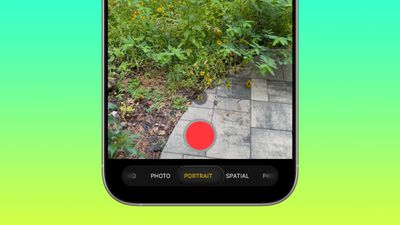
The navigation bar at the bottom of the Camera app has been overhauled in ‌iOS 26‌. Rather than the option to swipe between all of the photo and video modes, there are now just two main options that you see: Photo and Video.
ios 26 camera app nav bar
While it's only the Photo and Video buttons that are visible, you can actually still swipe in the same way to get to the other options like Portrait, Panorama, Slo-Mo, Cinematic, and more.

For multi-lens cameras, the small buttons to change focal length are still in the same position, and the buttons to view the photo you just snapped or change to the front camera haven't changed location. The button to view photos is now round instead of square, in line with the Liquid Glass update, and Apple has shifted the controls down on the display.

The Photo and Video buttons are below the shutter button, when they used to be above. The shutter button itself no longer has a bright white ring around it, with Apple instead opting for a more subtle Liquid Glass ring. Bezel size for the top and bottom bars hasn't changed.

Pop Out Menus

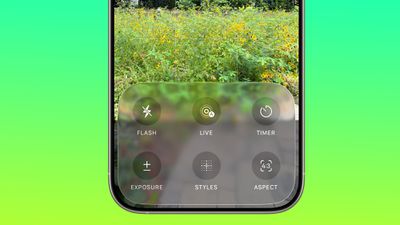
Some of the controls that used to be located at the top of the Camera app are now tucked inside pop out menus. When you select a mode like Photo, you can then tap on the Photo button to get more options.
ios 26 camera app menu
The menu has a Liquid Glass design and it offers large buttons for accessing Flash, Live Photo settings, Timer, Exposure, Styles, Aspect, and Night Mode. Tapping one gives you further options for that setting. So if you tap Exposure, you'll get a slider where you can quickly adjust the exposure setting before you take a photo.

In Video mode, you can tap to access Flash, Exposure, and Action. Most of the other modes also have at least one option that's accessed through this new menu. These menu options are also accessible by tapping on the menu icon at the top right of the display.
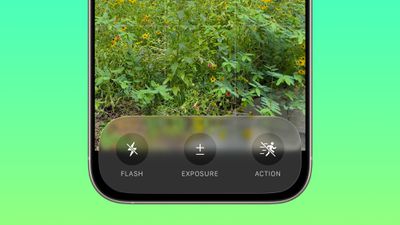
ios 26 camera app video nav bar
There are still some quick access buttons at the top of the Photos app, so you can swap to RAW mode, tap into Styles, or adjust flash and ‌Night Mode‌ settings without having to open the menu. Context-specific settings like the Macro mode toggle also still pop up in the same way as before when applicable.

There are toggles to see the Flash, Live Photo and Action Mode indicators in the Camera section of the Settings app.

Remote AirPods Shutter

The AirPods Pro 2 and AirPods 4 can be used as a camera shutter in ‌iOS 26‌, so you can take a photo by pressing on the stem of the AirPods. To get this to work, connect your AirPods to your iPhone, open the Camera app, and then press and hold on the AirPods stem.

You can take a photo using this method, or continue to hold to start a video. When you're finished recording, press and hold again to stop the video.

Using this feature requires ‌iOS 26‌ and the new AirPods firmware that accompanies ‌iOS 26‌. Using the AirPods as a remote shutter button works with the Camera app and with third-party photo apps.

Cleaning Warning

If your camera lens is dirty, your ‌iPhone‌ can detect that it needs to be cleaned and will send you a notification letting you know you should clean it.
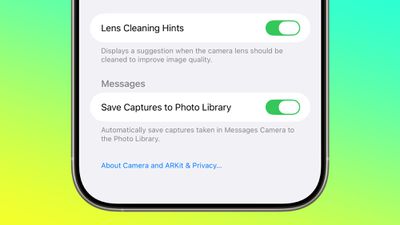
ios 26 camera app lens cleaning

Developer APIs

Developers have access to a new Cinematic mode API in ‌iOS 26‌ that allows third-party apps to capture Cinematic mode video, just like the built-in Camera app.
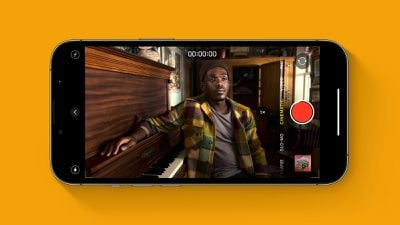
Cinematic Mode iPhone Feature
Cinematic mode supports recording video with a shallow depth of field and automatic focus changes between subjects. Apple uses rack focus to quickly swap the focus from one subject to another, for a movie-like recording experience.

Apple is also providing developers with an Audio Mix API for adjusting sound after a video is captured. Third-party video recording apps can offer the same Audio Mix controls that are available in the Camera app. Options include In-Frame for reducing sounds and voices from sources outside of the frame, Studio for reducing background sounds and reverb, and Cinematic for putting voices into a front-facing track while leaving environmental noises in surround, similar to movie audio.
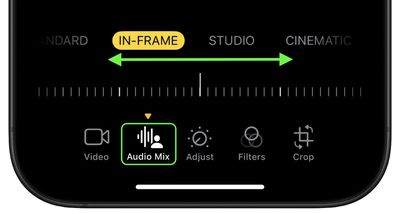
photos

Mac Accessibility

With macOS 26 and ‌iOS 26‌, your Mac can connect to your ‌iPhone‌ to use your ‌iPhone‌'s Camera app as a magnifying glass. A Magnifier on Mac feature uses the ‌iPhone‌'s zoom capabilities, with the ‌iPhone‌'s video feed showing up on a connected Mac through Continuity Camera.

Apple showed a student with vision issues using an ‌iPhone‌ to zoom in on a blackboard in a college class, with the feed coming through to her Mac so she could view what was going on while also taking notes.

Read More

We have a complete iOS 26 roundup that covers all of the new features that are available in the update.


Related Roundups: iOS 26, iPadOS 26
Related Forum: iOS 26

Popular Stories

airpods pro 3 purple

New, Higher End AirPods Pro Coming This Year

Tuesday January 20, 2026 9:05 am PST by
Apple is planning to debut a high-end secondary version of AirPods Pro 3 this year, sitting in the lineup alongside the current model, reports suggest. Back in September 2025, supply chain analyst Ming-Chi Kuo reported that Apple is planning to introduce a successor to the AirPods Pro 3 in 2026. This would be somewhat unusual since Apple normally waits around three years to make major...
smaller dynamic island iphone 18 pro Filip Vabrous%CC%8Cek

iPhone 18 Pro Leak: Smaller Dynamic Island, No Top-Left Camera Cutout

Tuesday January 20, 2026 2:34 am PST by
Over the last few months, rumors around the iPhone 18 Pro's front-panel design have been conflicted, with some supply-chain leaks pointing to under-display Face ID, reports suggesting a top-left hole-punch camera, and debate over whether the familiar Dynamic Island will shrink, shift, or disappear entirely. Today, Weibo-based leaker Instant Digital shared new details that appear to clarify the ...
Apple Logo Spotlight

Apple Expected to Unveil Five All-New Products This Year

Wednesday January 21, 2026 10:54 am PST by
In addition to updating many of its existing products, Apple is expected to unveil five all-new products this year, including a smart home hub, a Face ID doorbell, a MacBook with an A18 Pro chip, a foldable iPhone, and augmented reality glasses. Below, we have recapped rumored features for each product. Smart Home Hub Apple home hub (concept) Apple's long-rumored smart home hub should...

Liquid Glass App Store Feature

App Store and Apple TV Experiencing Outage

Tuesday January 20, 2026 4:36 pm PST by
Apple's App Store, iTunes Store, and Apple TV service are experiencing an outage at the current time, according to Apple's System Status page. Apple says that some users may be experiencing issues with the App Store and iTunes Store. Apple also says some users may be seeing intermittent issues with Apple TV. The Apple TV Channels feature is down too, and users may be unable to access some...
airtag prime day 2

Apple Developing AirTag-Sized AI Pin With Dual Cameras

Wednesday January 21, 2026 12:31 pm PST by
Apple is working on a small, wearable AI pin equipped with multiple cameras, a speaker, and microphones, reports The Information. If it actually launches, the AI pin will likely run the new Siri chatbot that Apple plans to unveil in iOS 27. The pin is said to be similar in size to an AirTag, with a thin, flat, circular disc shape. It has an aluminum and glass shell, and two cameras at the...

Top Rated Comments

augustrushrox Avatar
27 weeks ago
Thanks for the roundup! I hate this redesign.

It hides too many frequently used options. The Photo/Video switching to other options is too finicky and it's easy to pass over what you wanted to select, and finding the pop-out menu is not intuitive whatsoever.

Add to it that overlaying UI on top of content is something I fundamentally disagree with. I do not want my content to be obstructed, it proactively reduces usability.
Score: 12 Votes (Like | Disagree)
klasma Avatar
27 weeks ago
This is very low contrast. They should at least make the round buttons opaque. But the labels also need more contrast, they are below WCAG AA level in that screenshot.

Attachment Image
Score: 11 Votes (Like | Disagree)
antiprotest Avatar
27 weeks ago
Apple used to be good at design. It was one of several major reasons why I switched from Android to iPhone 3GS, and then from Windows to Mac soon after. Everything was well thought out and looked good, while products from others felt like they were made by people who never used them.

In recent years, I have been getting this same bad feeling from Apple that made me leave the others. They used to think of details that I never thought of, but that pleasantly surprised me once I found out how useful they were, but these years they have missed even obvious, glaring things, and they create pain points rather than solve or remove them.
Score: 11 Votes (Like | Disagree)
bcortens Avatar
27 weeks ago
These controls take up so much more space than the current design. Currently I can see my photo framed in the centre of the screen and then at the bottom I can swipe up and adjust exposure, contrast, timer, all without obstructing my viewfinder. Why would anyone be excited about this new design. I mean sure if you just open the camera to look at the controls it might be nicer but it doesn’t look like it makes taking pictures easier. Which I rather thought was the point of a camera…
Score: 8 Votes (Like | Disagree)
ThomasJL Avatar
27 weeks ago
Apple, please rehire the Steve Jobs-like visionary Scott Forstall so he can completely purge every last bit of user-unfriendly flat design (including flat design variants like neumorphism and glassmorphism) and bring back user-friendly iOS 6-style skeuomorphism.
Score: 6 Votes (Like | Disagree)
citysnaps Avatar
27 weeks ago
Looks great! Having made a ton of photographs with my phone I'm looking forward to giving the new camera app a whirl.
Score: 3 Votes (Like | Disagree)