Here's What's New With Visual Intelligence in iOS 26 - MacRumors
Skip to Content

Here's What's New With Visual Intelligence in iOS 26

Visual Intelligence, an Apple Intelligence feature that Apple introduced last year, has some new capabilities in iOS 26 that make it more useful and better able to compete with the functionality available through some Android smartphones.
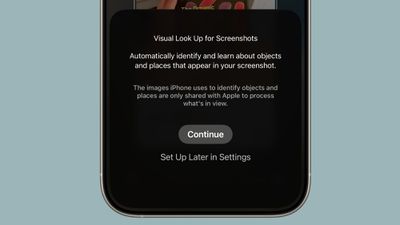
visual lookup ios 26

Onscreen Awareness

In iOS 18, ‌Visual Intelligence‌ only works with the camera, but in ‌iOS 26‌, it also works with what's on your device. You can capture a screenshot of what's on your screen and then use ‌Visual Intelligence‌ on it to identify what you're looking at, find images, and get more information through ChatGPT.

How to Get Use Onscreen Awareness for Visual Intelligence

‌Visual Intelligence‌ for screenshots works about the same as ‌Visual Intelligence‌ with the camera app, but it's located in the screenshot interface. Take a screenshot (hold down the volume up button and the side button), and then tap out of the Markup interface if it's showing.

To get out of Markup (which is the default view), tap on the little pen icon at the top of the display. From there, you should see the ‌Visual Intelligence‌ options.

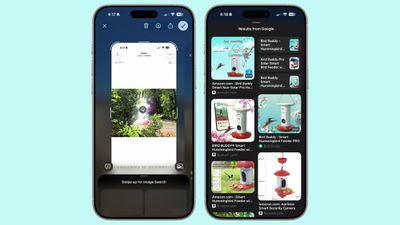
With Highlight to Search for ‌Visual Intelligence‌ onscreen content awareness, you can use a finger to draw over the object in the screenshot that you want to look up. It's similar to Android's Circle to Search feature.
visual intelligence screenshot ios 26
Highlight to Search lets you conduct an image search for a specific object in a screenshot, even if there are multiple things in the picture. It uses Google Image search by default, but Apple showed off the feature working with other apps like Etsy during its keynote event. Apps will likely need to add support for the feature.

In some cases, ‌Visual Intelligence‌ will identify individual objects in an image on its own, and you can tap without needing to use Highlight to Search. This is similar to the object identification feature in the Photos app, but it still leads to an image search.

If you don't need to isolate one object in your screenshot, you can simply tap on the Ask button to ask questions about what you're seeing. Questions will be relayed to ChatGPT, and ChatGPT will provide the information. The Search button queries Google Search for more information.
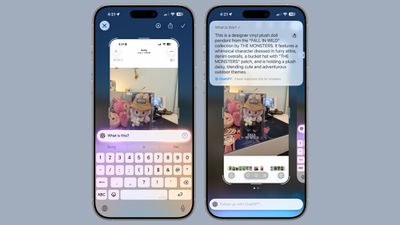
visual intelligence ios 26 screenshots
As with the standard Visual Search, if your screenshot includes dates, times, and related information for an event, it can be added directly to your calendar.

New Object Identification

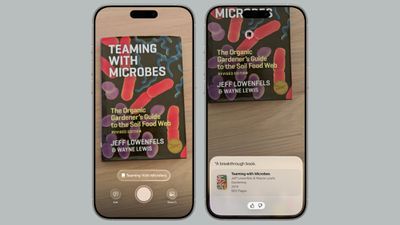
Apple didn't mention it, but ‌Visual Intelligence‌ adds support for quick identification of new types of objects. It can now identify art, books, landmarks, natural landmarks, and sculptures, in addition to the animals and plants it was able to provide information on before.
visual lookup books ios 26
If you use ‌Visual Intelligence‌ on an object that it is able to recognize, you'll see a small glowing icon pop up. Tapping on it reveals information about what's in view. What's neat about this aspect of ‌Visual Intelligence‌ is that it works with the live camera view or with a snapped photo.

For standard Ask and Search requests using ‌Visual Intelligence‌, you have to take a photo so that it can be relayed to sources like ChatGPT or Google Image Search. Art, books, landmarks, natural landmarks, sculptures, plants, and animals can be identified on-device without contacting another service.

Compatibility

‌Visual Intelligence‌ is limited to devices that support ‌Apple Intelligence‌, which includes the iPhone 15 Pro models and the iPhone 16 models. It is activated by a long press on the Camera Control button on devices that have Camera Control, or using the Action Button or a Control Center toggle.

Launch Date

‌iOS 26‌ is in beta testing right now, but it will launch to the public in September.

Related Roundups: iOS 26, iPadOS 26
Related Forum: iOS 26

Popular Stories

iOS 27 Feature Dark

Apple Now Pushing iPhone Users Still on iOS 26 to Install iOS 27

Thursday October 8, 2026 1:17 pm PDT by
Starting today, iPhone users still running iOS 26 will see iOS 27.0.1 as the prominent software update in the Settings app under General → Software Update, with iOS 26.7.1 now relegated to a smaller "Also Available" section at the bottom. iOS 27 was released on September 14, but until now that update and later iOS 27.0.1 were shown under the "Also Available" section, with iOS 26.7 and...

apple lock security bug vulnerability fix privacy

iOS 26.7.1 Fixes Vulnerability Used in Targeted Attacks

Monday September 28, 2026 11:45 am PDT by
iOS 26.7.1, iPadOS 26.7.1, macOS Tahoe 26.7.1, and macOS Sequoia 15.8.1 address a major vulnerability that Apple believes was used against a small number of people. Apple's security support pages say there was a CoreGraphics out-of-bounds write issue that could be exploited with a maliciously crafted file, allowing for arbitrary code execution. It has been fixed with improved bounds...
iphone duo screen crack in store

Crackgate? iPhone Duo Owners Report Screens Breaking Along the Hinge

Friday October 23, 2026 11:05 am PDT by
Some iPhone Duos are already experiencing hinge issues that cause display cracks, based on photos shared on Reddit and the MacRumors forums. Almost all of the display faults are right along the hinge, and most result in a line of bright pixels across one side of the screen. An iPhone Duo owner in Australia said his device cracked after being opened fewer than 20 times, and there was no...

Top Rated Comments

18 months ago

More like Onscreenshot Awareness.
Yeah, really bad that you have to litter your device with screenshots when you should be able to hold down on a picture or circle something like the photos clean up tool. When they demoed it at wwdc, I knew they missed the mark…too many extra steps.
Score: 9 Votes (Like | Disagree)
18 months ago
the fact that you have to screenshot (with the screenshot sound and everything) is the dumbest design i never thought I'd see
Score: 8 Votes (Like | Disagree)
klasma Avatar
18 months ago

Onscreen Awareness
More like Onscreenshot Awareness.
Score: 8 Votes (Like | Disagree)
klasma Avatar
18 months ago

I don’t mean to sound ungrateful after all the stuff that’s already coming to my iPad this fall but it sure would be nice if this wasn’t fenced off by product differentiation.
In particular since Apple Intelligence is a mix of on-device and online functions, it would really make sense to offer a cloud fallback for devices that lack the resources to do it on-device. They can still upsell to newer hardware for on-device privacy, offline capability and lower latency.
Score: 7 Votes (Like | Disagree)
It’s always something Avatar
18 months ago

My 16 pro max can’t run last years AI features without constantly crashing safari due to memory issues. So there’s no way older phones have a chance
The fine article says that the new Visual Intelligence features in iOS 26 offload at least some of the work to ChatGPT. There’s no reason they couldn’t offload *all* the work. I can use Google’s Gemini for the same stuff today on my iPad, so there’s no reason Apple can’t do it too.
Score: 5 Votes (Like | Disagree)
ipedro Avatar
18 months ago
Discoverability: 0.00pts

Hopefully this also works if you ask Siri about what's on your screen. "Hey Siri, tell me about this bird feeder". Siri assumes it's about something you're looking at on screen (and if not, it asks you to point your camera at it) and runs through the actions outlined above: screenshot, circling, Ask button.
Score: 4 Votes (Like | Disagree)
Latest Stories
Apple Stores Reportedly Rolling Out New Anti-Theft System for iPhones
5 hours ago
AirTag 2 Drops to New Low Price of $23 on Amazon
6 hours ago
New iMac and 14-Inch MacBook Pro With M6 Chip Expected This Week
6 hours ago
Apple Reportedly Announcing New MacBook Pro With OLED Touchscreen on Wednesday
6 hours ago
Apple Wants to Fix Safari's Cramped Layout on iPhone Duo
16 hours ago
Instagram Launches Apple TV App With Reels and More
16 hours ago
Apple's 'Servant' Copyright Lawsuit Win Upheld on Appeal
17 hours ago
'Arguably Better Than Face ID': the iPhone Duo Touch ID Tip to Try
21 hours ago
Verizon Apologizes for iPhone Duo Pre-Order Delays, Giving Customers $100 Gift Card
1 day ago
Skip the Touch ID Scan: Unlock iPhone Duo With Apple Watch
1 day ago
iPhone Duo Fails JerryRigEverything's Dusty Durability Test
1 day ago
Make iPhone Duo Volume Buttons Follow Screen Rotation
1 day ago
iPhone Duo Teardowns Reveal Two Batteries and More
1 day ago
M5 MacBook Air Returns to Prime Day Low With $200 Amazon Discount
1 day ago
Top Stories: Apple 'Pro and Tell' Debut, iPhone Duo Launch, and More
1 day ago
Apple Store Pickup System for iPhone Duo Just Went Live Again in U.S. and Canada
1 day ago
Apple Closes French Stores Ahead of Further Protests
2 days ago
Apple Pushes Back on DOJ Request for More Evidence
2 days ago
The iPhone Duo Can Be a Tiny Mac, a Toaster, and a Nintendo DS
2 days ago
Using an Apple Pencil With the iPhone Duo: What to Know
2 days ago
Apple Store Pickup for iPhone Duo Starting to Resume But Very Limited
2 days ago
iPhone Duo Jailbroken on Launch Day
2 days ago
Apple Seeds Updated watchOS 27.2 Release Candidate
2 days ago
Apple Store in UK Reopens With New Design on iPhone Duo Launch Day
2 days ago
Crackgate? iPhone Duo Owners Report Screens Breaking Along the Hinge
2 days ago
iPhone Duo Brings Back Long Lines at Apple Stores
2 days ago
The MacRumors Show: iPhone Duo Arrives, Touchscreen MacBooks Next
2 days ago
Apple Released iOS 27.1 for iPhone Duo Only
2 days ago
iPhone Duo: Open Two Apps Side by Side and Lock Them As an App Pair
2 days ago
iPhone Duo Launches With Carrier and Accessory Discounts Available
2 days ago