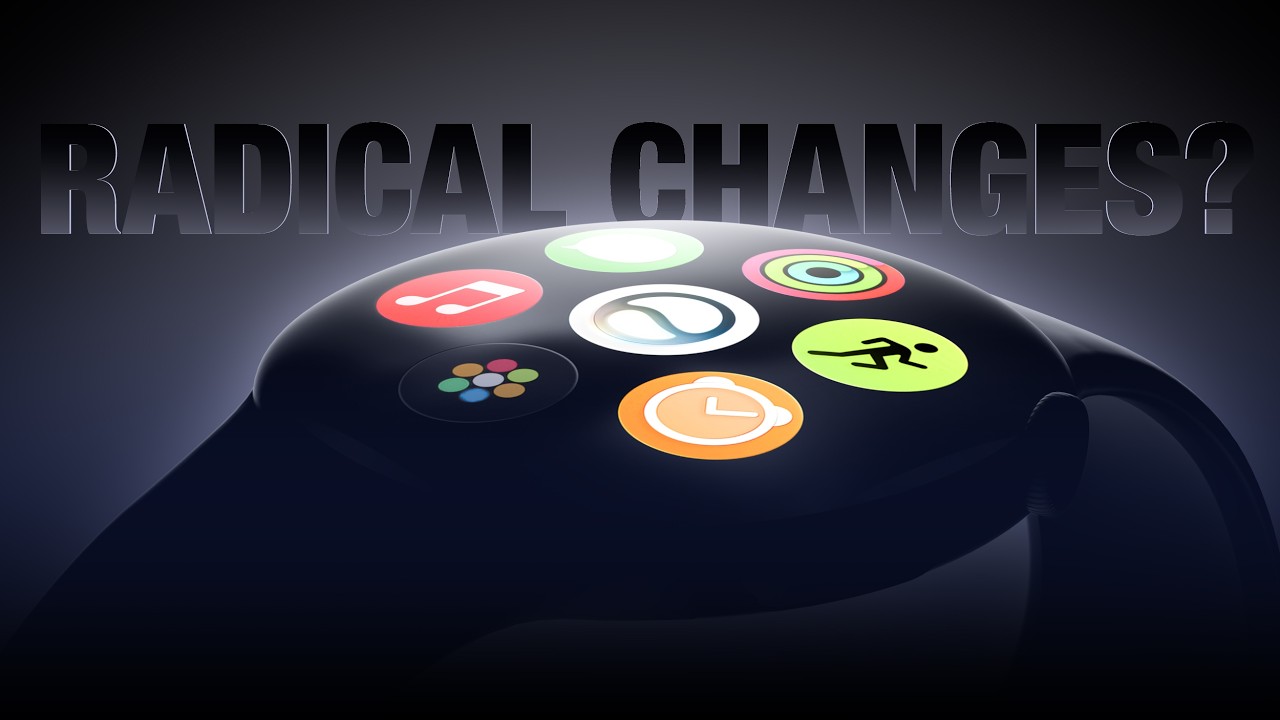
On this week's episode of The MacRumors Show, we discuss how the Apple Watch is seemingly heading into one of its least eventful new generations, yet the rumors stacking up behind it describe the most radical rethink in the product's history coming later.
The most eye-catching change potentially coming this year is not a new feature at all, but a case material Apple abandoned six years ago. Bloomberg's Mark Gurman says the white ceramic casing is set to return either this year or in 2027, reviving a finish that has become one of the more sought after options among collectors on the resale market.
Ceramic arrived with the Apple Watch Series 2 in September 2016, replacing the gold "Edition" model and bringing the top of the line down from thousands of dollars to $1,249. Apple marketed the finish as four times as hard as stainless steel. A gray option followed alongside the Series 3, before the Edition line vanished entirely with the Series 4 in 2018. White ceramic came back for the Series 5 in 2019 alongside titanium, then Apple discontinued it for good when the Series 6 launched in 2020.
Everything else expected of the Apple Watch Series 12 and Apple Watch Ultra 4 is considerably more restrained. Gurman believes the pair will continue the trend of "modest upgrades," featuring a meaningful performance increase. The Series 11, Ultra 3, and SE 3 all reused the S10 chip, which was itself barely changed from the S9 introduced in 2023.
Gurman also expects new color and band options and a number of health and fitness upgrades, but no design changes, meaning a third year for the case introduced with the Apple Watch Series 10 in 2024. He does not expect an Apple Watch SE 4 this year at all.
Separately, a known Weibo leaker claims Apple is focused on longer battery life with the Series 12. Apple rates the Series 11 at up to 24 hours on a charge, or up to 38 hours in Low Power Mode. Both new models are expected next month alongside the iPhone 18 Pro, iPhone 18 Pro Max, and Apple's first foldable iPhone.
Looking to the future, the leaker known as "Instant Digital" claims a major overhaul is due in 2027 or 2028, built around a new band attachment system that would free up internal space for a larger battery and break compatibility with the existing bands. The leaker went as far as advising anyone planning a 2027 purchase to hold off on buying extra bands in the meantime.
If accurate, it would resurrect the "Apple Watch X" plan Gurman reported on in 2023, which promised a magnetic band system, a thinner case, and a microLED display for the device's 10th anniversary. None of that ultimately arrived.
The timing also fits Apple's roughly three year design cadence, running from the original model through to the Series 3, the Series 4 through to the Series 6, and the Series 7 to through the Series 9. Apple has separately been evaluating next-generation OLED backplane technology for the 2027 model, while DigiTimes claimed at least one high-end model is due a significant redesign including eight sensors arranged in a ring on the underside.
Beyond that, Apple appears to be reevaluating the Apple Watch lineup as a whole. Gurman says the industrial design team has been exploring a broader rethink of its smartwatches, taking the resurgence of screenless fitness bands and smart rings seriously enough to consider Apple Watch style devices with no display, alongside new screen types and case sizes. A round display has been contemplated, though Gurman cautioned that such a device is unlikely to ship. Apple has also weighed premium variants sitting above the Ultra and Hermès models, and cheaper options below the SE.
No direction has yet been settled on, but the company is said to be "determined to reinvent the lineup in response to growing competition," with plans to make its wearables more AI-focused and an ambitious long-term revamp of the Health app. Apple also apparently continues to develop non-invasive blood sugar detection, with a goal of shipping it by 2030. The MacRumors Show has its own YouTube channel, so make sure you're subscribed to keep up with new episodes and clips.
The MacRumors Show is on X @MacRumorsShow, so be sure to give us a follow to keep up with the podcast. You can also email us at podcast@macrumors.com or head over to The MacRumors Show forum thread. Remember to rate and review the podcast, and let us know what subjects and guests you would like to see in the future.
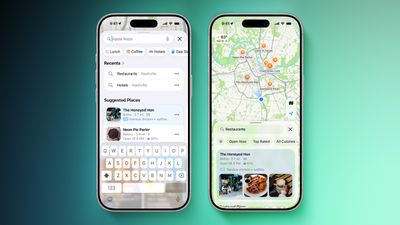
As reported by MediaPost, businesses in the U.S. and Canada can buy Apple Maps ad slots starting today. An introductory offer provides advertisers with a 15% credit towards future ad spend, on up to $1,000 per month of spend over the first year.
The ads do not appear to be visible in Apple Maps just yet, but they should be rolling out soon, as Apple previously stated that the ads would go live at some point in summer 2026. Ads will appear at the top of Apple Maps search results and at the top of a new "Suggested Places" section in the app.
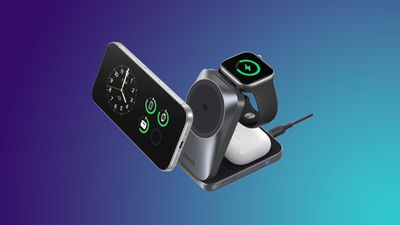
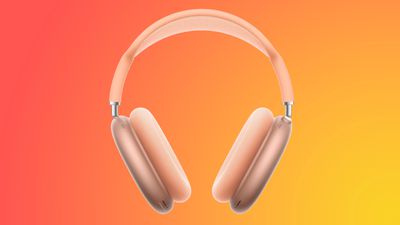
The highlights of this week in Apple deals include ongoing low prices on AirPods Pro 3, AirPods Max 2, and the 2026 MacBook Pro. We're also tracking solid deals on accessories from Anker and other companies on Amazon thanks to some back to school sales.
Note: MacRumors is an affiliate partner with some of these vendors. When you click a link and make a purchase, we may receive a small payment, which helps us keep the site running.
Back To School Accessory Deals
What's the deal? Save on accessories from Anker, Sonos, Samsung, and more
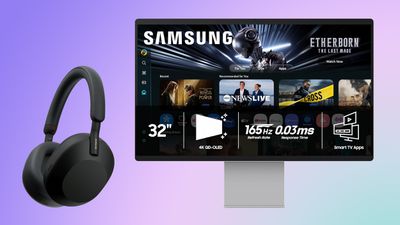
There's a big accessory sale happening on Amazon this week, with the year's best prices on Anker chargers, Samsung monitors, Sonos audio products, and much more. You can browse the full list of products on sale in our original article.
AirPods
What's the deal? Take $100 off AirPods Max 2, $59 off AirPods Pro 3, and more
Amazon this week had a big collection of discounts across the AirPods lineup, highlighted by the AirPods Pro 3 on sale for $189.99, down from $249.00. This is now the best price we've seen on the AirPods Pro 3 since Prime Day, and one of the overall best prices we've tracked so far in 2026, and it's accompanied by a solid deal on the AirPods 4 and AirPods Max 2.
MacBook Pro
What's the deal? Take up to $500 off 2026 MacBook Pro
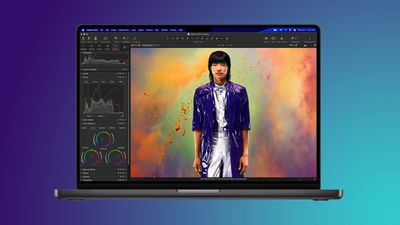
Amazon has kept discounting Apple's 2026 MacBook Pro in recent days, with steep markdowns available for both 14-inch and 16-inch devices. We're still tracking solid deals on every model of this computer, with up to $500 available on select models.
Apple Watch Series 11
What's the deal? Take $100 off Apple Watch Series 11 and Ultra 3
Amazon this week has low prices on the Apple Watch Series 11 and Ultra 3, with $100 discounts across numerous models of the smartwatches. This sale includes a handful of 42mm and 46mm GPS Series 11 aluminum models, but cellular devices are a bit more rare this time around.
If you're on the hunt for more discounts, be sure to visit our Apple Deals roundup where we recap the best Apple-related bargains of the past week.
Deals Newsletter
Interested in hearing more about the best deals you can find in 2026? Sign up for our Deals Newsletter and we'll keep you updated so you don't miss the biggest deals of the season!
Apple CEO Tim Cook once said that what Steve Jobs stood for, in a word, was "innovation." In a CBS News interview conducted yesterday, Cook – in his final weeks at the helm of the company – was asked what his legacy stood for, and this was his response:
"In my view, your legacy is described by others, not yourself. And so, I hope that people will say that I was a good and decent man. And if they say that at the end of the day, I will feel like I have achieved something."
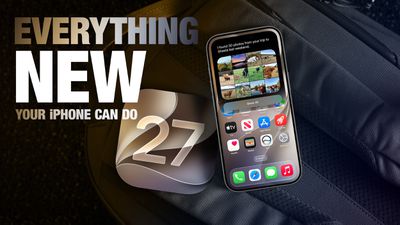
Apple will release iOS 27 in September, and despite the company's focus this year on refining its flagship operating system and nixing bugs, there are still many additional features on the way, not least of which is Apple's new context-aware Siri, re-tooled for the generative AI era.
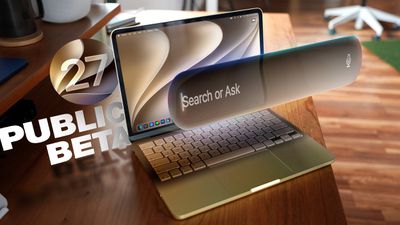
This year's major iPhone software update isn't all about AI, though, as the following feature list testifies. iOS 27 is currently in public beta – if you're OK with that, you can install it today.
Extend Your Photos and Lock Screen Wallpaper
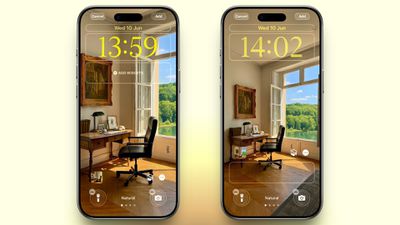
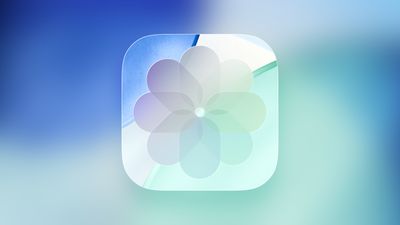
A new wallpaper extension feature in iOS 27 uses Apple Intelligence to automatically expand a photo beyond its original boundaries so it fills the entire Lock Screen more naturally. If a photo is cropped too tightly, doesn't match your iPhone's aspect ratio, or it leaves empty space when positioned on the Lock Screen, iOS 27 can generate additional image content around the edges with the "Extend" option. It will analyze the existing image and create matching background details that blend with the original photo, so there's no need for aggressive cropping. The Extend option can also be found in the Photos app.
Organize Your Safari Tabs
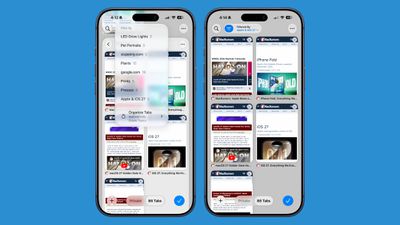
Safari uses Apple Intelligence to automatically organize your open tabs into related topics, making them easier to browse and manage. For example, if you're shopping for a new refrigerator while planning a vacation, Safari groups tabs for each activity into separate topic-based collections. You can enable this feature by opening Tab View, tapping the three-line icon in the top-right corner, and turning on Automatically Create Topics.
Use Natural Language for Reminder and Calendar Entries
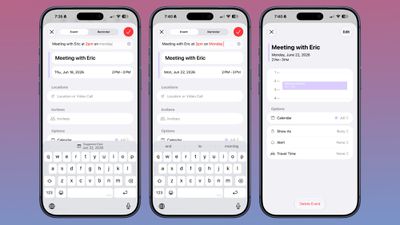
In the Reminders app, you can now create reminders using natural language, and Apple Intelligence will automatically fill in details such as the date, time, and location. For example, if you type "Pick up Dad at 6 p.m. tonight" or "Send the photos to Eric tomorrow at 3 p.m.," Reminders extracts the relevant information and adds it to the reminder automatically.
The Calendar app also supports natural language input, identifying people, dates, and locations as you type. You can then tap the suggested information to quickly add it to your event.
Inline Reply to Messages From Android Users
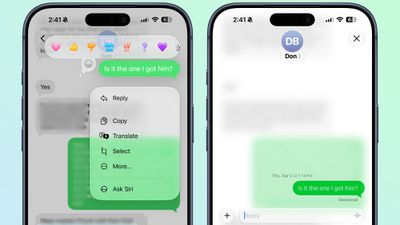
In the Messages app, you can now long press on a specific message from an Android user (a green chat bubble) and get an option to reply to it. That contrasts with iOS 26, where inline replies are limited to blue bubbles sent over Apple's iMessage platform.
Upgrade Your Wallet Passes
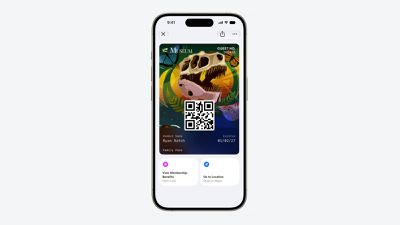
Apple has expanded the redesigned pass experience in the Wallet app with iOS 27, bringing the enhanced design introduced for airline boarding passes in iOS 26 to additional pass types. Membership, gift, loyalty, and rewards cards can now use a new Poster Generic layout with a background image, a logo, customizable header and footer fields, main information, and an optional barcode. Passes can also include up to two quick actions at the bottom, such as getting directions to a venue or checking a rewards points balance.
Describe Your Next Shortcut
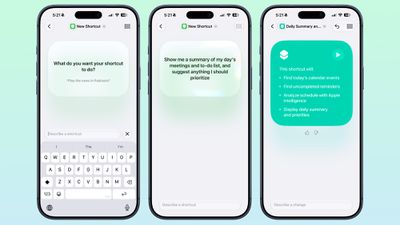
Apple Intelligence makes creating shortcuts much more accessible by letting you build them with natural language. Tapping New Shortcut in the Shortcuts app opens a Describe a Shortcut interface, where you simply explain what you want the shortcut to do. You can describe a single action or a more complex automation, and Apple Intelligence selects the appropriate actions and assembles the shortcut automatically.
For example, you could create a shortcut that sets tomorrow's alarm based on your first Calendar event, enables Sleep Focus, and dims the bedroom lights each evening, or one that displays your first meeting, the weather, and today's reminders every morning. Like existing shortcuts, these automations can be triggered by factors such as the time of day, your location, app activity, system events like taking a screenshot, incoming notifications, and more.
Get a Better Flyover of Your City
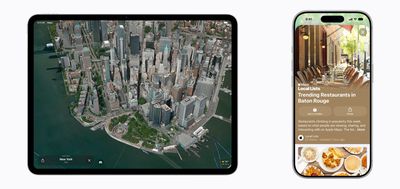
Apple is enhancing the Flyover feature in Maps with iOS 27, using Apple Intelligence models to improve aerial imagery with greater texture and sharper detail. Trees, buildings, and other landmarks appear more realistic, with more accurate geometry and improved lighting effects.
According to Apple, the update makes select cities around the world look more lifelike, from the shape of individual trees to the way light reflects off glass skyscrapers. Flyover already offers detailed 3D views of landmarks, roads, parks, and buildings in more than 350 cities, so iOS 27 is essentially using AI to further improve the quality of those visualizations.
Ask Siri What Your Camera Sees
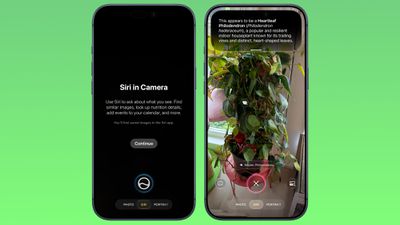
The iOS 27 Camera app has a new "Siri" mode that is available in addition to the video, photo, and other camera modes. The new mode uses Visual Intelligence to identify objects in the frame and provide information about them. It can be used to identify plants, animals, food, and more. If it's food you want info on, for example, it can tell you what it is, and how many calories are in it.
Other examples Siri mode can be used for include capturing a photo of an event flyer and adding a date to the Calendar app, text translation, splitting a bill, and more.
Make Your Lock Screen Clock More Compact
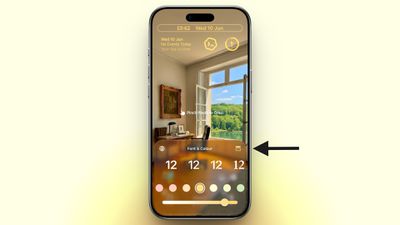
A new compact clock mode is available as a new Lock Screen layout option in iOS 27. Found in the top-right corner of the Font & Color panel, the option moves the time from its traditional large, centered position to a much smaller format alongside the date and widgets at the top of the screen. It's a nice option to have if you like a cleaner Lock Screen look that shows off your wallpaper more fully, and it's the complete opposite effect introduced in iOS 26 that stretches the clock down the screen.
Generate Photo-realistic Images with Image Playground
Apple's Image Playground has been a bit of an embarrassment up until now, being limited to cutesy re-renderings of actual photos and sketched illustrations. But the app gets a major update in iOS 27. Powered by a new generative model that runs on Private Cloud Compute, it can produce high-quality images in virtually any style, including photo-realistic output for the first time. All generated images automatically carry a hidden SynthID watermark to identify them as AI-generated. The app now also supports photo-based editing in addition to creation.
Tweak Liquid Glass Opacity
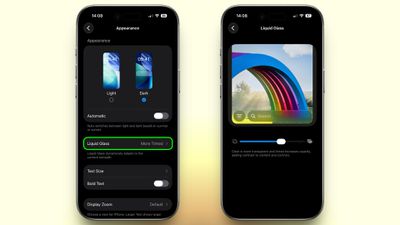
If Apple's Liquid Glass UI embrace in iOS 26 wasn't your thing, there's a way to tone it down. In iOS 27, Apple added a full Liquid Glass slider under Settings ➝ Appearance ➝ Liquid Glass. It changes the translucency of Liquid Glass elements, and you can choose a clear version of Liquid Glass that allows some of the background to show through, select a more opaque, tinted version that improves the legibility of text, or choose something in between.
Create a Slideshow from Any Album
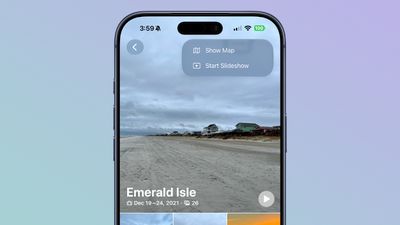
In iOS 27, you can create a slideshow from any album, collection, or selection of photos in the Photos app, rather than being limited to Memories. Open an album or select multiple photos, tap the menu button in the top-right corner, and choose Start Slideshow. Slideshows can be customized with different transition styles, slide durations, and background music, and then saved as a video or shared directly to social media.
Easily Switch Between Siri and ChatGPT
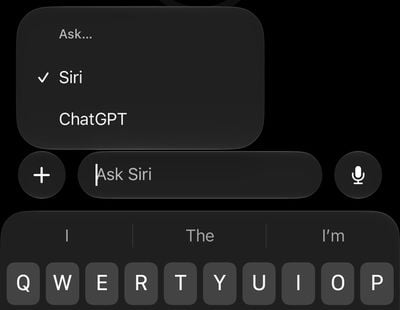
The new Siri app in iOS 27 defaults to the new Siri AI, but you can switch it to ChatGPT if you prefer. Simply long press on the text input field and tap "Ask...", then you'll see an option to change to ChatGPT. Note that conversation context does not transfer when you switch chatbot providers. Currently, ChatGPT appears as an alternative in the Siri AI app whether or not you have the ChatGPT extension enabled in Settings ➝ Siri ➝ ChatGPT.
Build a Browser Extension With a Prompt
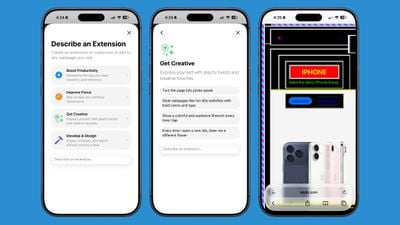
Safari has been given a new AI-powered extension creation feature. A new Create an Extension option, available from Safari's menu to the left of the address bar, lets you describe what you want an extension to do in plain language, and Apple generates it for you. If you need inspiration, Apple also provides suggested ideas across categories including Boost Productivity, Improve Focus, Get Creative, and Develop and Design.
Get AI Summaries of HomeKit Camera Footage (iCloud+ Only)
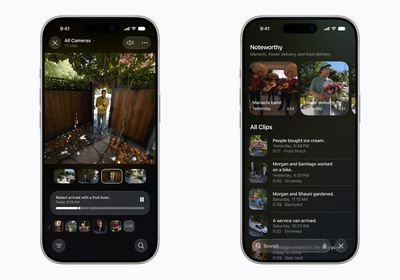
The Home app is now able to generate written summaries for motion alerts from HomeKit Secure Video cameras. It's also able to group footage from separate cameras for an overview of activity and pull out noteworthy recordings, plus it supports natural language search. Bear in mind that this feature is only available if you have an iCloud+ plan with at least 2TB of storage (that's a $9.99/month subscription).
Equalize Your AirPods
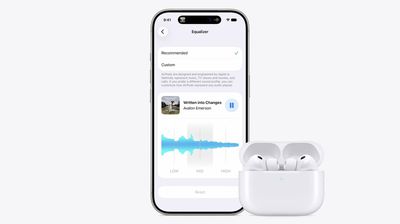
With iOS 27, Apple finally introduces adjustable EQ controls for compatible AirPods models. With your AirPods paired and the latest firmware installed, you can go to Settings ➝ [Your AirPods] ➝ Audio & Routing ➝ Equalizer ➝ Custom to adjust the lows, mids, and highs. Custom EQ is available on AirPods with Apple's H2 chip, including AirPods Pro 2, AirPods Pro 3, AirPods 4, and AirPods Max 2.
Customize Siri's Voice
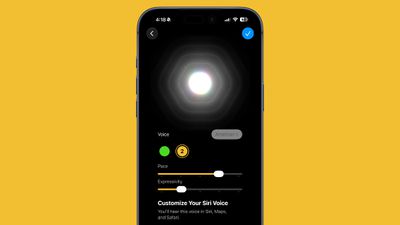
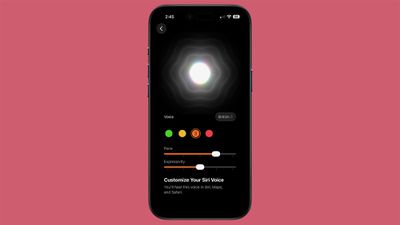
Apple has introduced a more powerful on-device Apple Intelligence model for the iPhone 17 Pro, iPhone 17 Pro Max, and iPhone Air. The upgraded model can understand and generate speech, as well as interpret text and images, enabling a more natural and responsive Siri experience. It also unlocks new voice customization options that let you adjust Siri's expressiveness and speaking pace to suit your preferences.
Rate Your Photos
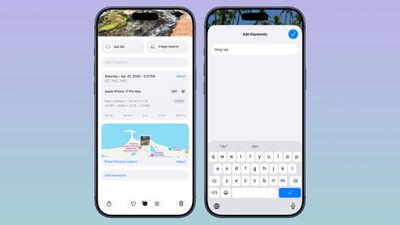
Apple now lets you assign one- to five-star ratings and keywords to photos and videos in the Photos app, making it easier to organize and filter your library. To go with the new feature, Apple has added a Show Rating Controls option to the Photos section of the Settings app. When enabled, it displays star ratings on photos and videos and adds rating badges to thumbnails, ensuring that your highest-rated media is easy to spot at a glance.
Ask Questions About Your Surroundings
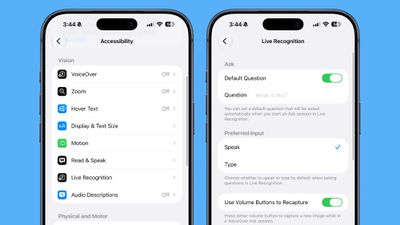
In Accessibility, Apple has added a new Live Recognition section. Powered by on-device intelligence, Live Recognition uses the iPhone's camera to identify and describe people, objects, and surroundings in real time. It can also answer questions about what it sees, with the option to set a default prompt for quick access.
Auto-Update Your Weak Passwords
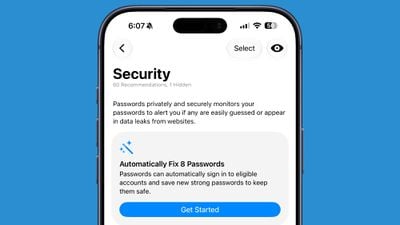
If you use Apple's Passwords app, there's a new feature that uses Safari to automatically change weak and compromised passwords for you. The feature uses Apple Intelligence to automatically navigate to eligible websites, sign in, and update your password with a tap.
Save a Still From a Video
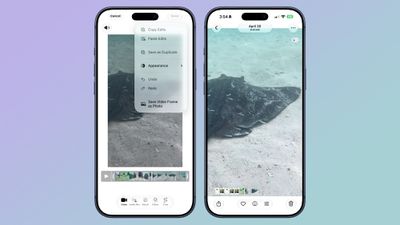
The Photos app in iOS 27 lets you pull a single frame out of a video and save it as its own photo. So you no longer have to rely on the old workaround of pausing playback, taking a screenshot, and cropping out the scrubber. The frame is subsequently saved in your library as a normal image, ready to edit or share just like any other shot.
Give Your Alarms Their Own Volume
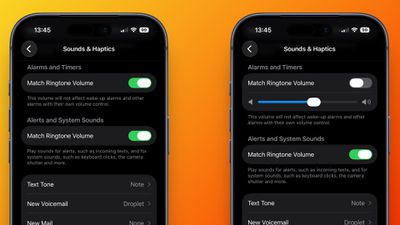
In iOS 27, Settings ➝ Sounds & Haptics gains an Alarms and Timers section with a "Match Ringtone Volume" toggle. Switch it off and a dedicated slider appears, so you can drop the ringer to nothing overnight and still get woken at the volume you chose. Apple's own note under the slider says it won't override wake-up alarms or other alarms that carry their own volume control.
Share Your Location for as Long as You Want
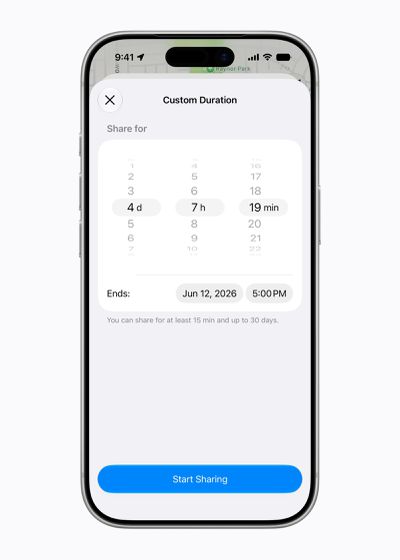
In iOS 26, sharing your location in Find My involves choosing from three presets: one hour, until end of day, or indefinitely. By contrast, iOS 27 adds custom durations – four days and six hours, for example. Alternatively, you can enter an exact date and time for sharing to expire. You can also pause sharing with specific people until the end of the day, without them being informed.
Show Both Camera Views on a FaceTime Call
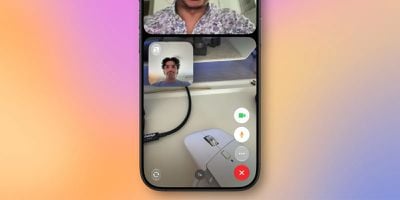
FaceTime has a Dual Capture option in iOS 27. On the iPhone 17 models and the iPhone Air, you can use the front and back cameras at the same time while on a FaceTime call. The person you're calling is able to see your face and what's shown through the back camera. You can turn on Dual Capture on a supported iPhone by tapping on the camera flip button. If you only want to show the back camera feed, you can tap to turn off the front camera view.
Draw in Messages
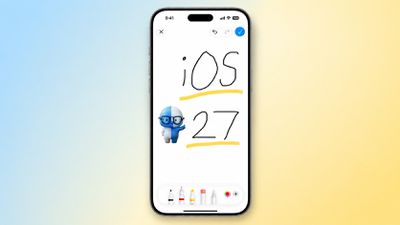
You can now drawing in the Messages app to send little sketches and notes. It's available when tapping on the "+" button next to the text bar in a conversation. The drawing interface is the same as the Markup tool available in apps like Photos and Notes. There's a marker, a pen, a highlighter, and an eraser, plus options to use the tools in any color.
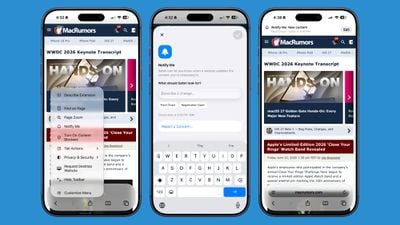
Get Notified About a Webpage Change
Apple's new version of Safari browser in macOS 27 and iOS 27 can be tasked to monitor a webpage and notify you of any changes. With "Notify Me," Safari can keep checking a website on your behalf – such as a product you've been watching for when it comes back in stock – and alert you when a change occurs.
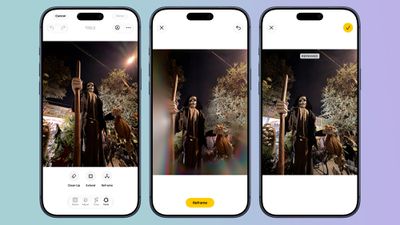
Reframe a Photo
A new Reframe feature in Photos can change the perspective of a photo and make adjustments to the angle of a person or object. It uses the spatial information the iPhone gathers when a photo is taken, and combines it with AI to change the angle of the camera in post-processing. The spatial data is used for adjusting the subject of the image, and then AI fills in any pixels that are missing.
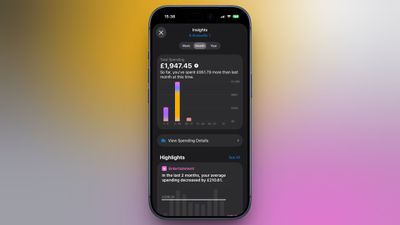
Get Spending Insights in Wallet
A new "Insights" feature in the Wallet app lets you add different Connected Accounts to monitor your spending. Accessed by tapping the three dots in the top right corner, the feature displays your spending highlights, trends, and other details. Note that Connected Accounts integration is dependent on your bank offering the feature, and currently it has broader support in the U.K. than in the U.S.
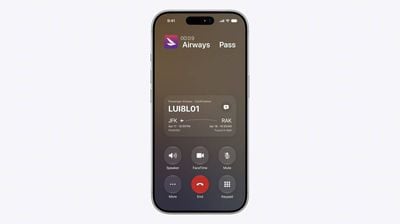
Get Context When on a Call
When you're on a phone call to a business, a new feature called "Call Context" proactively surfaces relevant information. If you call an airline to change a flight, for example, the Phone app can automatically find the relevant confirmation code or reservation number from Mail and display it during the call. Apple says Call Context looks only at who the user is calling and not at the call audio itself. The feature runs entirely on device, meaning no data is shared with Apple or any third party.
Learn What's Trending Around You in Maps
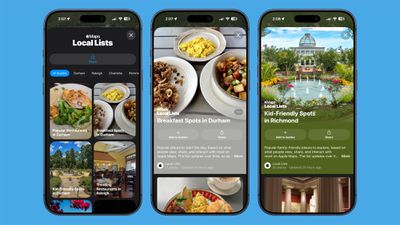
In Maps, a new Local Lists section uses intelligent insights from what's trending around you for suggestions on places you should visit. Maps surfaces locally relevant collections of places to make it easier to find popular and interesting locations. Apple says Local Lists is privacy-focused and does not use information tied to individual users. Note that this feature is only available in the U.S.
Reuters reports that Apple has trained its own large language model for the China market, rather than relying on a third-party model to power its Apple Intelligence features in the country.
The LLM has been developed with the help of Alibaba, according to the report's sources. The development marks a break from Apple's previous strategy of relying on domestic models to bring generative AI to its devices sold in China.
Rollout of its AI features in China is expected in the coming months. The rollout is described by the report as a "dual-track strategy" for AI deployment in China, allowing Apple to navigate regulatory hurdles that have limited access for other U.S. tech companies.
The move makes Apple the first foreign company approved by the Chinese government to offer a proprietary AI model in the country.
Apple previously agreed with Chinese regulators to incorporate Alibaba's Qwen model into Apple Intelligence features, similar to Apple's existing ChatGPT extension available elsewhere. Apple briefly published a support guide in China explaining how Mac users can connect Alibaba's Qwen AI to Siri and Writing Tools, before pulling it entirely less than a day later.
Note: Due to the political or social nature of the discussion regarding this topic, the discussion thread is located in our Political News forum. All forum members and site visitors are welcome to read and follow the thread, but posting is limited to forum members with at least 100 posts.
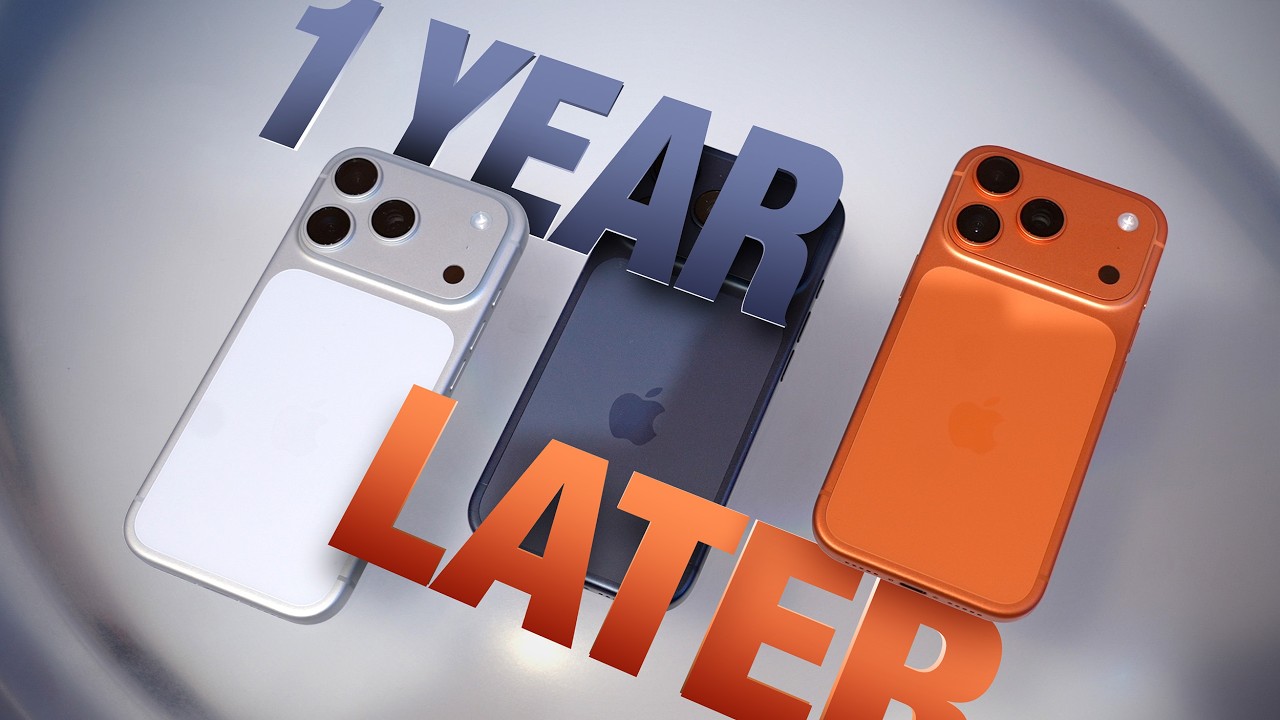
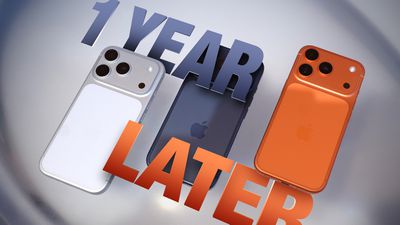
We're getting close to the launch of new iPhone 18 Pro models that will replace the iPhone 17 Pro models, so MacRumors videographer Dan Barbera decided to take a look back at the iPhone he's been using for close to 12 months.
Ceramic Shield 2 was the best iPhone upgrade this year. Apple said it's more resistant to scratches, and that turned out to be true. Dan goes caseless, and his iPhone 17 Pro has only faint scratches, while the 16 Pro was scratched after three weeks. The iPhone has also survived facedown drops with no damage, but there are a few chips in the aluminum along the edges. There have been reports of the orange color fading over time, but Dan didn't see that with his device.
Battery life was also a standout on the iPhone 17 Pro. It's able to keep up with a full day of heavy use, which is normally only possible with the larger battery in the Pro Max iPhones. Dan swapped to the smaller iPhone 17 Pro over the 17 Pro Max because the battery lasted longer than the 16 Pro battery.
Apple added vapor chamber cooling in the 17 Pro, and that kept the iPhone cooler than normal for most of the year. Dan said his iPhone is running hotter with minor dips in performance, probably because of the iOS 27 beta. Running beta software can affect battery life and device performance.
Rumors suggest the iPhone 18 Pro isn't going to be a huge upgrade over the iPhone 17 Pro, and it's likely prices are going to go up. It's not the worst idea to buy an iPhone 17 Pro now instead of holding out for the iPhone 18 Pro, especially if you have an older iPhone.
Apple will introduce at least five new devices at its iPhone-centric event next month, and it's also possible we'll get devices waiting on Siri AI like the Apple TV.
iPhone 18 Pro
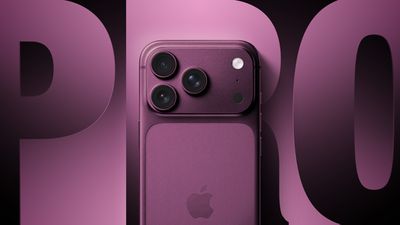
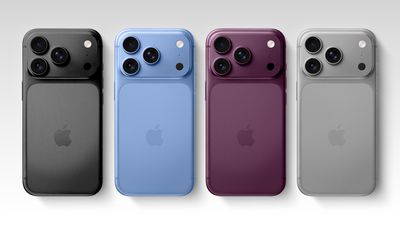
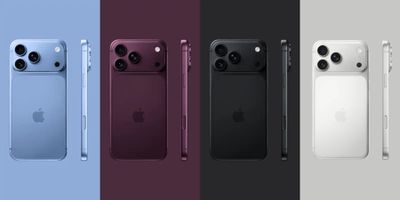
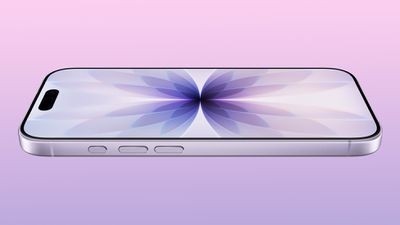
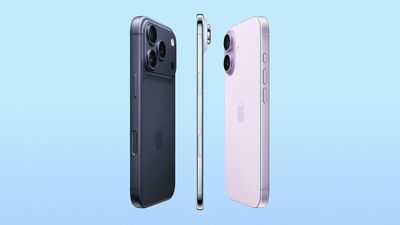
The iPhone 18 Pro is going to look like the iPhone 17 Pro, but with a smaller Dynamic Island. It's getting some internal updates, including a new Wide camera with a variable aperture for more control over lighting and a faster A20 Pro chip built on a new 2nm process. Battery life could improve with the updated chip and an upgraded LTPO+ OLED display, plus Apple could include a more efficient C2 modem and N2 networking chip. Dark Cherry is supposed to be this year's special color, and there will also be a light blue color.
iPhone 18 Pro Max
The iPhone 18 Pro Max will have the same feature set as the iPhone 18 Pro, but it will have a larger battery and a bigger screen. Multiple rumors indicate the iPhone 18 Pro Max will be slightly thicker than the iPhone 17 Pro Max and the iPhone 18 Pro because it is slated to get a bigger battery than Apple used last year.
Both the iPhone 18 Pro and the iPhone 18 Pro Max could be up to $300 more expensive than the iPhone 17 Pro and the iPhone 17 Pro Max. Apple raised prices on Macs and iPads, but is waiting for the September refresh before upping iPhone prices.
Foldable iPhone
Apple's first foldable iPhone is almost ready to launch. The "iPhone Ultra" is expected to have a ~5.5-inch display when closed and a ~7.8-inch display when open. It'll have a 4:3 aspect ratio like an iPad, so when unfolded, it will be similar to using an iPad mini. Apple is supposedly using a hinge design that minimizes the visibility of the crease, and it'll get the same 2nm A20 chip Apple is using in the 18 Pro models.
The foldable iPhone is expected to have dual batteries with one on each side of the device, but it will be limited to a two-lens rear camera system. The iPhone is too thin for the TrueDepth camera system, so it is rumored to use Touch ID instead of Face ID. The foldable iPhone could cost somewhere between $2,000 and $2,500.
We've seen some reports of foldable iPhone manufacturing issues, and rumors that it could launch after the iPhone 18 Pro and iPhone 18 Pro Max. Apple could introduce it in September, and then launch it a bit later, which is what the company did for the iPhone X back in 2017.
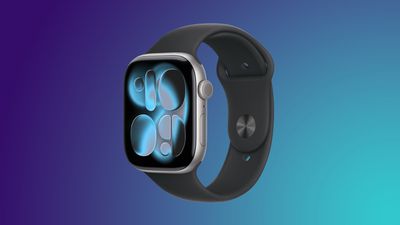
Apple Watch Series 12
Apple will refresh the Apple Watch this year, but it's going to be a somewhat boring update. No design changes are expected, but it could get a faster S-series chip, and the upgrade could add improvements to some health and fitness features. It could also have a bigger battery for longer battery life.
Apple Watch Ultra 4
There's going to be an Apple Watch Ultra 4, and it will get the same chip upgrade as the Series 12. DigiTimes claimed the Ultra 4 will be thinner with an upgrade to sensing functions, but the site isn't always accurate and no other rumors have backed up the claim.
Other Possibilities
There are home products and Macs Apple could launch before the end of the year, but it's possible Apple will hold a second event sometime in October or November. There are quite a few home devices in development, plus Apple is expected to introduce an all-new home hub, so a second smart home event would make sense.
Home Hub - Apple is working on a home hub with a 7-inch square display. It can be used to control smart home products, view photos, make video calls, and display information. It will have full Siri AI integration, and it will run Apple apps. The hub could come as soon as 2026, but Apple might also hold it until early 2027.
Apple TV 4K - The Apple TV 4K is finally getting an update with a faster processor, more RAM, and a new networking chip.
HomePod mini - Apple will refresh the HomePod mini this year, adding a faster chip and new color options.
HomePod - The full-size HomePod could also get a new chip.
Smart Home Camera - Apple has its own security camera in development, and it could launch alongside the home hub.
Other late 2026 possibilities include an OLED iPad mini, a refreshed 14-inch MacBook Pro with M6 chip, an iMac with an M6 chip, a high-end OLED MacBook Pro with touchscreen, a new Mac mini, and a new Mac Studio, but it's very doubtful these products would debut at the September iPhone event.
What's Not Launching
Apple isn't going to release a standard iPhone 18 in September 2026. The lineup will instead focus on more expensive iPhones. The iPhone 18, iPhone 18e, and iPhone Air 2 will come out in spring 2027 instead. Apple does not plan to refresh the Apple Watch SE this year.
Hello, Ternus. Goodbye, Cook
Tim Cook is stepping down from his role as CEO on September 1 to become Apple's executive chairman, and John Ternus is taking over. Ternus will lead Apple's September iPhone event, and it's likely we won't see Cook during Apple's presentation.
Likely Event Dates
Given historical iPhone event dates, this year's presentation is most likely going to happen on Tuesday, September 8 or Wednesday, September 9. September 7 is Labor Day, and Apple may not want to make members of the media travel on a holiday.
Australia's ChannelNews said Apple's event will take place on September 8, but it's not clear if that's accurate information.
If the event is on September 8 or September 9, pre-orders would normally be on Friday, September 11. That date marks the 25th anniversary of the 9/11 attacks, so Apple might avoid holding pre-orders on that day. Instead, we could get pre-orders on Saturday, September 12, which is what Apple did when the iPhone 6s pre-order date fell on 9/11 in 2015.
The Ted Lasso season 4 premiere was Apple's most popular TV show debut to date, according to Nielsen viewing data Apple sent to Deadline. The show racked up 296.6 million viewing minutes in the United States across the August 4 and August 5 launch window. It beat the premieres of prior seasons of Ted Lasso, plus the Severance and Pluribus premieres.
On just August 5, the first episode was the most-streamed program in the United States with more than 200 million viewing minutes.
Season 4 premiered more than three years after the season 3 finale aired, but the long break doesn't appear to have soured Ted Lasso fans. It initially seemed like season 3 might be the final season for the series, so a season 4 was more of a surprise than a wait.
In the fourth season, the show returns to its underdog roots with Ted Lasso moving back to Richmond to coach a second-division women's football team.
There are two episodes of season 4 available now, and new episodes come out every Wednesday.
Apple TV is priced at $12.99 per month, and it can be watched across Apple devices, on popular smart TVs, on set-top boxes like Roku, on gaming consoles, and on the web. Apple TV is also included in Apple One subscription bundles. New subscribers can get a seven-day free trial.
Apple today submitted a court-ordered proposal outlining the commission it believes is reasonable to collect from U.S. apps that link to purchase options outside of the App Store.
Apple is asking for half of its commission on standard apps, so apps that would pay 30 percent for an in-app purchase would pay 15 percent when linking to a web purchase option. Small Business Program participants that would normally pay 15 percent would pay 5 percent.
15 percent - Standard apps.
10 percent - Apps that are part of the News Partner Program, Video Partner Program, Mini Apps Partner Program, and subscription renewals.
5 percent - Apps that qualify for the Small Business Program. Apps qualify if they earn under $1 million per year.
These proposed fees are what developers would pay when someone uses their app, taps a link in the app, and then makes a purchase on the website in the link. So if someone using the Spotify app clicked a link in the app to go to the Spotify website and then purchased a subscription, Spotify would owe Apple a 15 percent fee. Apple says the fees were calculated based on expert analysis, and they are lower than the link-out rates Google is charging in the Epic v. Google case.
Apple submitted the proposal to the U.S. District Court for the Northern District of California, where Judge Yvonne Gonzalez Rogers has been tasked with determining a reasonable fee for Apple to charge for its intellectual property.
The appeals court suggested the commission could be limited to the direct costs of facilitating link-outs, and under that approach, the fee would be zero. Apple says a zero commission would not reflect the value that it provides developers, and its suggested commission gives it fair compensation for the App Store platform.
As a recap, Apple was ordered to change its App Store rules to allow developers to link to purchase options outside of the App Store way back in 2021 during its legal dispute with Epic Games. Appeals delayed the App Store update for several years, but Apple eventually implemented a 12 to 27 percent fee that was nearly identical to its regular App Store fees when taking into account fees from third-party payment processors.
Epic Games complained about Apple's fee structure, and Judge Gonzalez Rogers found Apple in contempt of court. In April 2025, she barred Apple from charging any fee on links, and since then, Apple has collected no money when an app sends users to a website to make a purchase. Apple appealed the ruling, and the appeals court upheld the contempt ruling, but said Apple was entitled to be compensated for its intellectual property. The appeals court sent the case back to the district court and Gonzalez Rogers to determine an appropriate fee.
With a loss on the contempt finding from the appeals court, Apple appealed to the Supreme Court. The justices agreed to hear the case in the term that starts in October. Apple tried several times to get the fee calculation paused until the Supreme Court rules on the case, but it was not successful.
The district court will now evaluate Apple's fee proposal and hear a response from Epic Games, and Apple will need to implement the fee the court sets. Apple wanted to pause fee calculations because if the Supreme Court decides the appeals court erred when upholding the contempt ruling, it could nullify the district court's ruling barring Apple from charging fees.
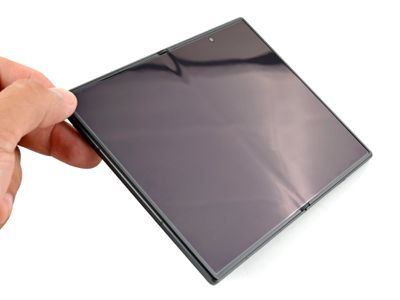
Samsung launched new foldable smartphones earlier this month, including the Galaxy Z Fold8. If you didn't know it was a Samsung device, you might look at it and think it's Apple's foldable because it matches rumors about the iPhone Ultra so well.
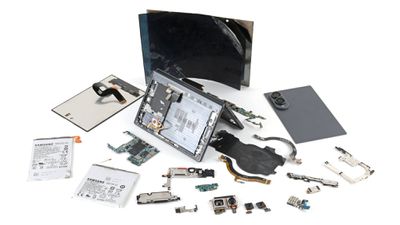
The Z Fold8 is likely to be the closest competitor to the foldable iPhone Ultra, which makes iFixit's teardown of Samsung's smartphone an interesting read. Will Apple's foldable have some of the same troubles as the Z Fold8, or has Apple solved the issues plaguing foldable smartphones?
Hinges have been a failure point on foldable smartphones, and it's a design problem Samsung hasn't been able to solve. The Fold8 has a dust-and-water ingress rating of IP48, so it's resistant to water, but not to dust. It's hard to keep dust away from a smartphone, and when dust gets inside, it gums up the hinge mechanism and it fails.
iFixit did a dust test on the Z Fold8, putting particulates in the hinge. It resulted in "truly awful crunching and grinding noises" and then the device stopped opening normally. Dust that made its way into the hinge did stay out of many of the sealed portions of the phone, but if a foldable smartphone isn't folding, there's still a major issue.
An IP4X dust rating means the Z Fold8 is resistant to particles 1mm in size and greater, but as iFixit found, many sand and dust particles are smaller than that. iFixit said beach sand measured 0.16mm, and the powder it used was 0.04mm.
Samsung used a new hinge design for the Z Fold8 and added a titanium-reinforced display structure that helps the screen open flatter, but it couldn't get rid of the crease entirely. Creases in foldables can become more visible over time as the device is opened and closed, and a recent Tom's Guide review said the crease in the Z Fold8 became more visible after just seven days.
iFixit was not impressed with the repairability of the Z Fold8, and it earned a repairability score of 4/10. The bezel around the inner display broke into pieces as it was removed, and there's no way to get to the hinge without removing the display. Batteries also aren't easy to replace because doing so requires removing the outer display. "It's an expensive, painful repair even when everything goes right," said iFixit.
The Z Fold8 has a tablet-like look and feel with a 5.5-inch screen when closed and a 7.6-inch screen when open. Most of Samsung's prior foldables have been tall and narrow, but this one is closer to an iPad mini, and its dimensions nearly match those rumored for Apple's foldable.
Apple waited to make a foldable iPhone because it wanted a device that had a minimal crease. Rumors suggest it is using a display panel created by Samsung Display and liquid metal for the hinge, along with optically clear adhesive to make the crease disappear as much as possible.
iFixit will likely do the same hinge test when the foldable iPhone comes out, and we'll know whether Apple "solved" the crease and hinge issue or will be dealing with the same problems. The foldable iPhone Ultra will be introduced at Apple's annual September event alongside the iPhone 18 Pro models.
Google's new Pixel 11 Pro Fold has an IP68 dust-and-water-resistance rating with a gearless hinge design, so it will presumably fare better than the Z Fold8 in a dust exposure test. It launches on August 20.
Apple today added the iPhone X to its public-facing obsolete products list, according to an updated support document on its website.
When an iPhone becomes obsolete, it is no longer eligible for repairs or other hardware service at Apple Stores or Apple Authorized Service Providers.
Apple considers a product to be obsolete once seven years have passed since it stopped distributing the product. Apple stopped selling the iPhone X in September 2018, but the device remained available at select resellers for longer.
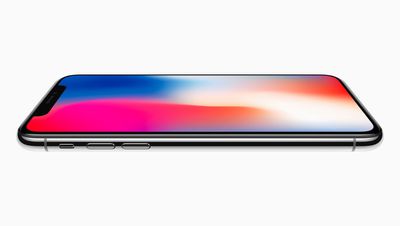
Released in November 2017, the iPhone X was the first iPhone with an OLED display and Face ID. The lack of a Touch ID home button resulted in the device having a more edge-to-edge screen with a notch for the front camera and Face ID sensors. The device featured a premium design with a glass back and a stainless steel frame.
iOS 16 was the final major software version compatible with the iPhone X. Apple continues to release iOS 16 security updates for the device.
Apple also added the 2018 edition of the 15-inch MacBook Pro to the obsolete products list.
Apple today opened its Advanced Manufacturing Center (AMC) in Houston, Texas. It's located in the same Houston facility where Apple makes AI servers and will start manufacturing the Mac mini this year.
Small and medium businesses can visit the 20,000-square-foot facility for free training and educational sessions, taking advantage of interactive labs, tools, and equipment, including a holographic lab table. Apple says participants can learn the "same innovative processes" used to make Apple devices.
"In less than nine months, we have invested hundreds of millions of dollars into this Houston facility. We stood up a factory, started production, and shipped the first advanced AI servers off the line. Today, we're thrilled to open our new Advanced Manufacturing Center, a place where businesses, workers, and students can learn the same innovative processes that we use to make Apple's most groundbreaking products. And we're pleased to begin Mac mini production later this year," said Tim Cook, Apple's CEO. "We believe in American workers and American ingenuity, and we are moving at an incredible pace because we want to build more than great products. We want to build the future of American manufacturing."
Apple experts will hold sessions on topics like advanced manufacturing principles for final assembly and design considerations for printed circuit board assembly, and lead interactive workshops that use the site's representative production facility and equipment. Apple says participants will learn to identify and adapt to production challenges in real time.
In the future, the AMC will offer hands-on training to local college students.
The location is part of Apple's pledge to spend $600 billion to support manufacturing in the United States. Businesses interested in visiting the AMC can sign up for notifications about future sessions on Apple's website.
It is now mid-August, meaning that Apple's annual iPhone event is just around the corner. Below, we take a look at when the event might be held this year.
This September, Apple is expected to unveil the iPhone 18 Pro, iPhone 18 Pro Max, and an all-new foldable iPhone that will reportedly be named the iPhone Ultra. The regular iPhone 18, a lower-end iPhone 18e, and the iPhone Air 2 are not expected to be announced until around March 2027, as part of a new launch strategy.
Australian media outlet ChannelNews today published an "exclusive" report claiming that the iPhone 18 Pro and iPhone Ultra event will take place on Tuesday, September 8. However, this date is questionable, as Apple has never held its iPhone event one day after Labor Day. Historically, there has always been at least a two-day gap between the holiday and the event, so it is more likely to fall on Wednesday, September 9 or later this year.
If the event were to fall on Tuesday, September 8 or Wednesday, September 9 this year, pre-orders would ordinarily begin on Friday, September 11. However, that Friday will mark the 25th anniversary of the 9/11 attacks, so Apple may want to avoid starting pre-orders that day out of respect. Perhaps for this reason, when the iPhone 6s event fell on Wednesday, September 9 in 2015, pre-orders began on Saturday, September 12.
It would be a lot smoother for Apple to skip the week of Labor Day and the 9/11 anniversary entirely and hold its iPhone 18 Pro and iPhone Ultra event the following week instead. Bloomberg's Mark Gurman reported that the event will take place in the first half of September, which would make Tuesday, September 15 the latest possible date.
If the event falls on Monday, September 14 or Tuesday, September 15, then pre-orders would likely begin on Friday, September 18, and the devices would likely launch Friday, September 25. It remains to be seen if the iPhone Ultra is available at the same time as the iPhone 18 Pro models, but it might be limited to the U.S. at first either way.
Since 2020, iPhone event videos have been pre-recorded, but in recent years Apple has invited select reporters to the Steve Jobs Theater to watch the video in person. Afterwards, attendees receive hands-on time with the new devices.
The table below provides an overview of dates for the last six iPhone events, with 2020 being an outlier due to the COVID-19 pandemic.
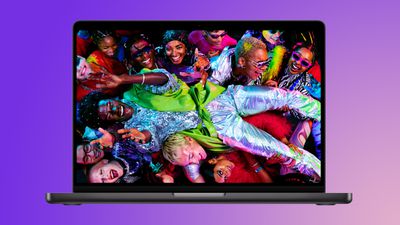
Towards the end of July, we began tracking major discounts on the 2026 MacBook Pro, with up to $500 off select models on Amazon. These sales are still available right now, and Amazon has even sweetened the pot for select devices with sales that are better than we saw during the July event.
Note: MacRumors is an affiliate partner with Amazon. When you click a link and make a purchase, we may receive a small payment, which helps us keep the site running.
14-Inch MacBook Pro
Prices start at $2,259.99 for the 24GB/1TB 14-inch M5 Pro MacBook Pro, down from $2,499.00. Amazon is also providing $300 off the 15-Core/24GB/2TB model, as well as $500 off the M5 Max 26GB/2TB model, both of which are solid low prices in the wake of the recent price hikes.
In terms of the larger display models, we're tracking discounts on all four models on Amazon. These start at $2,759.99 for the 24GB/1TB M5 Pro configuration ($239 off), and reach up to $4,499.00 for the 48GB/2TB M5 Max device ($500 off).
If you're on the hunt for more discounts, be sure to visit our Apple Deals roundup where we recap the best Apple-related bargains of the past week.
Deals Newsletter
Interested in hearing more about the best deals you can find in 2026? Sign up for our Deals Newsletter and we'll keep you updated so you don't miss the biggest deals of the season!
Apple has again added a collection of classic movies to Apple TV that subscribers can now stream at no extra cost.
The films are located in a new "Great Movies Available Now on Apple TV" carousel inside the Apple TV app. So far, free titles are showing up for subscribers in the United States, Canada, and the United Kingdom, with the exact selection differing by country. In the U.S., 19 movies are available:
21 Jump Street
Arrival
The Aviator
A Beautiful Mind
The Bourne Identity
Charlie's Angels
E.T.
Forgetting Sarah Marshall
Gone Girl
I, Robot
Looper
The Martian
Mission Impossible: Ghost Protocol
The Proposal
The Rookie
The Sixth Sense
Titanic
Zodiac
Zoolander
Other countries such as the United Kingdom appear to have much smaller collections of movies, with only six titles available.
These licensed titles sit alongside Apple's own catalog, which now includes more than 300 original productions.
It is not clear whether this is a lasting change to the catalog or a short-term feature. Apple added 51 licensed films under a "Great Movies on Apple TV+" label in March 2024, then followed up with roughly 30 more titles the next month, and neither run lasted more than a few weeks.
Apple's upcoming foldable "iPhone Ultra" may see a staggered country-by-country launch over several months, with initial availability limited to the U.S. market, according to an Australian publication.
In a report labeled "exclusive," ChannelNews said today it has been told by local carriers and one major retailer that Apple's first foldable iPhone will be a "no show" when the iPhone 18 Pro models launch in September, despite being unveiled together. Instead, Apple will release the book-style device in the U.S. market first, followed by key markets including China over two or three months.
The staggered launch is said to be due to supply setbacks and "pricing problems." The publication's sources also claim that Apple is "having testing issues with production models that have already been built."
Apple analyst Ming-Chi Kuo claimed last month that Apple would unveil its first foldable iPhone at the same time as the iPhone 18 Pro and iPhone 18 Pro Max, but that iPhone Ultra pre-orders would start at a later date than the latter models.
Kuo said manufacturing challenges have limited early production, but this is the first time we have heard that a staggered country rollout could be another consequence of continuing supply issues.
Vision Pro All Over Again?
It wouldn't be the first time Apple has launched a new product in a staggered manner. When the Vision Pro launched in February 2024, it was only available in the U.S. initially. The headset was later launched in China, Hong Kong, Japan, and Singapore in June, followed by Australia, Canada, France, Germany, and the UK in July.
The reasons for the Vision Pro's staggered launch came down to low volume production, retail store readiness, and the fact that it was an entirely new category for Apple. All three could arguably apply to the company's first foldable.
Multiple reports have suggested the iPhone Ultra's production has faced hurdles because of the complexity of the device, with the hinge structure and display durability testing having been the principal bottlenecks. However, those issues were thought to have been resolved during trial production at Foxconn, with Apple subsequently raising its order to around 10 million units, up from 7-8 million units for the year, according to Nikkei Asia.
That said, 10 million units amounts to only a third of Kuo's forecast of 20-22 million units for iPhone 18 Pro models this year. Meanwhile, Kuo still believes Apple's supplier will ship only 7-8 million foldable iPhones in 2026. At such a relatively small number, Apple would presumably struggle to stock 40+ countries on launch day.
It's worth bearing in mind that a staggered market launch is a claim made by the report's sources, and remains uncorroborated. Either way, we should know for sure soon enough. The iPhone Ultra's unveiling is only a matter of weeks away, and we're expecting it to feature an inner display of around 7.7 to 7.8 inches, a 5.5-inch cover screen, a thickness of roughly 4.5mm, and a starting price above $2,000. Apple's iPhone event is most likely going to happen on Tuesday, September 8 or Wednesday, September 9.
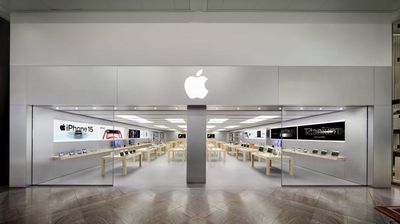
Apple today confirmed that its Apple Festival Place store in Basingstoke, England will permanently close in November 2026, while a nearby store in Reading undergoes a major expansion and will reopen with a new design in the following month (via 9to5Mac).
Apple The Oracle will become the closest replacement at around 18 miles from the old Basingstoke location, with Apple WestQuay in Southampton roughly 30 miles away and Apple Bentall Centre about 35 miles away as the next closest alternatives.
Apple Festival Place opened in August 2011, while Apple The Oracle first opened in the Oracle Shopping Centre in June 2011, so both stores are marking just over 15 years in operation as one closes and the other is rebuilt. Apple Festival Place will continue operating normally until November, and its staff will have the opportunity to move to Apple The Oracle or another location once it shuts.
Apple The Oracle is due to reopen in December with the features found in Apple's newest stores, including an experience room for trying out certain products, a dedicated Genius Bar, an Apple Pick Up area for collecting online orders, and free Today at Apple sessions.
The closure and rebuild are part of Apple's ongoing plan to open, relocate, and remodel dozens of stores worldwide. In the UK alone, Apple relocated its Touchwood store in Solihull to a much larger unit last summer and expanded its Trafford Centre store near Manchester earlier this year, while Apple Birmingham is said to be getting a series of upgrades.
The Basingstoke closure follows a more contentious round of U.S. store closures earlier this year, when Apple permanently shut three retail locations, including Apple Towson Town Center in Maryland, the first Apple store in the U.S. to unionize.
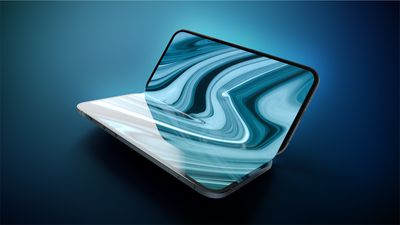
Apple's first foldable iPhone, with a book-style design featuring a ~5.5-inch outer display and a ~7.8-inch inner display with a minimal crease down the middle.







 As reported
  Note: MacRumors is an affiliate partner with some of these vendors. When you click a link and make a purchase, we may receive a small payment, which helps us keep the site running.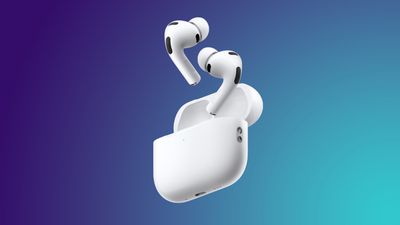
 Apple CEO Tim Cook once said that what Steve Jobs stood for, in a word, was "innovation." In a CBS News interview conducted yesterday, Cook – in his final weeks at the helm of the company – was asked what his legacy stood for, and this was his response: