10 Useful iPhone Tips and Tricks You Might Not Know About - MacRumors
Skip to Content

10 Useful iPhone Tips and Tricks You Might Not Know About

Over the years, the iPhone's operating system has gotten complicated. Apple adds new features with every version of iOS, and many of them aren't always obvious, leading to hidden iPhone capabilities you might not be aware of.

10 Useful iPhone Tips and Tricks Feature 2

Turn an App Into a Widget

You can turn most app icons into widgets right from the iPhone's Home Screen. Just long press on an app icon, and select one of the squares from the top to choose a widget size. It works with any Apple or third-party app that has a widget option. Long press again and select the top left icon with four squares to turn it back into a standard app icon.
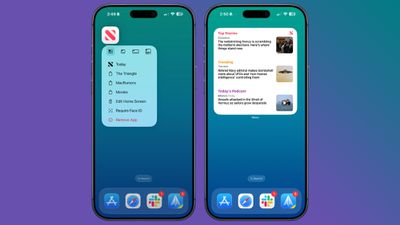
app icons to widgets

See Where You've Been

In the Maps app, you can look back at your location history to see places that you've visited. It's useful if you've been on a weekend trip, found a great restaurant, and want to remember where it was the next time you visit.
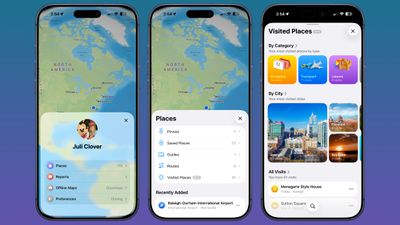
maps app visited places
You can get to this feature by opening up the Maps app, tapping on your profile, selecting Places, and then choosing Visited Places. Places are organized by category like leisure or shopping, and by city.

You can clear your history by scrolling down to the bottom of the interface, or select a period of time for visits to be kept. Go to Settings > Maps > Location > Visited Places to turn it off entirely.

Set Custom Vibrations

You probably know you can set custom sounds for people that call or text, but you can also do the same thing for vibration patterns if you keep your iPhone on silent all the time, as civilized people do.
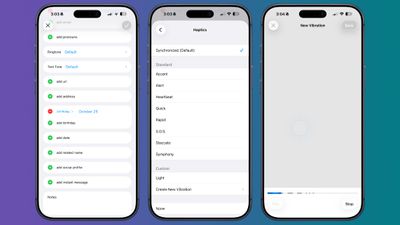
contacts app custom vibration
Important people you message can each have a different vibration pattern, so you know who is texting without having to look at your phone.

To set a vibration pattern for someone, open up the Contacts app and select them. Tap Edit in the upper right corner, then tap on Text Tone or Ringtone. Tap on Haptics and then select Create New Vibration. From there, you can use taps and presses to make your own vibration patterns.

Back Tap Gestures

Back Tap has been around for a long time, but it's easy to forget it exists. You can use it to set a tap on the back of the iPhone to do whatever you want, from snapping a screenshot to activating the flashlight. It even works with Shortcuts you've created.
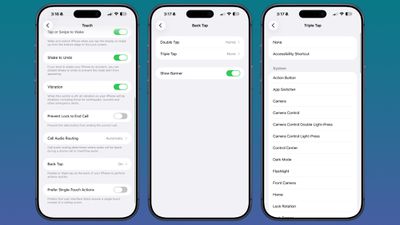
backtap iphone options
Go to Settings > Accessibility > Touch and then scroll down to Back Tap to set it up. You can set actions for a double tap or a triple tap.

Screenshot a Webpage

When you press the side button and volume buttons to take a screenshot, the default is a capture of what's currently on your display. If you want to screenshot a whole webpage or a PDF, there is a way to do it. Take the screenshot as normal, then tap it (if you have full-screen previews off). Select "Full Page" at the top of the interface, and then choose where to save your extra long screenshot.
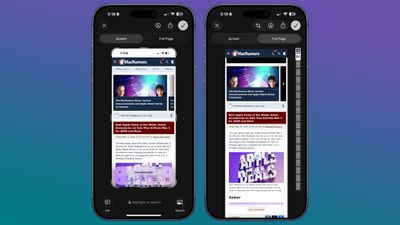
screenshot whole websites

Hide Apps

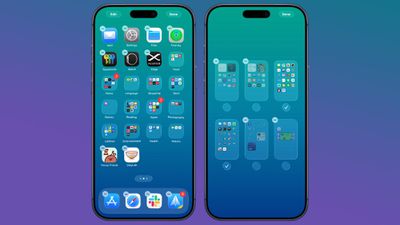
If you have apps that you don't want to show up on the ‌Home Screen‌, you can hide them one by one by long pressing and tapping the Face ID option, or you can hide a whole app page at once. To hide an app page, long press on the ‌Home Screen‌ to enter jiggle mode.

hide app pages
Tap on the dots at the bottom of the display, and then select the app page you want to hide from view. Apps hidden this way don't show up in the Hidden folder in the App Library. You can still find them through Spotlight Search and they're visible in their appropriate App Library category. To unhide a page, follow the same steps and tap the checkbox to bring it back.

Rate Your Pictures

iOS 27 includes support for adding keywords and star ratings to your photos and videos, which makes them easier to find later via search or filters.
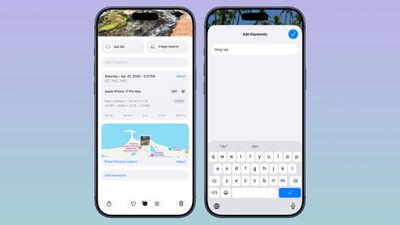
ios 27 photos metadata
You can add any keyword or rate images from one to five stars.

Remove Photos Location Data

If you're sending a photo to someone, you might want to remove metadata like location first. To do so, select an image in the Photos app, swipe up, and tap on Adjust Location. From there, you can choose No Location.
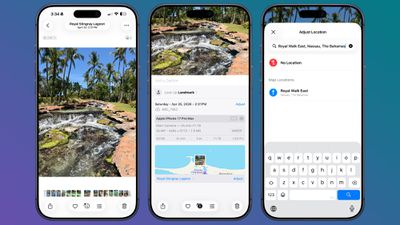
photos app remove metadata 1
Alternatively, when you go to share a photo, you can turn off metadata there. Select a photo, and tap on the Share button. Tap on Options, and toggle off Location.
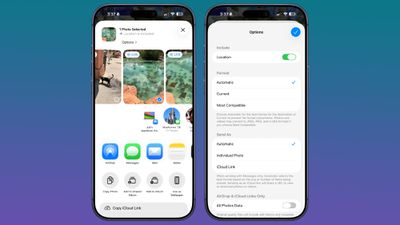
photos app remove metadata 2

Use a Timer to Turn Off Media

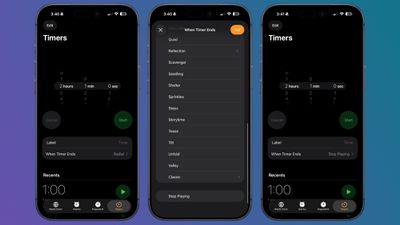
You can use timers to control how long music, podcasts, audiobooks, and other media play for, which is useful if you only want to listen for a short period at night.
timers stop playing media
In the Clock app, tap on Timers. Set a time period, and then tap on the When Timer Ends option. Scroll down and select Stop Playing. When your timer goes off, any media you have playing will stop.

Save a Still From a Video

In ‌iOS 27‌, there's a new feature that lets you save a still from a video without having to capture it as a screenshot. Just open up a video in the ‌Photos‌ app, navigate to the frame you want to save, then tap on the three-dot icon in the upper right of the display. Select the "Save Video Frame as Photo" option to save the image.

More Tips

Have a favorite iPhone tip that most people don't know about? Let us know in the comments below.

Popular Stories

Apple TV Sans Remote Feature

New Apple TV 4K Leaked

Friday September 25, 2026 8:16 am PDT by
MacRumors contributor Aaron Perris has uncovered an image file from Apple for an unreleased Apple TV 4K, suggesting that a new model will finally be released soon. The image is specifically for an "Apple TV 4K (4th generation)" model. Apple TV 4K (4th generation) image (on a gradient) The image reveals that the Apple TV will have the same external design as the current model, with all of its...
HomePod minis Apple TV and iPad mini Leak Feature

iPad Mini With A20 Pro, New HomePod Mini Colors, and New Apple TV 4K All Just Leaked

Friday September 25, 2026 8:18 am PDT by
The next iPad mini, HomePod mini, and Apple TV 4K models have all leaked, just a few weeks before the devices are expected to be announced. Specifically, MacRumors contributor Aaron Perris discovered a few of Apple's official images of the devices, confirming their existence and some new features that are planned. The most notable iPad mini details revealed in today's leak include an A20 Pro ...
iPad mini 7 feature

iPad Mini 8 Leaked: A20 Pro Chip, Landscape Camera, and More

Friday September 25, 2026 8:18 am PDT by
Apple's next-generation iPad mini will feature the A20 Pro chip, a rearranged front-facing camera, and a new speaker system, leaked code reveals. The information originates from Apple's own code (spotted by MacRumors contributor Aaron Perris) and also shows clear product images of the new iPad mini. Although images of the device only show the front, leaving any design changes of the rear or ...

Top Rated Comments

Mr_Ed Avatar
19 weeks ago

I doubt anyone who follows an Apple page doesn’t know this already…
TBF, there are new iPhone users (and MR members) all the time, so I expect all levels of knowledge in the crowd. Even with long-time users, most won’t explore and read about all the ins and outs of every feature. Whenever MR posts this type of article I find I do know about most of it, but always find something I had not explored.
Score: 14 Votes (Like | Disagree)
19 weeks ago

I doubt anyone who follows an Apple page doesn’t know this already…
I'm what you would call a power iPhone user. I learned several things I didn't know with these. I don't have time to read through all the documentation about every feature on the phone. I'd be highly surprised if many people know everything about every possible phone feature.
Score: 10 Votes (Like | Disagree)
Unami Avatar
19 weeks ago
Nice Tips, as always - keep them coming. I totally forgot about the back tap gesture.

I remember, there once was a long article containing lots of those tricks in one place. Maybe a permanent section with a regularly updated collection (not spread over multiple articles, the comments and the forum) would be a nice feature for the macrumors-site?
Score: 9 Votes (Like | Disagree)
AusMness Avatar
19 weeks ago
One of my favourite neat tips is dialing *3001#12345#* in the phone app to open FTMinternal for cell info
Score: 7 Votes (Like | Disagree)
19 weeks ago
I liked learning you can do a "screen" shot of an entire web page. Probably won't use this much but nice to know I can easily.
Score: 6 Votes (Like | Disagree)
tonywalker23 Avatar
19 weeks ago

TBF, there are new iPhone users (and MR members) all the time, so I expect all levels of knowledge in the crowd. Even with long-time users, most won’t explore and read about all the ins and outs of every feature. Whenever MR posts this type of article I find I do know about most of it, but always find something I had not explored.
Amen. To quote my profession, no matter how much seminary training you get, never forget to preach to the person who just walked in and sits in the back pew.

Score: 5 Votes (Like | Disagree)
Latest Stories
Amazon Just Knocked $900 Off Apple's Latest 16-Inch MacBook Pro
12 hours ago
Top Stories: Apple Leaks, Siri AI Settlement, and More
2 days ago
watchOS 27: 12 New Things To Check Out on Your Apple Watch
2 days ago
Banks and Credit Unions to Team Up Against Apple Pay Fees
2 days ago
Apple Finally Shares tvOS 27 Release Notes With List of New Features
2 days ago
Amazon's $199 Discount on Apple Watch Ultra 3 Returns to Help Clear Stock
2 days ago
MacRumors Giveaway: Win an Apple Watch Ultra 4 From Lululook
2 days ago
Apple Code Confirms iPad 12 Specs: A19, 8GB RAM, N1, C1X Modem
2 days ago
Some iPhone 18 Pro Max Users Experiencing AT&T Cellular Issues
2 days ago
Launch Week Deals Hit Latest Macs, Apple Watch Ultra 4, and Apple Accessories
2 days ago
The MacRumors Show: Tyler Stalman Talks iPhone 18 Pro's Camera
2 days ago
iPad Mini With A20 Pro, New HomePod Mini Colors, and New Apple TV 4K All Just Leaked
3 days ago
iPad Mini 8 Leaked: A20 Pro Chip, Landscape Camera, and More
3 days ago
Exclusive: First Look at HomePod Mini 2 in Three New Colors
3 days ago
New Apple TV 4K Leaked
3 days ago
Create a Custom Pass in the Wallet App on iPhone
3 days ago
How to Check Your Mac's Manufacture Date in macOS 27
3 days ago
What's Gone in macOS Golden Gate and What's Next in macOS 28
3 days ago
TestFlight App Gets New iOS 27 Features
3 days ago
Google Photos Wardrobe Feature Comes to iOS
3 days ago
Apple Music to Host Free Head Trip Festival Livestream
3 days ago
watchOS 27.2 Code Hints at iPhone-Style Screenshot Previews
3 days ago
Beats 360 Headphones Now Available in Apple Stores
3 days ago
Apple Shares New Video Promoting iOS 27 Parental Controls
3 days ago
Apple Has Announced 12 New Products in the Past Month
3 days ago
Apple Watch Ultra 2 vs. Ultra 4 Buyer's Guide: Should You Upgrade?

3 days ago
Here's When Apple TV is Airing Free 'Peanuts' Holiday Specials This Year
4 days ago
Square Announces Apple Business Integration
4 days ago
AirPods Pro 3 on Sale for $199 This Week on Amazon
4 days ago
Qualcomm Announces Renewed Agreement With Apple
4 days ago