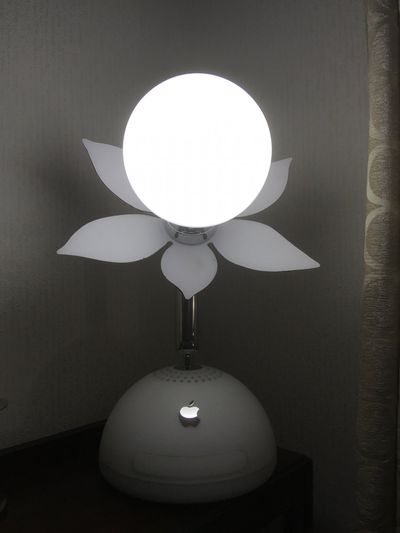
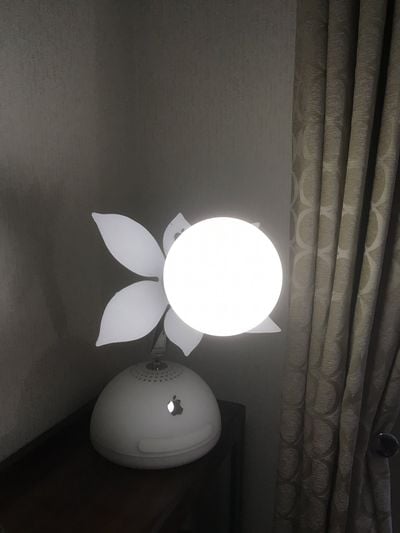
Sold between 2002 and 2004, the iMac G4 is long outdated, but MacRumors forum member Hughmac has given the arm-mounted computer a second life by cleverly transforming his into a desk lamp.
Hugh says he started by gutting the inside of the iMac's base, removing all components. Next, he removed the display and cut the back side of it into a flower shape, making sure to keep the Apple logo intact. Last, he connected a ceiling light to the top of the arm, ran wiring through the base, and added a power switch.
All in all, this is a brilliant do-it-yourself project that takes recycling to a whole new level. More photos can be found in the MacRumors forums.
A new ad for Apple Arcade released today blends the real world with the virtual one while showcasing several games available on the service, including LEGO Builder's Journey and Ultimate Rivals: The Rink.
Apple Arcade launched in September, providing iPhone, iPad, Apple TV, and Mac users with access to over 100 games with no in-app purchases or ads for $4.99 per month in the United States. The latest titles include co-operative augmented reality game Secret Oops! and family-friendly battle royale game Butter Royale.
The one-minute ad is accompanied by an animated "livestream" of Oceanhorn 2, another game available on Apple Arcade.
Apple Arcade has also taken over Apple.com, possibly as part of a larger advertising campaign timed with the Super Bowl today.
Apple analyst Ming-Chi Kuo has lowered his iPhone shipment forecast by 10 percent to 36-40 million units in the first quarter of 2020, noting that the Wuhan coronavirus outbreak is affecting iPhone supply in China.
For example, multiple reports have indicated that assembly of the rumored "iPhone 9" or "iPhone SE 2" could be disrupted. The lower-cost device, expected to be a revamped version of the iPhone 8, was rumored to enter mass production in February ahead of a March release. Apple could still announce the device in March, but initial supply could be limited until production can ramp up.
In his research note with TF International Securities, seen by MacRumors, Kuo added that smartphone shipments in the Chinese market declined by 50-60 percent year-over-year during the Chinese New Year holiday period, possibly due to declining consumer confidence in the country stemming from the coronavirus outbreak.
Earlier this week, the World Health Organization declared the Wuhan coronavirus outbreak a global public health emergency. More information about the virus and how to protect yourself is available on its website.
Browse Apple's US website today and you may be surprised to see your favorite video game character drop in and make an unexpected appearance.
Characters including the likes of Sonic, Frogger, and little LEGO people have invaded Apple's homepage to promote Apple Arcade, the company's subscription gaming service.
Launched in September 2019, Apple Arcade is a premium subscription service that allows App Store users to pay one monthly fee to gain access to over 100 games that that have no in-app purchases or additional costs.
All Arcade games work on the iPhone, iPad, Apple TV, and Macs, which is likely one of the reasons why Apple's playful promotion has seen game characters take over every product section on its homepage.
Apple teamed up with both indie developers and big-name gaming companies to create "new and exclusive" games for the Apple Arcade service. All the content that is released through Apple Arcade is freshly created for Apple Arcade, so it doesn't include existing games.
Apple Arcade is priced at $4.99 per month or $49.99 per year, and one subscription allows up to six family members to play through Family Sharing. For those who have not yet given Apple Arcade a try, there is a one-month free trial available.
In his latest earnings call, CEO Tim Cook said Apple Arcade had got off to a "strong start," but he didn't reveal subscription figures. Apple has also recently increased visibility of Apple Arcade in its retail stores, introducing colorful promotional displays and highlighting compatible gaming accessories.
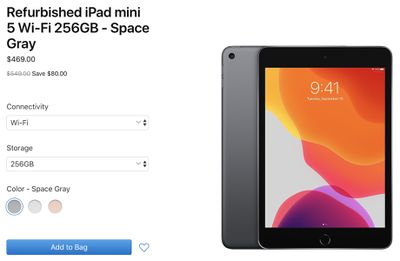
A wide selection of refurbished iPad Air and iPad mini 5 models are available, including configurations with Wi-Fi or LTE, 64GB or 256GB storage, and Space Gray, Gold, or Silver finishes. Prices are discounted by around 15 percent compared to the equivalent brand new models on Apple.com.
Apple says certified refurbished iPad models are thoroughly inspected, tested, cleaned, and repackaged in a new white box, with all accessories and documentation included. Every refurbished iPad receives a new battery and a new outer shell, making them virtually indistinguishable from brand new iPads.
Every refurbished iPad is covered by Apple's standard one-year warranty effective on the date the tablet is delivered. The coverage can be extended to two years from the refurbished purchase date with AppleCare+, which costs $69 or $3.49 per month for the latest iPad Air and iPad mini in the United States.
While certified refurbished iPads represent a decent opportunity for savings straight from Apple, better deals are often available from resellers like Amazon and Best Buy. Be sure to monitor our Apple Deals roundup.
Apple today announced that it has closed all of its corporate offices, stores, and contact centers in mainland China through February 9 due to the Wuhan coronavirus outbreak, out of an abundance of caution.
Our thoughts are with the people most immediately affected by the Coronavirus and with those working around the clock to study and contain it. Out of an abundance of caution and based on the latest advice from leading health experts, we're closing all our corporate offices, stores and contact centers in mainland China through February 9. Apple's online store in China remains open. We will continue to closely monitor the situation and we look forward to reopening our stores as soon as possible.
Earlier this week, the World Health Organization declared the Wuhan coronavirus outbreak a global public health emergency. More information about the virus and how to protect yourself is available on its website.
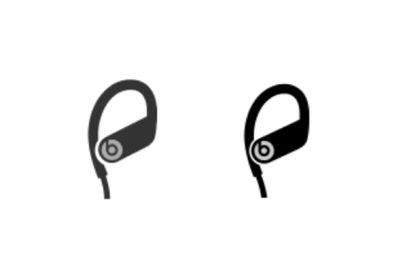
The final week of January began with the 10th anniversary of Steve Jobs unveiling the original iPad, followed by well-known analyst Ming-Chi Kuo forecasting several new Apple products that he expects to launch in the first half of 2020. Other top stories included leaked images of Powerbeats4 earphones, SIM-free iPhones becoming eligible for interest-free financing with Apple Card Monthly Installments, and more.
Apple Said to Launch AirTags, New iPads and Macs, Small Wireless Charging Mat, High-End Headphones, and More in the First Half of 2020
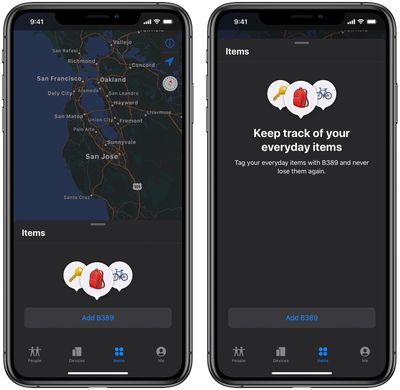
Apple plans to release several new products in the first half of 2020, including Ultra Wideband item tracking "AirTags," high-end wireless headphones, a small wireless charging mat, a lower-cost 4.7-inch iPhone, refreshed iPad Pro models, and refreshed MacBook Pro and/or MacBook Air models, according to the latest forecast from well-known analyst Ming-Chi Kuo.
iOS 13.3.1 Released, Includes Images of Upcoming Powerbeats4 Earphones
Apple released iOS 13.3.1 this week with a toggle for enabling or disabling the U1 Ultra Wideband chip in iPhone 11 and iPhone 11 Pro models. However, there's more to the update than meets the eye.
Apple has also released macOS Catalina 10.15.3, watchOS 6.1.2, tvOS 13.3.1, and a software update for the HomePod.
iOS 14 Rumored to Support Same iPhones as iOS 13
iOS 14 will be compatible with any iPhone that can run iOS 13, according to French website iPhoneSoft.fr. On the other hand, the report claims iPadOS 14 will drop support for a few older iPad models, including the iPad Air 2 and the iPad mini 4.
Monday marked the 10th anniversary of Steve Jobs unveiling the iPad at the Yerba Buena Center for the Arts in San Francisco. It was one of the last major products that he unveiled before his death in 2011.
"iPad is our most advanced technology in a magical and revolutionary device at an unbelievable price," said Steve. "iPad creates and defines an entirely new category of devices that will connect users with their apps and content in a much more intimate, intuitive and fun way than ever before."
25 Must-Know macOS Tips for Beginner, Intermediate and Advanced Mac Users
There are dozens if not hundreds of macOS shortcuts and tricks to streamline your workflows and make it easier to use your Mac, but many of these shortcuts are easily overlooked or forgotten.
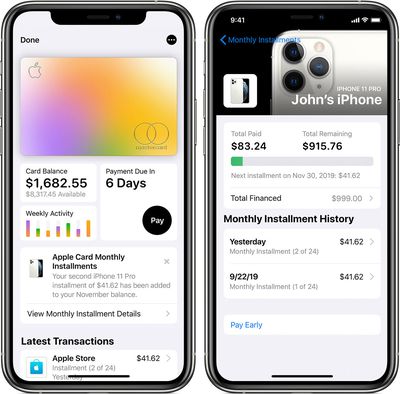
SIM-Free iPhones Now Qualify for 24-Month Interest-Free Financing With Apple Card
SIM-free iPhone models now qualify for Apple Card Monthly Installments, which allows customers to purchase an iPhone with the Apple Card and pay for it over two years with no interest or fees in the United States. Previously, the installment plan was limited to carrier-activated iPhones.
Apple already offered interest-free iPhone financing through its iPhone Upgrade Program, but the Apple Card plan has a few advantages, including managing payments in the Wallet app and no late fees. iPhone purchases via Apple Card Monthly Installments also qualify for 3% Daily Cash.
MacRumors Newsletter
Each week, we publish an email newsletter like this highlighting the top Apple stories, making it a great way to get a bite-sized recap of the week hitting all of the major topics we've covered and tying together related stories for a big-picture view.
Apple is now offering an onsite repair option for customers in select cities who need issues with their Apple devices addressed but aren't able to visit a repair shop or Apple Store.
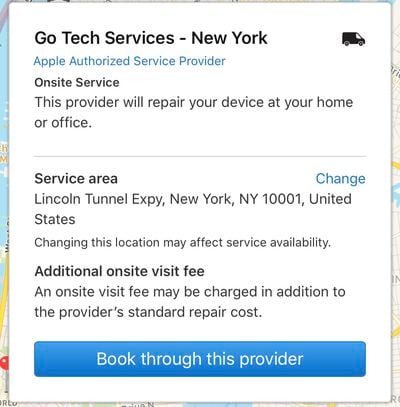
The onsite repair options are available through Apple Authorized Service Provider Go Tech Services, which promises to repair your device "at your home or office."
When visiting Apple's Support site to initiate a device repair, there's now a mention of an onsite option when scheduling a repair. "Look for an Apple Authorized Service Provider or Genius Bar. In select locations, onsite service may be available."
Onsite repairs from Go Tech Services appear to be available in San Francisco, Los Angeles, New York, Chicago, Houston, and Dallas. When choosing a repair option in one of these cities, Go Tech Services can be selected as one of the repair providers.
Go Tech Services is listed as the top option in cities where it is available, and selecting it warns that an onsite visit fee may be charged in addition to the provider's standard repair cost. Apple's support site does not include additional details about the fee, and clicking the "Book through this provider" option redirects users to Go Tech Services' website, where an appointment can be scheduled.
On the site, users are instructed to select a date and a time for a repair, but this part of the booking process also does not include information on fees. In San Francisco, there are no available same-day appointments, with the earliest appointment available on Monday.
Apple offers onsite repairs for its enterprise customers, but until now, there has never been a similar repair option for regular consumers. Go Tech Services is an Apple Authorized Service Provider, so the repairs aren't coming directly from Apple, but it's akin to visiting a similar AASP like Mobile Kangaroo or Best Buy.
It's not clear the extent of the problems that can be addressed by the onsite service provider. We were able to choose Go Tech Services for a cracked iPhone display, but not for a battery replacement.
Go Tech Services appears to operate exclusively through Apple, as visiting the company's website redirects to a notice that repairs must be initiated through Apple's support site.
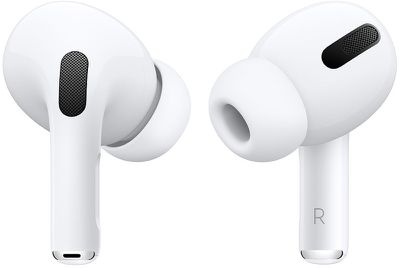
Customers who have AirPods Pro that also purchased an AppleCare+ protection plan for $29 appear to be able to receive free replacement tips for their AirPods Pro.
Multiple MacRumors readers have reported being provided replacement tips at no cost after going through Apple's support repair steps for the AirPods Pro.
I'm not sure if it's an AppleCare+ thing or not but I set up the replacement online and there was no fee. I was under the impression that there will be a cost even with AppleCare+.
AirPods Pro owners with AppleCare+ who want to order replacement tips can do so by going to the Apple support site, choosing the AirPods Pro, picking the option to replace an AirPod or an ear tip, selecting the option to replace the AirPods Pro ear tips, and then choosing the order replacement option.
When ordering replacement tips, Apple sends one pair in a specified size only, and it's not clear if there's a limit on the number of free replacement tips that can be ordered.
Apple's support site and the AppleCare+ page for headphones don't mention the possibility of free replacement tips, instead suggesting the tips will have a $3.95 replacement fee. Ordering AirPods tips without AppleCare+ incurs the aforementioned $3.95 fee.
One or more wireless carriers violated federal law by failing to protect sensitive customer information like real-time data location, FCC Chairman Ajit Pai confirmed today in letters sent to Congress as part of a wireless location investigation [PDF].
As noted by Bloomberg, Pai's letter comes after the U.S. Committee on Energy and Commerce in November accused the FCC of "failing in its duty to to enforce the laws Congress passed to protect consumers' privacy."
The accusation was referring to major wireless carriers disclosing real-time consumer location information to third-party data services, with data services then selling that sensitive info to a variety of companies without customer consent.
The location selling practices surfaced last year after Motherboard reported that Sprint, AT&T, and T-Mobile were selling subscriber geolocation data to third-party companies like LocationSmart and Zumigo, with those companies then passing it along to bounty hunters, bail bondsmen, and more.
The FCC's letter confirms that one or more wireless carriers violated the law by sharing location data with third-party services, though it does not specify which carriers have done so. Verizon, AT&T, Sprint, and T-Mobile have all been questioned about their data selling practices in the past.
Pai says that he's committed to ensuring that carriers comply with the Communications Act and the FCC's rules, and the carriers that have been found in violation of the law could be facing fines.
U.S. district judge Jon Tigar on Thursday denied Apple's motion to dismiss the plaintiffs' claims for breach of implied warranty under California law, violations of the Magnuson-Moss Warranty Act, and unjust enrichment in the form of an alternative remedy. The court granted Apple's motion to dismiss the remaining claims, but the plaintiffs have an opportunity to amend their complaint within 21 days.
Filed in May 2019, the class action lawsuit alleged that "the materials used in the iPhone's external casing are insufficient and inadequate to protect the internal parts," eventually resulting in the audio chip losing electrical contact with the logic board due to "flexion" of the device during regular use.
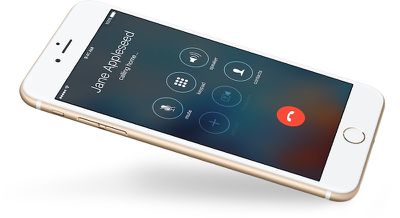
The defect results in multiple issues on affected devices, ranging from a grayed-out speaker button to customers not being heard during phone calls and FaceTime video chats, according to the complaint.
The initial complaint sought an order that would require Apple to repair, recall, and/or replace the affected iPhones and to extend the warranties of the devices for a reasonable period of time. The plaintiffs also sought damages "likely in the millions of dollars" that would be divided among affected customers.
The class action has been consolidated in Northern California court.
"Loop Disease"
In an internal document obtained by MacRumors in May 2018, Apple acknowledged a microphone issue affecting some iPhone 7 and iPhone 7 Plus models. The memo to Apple Stores and Apple Authorized Service Providers described the same audio issues mentioned in the class action lawsuits.
The alleged defect is commonly referred to as "Audio IC issues" and it is also informally known as "Loop Disease" on the web.
Apple's document said service providers could request a "warranty exception" for affected iPhones, which resulted in free repairs for at least some customers, but that abruptly ended in July 2018 after Apple deleted the document.
Since then, some Apple employees have failed to acknowledge the internal guidelines ever existed, resulting in many customers having to pay an out-of-warranty fee of over $300 in the United States for a fix. Of course, some customers have managed to argue their way to a free repair, but mileage varies.
iPhone 7 and iPhone 7 Plus devices still within Apple's limited one-year warranty period or covered by AppleCare+ remain eligible for a free repair, but the audio chip issues usually take time to manifest, and warranty coverage has lapsed on many of the devices since they were released in September 2016.
MacRumors has repeatedly contacted Apple for comment regarding the audio chip issues, but we have never received a response.
The full order on Apple's motion to dismiss is embedded below.
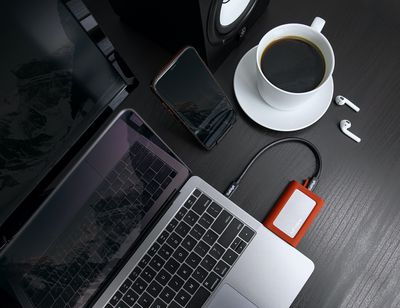
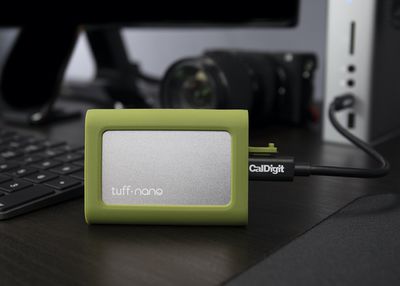
For this week's giveaway, we've teamed up with CalDigit to offer MacRumors readers a chance to win one of the company's 512GB Tuff Nano SSDs.
Priced at $130, CalDigit's Tuff Nano SSDs are designed to be rugged and durable, making them ideal for an on-the-go lifestyle.
The Tuff Nano is CalDigit's smallest SSD, and it fits in the palm of a hand and can be tucked into a pocket. It measures in at just over two inches tall and three inches wide, and it's just a half an inch thick.
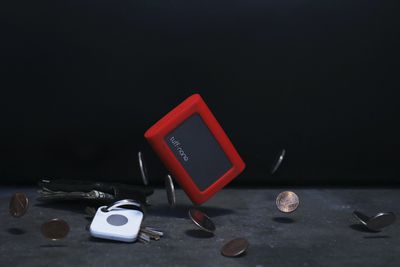
An aluminum chassis offers passive cooling and provides waterproofing, giving the Tuff Nano an IP67 water and dust resistance rating, which means it's dust proof can withstand immersion in water up to a meter deep for 30 minutes.
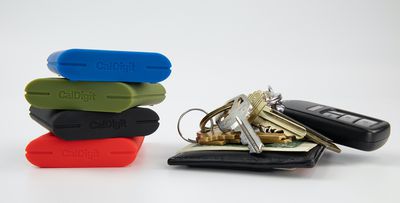
The Tuff Nano is wrapped with a silicone bumper that comes in Tomato Red, Olive Green, Royal Blue, and Charcoal Black, offering protection from drops and bumps. It can survive drops from heights up to three meters, which is close to 10 feet.
Inside the aluminum and silicone enclosure, the Tuff Nano features an NVMe PCIe SSD from Toshiba, capable of read speeds up to 1055MB/s and write speeds up to 900MB/s.
The Tuff Nano, which connects via a waterproofed USB-C port, is compatible with all of Apple's Macs as well as the USB-C iPad Pro and PCs.
We have four Tuff Nano SSDs to give away to MacRumors readers. To enter to win our giveaway, use the Gleam.io widget below and enter an email address. Email addresses will be used solely for contact purposes to reach the winners and send the prizes. You can earn additional entries by subscribing to our weekly newsletter, subscribing to our YouTube channel, following us on Twitter, following us on Instagram, or visiting the MacRumorsFacebook page.
Due to the complexities of international laws regarding giveaways, only U.S. residents who are 18 years or older and Canadian residents (excluding Quebec) who have reached the age of majority in their province or territory are eligible to enter. To offer feedback or get more information on the giveaway restrictions, please refer to our Site Feedback section, as that is where discussion of the rules will be redirected.
The contest will run from today (January 31) at 11:00 a.m. Pacific Time through 11:00 a.m. Pacific Time on February 7. The winners will be chosen randomly on February 7 and will be contacted by email. The winners will have 48 hours to respond and provide a shipping address before new winners are chosen.
Pioneer has long been one of the biggest names in aftermarket car audio, and the company's lineup of NEX receivers offers a terrific option for adding CarPlay and other enhanced functionality to older cars or entry-level models that lack some of the latest technology.
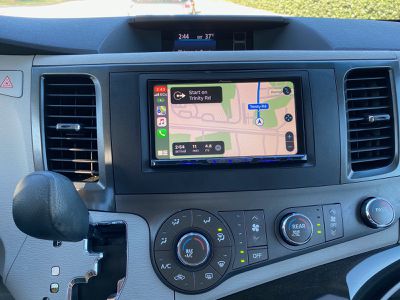
Pioneer's 2019 NEX lineup includes models at a range of price points offering varying feature sets. Several months ago, Pioneer offered me the opportunity to try out the top of the line AVIC-W8500NEX, which offers a nearly 7-inch capacitive touchscreen display with onboard HERE navigation, wired and wireless CarPlay support, a DVD/CD player, and more.
As the top-end model in the lineup, the AVIC-W8500NEX carries a list price of $1200, so it's not necessarily for the budget-conscious customer. You can generally save hundreds of dollars by buying through Amazon sellers and other sources, but many of these are not authorized Pioneer dealers so you do want to be careful about where your unit is coming from.
And the unit itself is not the only item you'll need in order to add this receiver to your car. Anytime you're swapping out the radio system on your vehicle, you'll need a few other accessories like an appropriate wiring harness and dashboard trim plate for your specific vehicle. And depending on any other integration like steering wheel controls and backup camera connections, you may need a few more things.
MacRumors readers have a chance to save up to $409 on a collection of custom configuration 16-inch MacBook Pro models this week, thanks to our new exclusive partnership with Apple reseller Expercom. These notebooks are slight variations on the two base models offered by Apple, with added storage of up to 8TB, more RAM, and improved graphics.
Note: MacRumors is an affiliate partner with Expercom. When you click a link and make a purchase, we may receive a small payment, which helps us keep the site running.
The first model on sale is an upgrade on Apple's $2,399.00 16-inch MacBook Pro with 16GB RAM and a 512GB SSD. Expercom's custom configuration has an upgraded 32GB RAM, 512GB SSD, and AMD Radeon Pro 5300M with 4GB of GDDR6 memory; it's available for $2,597.94 ($201 off of Apple's original price).
The rest of the custom configurations are iterations on Apple's second base model with a 2.3GHz 8-core Intel Core i9 processor, 16GB RAM, a 1TB SSD, and AMD Radeon Pro 5500M with 4GB of GDDR6 memory, which runs for $2,799.00. Expercom's models add 64GB RAM, up to 8TB SSD, and improved graphics with up to 8GB of GDDR6 memory. In total, these prices are the lowest you'll find online for the custom configuration MacBook Pros listed below.
Because they're custom configurations, shipping estimates are also slightly longer than normal, and the notebooks are estimated to be delivered within 10 to 19 business days. Expercom automatically discounts each 16-inch MacBook Pro below Apple's prices on the same custom configurations, but our readers can receive deeper discounts by entering the promo code macrumors at checkout.
Lastly, below you'll find a few sales on the Apple TV 4K and one model of the Apple Watch Series 5. The 32GB Apple TV 4K is on sale for $159, down from $179, representing one of the best prices currently available online for the streaming box. Expercom's deal on the Apple Watch Series 5 is for the 44mm Space Gray Aluminum model at $399, which is also a current low price for this version of the Apple Watch.
"Secret Oops!" by Italian developer MixedBag is this week's addition to Apple Arcade across the iPhone, iPad, Apple TV, and Mac.
When a new threat arises and briefcases start to disappear all over the world, the S.P.Y. Agency sends Special Agent Charles to investigate. To help Charles accomplish his mission, players are tasked with interacting with the virtual world remotely and disabling security systems, deadly traps, and more.
The co-operative, multiplayer game is ideal for parties with family and friends, as up to four people can gather in a room and play together on the same virtual game board using augmented reality based on Apple's ARKit 3.
"Secret Oops!" can be downloaded from the App Store with an Apple Arcade subscription. Apple's gaming service launched in September, providing iPhone, iPad, Apple TV, and Mac users with access to over 100 games with no in-app purchases or ads for $4.99 per month or $49.99 per year in the United States.
As noted on Reddit, Apple recently released a new batch of underwater screensavers for the Apple TV 4K and Apple TV HD.
The new screensavers showcase marine life and ecosystems, ranging from dolphins off the coast of Costa Rica to coral reefs in the Red Sea near Egypt. Other additions display moon jellyfish off the coast of Alaska, waves breaking on the shores of Tahiti, golden cownose rays off the coast of Mexico, and more.
Apple TV displays a screensaver after it has been idle for a short period. To change the number of minutes before a screensaver starts, go to Settings > General > Screen Saver and select Start After. You can also start a screensaver at any time by pressing the Menu button on the Siri Remote while on the tvOS home screen.
A tap on the Siri Remote provides information on where a screensaver was filmed, while a swipe left or right will change the location of the screensaver that is displayed if multiples have been downloaded.
New screensavers can be downloaded daily, weekly, or monthly via Settings > General > Screen Saver > Download New Video. While it is not possible to choose a specific screensaver on the Apple TV, 9to5Mac's Benjamin Mayo maintains a website that showcases all of the available scenes.
Apple is closing in on a series order for a musical comedy starring "Saturday Night Live" cast member Cecily Strong, reports Deadline.
Photo by Marion Curtis/StarPix/Shutterstock
Written by Despicable Me duo Cinco Paul and Ken Daurio, the as-yet untitled comedy series follows a couple on a backpacking trip designed to reinvigorate their relationship when they discover the magical town of Schmigadoon, in which everyone acts as if they're in a studio musical from the 1940s. They then discover that they can’t leave until they find "true love."
Strong will produce as well as star in the series, while Paul will be showrunner and Daurio will serve as consulting producer.
The series has reportedly been in the works at Apple for almost a year. While Strong is thought to be in the final year of her current "Saturday Night Live" contract, her involvement in Apple's comedy series doesn't necessarily mean she's leaving NBC's late-night sketch program.
Earlier this week, Apple announced that it was also nearing a series order for a comedy-drama series starring Rose Byrne. Titled "Physical," the show is set in a 1980s Southern California beach community, in which Byrne plays a housewife who discovers unexpected power in the world of aerobics.
Apple WebKit engineers have put forward a proposal to make one-time passcode SMS messages more secure by developing a standardized format for the two-step verification process, reports ZDNet.
Two-step verification logins require a user's password and another element that only the user would know – in this case, a one-time code sent via text message – to gain access to an online account.
As it stands, these SMS messages can arrive in a variety of formats, making it difficult or impossible for apps and websites to detect them and automatically extract their information.
Apple's proposal has two goals. The first is to introduce a way that one-time passcode SMS messages can be associated with the website, by adding the login URL inside the message itself.
The second goal is to standardize the format of the SMS messages, so that browsers and other apps can identify the incoming message, recognize the URL, and then extract the OTP code for automatic insertion into the appropriate login field on the website.
The idea behind automating OTP entry is that it eliminates the risk of users falling for a scam and entering an OTP code on a phishing site with a different URL.
Apple developers provided the following example of the new format SMS message for OTP codes:
747723 is your WEBSITE authentication code. @website.com #747723
The first line is intended for the user, enabling them to determine the website that the SMS OTP code came from, while the second line is processed by browsers and apps so that they can automatically extract the OTP code and complete the 2FA login operation.
If auto-complete fails, users will be able to check the URL of the website that sent the text against the site they're trying to log in to.
According to the report, Google Chrome engineers are already on board with Apple's proposal, but Mozilla's Firefox team have yet to provide official feedback on the standard.
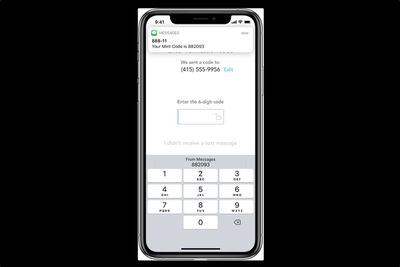
The new proposals would add another layer of security to Apple's existing security code autofill feature, introduced in iOS 12, that can detect one-time passcodes in Messages and display them conveniently above the user's keyboard.












 Note: MacRumors is an affiliate partner with Expercom. When you click a link and make a purchase, we may receive a small payment, which helps us keep the site running.