With the launch of OS X 10.10.3 Yosemite, Apple released its much-anticipated Photos app, which was first announced during its Worldwide Developers Conference in 2014. The Photos for OS X app took several months to complete because it was designed from the ground up to work with OS X Yosemite and integrate with both the Photos for iOS app and iCloud Photo Library.
Because Photos for OS X replaces both of Apple's existing photo apps, Aperture and iPhoto, you're going to need to migrate your Aperture and iPhoto libraries into the new Photos app if you want to be able to use Apple's latest and greatest photo editing tools with your images.
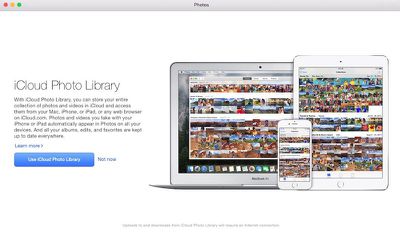
The migration from iPhoto or Aperture to Photos actually happens automatically if you only have one library in your Pictures folder. However, you may have more than one photo library on your Mac if you've split your iPhoto library up or if you use both iPhoto and Aperture, which makes things a little more difficult. You may need some help figuring out how to manually migrate additional libraries, so we've created a handy guide to explain how to get those other libraries into Photos quickly and easily.
One quick note: Before you migrate all of your existing photos into Photos for OS X, make sure you have enough iCloud storage space if you want to take advantage of iCloud Photo Library, which syncs your images across al of your devices. With iCloud Photo Library turned on in the Photos app, all of your images will be uploaded to the cloud, which does eat up your iCloud storage space. You can use Photos without iCloud Photo Library -- just make sure you turn it off in the Preferences menu.

 Following the April 8 public release
  SamMote was recently updated to allow Apple Watch users to control supported Samsung TVs using their wrist. The third-party app, created by developer Eric Degrange and noted by
  Roomie Remote is a Wi-Fi-based universal remote app for home theater and automation that controls thousands of devices like TVs, cable and satellite boxes, receivers, Blu-ray players, lights and thermostats. The app also allows you to control Apple TV. iPhone and iPad versions of the app have been available since February 2012, and earlier this week the app was updated with Apple Watch support as well. Roomie Remote works with a wide variety of devices, but is


 Apple CEO Tim Cook has made TIME's
 Apple has quietly updated the