YouTube recently began rolling out support for high dynamic range video content on iPhone X, as noted by users on the MacRumors forums and Reddit. HDR videos provide a broader range of colors and luminance compared to sub-HDR content, and the format also supports quality video playback on a wide variety of screen sizes.
For iOS users, YouTube videos in HDR can be viewed on the iPhone X, but the feature does not yet appear to be working on the latest iPad Pro models. YouTube has many HDR-supported videos on its site, with dedicated channels like The HDR Channel providing videos for you to watch in HDR on iOS. To make sure of the quality of playback find a video to play, then tap anywhere on the video itself, tap the three dots in the top right-hand corner of the screen, tap "Quality," and then make sure it reads 1080p60 HDR.
Apple debuted HDR support last year with the "Super Retina" display in the iPhone X, which became the first HDR OLED display incorporated into one of Apple's smartphones. Apple also lists the iPhone 8 and iPhone 8 Plus as supporting HDR, but the displays for these devices are not the same as the Super Retina display on iPhone X, so any HDR content played on the 8 or 8 Plus isn't true HDR.
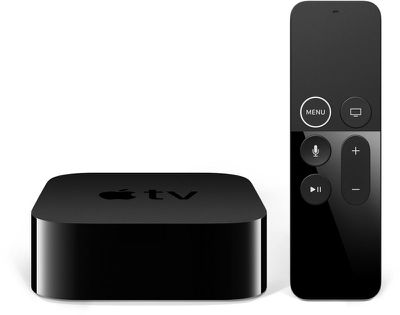
On the iTunes Movies Store on Apple TV 4K, select films also support 4K, HDR10, and Dolby Vision when paired with compatible 4K television sets. Although YouTube recently updated its Apple TV app and listed a few videos as "4K," the app still has yet to support true 4K. When viewing details about a video, maximum available resolution is still listed as 1920 x 1080, while 4K resolution is 3840 x 2160.
According to the smartphone industry on May 9, Apple is expected to load its next 6.1-inch iPhone model with an MLCD+ display which LG used in its G7 ThinQ smartphone. The MLCD+ display realizes a bright screen with less power consumption than the IPS LCD display.
Whereas a traditional LCD screen has three sub-pixels, forming a red, blue, and green stripe, MLCD+ screens have a fourth white sub-pixel for increased brightness, yet with lower power consumption than an IPS LCD panel. LG's G7 has a peak brightness of 1,000 nits, for example, compared to between 625 nits and 804 nits on the iPhone X.
Like the OLED display on the iPhone X, MLCD+ screens can also display 100 percent of the wide DCI-P3 color gamut for improved color accuracy. The panel in the G7 is capable of 10-bit color depth, so if Apple used this technology, the 6.1-inch iPhone could be more compliant with some HDR standards.
Rumors suggest the 6.1-inch iPhone will essentially be a lower-priced iPhone X, achieved through some cost-cutting design compromises, including the lack of an OLED display. Based on this report, however, it sounds like the device could still have a better display than the iPhone 8 and iPhone 8 Plus.
Apple has ditched its plans to build a $1 billion data center in Ireland because of continual delays in the approval process chiefly brought about by planning appeals by local residents (via Reuters).
Apple had been trying to get its $1 billion data center in County Galway, Ireland built for over three years, but has experienced pushback from individuals and organizations highlighting environmental protection issues.
Those against Apple's plans claimed a data center could have negative effects on local animal populations, while potential flooding concerns on a neighboring golf course were also raised. The planned site's proximity to a local nuclear power plant was later used to bring up new objections to the site's construction, despite the plant having been shut down for years.
In October 2017, Apple finally won approval for construction by the Irish High Court, after an appeal by two individuals against the decision was dismissed. However, the appellants decided to take their case to the country's Supreme Court, and while that hearing was due to go ahead on Thursday, Apple appears to have already decided to give up its fight to get the go-ahead for the data center.
"Despite our best efforts, delays in the approval process have forced us to make other plans and we will not be able to move forward with the data centre," Apple said in a statement ahead of the Supreme Court heading on Thursday.
"While disappointing, this setback will not dampen our enthusiasm for future projects in Ireland as our business continues to grow," the company said, citing plans to expand its European headquarters in County Cork where it employs over 6,000 people.
Apple's decision to cancel its plans is a blow for the Irish government, which is seeking to boost the country's economy through foreign investments. According to Reuters, the state is in the process of changing its planning laws to include data centers as "strategic infrastructure", which would allow them to get through the planning process much more quickly in future.
"There is no disputing that Apple's decision is very disappointing, particularly for Athenry and the West of Ireland," Ireland's Minister for Business and Enterprise Heather Humphreys said in a statement.
"The Government did everything it could to support this investment... These delays have, if nothing else, underlined our need to make the state’s planning and legal processes more efficient."
Apple announced in July that it would spend $921 million on a second data center in Denmark run entirely on renewable energy. Apple said the new data center would begin operations in the second quarter of 2019 and would power its online services, including the likes of iMessage, Siri, Maps, and the App Store.
Google yesterday introduced the newest version of Android, Android P, at its Google I/O developer conference held in Mountain View, California. Android P includes a few enticing features like a new Dashboard for monitoring usage and an adaptive battery feature for improving battery life, but what was of interest to iPhone users was the new gesture system.
Android P adopts a new gesture-based system interface that's reminiscent of the interface of the iPhone X, so we decided to download the Android P beta to check it out for ourselves.
For years, Android has used a navigation system that focuses on three buttons: home, back, and multitasking. That's gone in Android P, having been replaced with a small oblong button at the bottom of the display that will be familiar to iPhone X users.
Swiping up on the button brings up a card-like interface with an app overview that includes a search bar, your recently used apps, and five predicted apps, while a longer swipe (or a second swipe) brings up the All Apps screen where you can access all of the apps installed on an Android device.
As on the iPhone X, you can use the swipe up gesture from anywhere in the Android operating system, regardless of which app is being used, while a tap goes to the Home screen. A left or right swipe, meanwhile, initiates a "Quick Scrub" gesture that lets you swap between your recently used apps.
The iPhone X's gesture system is intuitive and easy to use, so it's no surprise that Google opted to introduce a similar design, and it's the natural evolution for controlling a smartphone without traditional buttons.
In addition to adopting a swipe-based interface, Android P has some other neat features, a few of which we may see in some form in iOS 12. A new Android Dashboard, for example, is designed to tell you how much time you're spending on your device and in apps in the name of digital health, something that Apple is also expected to focus on this year.
A new Do Not Disturb feature called "Shush" automatically silences Android devices when placed facedown, while a Wind Down option lets Android users set a specific bed time that enables Do Not Disturb and turns the entire phone's interface gray to discourage further use at night.
Google is also introducing a new Adaptive Battery feature that maximizes battery power by prioritizing the apps you're most likely to use next, while a new Auto Brightness feature modifies screen brightness based on your own personal preferences. Some of these features haven't been enabled just yet on all Android devices that are eligible for the beta, but they should be coming soon.
What do you think of the new Android P operating system? Are there features here you would like to see Apple enable in iOS? Let us know in the comments.
Apple is planning to offer subscriptions to select streaming TV and video services through its dedicated TV app that's available on the iPhone, iPad, and Apple TV, reports Bloomberg.
The TV app already aggregates television and movie content from a range of different providers into one easy-to-access place, so offering subscriptions is a natural evolution of Apple's efforts to simplify and improve the television watching experience.
Right now, while you can access content from hundreds of apps and cable providers, many require a premium subscription that must be obtained directly from the provider. Services like HBO, Showtime, Starz, Netflix, and more, for example, all require subscriptions, which must be purchased from within a third-party app or website.
Apple is going to offer the TV app subscription options as an alternative to requiring customers to subscribe to various video services from multiple apps and content providers. It will streamline content acquisition for customers, but it will also bolster the company's rapidly growing services business.
Apple is said to be planning to introduce the new subscription feature "in the next year."
There's no word on how Apple's own original programming efforts will factor in to the subscription service. Apple has more than a dozen television shows in the works, and at the current time, it's still unclear whether Apple is building a dedicated service for the content or if it will debut on iTunes or Apple Music.
iPhone users who have been waiting to take advantage of Apple's discounted battery replacement offer may be in luck.
Apple has confirmed that "service inventory of all iPhone replacement batteries is now available without delay," in an internal memo distributed to Apple Stores and its network of Apple Authorized Service Providers on April 27. The document was obtained by MacRumors from a reliable source.
What this means is that Apple Stores and Apple Authorized Service Providers can now order iPhone replacement batteries from Apple and receive them without facing extended shipping delays, but that doesn't necessarily mean that every Apple Store or authorized repair shop will have supply available right away.
The information that Apple shared in this internal memo likely applies worldwide, but as with any supply-demand situation, availability of replacement batteries will likely vary by Apple Store and region. Apple's support website still notes that the replacement process may take up to five business days.
Apple previously said that replacement batteries for select iPhone models may be in short supply until late March or early April, and that certainly proved to be the case, as some but not all customers to date have been required to wait up to several weeks for their iPhones to be serviced and returned.
In fact, multiple sources have informed MacRumors that Apple hired third-party contractors, or reassigned existing AppleCare employees in some cases, to help clear the backlog of iPhone battery replacements at some of its stores.
Apple lowered its battery replacement fee to $29 in the United States in late December for the iPhone 6 and newer, as part of an apology over its lack of transparency about slowing down some older iPhone models to prevent unexpected shutdowns. The discount varies in other countries and is available until the end of 2018.
Valve today announced the upcoming launch of the Steam Link app, which is designed to allow Steam users to play Steam games on the iPhone, iPad, and Apple TV using either a 5GHz network or a wired Ethernet connection to a host PC or Mac.
Because of the requirement to stream via an Ethernet connection or a 5GHz network, it won't be possible to play Steam content on the go, but it will be handy for accessing a Steam library while at home on alternate devices or while at a friend's house or another location with a high-speed wireless connection.
Steam Link will launch during the week of May 21, and in addition to being compatible with Apple devices, it will also be available for Android devices that include phones, tablets, and Android-enabled TVs. Steam Link has previously been available for dedicated Steam Link peripherals and some Samsung TV sets.
The Steam Link app will include support for both the Steam Controller and Made for iPhone controllers.
Steam also plans to introduce a Steam Video app later this summer, which will let users play Steam movies and shows on their Android and iOS devices using a Wi-Fi or LTE connection. Valve has been offering movies and TV show purchases for some time now, and that content is currently not available on mobile devices.
Hulu today announced the launch of a Live TV Guide that's designed to allow subscribers to its live television service to access a dynamic list of the television programs that are currently available to watch.
Hulu first introduced a Live TV guide option on the web as a test project last fall, and promised an interface redesign with the Live TV guide back at CES in January. As of this morning, Hulu's new guide and dedicated live destination is rolling out to the fourth and fifth-generation Apple TV, the Xbox One, the Amazon Fire TV, and the Nintendo Switch.
On these devices, live TV subscribers will be able to instantly access live TV using the new lightning bolt icon that's located to the right of the home icon. Selecting this icon will bring users to live playback on their most recently watched channel.
While watching live programming, Hulu subscribers can access an enhanced guide with details on what's currently on and what's coming up next. Users can customize the look of the guide by choosing to sort via "All Channels" or "Recent Channels," which lists the last 10 watched channels.
Using the guide, subscribers are also able to record any live or upcoming programming or start a program from the beginning if it's available for DVR recording. Hulu has designed the guide to let subscribers navigate between watching now, browsing, or recording a show for later all with a few clicks.
Hulu says the live TV destination and guide will roll out to additional devices in the near future.
Apple's design chief Jony Ive, who is responsible for overseeing the creation and design language of almost all of Apple's products, even down to its stores and campuses, recently sat down for an interview with Benjamin Clymer, the founder of watch-focused site Hodinkee.
Ive shared details on the creation process behind the Apple Watch, some of Apple's inspiration for the device, and the experts the company consulted with, along with background on the first watches he purchased, Apple's focus on health, what he finds inspiring, and more.
Ive's first watch of note was an Omega Speedmaster, which he says he bought in 1992 on a trip to Kowloon. Ive says he was "utterly seduced" by its use in space exploration. "Somehow it epitomizes the optimism, ambition, and courage of invention," he said. Ive said he also admires the Nautilus by Patek Philippe, which he describes as a "bizarre, bizarre object."
According to Ive, Apple CEO Steve Jobs had no particular interest in watches, and so early discussions for the watch didn't take place until 2012, a few months after Jobs passed away. The death, said Ive, caused Apple to "think about where we wanted to go" and what trajectory Apple was on as a company. Apple was also exploring its contribution to its users. "I think, incontrovertibly, that Apple since the 1970s has made difficult-to-comprehend and inaccessible technology easy to understand and accessible."
The Apple Watch, with its focus on the personal, was the next logical step in device development, and its creation was different from many of the products that came before it because there were existing references. "Normally there are no parallel products from which to learn," said Ive. Given the historical context of the watch, though, Apple did something "highly unusual" and consulted a range of experts.
Ive says Apple asked seven experts for their assistance with the Apple Watch while it was still in development, and he provided details to Hodinkee. Apple consulted Will Andrewes (a horologist with 40 years of expertise), Jonathan Betts (Curator Emeritus at the Royal Observatory), Dominique Fléchon (a specialist in antiquarian horology), Grégory Gardinetti (Fondation de la Haute Horlogerie historian), Claudia Hammond (a writer and psychology lecturer), David Rooney (Keeper of Technologies and Engineering at the London Science Museum), and Chris Lintott (an astrophysicist at the University of Oxford). Marc Newson, who Ive said is his best friend, was also involved in the Apple Watch's development as he had designed several watches in the past.
Apple wasn't aiming to solve a particular problem with the Apple Watch, according to Ive. It was more so a "matter of optimization - of opportunity." In the vein of "opportunity" Ive also alluded to future Apple Watch development and how much more impressive the idea of opportunity is to him because he knows the technology Apple has in development.
You can look at Apple Watch in terms of trade docs - what it does, etcetera - or you can look at what would be possible if you knew that you had this much technology with you at all times. Many of us have our phones with us all the time, but they aren't connected to you. Imagine having something this powerful with you at all times, and what opportunities that might present to the user.
That the opportunity is phenomenal. Particularly when [you] don't understand just where we are today in terms of technology and capability, but where we are headed.
Despite the early input from horological experts and the storied history of the watch, Ive says there were no homages in the Apple Watch. "Everything served a purpose," said Ive. "Everything we did was in the pursuit of what we thought was the best solution." Ive used the digital crown as an example, which he said "took a modicum of courage" to implement with Apple's typical disposition towards "direct manipulation."
According to Ive, one of Apple's aims with the Apple Watch was to "broaden how relevant we were," which is why the company explored new materials like the gold and ceramic that's been used for higher-end Edition watches. Ive says that working in gold and ceramic was "purposeful" for expanding "who Apple is" and from a materials science perspective as it will help with the development of future products.
Health-based capabilities were "an early and significant focus" of the Apple Watch, and Ive says that feedback from customers who have had health benefits from the Apple Watch has been hugely motivating. In fact, he says that he finds customer feedback much more motivating than Apple's new position as the largest watchmaker by revenue.
I am honestly far more motivated by hearing from one customer who believes that the Watch has materially improved his or her life. It's a privilege to work on products that people develop an affection for and that become an important and positive part of their daily lives.
The full Ive interview, which goes into much greater depth on many topics surrounding Apple Watch development, can be read over at Hodinkee.
Signal's Mac app displays recently received messages in the Notification Center on macOS, and this feature could compromise a user's disappearing private messages, as discovered by security researcher Alec Muffett and reported by Motherboard.
One of Signal's main advantages is its ability to send disappearing messages, so that after a predetermined amount of time the message is deleted from the app.
Muffett pointed out on Twitter this week that Signal's default Mac app settings somewhat defy this security measure due to the way Macs handle notifications. So, even if you send a self-destructing message within the Signal app, the messages remain on the recipient's Mac Notification Center, displaying your name and message details. Muffett was running macOS 10.13.4 and Signal version 1.9.0.
#HEADSUP: #Security Issue in #Signal. If you are using the @signalapp desktop app for Mac, check your notifications bar; messages get copied there and they seem to persist — even if they are "disappearing" messages which have been deleted/expunged from the app. pic.twitter.com/CVVi7rfLoY
— Alec Muffett (@AlecMuffett) May 8, 2018
Mac security researcher Patrick Wardle then investigated the issue further, discovering that the "deleted" Signal messages that remain in the Notification Center are saved on the Mac's disk inside the operating system. While this is true of any app that displays notifications, it's particularly troublesome for Signal users in need of high-level security, like government workers or journalists.
Any malicious third parties would still need to get their hands on your Mac to get into your message history, so as Motherboard pointed out, "this is not a major threat for most people." Still, this could be a major security risk for high-level Signal users, since this means that any disappearing messages that popped up in Notification Center can be recovered later, "even after they are gone within the Signal app."
Wardle summed up his findings:
In short, anything that gets displayed as a notification (yes, including 'disappearing' Signal messages) in the macOS Notification Center, is recorded by the OS.
If the application wants the item to be removed from the Notification Center, it must ensure that the alert is dismissed by the user or programmatically! However, it is not clear that this also 'expunges' the notifications (and the their contents) from the notification database...i'm guessing not! If this is the case, Signal may have to avoid generating notifications (containing the message body) for disappearing messages...
Wardle said that Signal's iOS app does not appear to have a similar issue at this time, although the app "should be investigated." Of course, any Signal Mac user who is worried about potential privacy risks can navigate to Signal's Preferences menu on the top-left corner of the screen when the app is open, click Notifications, and "Disable notifications."
Apple has applied to participate in a pilot program that would allow the company to operate drones in ways that are typically restricted by the Federal Aviation Administration in the United States, according to Reuters.
DJI Mavic Air
The report states that the U.S. Department of Transportation will announce 10 winning state or local government bodies for inclusion in the program today, and each has partnered with companies who will play a role in the tests. At least 200 companies are said to be vying to be part of the program.
The initiative, introduced by the U.S. government last year, will allow for a larger range of testing, including flying drones at night, over people, and beyond an operator's line of sight, within the United States.
The list of winners, which appears to have been determined, is said to include companies that plan to test drones for delivering packages, environmental monitoring, precision agriculture, pipeline oversight, and for various uses at airports, but it's unclear what Apple's intentions will be if selected.
Update: The FAA has revealed the 10 government agencies who will conduct flight tests, including North Carolina's Department of Transportation. Apple will reportedly be a partner in North Carolina's program, and plans to use drones to capture aerial images to improve Apple Maps.
On the @Reuters wire now - Apple is a partner in North Carolina's drone testing pilot and plans to use drones to capture aerial images to improve Apple Maps. Apple will blur things like faces and license plate numbers to protect people's privacy, the comapny says. pic.twitter.com/nWmEpZTt2g
— Stephen Nellis (@StephenNellis) May 9, 2018
Yet another Unicode bug has been discovered that is capable of crashing apps and operating systems, ranging from WhatsApp on Android to iMessage on iOS. We won't share the exact string, to prevent it from spreading further, but it includes black dot (⚫️) and pointing left (👈) emojis plus other hidden characters.
Simply put, this particular Unicode string cannot be rendered properly and leads to system crashing. In general, when the bug affects iMessage, the issue can be resolved by deleting the conversation containing the problematic message. The following steps work on iPhone 6s and newer, excluding the iPhone SE:
Ask Siri to send a reply to the sender of the message as many times as necessary until the bubble containing the Unicode string is bumped off the visible part of the conversation.
Open the Messages app.
Tap on the back arrow in the top-left corner to return to the conversation list.
Tap on Edit in the top-left corner of the conversation list.
Tap the circle to the left of the conversation containing the problematic message. A blue checkmark will appear.
Tap on Delete in the bottom-right corner.
It may also be possible to delete the problematic message on another device running the iOS 11.4 or macOS 10.13.5 betas via Messages on iCloud.
While this latest Unicode bug was discovered last week, it is only now beginning to receive widespread attention in the Apple community, after it was highlighted on a few popular YouTube channels. We've elected not to provide any links, but the specific string is easily Google-able for those interested.
The bug affects both iOS 11.3 and iOS 11.4 beta, and many other software versions, platforms, and devices. Apple has yet to issue a fix, but it will likely release software updates to address the problem soon.
Jet.com today became an Apple Authorized Reseller, which allows the Walmart-owned marketplace to sell brand-new Apple products like the iPad, MacBook, Apple Watch Series 3, and much more (via Business Insider). In terms of prices, Jet isn't offering many notable discounts on Apple's devices, with most products -- like Beats headphones and 2018 iPad -- matching the original retail prices at Apple.com.
Note: MacRumors is an affiliate partner with Jet.com. When you click a link and make a purchase, we may receive a small payment, which helps us keep the site running. However, Jet's entry into the Apple Authorized Reseller program comes with an offer of up to $200 off when you buy select Apple products and accessories together. The bundles are pre-made by Jet, and offer combos like a MacBook Pro (2.3GHz, 8GB RAM, 128GB HD), Beats Studio3 Wireless Headphones, and Magic Mouse 2 for $1,577.82, down from $1,727.95. One bundle climbs to $300 off a 15-inch MacBook Pro (2.9 GHz, 16GB RAM, 512GB HD) with the same accessories added in for $2,927.68, down from $3,227.95.
Apple Watch Series 3 models are bundled with PowerBeats3 Wireless Headphones, with offers like the 38mm GPS Aluminum Apple Watch and Powerbeats3 priced at $478.76, down from $528.95. Even with the bundle discount, it would still be cheaper to purchase the Apple Watch Series 3 and Powerbeats3 separately at places like Best Buy, where they are currently discounted to $279.00 and $119.99, respectively. All of Jet's bundle prices will last through May 23.
There are a handful of featured Apple deals matching discounts at other places, like the Apple Watch Series 1 for $149.00 in 38mm Aluminum and $179.00 in 42mm Aluminum, similar to the current prices at Jet's parent company Walmart. An iPad mini 4 (128GB) discount to $299.99 matches Best Buy and Walmart's current price, while a sale on the 5th generation iPad (32GB) also matches Walmart's price of $249.00, while beating B&H Photo ($269) and Best Buy ($314).
When ordering from Jet, the retailer offers 2-day delivery on thousands of items, and free shipping on orders over $35. Besides electronics, Jet features a wide variety of products, from groceries to household cleaners, patio and garden furniture, small appliances, and more. Jet launched in 2015, and in 2016 Walmart acquired the company and it became a subsidiary of Walmart later that year.
The Ralph Lauren Corporation today announced that it intends to add Angela Ahrendts to the company's Board of Directors this August. Along with Ahrendts, Qurate Retail CEO Michael George will be added to the board, bringing the number of directors to 13.
Ahrendts joined Apple as the Senior Vice President of Retail in May 2014, where she now spearheads the company's retail strategy, contributes to real estate and development areas, and oversees the operation of Apple's physical stores around the world. Prior to joining Apple, she was CEO of Burberry, Executive Vice President at Liz Claiborne, and President of Donna Karan International.
In joining Ralph Lauren's board, Lauren himself said one of the reasons the company chose Ahrendts was due to her "deep expertise in luxury retail."
“I am delighted to welcome Angela and Mike to the Board of Directors,” said Mr. Ralph Lauren, Executive Chairman and Chief Creative Officer. “Angela is an industry leader and innovator with deep expertise in luxury retail and an outstanding track record of growing global brands. Mike brings invaluable experience as a senior leader and board member, helping companies drive consumer engagement and growth. Their counsel will be incredibly valuable as we continue to build the future for our iconic brand.”
Ms. Ahrendts said, “I have admired Ralph and been inspired by his pure global lifestyle vision for many years. It is an honor to join this Board as he and Patrice continue to evolve and expand his incredible aesthetic.”
Last September, Ahrendts climbed to the 13th spot on Fortune's "Most Powerful Women" list for 2017, rising from 14th in 2016 and 16th in 2015. During her time with Apple, she has launched the company's new "Today at Apple" retail initiative, offering a range of classes on coding, art, music, design, and photography at Apple stores around the world. Ultimately, Ahrendt's goal with the new program is to change the perception of Apple stores as "forums" or "town squares," and not places where you go to just shop.
While George has been appointed to the board effective today, May 9, Ahrendts will be nominated for election at the company's annual stockholders meeting in August. Ahrendts will retain her duties at Apple following her appointment to Ralph Lauren's board.
Yahoo this week began testing a new messaging app on iOS and Android called "Squirrel," aimed at organizing private group chats with friends, family members, and work acquaintances. The app's main feature is that group access is private and people can only be added through invitation links (via TechCrunch).
Squirrel looks visually similar to apps like Slack and Discord, offering groups access to a "Main Room," where everyone can meet up and chat, and then there's an option to create side rooms for more specific topics. These can potentially include "Secret Rooms" for chats hidden from the main group and one-on-one threads. Users in all rooms can share photos, documents, or links in chats, as well as create custom reactions.
Users can mute rooms they don't have any interest in, and administrators can send "blasts" to all users that flag priority messages. Whenever someone mentions your name, a separate Activity view will accumulate these messages so it's easier to scroll through and get caught up with the conversation.
Yahoo originally debuted its Yahoo Messenger app on the iOS App Store [Direct Link] in April 2009, giving users the ability to instant message their contacts when away from their computer. In the years since, messaging apps like Apple's iMessage, Facebook Messenger, and others have surged in popularity and caused users to leave Yahoo's platform for ones more popular among their own friend groups. Today, Yahoo Messenger is #167 on the App Store's most-downloaded Social Networking app list.
According to Yahoo parent company Oath, one of the main reasons for Squirrel's creation is "improving group communication in everyday life."
“At Oath, we’re always looking for creative ways to add value to our members’ lives,” a spokesperson said in an emailed statement. “We listen closely and frequently test new product ideas based on research and feedback. Right now we’re experimenting with a new invite-only messaging app focused on improving group communication in everyday life.”
Since Squirrel is invite-only, to gain access you'll have to ask someone who already has it to send you an invite to a group. According to TechCrunch, "the ability to kick off a conversation group is also currently in invitation-only mode." The iOS app is compatible with iPhone, iPad, and iPod touch [Direct Link].
Apple has stepped up its policy of removing apps from the App Store that violate its guidelines by sharing location data with third parties without explicit consent.
As noted by 9to5Mac, Apple appears to have ratcheted up its software scrutiny in the last few days by informing affected developers by email that upon re-evaluation, their app violates two sections of the App Store Review Guidelines and will therefore be removed from sale:
Legal - 5.11 & Legal 5.1.2 The app transmits user location data to third parties without explicit consent from the users and for unapproved purposes.
Apple's contention is that the apps in question don't provide enough clear information to users regarding what their data is used for and how it's shared once it's been collected. There also seems to be concern that the data collection isn't specifically for improving the user experience or enhancing app performance.
The company's retrospective action is likely related to General Data Protection Regulation (GDPR), which sets the rules for how businesses manage and share the personal data of customers.
GDPR is a European Union rule to protect EU citizens, but as with its website cookie consent policy, basically every company with an online presence is affected by the law. An updated version of the GDPR goes into effect on May 25 to underline this applicability. Interested readers can find a summary of the key changes to the regulations here.
Stationery Pad is a handy way to nix a step in your workflow if you regularly use document templates on your Mac. The long-standing Finder feature essentially tells a file's parent application to open a copy of it by default, ensuring that the original file remains unedited.
Stationery Pad doesn't get much attention these days, but it's a neat alternative to repeatedly editing templates and using the "Save As..." command, which can lead to overwriting the original file if you're not too careful.
Almost any file type can be defined as a template with Stationery Pad – it could be used to streamline common Photoshop jobs, create skeleton HTML/CSS files, or help with Word document invoicing. To make use of Stationery Pad, create the file you want to use as a template, then follow the steps below.
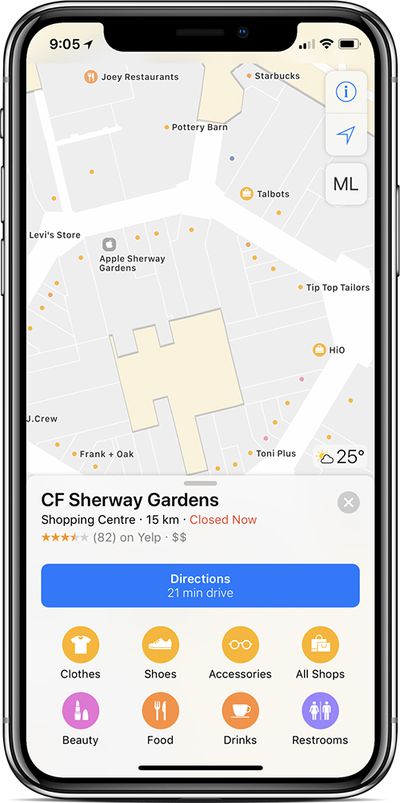
Apple recently expanded the indoor mapping feature first introduced in iOS 11 to new locations, including the Sydney Kingsford Smith Airport and indoor malls located in Dallas and Houston, Texas. The additions were noted on Apple's Feature Availability page for iOS 11.
At launch, indoor maps were only available in a handful of airports and malls around the world, but Apple has been steadily adding additional mall and airport maps.
Indoor maps are now available in more than 35 of the largest airports in the world, while indoor mall maps are available in a select number of cities in the United States and Europe, including Baltimore, Boston, Chicago, Dallas, Houston, London, Los Angeles, New York, Philadelphia, San Jose, San Francisco, and Washington, DC.
Apple's indoor mapping feature provides full layouts of each mall or airport location with icons for restaurants, elevators, bathrooms, shops, and other notable landmarks. Different floors are clearly marked, making it easy to navigate through unknown areas.
At airports, Maps users can see the location of gates, terminals security checkpoints, check-in desks, and baggage claim areas, which can be helpful when in a new location. As for malls, stores can be filtered by categories like clothes, beauty, food, and shoes, making it quicker to find what you're looking for.
A full list of all of the airports and mall locations where the Apple Maps indoor mapping feature can be used is available on Apple's website.