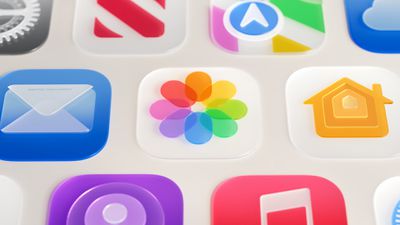
Apple has redesigned its first-party app icons for the second year running, with iOS 27 addressing blurriness complaints about iOS 26 by integrating additional layers of Liquid Glass directly into the icon artwork itself.
When Apple introduced Liquid Glass with iOS 26 last year, it redesigned its entire lineup of first-party app icons to give them a layered glass look with subtle depth. The approach drew criticism from some users who found the results blurry, and in some cases, a heavy specular sheen sat over the icon artwork, obscuring detail and giving icons a washed-out appearance.
The shimmering motion effect that animated icons dynamically as the device was tilted also caused a widely reported optical illusion, with asymmetric highlights in icon corners tricking the eye into reading icons as slanted. With iOS 27, Apple is taking the icon design further rather than rolling it back.
The core change to how icons are constructed is the addition of multiple distinct Liquid Glass layers built into each icon's artwork, rather than the thick glass look applied uniformly over the top in iOS 26. Apple says the new rendering pipeline adds more visual separation between layers, resulting in sharper edges and more defined refractions.
Not totally sold on the dark specular highlights, but overall it's a huge upgrade for Apple's app icons. pic.twitter.com/W5hEkGh6sd
— Andreas Storm (@avstorm) June 10, 2026
In practice, artwork is now considerably more visible and detailed with higher contrast and greater definition, with the glass look functioning as a refined finish rather than a dominant overlay. The refraction effects between layers are also selectively applied.
The motion-based shimmer has also been significantly reworked. The gyroscopic specular highlight effect introduced with iOS 26 appears to have been removed entirely in the first iOS 27 developer beta. Icons still feature highlights around their edges, now positioned at the top and bottom, but they no longer shift with device movement or produce the tilting illusion, and are much subtler overall.
Icon Composer, Apple's dedicated app icon design tool, has been updated to support building icons from multiple layers of Liquid Glass. New annotation features let developers add refraction effects or fine-tune content effects, while an interactive preview shows how a designed icon will render.
The updated icons are part of broader Liquid Glass refinements Apple announced at WWDC 2026, which also include a new system-wide transparency slider and improved material diffusion for better readability. For a full breakdown of all the Liquid Glass changes in iOS 27, see our dedicated article.
Starting with iOS 27, the Apple Wallet app will offer enhanced digital keys at participating hotels and resorts. Apple said you can view more details about your trips, receive updates about booked activities, access services available during your stay, and more.
Apple did not share a list of hotels and resorts that will be offering these upgraded keys, but TechRadar reported that Walt Disney World Resort plans to add support for the improved feature by the time iOS 27 is released in September.
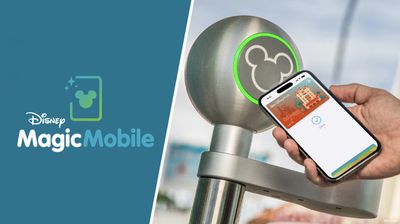
You can already add your Disney World tickets to Apple Wallet through the My Disney Experience app, and then simply tap your iPhone or Apple Watch on the scanners located at the entrances to parks and Lightning Lane queues for rides. On iOS 27, though, the report said this MagicMobile experience will get better in several ways.
According to the report, tapping on your MagicMobile pass in the Wallet app will allow you to view more information, including your park reservations for the current day and future days, your Lightning Lane ride selections, special ticketed events (such as After Hours), dining reservations, and more. The enhanced passes are dynamic, meaning that the information shown is updated automatically throughout the day.
You will still need to use the My Disney Experience app to actually make your Lightning Lane selections, dining reservations, and so forth.
These enhancements will make Apple Wallet more useful for Disney World visits — especially if someone else in your group is managing your day.
Resorts World Las Vegas also plans to offer enhanced Apple Wallet keys on iOS 27, per the report. The property has three hotels operated by Hilton.
Amazon Prime Day is just one week away, and early deals are already available on charging accessories, monitors, and more. Prime Day 2026 is set to officially kick off on June 23, and this year it will run for four days and end on June 26.
Note: MacRumors is an affiliate partner with some of these vendors. When you click a link and make a purchase, we may receive a small payment, which helps us keep the site running.
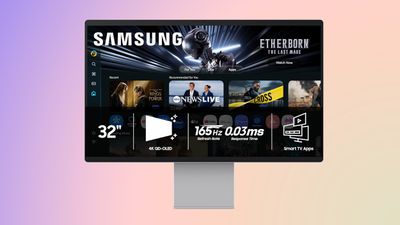
Highlights of early Prime Day sales include a handful of monitor deals, like the 32-inch Samsung OLED M90SF Smart Monitor for $1,199.99, down from $1,599.99, which is a match of the best-ever price on this model. Below you'll also find great deals on monitors from Dell and LG.
These new deals join ongoing highlights of early Prime Day deals, including Anker's Prime 3-in-1 Wireless Charging Station, available for $109.99 on Amazon this week, down from $149.99. This is one of Anker's newest accessories, and Amazon's sale today is a solid second-best price on the device.
We're also tracking big discounts from brands like Sony, Samsung, Sonos, and more in the lists below. Accessories on sale include USB-C wall chargers, MagSafe-compatible wireless chargers, portable batteries, headphones, and soundbars.
Lastly, and perhaps most importantly, Amazon Prime Day requires you to have an Amazon Prime membership to take advantage of many of the discounts. Amazon Prime costs $14.99 per month or $139.00 per year, and it comes with a 30-day free trial for new subscribers.
Special for 2026, Amazon is also offering 50% off Prime for Young Adults right now. Prime for Young Adults is a discounted Prime membership for anyone age 18-24 that offers all of the Prime benefits at $69.00 per year, half of the price of regular Prime.
If you're on the hunt for more discounts, be sure to visit our Apple Deals roundup where we recap the best Apple-related bargains of the past week.
Deals Newsletter
Interested in hearing more about the best deals you can find in 2026? Sign up for our Deals Newsletter and we'll keep you updated so you don't miss the biggest deals of the season!
Code strings discovered in iOS 27 suggest that Apple may be planning to show users a break reminder after especially long Siri AI conversations.
Strings of code in the first developer beta of iOS 27 refer to a "Take a Break Message" that would remind users they have been in a conversation for an extended period and that Siri is not a real person. Based on the shared code, the reminder appears to read: "You've been in this conversation for [n] hours - consider taking a break. Siri is not a person, but will be here when you're ready to continue."
Where screen time tools typically focus on usage duration, Apple appears to be specifically addressing the risk of parasocial attachment to AI, building in a prompt that explicitly reframes Siri as a tool rather than a companion. The concern is part of a broader conversation across the AI industry about unhealthy usage patterns. Both OpenAI and Google have moved to add guardrails to their chatbot products, and Anthropic has been spotted nudging Claude users toward healthier habits after long sessions.
Apple touched on several privacy and responsibility considerations for Siri AI during last week's WWDC keynote, but did not address the question of extended conversations. The existence of these code strings suggests the company is thinking about the issue behind the scenes.
It is not yet clear how Apple would trigger the reminder. The code does not appear to specify a fixed time threshold, suggesting the company may use conversation length in combination with other signals to determine when to display the message.
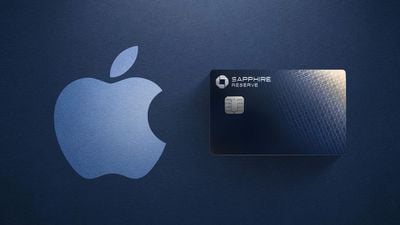
It turns out that the Apple One discount now extends to Chase's premium Sapphire Reserve credit card too ($795 annual fee). The Sapphire Reserve has offered free subscriptions to both Apple TV and Apple Music since last year, but now cardholders can receive a combined $15/month discount on an Apple One subscription instead.
For example, a Reddit user showed that their Apple One Premier plan has been discounted to $21.95 per month, down from the regular price of $37.95 per month. This is actually a $16/month discount, which is slightly higher than advertised.
You can manage your Apple perks on Chase.com or in the Chase Mobile app. Make sure to read the fine print on Chase's Sapphire Reserve page.
Back in March with the release of macOS Tahoe 26.4, Apple introduced a new security popup that warns Mac users when they paste a command into the Terminal app that could be harmful. Apple has now published a support document explaining why the popup warning appears.
Scammers often encourage pasting text into Terminal to try and harm your Mac or compromise your privacy.
These instructions are commonly offered via websites, chat agents, apps, files, or a phone call.
There is a "Paste Anyway" option for users to proceed if they wish.
In a document titled "If your Mac blocks a Terminal command paste or script," spotted by 9to5Mac, Apple explains that the alert appears if you don't regularly use Terminal and you copied the command from somewhere like a website, chat agent, or messaging or email app.
"Scammers use these channels to instruct people to paste malicious commands into Terminal to harm your Mac or compromise your privacy," says Apple. "This alert helps make sure that you aren't tricked into running a command that you didn't expect."
The document also mentions two other types of Terminal-related alerts that are more proactive. If a "Malware Detected, Paste Blocked" or "Malicious Script Blocked" alert appears, macOS has detected a command or script that contains known malware and has blocked it, according to Apple. In such cases, no "Paste Anyway" option is provided.
Apple says that if you believe the command or script was mistakenly blocked, it could be because a website that it tries to access was incorrectly reported as deceptive. In that case, users can report the error.
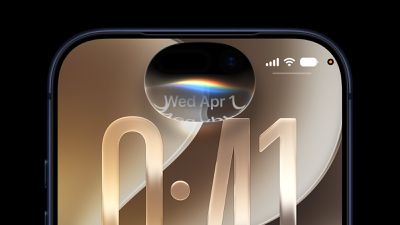
In iOS 27, Siri now appears as a glowing pill-shaped orb that expands directly from the Dynamic Island, but may give way to a circle on next-generation iPhones.
Instead of the glowing light effect that previously traced the edges of the display, a swirling Siri orb expands from the Dynamic Island in iOS 27, with the design hiding its true cutouts, just like other Dynamic Island animations.
Apple now represents Siri in most places with a circular orb, such as in the new dedicated Siri app icon, throughout promotional artwork for iOS 27, and initially on the iPad, Mac, and Vision Pro. At the very least, the pill-shape of Siri AI on the iPhone appears to be necessitated because the current Dynamic Island hardware demands it.
Amid rumors that the iPhone 18 Pro is set to move to a narrower Dynamic Island, X user @MichalLangmajer connected those dots to suggest that iOS 27's Siri interface could become circular on upcoming iPhone models:
If you were wondering why the iOS 27 Siri AI has such a weird shape, it's because of the notch. On the iPhone 18 (with its speculated smaller notch), it could become a perfect circle. pic.twitter.com/8o7BHQpsZG
— Michal Langmajer (@MichalLangmajer) June 10, 2026
The post included a visual overlaying the Dynamic Island shapes of the iPhone 17 and a speculated iPhone 18 model, illustrating how a narrower cutout would allow the Siri orb to resolve into the true circle Apple already uses elsewhere.
A series of reports suggest that the iPhone 18 Pro and Pro Max will feature a smaller Dynamic Island, enabled by relocating Face ID components beneath the display. Leaker Ice Universe claimed the cutout will be approximately 35% narrower than on the iPhone 17 Pro, dropping from around 20.7mm to around 13.5mm in width. Prototype images and screen protector leaks that surfaced in March appeared to corroborate the change.
iOS 27, the iPhone 18 Pro, and iPhone 18 Pro Max are expected to be released this fall.
Italy's competition regulator said on Tuesday it had launched an investigation into Apple over its compliance with interoperability obligations as set out in the European Digital Markets Act (DMA).
Under the DMA, Apple must ensure that third-party providers of consumer cloud services can interoperate effectively and free of charge with Apple's iOS and iPadOS software platforms. The rules also mandate equal access to Apple's iCloud service.
The Italian Competition Authority said in a statement on its website that it had proof that other providers of consumer cloud services "may not be placed on an equal footing as Apple's iCloud," as they did not appear to have access to the same software features available to Apple's own service.
Specifically, the authority said that Apple does not allow alternative cloud storage services to use features in iOS and iPadOS that enable users to perform a full backup of their device's data.
The probe is the first of its kind opened by the Italian watchdog under the DMA, which allows national regulators to conduct preliminary investigations.
The authority said its findings will be shared with the European Commission "to support it in its role as sole DMA enforcer." Companies violating DMA rules can face fines up to 10% of worldwide annual revenue.
Note: Due to the political or social nature of the discussion regarding this topic, the discussion thread is located in our Political News forum. All forum members and site visitors are welcome to read and follow the thread, but posting is limited to forum members with at least 100 posts.
Next year's regular iPhone 18 will come with 12GB of RAM to support Apple's most powerful on-device AI model and related Siri features, according to South Korea's KB Securities (via DigiTimes).
In its Siri AI announcement during WWDC 2026, Apple confirmed that its most powerful model enables more expressive Siri voices and major accuracy improvements for systemwide dictation. Both features require 12GB of unified memory.
Among current iPhones, that limits the more powerful model to the iPhone Air, iPhone 17 Pro, and iPhone 17 Pro Max.
The iPhone 17 misses out because it only has 8GB of RAM, but the same limitation isn't expected for the iPhone 18. Apple will boost memory for the base model to 12GB while keeping the iPhone's price unchanged, according to today's report.
It's the second time we've heard that Apple is planning to ensure memory parity across its iPhone 18 lineup. Last October, Korea's The Bell said the iPhone 18 would have 50 percent more memory than its predecessor.
Apple has apparently asked its RAM suppliers to increase its supply of LPDDR5X chips for the next iPhone lineup. KB Securities also noted that Apple will continue buying mobile DRAM from the world's three largest memory makers – Samsung, SK Hynix, and Micron – at prices above market levels, and suggested the company will absorb the costs rather than pass them on to the consumer. If so, the existing $799 starting price should remain in place.
The iPhone 18 Pro, iPhone 18 Pro Max, and foldable iPhone are expected to launch in the fall of 2026, with the iPhone 18, iPhone Air 2, and iPhone 18e following in the first half of 2027.
Suggestions that Apple's rumored foldable iPhone will be delayed are wide of the mark, claimed a Chinese leaker today.
In a post on Weibo, the leaker known as Fixed Focus Digital said launch delay rumors are "false" and suggestions that the device's release has been pushed to next year are "far-fetched."
Multiple reports have suggested Apple's first foldable iPhone could be unveiled alongside the iPhone 18 Pro models this September, and the leaker believes that still stands. "The most likely scenario is that it will launch alongside the iPhone 18 series," said Fixed Focus Digital in another post earlier this month. "Even if there is a delay, it would probably only be postponed by about one month before going on sale," they added.
There have been sporadic reports that Apple's first foldable device has faced engineering challenges in late-stage development. In May, for example, Instant Digital claimed Apple's foldable iPhone continued to face durability-related issues with its hinge mechanism. Apple is believed to have largely overcome concerns surrounding display creasing, but the leaker said that long-term hinge reliability has yet to meet the company's standards.
Apple is known for imposing strict reliability standards on new product categories, but ongoing concerns about the hinge itself would be an unusual situation this close to an anticipated launch.
Bloomberg's Mark Gurman said in March that the new foldable iPhone may not ship to customers in the same September time frame as the iPhone 18 Pro and iPhone 18 Pro Max. Prior to Gurman's report, Barclays analyst Tim Long suggested that the foldable iPhone won't ship until December, opening up a roughly three-month delay between the completely new device and the iPhone 18 Pro models.
Apple has done a split launch before, shipping one model later than another. When the iPhone X launched in 2017, it shipped out in November, while the iPhone 8 and 8 Plus introduced alongside it came out in September as usual. Even if Apple does plan to ship the iPhone Fold after September, expect to see it introduced during the annual iPhone event that will feature the iPhone 18 Pro models. Apple will likely announce all three phones at once, and then bring them to customers when they're ready.
The foldable iPhone is expected to feature a 7.8-inch inner display and a 5.5-inch cover display, the A20 chip and C2 modem, a Touch ID power button instead of Face ID, and two rear cameras, with pricing rumored at around $2,000. Apple's book-style foldable could launch as the "iPhone Ultra," as suggested by reports.
The biggest change in iOS 27 is Apple's total overhaul of Siri, with Siri turning into Siri AI. Apple delivered on the features originally promised at WWDC 2024 and added new capabilities that turn Siri into a viable competitor to chatbots like Claude and ChatGPT.
Siri AI is available in the iOS 27 beta that developers and public beta testers can download, but everyone will get access this fall. Below, we walk through everything new you can expect from Siri.
Siri AI
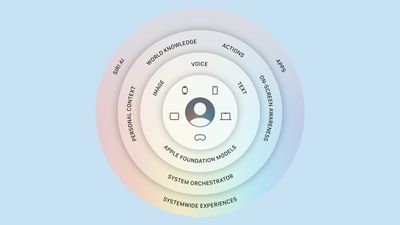
Siri AI is more knowledgeable, more capable, and unlike other chatbots, able to tap into your personal data in apps like Mail, Messages, and Photos. Apple says Siri has understanding and reasoning that wasn't available before, with four main improvements that change how Siri works.
All of the different Siri functions come together to allow Siri to do far more than it could before. You can have full back-and-forth conversations with Siri, and include multiple tasks in a single request.
Personal Context Understanding
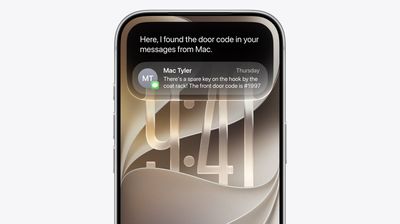
Apple overhauled its search index, and Siri has access to emails, text messages, files, photos, notes, and more. Siri can find content from across your apps, but it also understands that content. You can ask Siri to surface photos, bring up information from emails or texts, or find files, and the Apple Intelligence semantic index behind the scenes finds what you need.
What was that movie my brother told me to watch last week?
Can you get me the directions to that place I was supposed to meet Eric tomorrow?
What video games did John recommend to me last year?
Find images with pancakes from 2024
What was the name of that restaurant I ate at in February?
What's the confirmation number for my upcoming flight?
What do I need to do tomorrow?
Show me my photos from the music festival last weekend
What's the door code Sarah texted me?
Find the lease my landlord emailed me last month
Who did I have lunch with two Tuesdays ago?
Broad World Knowledge
Apple can search the web for up-to-date information to answer questions about anything, similar to other chatbots. Siri can analyze documents and get information from the web for additional context, help come up with recipes, do party prep, help with homework, give gardening tips, assist with DIY projects, and much more.
When is the Suki Waterhouse show in SF?
How can I get tickets?
I'm planning a birthday party, can you find me some good cake recipes?
What's the difference between pine warblers and goldfinches?
What's the Hurricanes score?
What are the hours for the closest Ace Hardware?
What's a good substitute for buttermilk?
What's a 15% tip on $84?
Help me plan a 5-day trip to Lisbon
Onscreen Awareness
Siri knows what's on your screen and can answer questions about it. Siri can tell what you're looking at, read text, and analyze images.
Siri can tell you where a photo was taken if there's something recognizable in it, and you can ask questions about any app you're in without having to provide specifics.
Where was this photo taken?
Summarize this
Can you give me directions here?
What are the best native plant options for a shady spot near my house?
Does this document look correct?
What is this?
Translate this menu
Explain what this chart is showing
App Actions
App Actions allow Siri to use tools in apps to complete requests. Siri can use some apps on your behalf, including apps from Apple and third-party apps that have implemented App Actions support.
Write a quick response to this email
Send all the photos from today to Eric
Add a 3pm Tuesday meeting with the neighbor to my calendar
Add these photos to the cat album
Get me directions to the post office, but add a stop at the coffee shop first
Move my 2pm meeting to Thursday
Siri Design
On the iPhone, a new Search and Ask Siri interface replaces the former Spotlight search option, and it's available from the Dynamic Island. A swipe down from the middle of the iPhone's display brings up Search or Ask, where you can type or speak a question or request to Siri.
An animation is displayed as Siri is thinking, and then the Siri bubble expands into a short response. If you swipe down on a response, it brings up a text bar where you can provide clarification or ask another question. A "+" button lets you add images or documents to the conversation.
Some responses use rich information cards pulled from apps. If you ask Siri about the weather, you'll see the current weather forecast. If you ask about upcoming calendar events, you'll see them listed in the Calendar app format.
You can also access Siri by pressing the side button or by using the "Siri" and "Hey Siri" wake phrases.
Systemwide Context
Siri works in any app. You can select text or images, then ask Siri about the selection. If you see an image in Safari you want to know more about, you can long press it to select and then ask Siri whatever you want about it.
Siri App
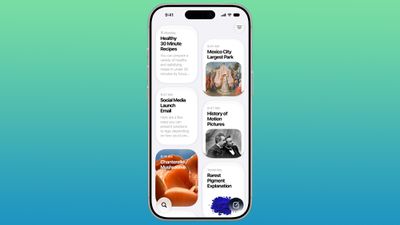
There is a dedicated Siri app where you can start new conversations or revisit past conversations you've had with Siri.
The app has a card-style interface with details on your most recent conversations across all of your devices. You can also use the search button to find conversations, and there's a pin option for conversations that you revisit frequently.
Write with Siri
In iOS 27, you can write with Siri anywhere you type with a systemwide Write with Siri feature. Siri can draft documents from scratch, and in Mail and Messages, it can use the same writing style that you normally use.
Siri can give you feedback on your writing if you select your text and ask Siri how it sounds, and as you type in apps, there's automatic proofreading for misspellings and grammar. Siri can also edit, and you just need to describe the change that you want to make to something you've written, such as changing the tone to be more professional.
Make this email sound more formal
Turn these bullet points into a paragraph
Shorten this to three sentences
Draft a thank you note for a gift
Rewrite this to be friendlier
What do you think of this presentation?
How can I improve this email?
Apple's AI Models
The Apple Foundation models used for Siri and other Apple Intelligence features in iOS 27 are the result of Apple's collaboration with Google. Apple used the technologies behind the Gemini AI models to develop the next generation of Apple Foundation models.
Apple's AI models are integrated into iOS and coordinated with a system orchestrator that can use the Spotlight index and the app toolbox.
The Spotlight index surfaces data from any app that integrates with it, such as Mail, Calendar, and Messages. The app toolbox identifies which app tools might be useful to answer a request.
Siri Voice
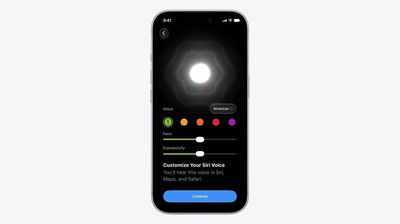
Apple has a more powerful on-device model for the iPhone 17 Pro and iPhone Air, allowing for a customizable Siri voice. Apple says its on-device model can understand and generate speech, plus understand text and images. You can tweak expressivity and pace when customizing Siri's voice.
The on-device model also improves accuracy for system-wide dictation thanks to better natural language understanding. Dictation is better at capturing what you're saying, and it makes fewer mistakes with spelling, punctuation, and capitalization.
Privacy
Apple's Siri features run on-device and on cloud servers using Private Cloud Compute. Data is not accessible to Apple or third parties.
Private Cloud Compute servers have historically all been Apple servers in Apple data centers, but Apple is expanding Private Cloud Compute to run Apple Intelligence workloads on Google Cloud using NVIDIA hardware.
Cross-Platform Availability
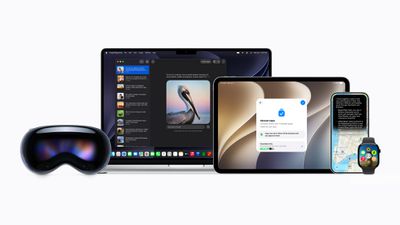
Siri AI is available in iOS 27, iPadOS 27, macOS Golden Gate, visionOS 27, and watchOS 27, so you can start a Siri request on one device and revisit it on another device.
Siri conversations sync across devices, and the Siri app is available on most of Apple's software platforms.
Siri AI features are also available when using CarPlay and AirPods.
Device Requirements
Siri AI requires a device that supports Apple Intelligence, including the iPhone 15 Pro and later.
Siri AI will not be available in the European Union at launch on iPhone or iPad, but it will be available on the Mac. It will not be available in China.
Language Support
Siri AI works in English (Australia, Canada, Ireland, India, New Zealand, South Africa, UK, U.S.), and will expand to more languages in the future.
Apple is planning to unify the email domains used by Sign in with Apple and iCloud+ Hide My Email under a single private.icloud.com domain.
Addresses generated for both features will be issued on the new domain, Apple says.
Sign in with Apple addresses currently use the privaterelay.appleid.com domain, while iCloud+ uses icloud.com. Later this summer, both will use the same private.icloud.com domain.
Email addresses that use the legacy domains will continue to work and mail will be forwarded with no interruption.
Developers with apps or websites that use Sign in with Apple will need to make sure their account systems, email validation logic, and allowlists accept addresses on the private.icloud.com domain in addition to the existing domains. Email service providers may also need to update domain-based filtering, suppression lists, or routing rules to include the private.icloud.com domain.
Regular users won't need to do anything, and both features will continue to work as expected.
Apple is teaming up with Nike for an Apple Card promotion that gives extra Daily Cash back.
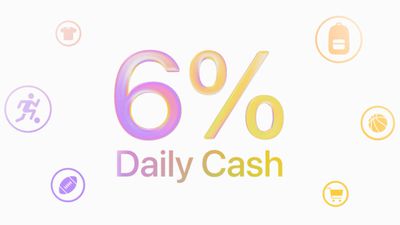
For the next month, Apple Card users can get 6% Daily Cash back when making a purchase with Apple Card using Apple Pay at a Nike retail store, the Nike website or Swoosh website, or Nike's apps.
The Apple Card normally offers 3% cash back on Nike purchases, so the bonus is doubled during the promotion period (June 15 to July 15).
Apple Card holders can get the 6% Daily Cash back on up to $500 in purchases, for a total of $30 back. The deal is available to Apple Card owners, co-owners, and participants, so multiple family members can take advantage of the bonus offer.
Most Apple Pay purchases provide 2% Daily Cash, but Apple has partnered with companies like Nike to increase that to 3%. Extra cash back is available when using Apple Pay and Apple Card for purchases at Ace Hardware, Apple retail stores, ChargePoint, Duane Reade, Hertz, Booking.com, Uber, and Walgreens.
To get the free year of Apple TV, which typically costs $12.99 per month in the U.S., you must activate the card by December 31, 2026.
If you are already subscribed to Apple TV directly through Apple, the complimentary subscription from Chase will automatically supersede your paid subscription until it ends, at which point the paid subscription will resume at the going price.
As noted by 9to5Mac, Apple One subscribers can receive a $7.50 discount per month instead.
If you are subscribed to Apple One directly through Apple, and activate your complimentary Apple TV access on Chase.com or the Chase Mobile app with the same Apple Account connected to your Apple One billing, you will automatically receive a $7.50 discount on your Apple One subscription for 12 months starting on your next billing period.
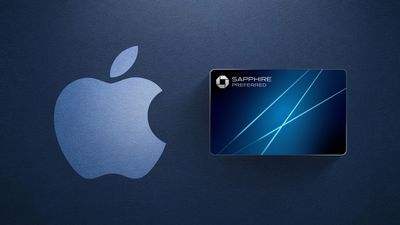
Chase's Sapphire Preferred card continues to have a $95 annual fee. New and existing cardholders have access to these new benefits starting today.
The other new benefits include 3× points on gas, EV charging, and Airbnb and Vrbo bookings, while the card's annual hotel statement credit has been doubled to $100. There is also a new $120 Global Entry, TSA PreCheck, or NEXUS credit every four years, along with new "emergency evacuation and transportation" coverage.
On the other hand, the 10% anniversary bonus benefit is being discontinued, and Ultimate Rewards points will transfer to World of Hyatt at a rate of 4:3.
More details are available in Chase's press release. For a limited time, new cardholders can earn 100,000 points after spending $5,000 in the first three months.
Chase's higher-end Sapphire Reserve credit card offers complimentary Apple TV and Apple Music subscriptions, but it has an annual fee of $795.
Apple's standard iPhone 18 model will launch in early 2027, based on comments from a partner in the company's supply chain that appear to corroborate rumors of a delayed spring release for the base model.
Apple typically works on an annual smartphone launch cycle where it releases the entirety of its latest flagship iPhone series in the fall, usually around mid-September. That appears set to change this year, however.
Multiplereportsclaim the base iPhone 18 model will be held over until spring 2027, and only the iPhone 18 Pro models will debut this year alongside Apple's first foldable iPhone.
Now, comments from a key Apple supplier appear to offer corroborating evidence that the company is preparing to break from its traditional launch schedule.
Speaking at Largan Precision's annual shareholders' meeting, chairman Lin En-ping said a major U.S. customer had postponed the launch of a new model to the first quarter of 2027, shifting component procurement later into the year and boosting expected factory utilization in the fourth quarter.
Lin did not identify the customer or product, but Largan is Apple's primary supplier of iPhone camera lenses, so the remarks are notable in light of reports that the standard iPhone 18 will not launch alongside Apple's higher-end models this time around.
The comments are particularly noteworthy because Apple suppliers rarely offer public details about clients' future product launches, even indirectly.
According to reports, Apple plans to split future iPhone launches across two release windows. Under the new strategy, premium models would continue to debut in September, while lower-cost models would follow the next spring. If accurate, the standard iPhone 18 will arrive in early 2027 alongside the iPhone 18e and iPhone Air 2, roughly six months after the iPhone 18 Pro, iPhone 18 Pro Max, and Apple's much-rumored foldable "iPhone Ultra."
The staggered approach is expected to help Apple manage manufacturing resources more efficiently as its lineup grows to six devices instead of five, while helping maintain sales momentum throughout the year. If implemented, it would be the first deliberate separation of Apple's flagship iPhone releases since the company established its annual fall launch pattern with the iPhone 4S in 2011.
The standard iPhone 18 models are not expected to feature design changes, with Apple using the same 6.3-inch display size for the iPhone 18 and the 6.1-inch size for the iPhone 18e. For everything we know so far, be sure to check out our dedicated roundup.
Apple today provided the second beta of an upcoming macOS Tahoe 26.6 update to developers for testing purposes, with the update coming almost three weeks after Apple seeded the first beta.
Developers can download the macOS Tahoe 26.6 update by opening up the System Settings app, selecting the General category, and then choosing Software Update. Beta Updates will need to be enabled, and a free developer account is required.
With macOS Golden Gate set to launch in just a few months, Apple is likely focusing most of its attention on the new software. We are not expecting any major new features in macOS Tahoe 26.6.
Apple today seeded the second betas of upcoming iOS 26.6 and iPadOS 26.6 updates to developers for testing purposes, with the software coming three weeks after Apple seeded the first betas.
Registered developers can download the betas from the Settings app on the iPhone or iPad by going to the General section and selecting Software Update.
With iOS 27 set to launch in September, Apple is wrapping up work on iOS 26. We are not expecting any major new features in the iOS 26.6 update, and it will primarily focus on bug fixes and performance improvements.
The update adds new wording around blocked contact limits, letting users know when they have exceeded the maximum number of blocked contacts. The update might also include a new anti-snatching feature that locks your iPhone if it's grabbed from your hand.
Apple today provided developers with the second betas of upcoming watchOS 26.6, tvOS 26.6, and visionOS 26.6 betas for testing purposes. The software comes three weeks after Apple seeded the first betas.
The software updates are available through the Settings app on each device, and because these are developer betas, a free developer account is required.
There's no word on what's in the software as of yet. watchOS, tvOS, and visionOS often get few features in each new beta, with updates primarily focusing on bug fixes and performance improvements.


 Note: MacRumors is an affiliate partner with some of these vendors. When you click a link and make a purchase, we may receive a small payment, which helps us keep the site running.