macOS 26.4 Introduces New Security Feature for Terminal Commands - MacRumors
Skip to Content

macOS 26.4 Introduces New Security Feature for Terminal Commands

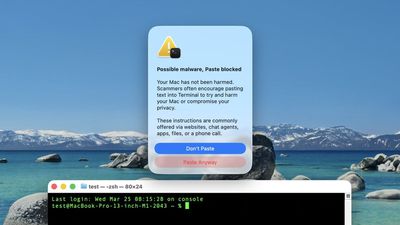
macOS Tahoe 26.4 introduces a new security feature that warns Mac users if they paste certain commands in the Terminal app that may be harmful.

macOS 26 and Terminal Feature
For those unaware, the Terminal app allows you to enter text commands to perform tasks on your Mac. Terminal is primarily intended for advanced users and developers, but unfortunately casual users can be tricked into entering harmful commands that can permanently delete files, change user permissions, and cause other problems.

Here is what the warning says when it appears:

Possible malware, Paste blocked

Your Mac has not been harmed.

Scammers often encourage pasting text into Terminal to try and harm your Mac or compromise your privacy.

These instructions are commonly offered via websites, chat agents, apps, files, or a phone call.

There is a "Paste Anyway" option if you wish to proceed.

The warning was spotted by users across Reddit and X over the past week.

macOS Tahoe 26 4 Terminal WarningScreenshot via "Mr. Macintosh"

We have yet to determine exactly which commands trigger the warning, which does not always appear. For this reason, always be careful. If you are unfamiliar with how Terminal works, it is probably best to avoid using it entirely.

macOS 26.4 was released earlier this week.

Related Roundup: macOS Tahoe
Related Forum: macOS Tahoe

Popular Stories

macOS Tahoe 26 Thumb 2

Apple Seeds macOS Tahoe 26.6 Release Candidate

Monday July 20, 2026 10:04 am PDT by
Apple today provided the release candidate version of an upcoming macOS Tahoe 26.6 update to developers for testing purposes, with the update coming a week after Apple seeded the fifth beta. The release candidate marks the final version of macOS Tahoe 26.6 that will be released to the public if no major bugs are found. Developers can download the macOS Tahoe 26.6 update by opening up the...
macOS Tahoe 26 Feature

Apple Releases macOS Tahoe 26.6

Monday July 27, 2026 10:48 am PDT by
Apple today released macOS Tahoe 26.6, a small update to the macOS Tahoe operating system that came out last year. macOS Tahoe 26.6 comes a month after Apple released macOS Tahoe 26.5.2. Mac owners can download the software by opening the System Settings app and then navigating to the Software Updates section. According to Apple's release notes for the update, macOS Tahoe 26.6 includes...
apple lock security bug vulnerability fix privacy

Update Now: iOS 26.6 and macOS Tahoe 26.6 Patch Hundreds of Security Flaws

Monday July 27, 2026 11:55 am PDT by
Apple today released iOS 26.6, iPadOS 26.6, and macOS Tahoe 26.6, all of which have a long list of security fixes. iOS 26.6 and iPadOS 26.6 address almost 90 security vulnerabilities affecting everything from the App Store to the Neural Engine. Multiple kernel and WebKit vulnerabilities were fixed, along with problems affecting Wi-Fi, Siri, and the iPhone's image processing. Details on...

Top Rated Comments

klasma Avatar
21 weeks ago
It would be helpful if the dialog actually showed what is being pasted, so that the user could decide whether they want to “Paste Anyway”…


Since the clipboard can contain multiple contents with different mime types, and what exactly gets pasted depends on the receiving application, an accurate preview can be essential.

Attachment Image
Score: 18 Votes (Like | Disagree)

!!! Avatar
21 weeks ago

We have yet to determine exactly which commands trigger the warning
Presumably anything containing [ICODE]curl[/ICODE] and/or a URL.

I'm sure some will complain but I think this is a great feature
It's annoying when you know what you're doing and these "security" features get in your way. I understand the vast majority of users don't understand terminal, but that doesn't mean you need to harm my experience.

Maybe one awesome optimization would be right click → Paste should just do it
Not really a good idea, I've found it's far more likely that the basic computer user uses right-click for copying and pasting. App launches are different as most people double-click.
Score: 13 Votes (Like | Disagree)
Starfia Avatar
21 weeks ago
Reactions:

• Seemingly well-intended to protect users.

• What happens when you know you know what you're doing? Is this going to bother you once in a while anyway?

• What kind of a Mac alert title is "Possible malware, Paste blocked"? A comma splice with incorrect capitalization?
Score: 12 Votes (Like | Disagree)
twistedpixel8 Avatar
21 weeks ago

I'm sure some will complain but I think this is a great feature
Who would complain?! Probably the same people who complain about being forced to wear a seatbelt.

“Wall lickers”, we call them in Scotland.
Score: 10 Votes (Like | Disagree)
th0masp Avatar
21 weeks ago
How about making these extra safety steps optional but default - and let the user toggle them in system preferences?

Would be nice to have some choice back instead of having to deal with pop-ups and sometimes totally misleading error messages in this current state of OS affairs (like the one that calls certain downloaded installer files broken when they are merely unsigned and not coming from the Appstore).

Not everybody grew up glued to an iPad FFS. 🤪
Score: 9 Votes (Like | Disagree)
jz0309 Avatar
21 weeks ago
I'm sure some will complain but I think this is a great feature
Score: 8 Votes (Like | Disagree)