Drone maker DJI today unveiled the "Mavic Air" at an event in New York City, stating that the new drone combines the "best features" of the Mavic series into an ultra-portable and foldable drone in line with last year's Spark model.
Mavic Air includes a 4K camera, QuickShot and SmartCapture modes for simpler photo and video capturing, and FlightAutonomy 2.0 with Advanced Pilot Assistance Systems to ensure safer flights. DJI called the Mavic Air "the most portable DJI drone ever created" at a weight of 430 grams, and it can fold its arms and propellers to sit flush against its frame, similar to the Spark.
“When DJI introduced the Mavic Pro, it reinvented what a consumer drone could be: powerful, yet portable, accessible, but advanced,” said Roger Luo, President at DJI. “Today, with the introduction of Mavic Air, we have pushed these attributes to the next level to create our best consumer drone yet.”
The drone's camera houses a 1/2.3" CMOS sensor and the equivalent of a 24mm F2.8 lens, connected to a recessed three-axis mechanical gimbal for steadier shots. The final images are said to result in 12-megapixel stills that use new HDR algorithms to "preserve more highlight and low light details."
In regards to panoramic shots, Mavic Pro can combine 25 still images to make one 32-megapixel panoramic image in under one minute. The drone also supports other panorama modes, including horizontal, vertical, and 180 degree images.
For video, Mavic Air shoots stabilized 4K video at 30 fps with a maximum bitrate of 100 Mbps, another best for DJI's family of drones according to the company. The drone can also shoot 1080p slow-motion video at 120 fps. To store all of this footage, Mavic Air includes 8 GB of onboard storage and a new USB-C port so exporting data is easier. There's also a micro SD card slot to further expand storage.
Taking a cue from Spark's easy-to-use features, Mavic Air enables image and video capture in user-friendly modes like QuickShot, which lines out predefined flight paths that keep subjects in frame. SmartCapture includes various hand gestures that activate Mavic Air and command it to take pictures, follow you, record a short clip, land, and more, all without a physical remote.
More detailed controls can be found on the included remote controller, however, which has detachable control sticks that can be stored inside the remote controller for added portability.
Users will be able to fly Mavic Air for up to 21 minutes at a maximum range of 2.5 miles, and it can fly standby in windy conditions of up to 22 mph. When in the air, FlightAutonomy 2.0 helps the drone navigate complex outdoor environments using seven onboard cameras and infrared sensors, and a Sport Mode boosts speeds up to 42 mph.
DJI will sell Mavic Air in Onyx Black, Arctic White, and Flame Red starting at $799, with a package that includes the drone, battery, remote controller, carrying case, two pairs of propeller guards, and four pairs of propellers. A Mavic Air Fly More Combo will also be for sale at $999 and includes the drone, three batteries, remote controller, travel bag, two pairs of propeller guards, six pairs of propellers, a battery to power bank adapter, and battery charging hub.
Those interested can pre-order Mavic Air on DJI's website today, and it will begin shipping in a few days on January 28.
Note: MacRumors is an affiliate partner with DJI. When you click the above link and make a purchase, we may receive a small payment, which helps us keep the site running.
While the HomePod is initially launching in the United States, Australia, and the United Kingdom next month, MacRumors can confirm that Apple's smart speaker will function in most other countries around the world.
When users try to set up the HomePod outside of those aforementioned countries, a dialogue box will appear that directs them to choose one of three English language options to proceed. We can confirm this setup process can be completed, and that the HomePod functions, in mostly any country from day one.
The setup process was leaked by Guilherme Rambo back in August:
What this all means is that if you manage to purchase a HomePod from one of the initial launch countries, you could take it back home to a country like Canada or elsewhere in Europe and it should function properly, but until Siri gains support for additional languages, you'll be stuck using English only.
While this information isn't all that surprising, we decided to share it given an influx of questions we have received from our international readers.
Apple today announced the HomePod will be available to order this Friday, January 26 in the United States, Australia, and the United Kingdom for $349, $499, and £319 respectively. Those orders will begin arriving to customers, alongside limited in-store availability, starting Friday, February 9.
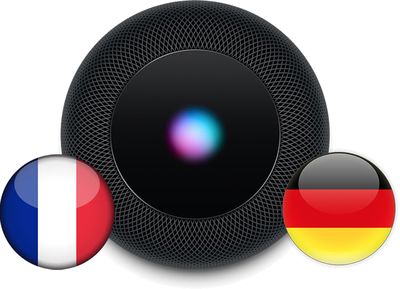
Apple said the HomePod will launch in France and Germany this spring, marking the first countries where English isn't the primary language spoken where the speaker will be available. As mentioned, a future software update should add French and German language support to Siri on the HomePod.
Apple today updated its HomePod product page with new details about the speaker's gesture controls for Siri and audio playback.
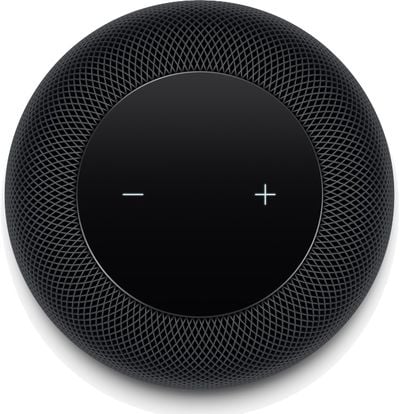
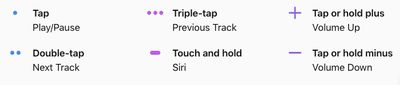
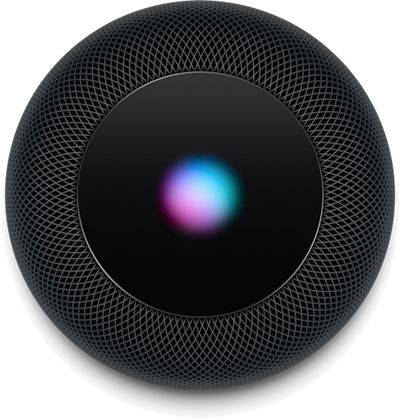
Apple has confirmed that users can tap the top of the HomePod to play, pause, skip a song, or adjust the volume, or touch and hold to talk to Siri. A colorful, animated LED waveform will appear when Siri is listening.
A single tap plays or pauses music, a double tap skips to the next track, and a triple trap returns to the previous track. Tapping and holding the digital plus or minus sign raises or lowers the speaker's volume respectively.
The touch and hold gesture to invoke Siri is in addition to the "Hey Siri" voice command that can be said from anywhere in a room.
Apple today announced that the HomePod will be available to order starting Friday, January 26, with in-store availability and orders arriving to customers starting Friday, February 9, in the United States, Australia, and the United Kingdom.
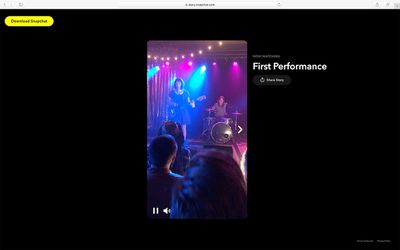
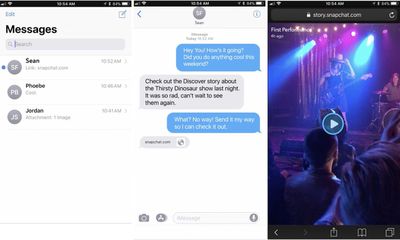
Snap Inc. has announced that users will now be able to share the Discover section's Official Stories, unpartnered Our Stories, and Search Stories with anyone who isn't on Snapchat. The company confirmed to MacRumors that this Story sharing feature does not cover the sharing of a user's own personal Stories outside of the app.
To share a Story, Snapchat users can tap and hold on tiles in Discover, and then they'll notice a new "share" prompt on the Story's mini-profile. After choosing to "Share Story," users can decide to send it via text message, email, Facebook, Twitter, or copy the link. For those who click on the link, they'll be taken to a new Story player on Snapchat's website.
Images via Snap Inc.
Stories viewed on the web will retain Snapchat's ephemerality, so Our Stories and Search Stories will be viewable outside of the app for 30 days, while Official Stories will last for the traditional 24 hours. Each link includes a "Download Snapchat" button, encouraging those who visit the Story and who aren't on the social network to try it out.
Beginning this week, the new addition will be rolling out to those iOS and Android Snapchat users already on the redesigned app. Then, the update will continue to expand across the globe in the coming weeks in tandem with the redesign's expansion.
The company first revealed its major redesign in November 2017, with the aim to separate a user's personal friends from brand content. The update, which Snap Inc. CEO Evan Spiegel said is a way to "separate the social from the media," began slowly rolling out to users following that announcement, but many still remain on the app's previous user interface.
A new report out today by Recode examined how major technology companies spent a record amount of money lobbying the United States government in 2017, over issues like net neutrality, encryption, immigration, and more. In total, Apple, Amazon, Facebook, and Google spent about $50 million lobbying the government last year, and of that Apple alone spent $7 million.
Apple's spending on lobbying grew from just over $4 million in 2014 to about $4.5 million in 2015 and 2016, before greatly increasing to $7 million in 2017. In terms of lobbying, this was a record spending amount for the company, and Apple's areas of focus were said to have been encryption and immigration. The last time Apple's lobbying amount emerged was in July 2017, when it was reported that Apple spent $2.2 million lobbying the government between April 1 and June 30, 2017.
Apple, Amazon, Facebook and Google cumulatively racked up a roughly $50 million tab fighting off President Donald Trump and an onslaught of new federal regulations last year — a reflection that the tech industry is increasingly under political siege in the nation’s capital.
And Apple shelled out $7 million — again, more than ever — to lobby the U.S. government over the same period. The iPhone giant continued to press forward on issues like encryption and immigration. And the company — like the rest of the industry — advocated for the tax reform law recently signed by Trump.
For the other companies, Google spent the most at more than $18 million in lobbying last year, Amazon spent more than $12.8 million, and Facebook spent $11.5 million. Google spent to "stave off new regulations targeting the content and ads" on its search engine and YouTube, while Amazon advocated for "friendlier federal rules" on online sales tax, cloud computing, and package delivery drones. Much of Facebook's 2017 lobbying was focused on its fight against "fake news" in newsfeeds.
Because of the ongoing lobbying, Recode reported that the technology industry's 2017 political activities "may only presage a tougher and costlier clash with Washington, D.C., in the year to come."
Note: Due to the political nature of the discussion regarding this topic, the discussion thread is located in our Politics, Religion, Social Issues forum. All forum members and site visitors are welcome to read and follow the thread, but posting is limited to forum members with at least 100 posts.
Within the HomePod's pre-order date and launch announcement today, Apple confirmed that the smart speaker's multi-room audio and stereo features won't be making it into the device at launch. Instead, users will be able to activate these features sometime "later this year" in a free software update.
Multi-room audio with Apple's AirPlay 2 protocol will be aimed at customers who purchase more than one HomePod, and will let them play music throughout their home.
The feature allows for different songs to be played simultaneously in different rooms, or the same song can be played in each room "perfectly in sync," and the speakers communicate with one another through AirPlay 2.
Stereo sound is created when two HomePods are placed in the same room, after which they automatically notice one another and become a "stereo pair" to provide a "more immersive" listening experience.
Coming this year in a free software update, users will be able to play music throughout the house with multi-room audio. If HomePod is in the kitchen, users can ask Siri to play jazz in the dining room, or play the same song in each room — perfectly in sync. If there's more than one HomePod set up in the same room, the speakers can be set up as a stereo pair for an even more immersive sound experience.
Of course, right now it's unclear exactly when Apple's free software update for these features will go live in 2018. Ahead of that, users will be able to pre-order HomePod on Friday, January 26, and then the speaker will officially launch two weeks later in the United States, United Kingdom, and Australia on February 9.
In addition to the HomePod launching February 9 in the United States, Australia, and the United Kingdom, Apple has also revealed that its Siri-enabled speaker will launch in France and Germany at some point "this spring," suggesting a release date between March and June at the absolute latest in those countries.
France and Germany will be the first HomePod launch countries where English isn't the primary language spoken. Siri on the HomePod should be able to answer French and German queries as on the iPhone and other devices.
While we already knew the HomePod is priced at $349 in the United States, Apple today confirmed the speaker will cost £319 in the United Kingdom and $499 in Australia. Apple hasn't revealed pricing information in France or Germany yet, or provided release dates for other countries like Canada at this time.
Apple has primarily positioned the HomePod as a speaker that can stream Apple Music, but with built-in Siri, users can send messages, set timers, play podcasts, check the news and weather, control HomeKit-enabled smart home accessories, and complete other tasks without needing to take out their iPhone.
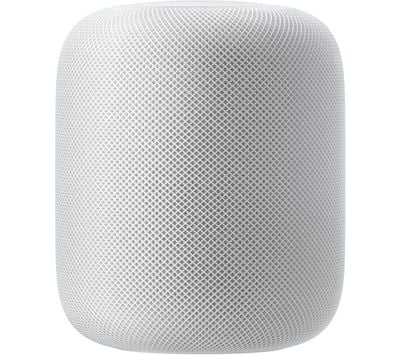
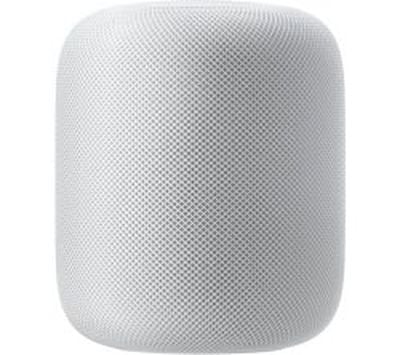
The high-fidelity speaker is equipped with spatial awareness and Apple-engineered audio technology, including a seven‑tweeter array and high-excursion woofer. The nearly seven inch tall speaker is powered by Apple's A8 chip.
HomePod is Apple's answer to the Amazon Echo and Google Home. The speaker was originally set to be released in December, but Apple delayed the launch, and missed out on sales during the holiday shopping season in the process.
Apple today announced that its HomePod speaker will be released on Friday, February 9, with orders beginning Friday, January 26 via Apple's online store or the Apple Store app in the United States, Australia, and the United Kingdom.
Apple added that HomePod will launch in France and Germany at some point "this spring," but hasn't provided release dates for other countries like Canada.
HomePod is priced at $349 in the United States, £319 in the United Kingdom, and $499 in Australia. The speaker will be available in White or Space Gray from Apple Stores and at select resellers in each country, such as Best Buy in the United States, John Lewis and EE in the UK, and Harvey Norman and Telstra in Australia.
Apple has primarily positioned the HomePod as a speaker that can stream Apple Music, but with built-in Siri, users can send messages, set timers, play podcasts, check the news and weather, control HomeKit-enabled smart home accessories, and complete other tasks without needing to take out their iPhone.
The high-fidelity speaker is equipped with spatial awareness and Apple-engineered audio technology, including a seven‑tweeter array and high-excursion woofer. The nearly seven inch tall speaker is powered by Apple's A8 chip.
Apple's marketing chief Phil Schiller:
HomePod is a magical new music experience from Apple. It brings advanced audio technologies like beam-forming tweeters, a high-excursion woofer and automatic spatial awareness, together with the entire Apple Music catalog and the latest Siri intelligence, in a simple, beautiful design that is so much fun to use. We're so excited for people to get HomePod into their homes, apartments and businesses to hear it for themselves.
We think they will be blown away by the audio quality. The team has worked to give Siri a deeper knowledge of music so that you can ask to play virtually anything from your personal favorites to the latest chart-topping releases, simply by saying 'Hey Siri.'
Apple said a software update coming later this year will enable users with more than one HomePod to play music throughout their homes with multi-room audio via its AirPlay 2 protocol. And if there's more than one HomePod placed in the same room, the speakers will be able to detect each other and deliver stereo sound.
HomePod is compatible with iPhone 5s or newer, any iPad Pro, iPad Air or newer, iPad mini 2 or newer, and the sixth-generation iPod touch running iOS 11.2.5, which remains in beta testing, or later software versions.
HomePod is Apple's answer to the Amazon Echo and Google Home. The speaker was originally set to be released in December, but Apple delayed the launch, and missed out on sales during the holiday shopping season in the process.
Privacy oriented search engine DuckDuckGo today launched revamped versions of its browser extension and standalone mobile app, promising users seamless built-in tracker network blocking and smarter encryption.
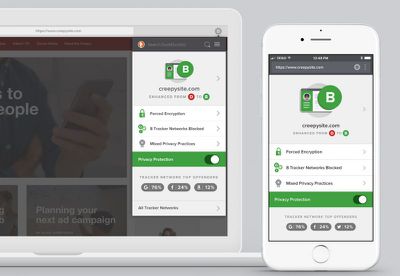
The headline feature in both the DuckDuckGo browser extension and mobile app is a Privacy Grade rating (A-F) information card whenever a user visits a site. The rating aims to let them see at a glance how protected they are, while providing additional options to dig deeper into the details of blocked tracking attempts.
The generated Privacy Grade score for a website is based on the prevalence of hidden tracker networks, encryption availability, and any existing privacy practices, according to the internet privacy company.
The vast majority of websites across the Internet contain hidden tracker networks, with Google trackers now lurking behind 76% of pages, Facebook’s trackers on 24% of pages, and countless others soaking up your personal information to follow you with ads around the Web, or worse. Our Privacy Protection will block all the hidden trackers we can find, exposing the major advertising networks tracking you over time, so that you can track who's trying to track you.
Together, the privacy rating and tracking breakdowns aim to provide a more effective solution than installing multiple add-ons and apps on each device, while offering a more upfront level of privacy than common private browsing modes. Elsewhere, a new encryption protection feature automatically sends users to an encrypted version of a website when available, rather than defaulting to a non-encrypted version.
As expected, the new software releases also include DuckDuckGo's private search engine by default. The updated macOSbrowser extension is available now for Safari, Firefox, and Chrome, with the mobile iOS app a free download from the App Store. For further details on privacy measures implemented in the new releases, check out the DuckDuckGo website.
Apple plans to release a new entry-level 13-inch MacBook in the second half of 2018, according to industry sources cited by DigiTimes. The report claims General Interface Solution (GIS) is expected to win more LCD display orders from Apple for the planned new model, after it began supplying the modules for existing MacBooks in the fourth quarter of last year.
Touch panel maker General Interface Solution (GIS) is expected to land more LCM (LCD module) orders from Apple, which reportedly plans to release an entry-level 13-inch MacBook in the second half of 2018, according to industry sources.
With new orders for MacBooks and other models, GIS is expected to ramp up its LCM shipments to 600,000 units a month by the end of 2018 compared to 300,000 units currently, said the sources.
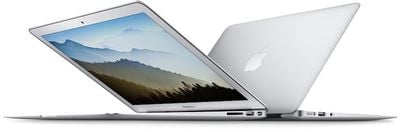
Extrapolating from today's report, which is light on detail, Apple's next entry-level MacBook will likely replace the 13-inch MacBook Air, Apple's lowest-cost notebook starting at $999. Apple's long-term aim was for the 12-inch MacBook to replace the MacBook Air, which was introduced in 2008, but sales of the Air have remained strong mainly thanks to its affordability. In 2016, Apple tried to position the 13-inch MacBook Pro with no Touch Bar as a viable MacBook Air alternative, but the Pro starts at $1,299, which is $300 more than the entry-level Air model.
With its signature tapered design, the MacBook Air is the only notebook the company still sells that does not have a Retina display. To keep it viable for a while longer, Apple bumped the base model's processor from 1.6 GHz to 1.8 in June 2017, but it has only seen similar minor updates since its last major revision in March 2015. The 11-inch MacBook Air has been discontinued entirely, and we do not expect to see further substantial updates to the line.
It's unclear what form a new entry-level 13-inch MacBook would take, although Apple would likely make efforts to clearly distinguish it from any existing 13-inch MacBook Pro models. Apple is known to be exploring the possibility of using fullscreen OLED displays in future MacBook series, which could see the company retain LCD display technology in a new entry-level machine while eventually adopting OLED for its Pro line-up, similar to the OLED/LCD differentiation strategy it will take for this year's upcoming iPhone line-up.
Apple is also reportedly looking into using ARM-based core processor chips for future MacBooks, which would reduce the company's dependence on Intel, especially given the recent Spectre and Meltdown troubles. Apple's interest in building its own core processors for notebooks could also enable it to control next-generation display technology and some related key components, according to sources, which would further differentiate the company's computers from others on the market.
Apple today announced that it has teamed up with Malala Fund to become the fund's first Laureate partner, providing Malala Fund with the support it needs to double the number of grants it provides and expand into India and Latin America.
The Malala Fund, led by Nobel Peace Prize Laureate Malala Yousafzai, champions every girl's right to 12 years of free, safe, quality education.
Following the announcement, Apple CEO Tim Cook spoke with iMore in a short interview in Toronto where he shared some insight into how Apple and the Malala Fund came to form a partnership. Cook says that after meeting Malala, it became clear that their values aligned. "Not only the Malala Fund and Apple, but our personal values as well," Cook said.
"One, equality is at the core of our belief and values and, two, that education is the great equalizer of people. If you believe both of those, it's not an extension at all to say, 'how do we help Malala achieve her vision of educating 130-million young girls around the world?'"
Cook said that he loves the Malala Fund's focus on secondary education, because in some places around the world, girls receive an education until grade 6 or grade 7, and then their schooling stops. "This isn't right," said Cook. "It doesn't maximize potential and it doesn't treat people with dignity or respect."
With Apple's help, the Malala Fund will double the grants it provides through its Gulmakai Network (which supports educational programs in Afghanistan, Pakistan, Lebanon, Turkey, and Nigeria) and extend funding programs to Latin America and India, offering secondary education opportunities to more than 100,000 girls to start with.
Apple will provide technology, curriculum, and research into policy changes needed to help girls around the world attend school and complete their education. Going forward, Cook will also serve on the Malala Fund leadership council.
Cook's full comments on the Malala Fund and some additional commentary on Swift Playgrounds can be read over at iMore.
Note: Due to the political nature of the discussion regarding this topic, the discussion thread is located in our Politics, Religion, Social Issues forum. All forum members and site visitors are welcome to read and follow the thread, but posting is limited to forum members with at least 100 posts.
Under the leadership of Apple CEO Tim Cook, Apple has spearheaded an "Everyone Can Code" initiative designed to introduce coding curriculum into elementary schools, high schools, and colleges, so kids and adults of all ages can learn to code.
Apple CEO Tim Cook always speaks passionately about the importance of teaching coding to children of all ages, and last week in an interview, he even said that if you have to make a choice, it's more important to learn to code than to learn a foreign language.
Cook's recent comments spurred MacRumors reader El-ad to ask Cook about his own coding experience in an email, which Cook responded to. Cook says he learned to code in college because coding wasn't offered at the high school he attended.
El-ad,
I learned in college. No classes exist in the high school I attended. I'm happy this is now changing.
Tim
That Cook can code may not be immediately obvious as he ran Apple's worldwide operations before becoming CEO of the company, but it's no surprise. Before going to Duke University's Fuqua School of Business for his MBA, Cook graduated from Alabama's Auburn University with a bachelor's degree in industrial engineering, a major that requires a programming background.
In October of 2017, Cook shared additional details on his coding experience in an interview with The Sun. Back when he was attending Auburn University, Cook built a system to improve the traffic lights near the university. He aimed to optimize traffic to reduce wait times while maintaining the safety of the lights. His work was a success and it was implemented by the local police force.
"That was pretty cool at the time - and it worked, Cook said. "Law enforcement implemented it."
Apple's Everyone Can Code curriculum is available in schools and colleges around the world, with many colleges offering Apple's App Development with Swift Curriculum. That course is a full-year coding course designed by Apple engineers and educators and it is designed to teach students how to code and design apps for the App Store.
For younger learners, Apple offers Get Started With Code and Swift Playgrounds curriculum, and for those who want to learn outside of a classroom, Apple offers the Swift Playgrounds app on the iPad.
Popular photo and image editing software Pixelmator Pro was today updated to version 1.0.6, adding customizations for the crop tool along with a whole slew of other improvements and bug fixes.
According to the Mac App Store release notes, the update introduces an option for custom aspect ratios for the crop tool, which can also be saved as custom crop presets. This should make cropping to your exact specifications quicker and easier even across different projects.
With this new version of Pixelmator Pro, files exported to JPEG will be saved with a .jpg extension instead of .jpeg, and files can now also be exported in BMP and GIF formats.
Improvements have also been made to other tools, such as the Type tool, the selection tools, and the Color Selection tool, with a full list of new improvements available below:
Use the Crop tool to crop with your own custom ratios.
Create and save custom crop presets.
The Type tool will now be highlighted when a text layer is selected.
If no text is selected, clicking a text preset will now add a new text layer with the preset style applied.
When using the Type tool's Color Picker, pressing the Escape key will now close the Color Picker, as it should.
Drag shapes from the Layers view to the Shapes palette to save them to your collection.
The selection tools will now be highlighted if there is an active selection.
A number of performance improvements make the selection tools faster and more reliable.
You can now copy, cut, paste, and duplicate the components inside shapes.
The Color Selection tool now works on layers with color adjustments.
You can now hold down the Space bar to move selections while using the Rectangular and Elliptical selection tools.
Dozens of additional bug fixes and small tweaks included in Pixelmator Pro 1.0.6 are listed in the Mac App Store update history.
Pixelmator Pro, released in late November, is an updated and more advanced version of Pixelmator, which has been a popular photo editing app on Macs for years now. Pixelmator Pro was built from the ground up for the Mac and it takes advantage of the latest macOS software additions like Core ML, Metal 2, and more.
Compared to Pixelmator, Pixelmator Pro offers a reimagined workflow with simplified and streamlined editing tools, a single-window editing interface, intelligent image editing features powered by machine learning, a new painting engine, an improved repair tool, and much more.
Pixelmator Pro can be downloaded from the Mac App Store for $59.99. [Direct Link]
TestFlight, which is designed to allow developers to provide testers with beta versions of apps ahead of their release, was today updated to version 2.0.1, introducing a handful of new features.
The update brings support for downloading apps that are up to 150 MB in size over a cellular data connection. The previous TestFlight beta app limit was 100 MB, with this updated limit bringing TestFlight apps in line with other iOS apps.
Apple officially increased the App Store cellular over-the-air download limit to 150 MB in September of 2017, but the new increased limit apparently did not apply to beta apps. With the new limit, testers will be able to download TestFlight apps up to 150 MB without needing a WiFi connection.
Today's TestFlight update also introduces support for Smart Invert Colors, an accessibility option, and it includes a revised 3D Touch peek view that offers up "What to Test" information. Apple says the update also includes small bug fixes and UI improvements.
TestFlight can be downloaded from the App Store for free. [Direct Link]
Starting in February, Apple will be hosting an internal company wide fitness challenge for all of its employees, with a prize that includes a unique fitness-themed Apple Watch band.
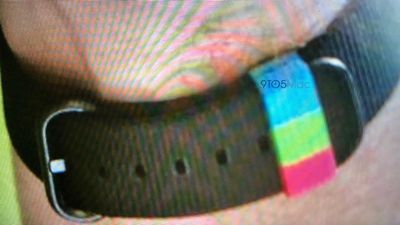
The band, as seen in a photo shared by 9to5Mac, appears to be similar to Apple's Woven Nylon bands. It comes in a solid black color but has an accent loop in a dark pink/red shade, lime green, and light blue, the three colors that represent the Activity rings on the Apple Watch.
The red colored ring tracks a person's overall movement and calorie burn throughout the day, and the amount of movement necessary to fill it up will vary based on each person's personal goal. The green ring represents exercise and can be completed with 30 minutes of exercise per day (based on an elevated heart rate), while the blue ring represents how many hours out of the day an Apple Watch user stands up and moves. One minute of standing movement per hour is required to fill the stand ring.
To earn the special Apple Watch band, employees will need to complete the challenge at the "gold" level, earning points by filling their Activity rings for a set number of days.
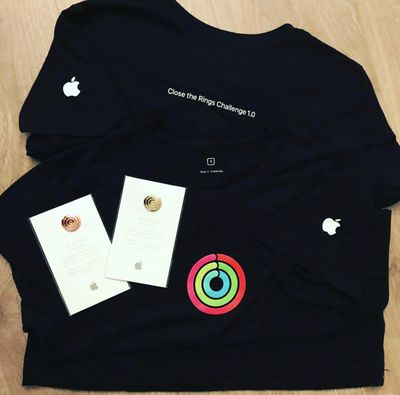
Apple last year hosted a "Close the Rings" Apple Watch fitness challenge for employees. Rewards for completing that challenge included pins in gold, silver, and bronze, awarded based on performance, along with a T-shirt that included the colorful Activity rings and the phrase "Close The Rings Challenge 1.0."
The prize for the 2017 employee-only "Close the Rings" challenge.
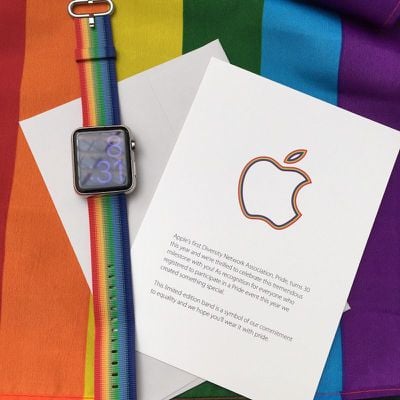
While this will be the first activity challenge that rewards employees with a unique Apple Watch band, Apple has done employee-only Apple Watch bands in the past. In 2016, for example, Apple provided employees with exclusive rainbow-colored Apple Watch bands at the LGBT Pride festival in San Francisco.
Unique Pride band provided to employees in 2016
Apple made a similar version available in 2017, so it's always possible these special Apple Watch bands could be released to the public at some point.
The February fitness challenge is internal only and will be limited to employees, but Apple has done many other public fitness challenges. One of the most recent challenges was the "Ring in the New Year" activity challenge that asked Apple Watch owners to close all activity rings for seven days in a row in January to earn a special badge in the Apple Watch app on iPhone.
The Apple Watch is the most popular smartwatch on the market, yet battery life has never been its strong suit. That said, Apple has made improvements in this area with successive models, and while the company still only promises all-day battery life on a single charge, many Series 3 and 4 owners find they can get a lot more.
Of course, how long a given Apple Watch lasts between charges depends almost entirely on how it's used. With that in mind, this article aims to help wearers optimize their usage and get the best battery life they can reasonably expect based on their individual needs. Read on for some of our favorite power-saving tips for Apple Watch.
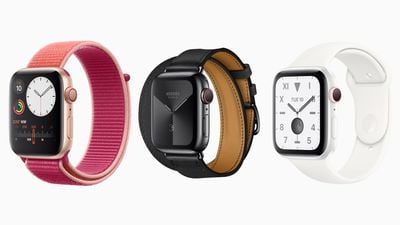
The latest Apple Watch Series 5 models come equipped with a new always on display feature. With the always on display function enabled, some element of the screen is always lit, even when the wrist is down. It's a handy way to keep an eye on the time or to keep track of a workout without needing to raise a wrist, but there are various reports from users that it can be a significant battery drain, at least on watches running early versions of watchOS 6.
On the Apple Watch Series 5, battery life can be improved by disabling the always on feature. To do so, launch the Watch app on iPhone, tap the Watch tab, then tap Display & Brightness and turn off the switch next to Always On.
Wake Screen on Wrist Raise
It shouldn't come as a surprise that the Apple Watch's OLED display draws a significant amount of power. If it tends to light up when you least expect it, and you'd rather manually activate it with a button press or by tapping the display, then try turning off the automatic wake screen feature. To do so, open Settings on your Apple Watch, tap General -> Wake Screen, and toggle off Wake Screen on Wrist Raise. (You can also find this setting in the Watch app on your iPhone.)
Theater Mode
To some users, turning off the automatic wake screen feature might seem like overkill. Perhaps you only accidentally wake the screen during certain times of the day – when you're in bed, for instance.
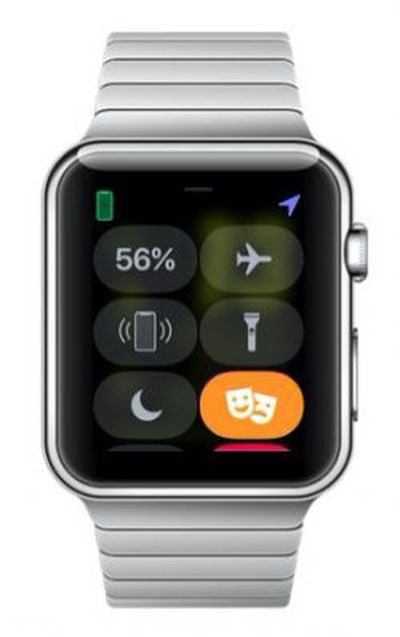
In that case, you're better off making selective use of the Theater Mode. To enable it, swipe up from the bottom of any clock face to reveal the Control Center, and tap the symbol showing two theater masks. Note that Theater Mode also silences notifications, which is why it's best kept for bedtime or trips to the movies.
Adjust Brightness
Many Apple Watch owners find that they can easily get along with the OLED display set at its lowest and least energy-sapping brightness level. To adjust the brightness, select Settings on your Apple Watch, tap Brightness & Text Size, and alter the level to suit. (You can also find this setting in the Watch app on your iPhone.)
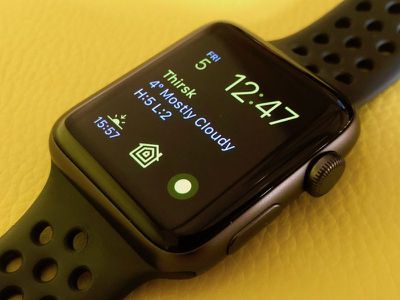
OLED panels don't expend energy on displaying true black colors – those pixels simply remain unlit. In other words, the more screen space your chosen clock face takes up (if it displays a photo, say) the more likely it is to drain battery whenever it's activated. For this reason, you might want to consider using a more minimalist watch face and disabling any complications you don't need to see every time you raise your wrist.
Apple Watch Apps
Apps and Complications
Another good reason to minimize your use of complications is that many of them require frequent refreshing in order to display up-to-date information, which uses additional power. So if you rarely tap it, then turn it off using the clock face customize mode, which is activated with a single long press on the clock face screen.
The same goes for third-party apps, many of which frequently refresh in the background whether you use them or not. If you find yourself regularly reaching for your iPhone to check social media, then ask yourself, do you really need that Twitter function on your wrist? Only install apps on your Apple Watch that benefit you by being there.
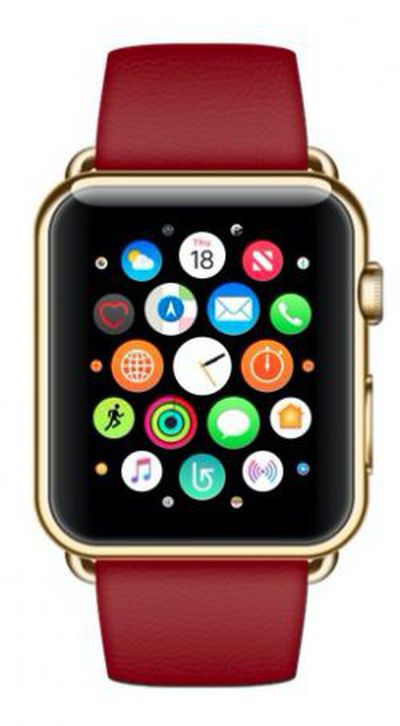
It's worth extending this general policy to clock faces, too. There's anecdotal evidence that uninstalling the ones you don't use can save power by reducing background refreshes. To remove watch faces, open the Watch app on your iPhone, tap Edit next to My Faces, and tap the minus buttons in the list. The Siri watch face in particular is often cited as a battery drainer, so if you don't use it, ditch it.
Installation Creep and Refresh Management
These days many third-party iOS apps include an Apple Watch component which gets added automatically upon installation. To prevent this default behavior, open the Watch app on your iPhone, select General and toggle off Automatic App Install.
Another way of restricting the number of apps that draw power is to selectively control which ones refresh in the background. You can manage this on an individual basis from the Watch app on your iPhone: Select General -> Background App Refresh, and toggle the sliders for each installed app. Remember, only leave this enabled for apps with a functional dependency on up-to-date data, such as weather and calendar apps.
Notifications
Notifications come down to personal preference, but every additional alert on your wrist sucks a bit more power from your watch's battery. Look at your usage and try to assess which notifications are worthwhile, and which ones could just as easily be picked up on your iPhone at a later time.
To manage notifications on an app-by-app basis, open the iOS Watch app and select Notifications. Pay particular attention to third-party apps, listed in the second column, and turn off any pointless permissions that mirror your iPhone alerts.
With judicious use of these settings, you should be able to recognize if or when your needs change over time. For example, some app notifications have a shelf life – if they start to bug you, turn them off. That includes Activity and Breathe reminders. Be ruthless.
When it comes to email alerts, you may find they're only worth the bother if the emails come from specific addresses. So add these to your VIP list in the Mail app, and then disable all watch Mail notifications except for VIP alerts.
Other Power-Saving Settings
Heart Rate
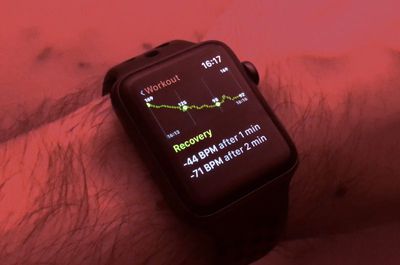
If you're only interested in tracking distance or speed (or both) during running or walking workouts, Apple recommends turning on Power Saving Mode to disable the heart rate sensor. To do this, open the Watch app on your iPhone, go to My Watch -> Workout, and toggle on Power Saving Mode. (The same setting can be found on your Apple Watch in Settings -> General -> Workout.) Note that when the heart rate sensor is off, calorie burn calculations may not be as accurate.
If you're training for a marathon or regularly participate in long-duration workouts, consider using a Bluetooth chest strap instead of the built-in heart rate sensor. To connect the Bluetooth chest strap to your watch, make sure it's in pairing mode, then open Settings on your Apple Watch, select Bluetooth, and choose from the list of Health Devices.
Hey Siri
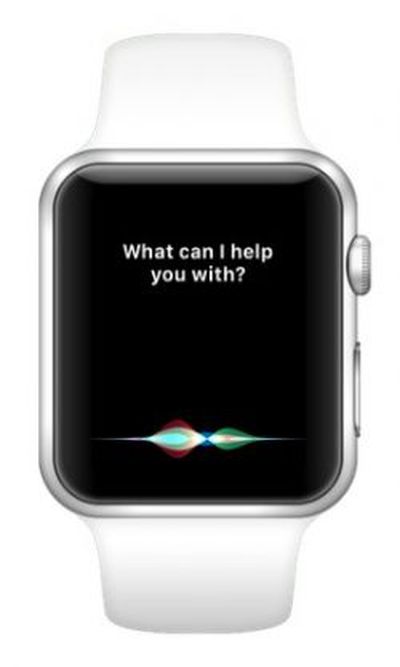
Like on your iPhone, the "Hey Siri" feature on your Apple Watch allows you to use voice search and control other features without touching the device. Your watch's mic only listens for the magic phrase when the display is activated, but it does use a bit more power. So if you simply don't use the function, turn it off. To do so, open Settings on your Apple Watch, select General -> Siri, and toggle it off.
Remember, you can still activate Siri anytime by long-pressing your watch's Crown. Using the same Settings menu above, you can also make Siri respect Silent Mode when it's on, as well as limit spoken responses so you only hear them when headphones are connected.
Silent Mode and Do Not Disturb
Theater Mode, mentioned earlier, offers a middle ground between two additional settings: Silent Mode and Do Not Disturb. Silent Mode mutes audible alerts and can be turned on permanently if you're happy to rely on haptic vibrations for alerts, calls, alarms, and timers.
With Do Not Disturb enabled, your watch activates the same mode on your iPhone, silencing audible and vibration-based alerts across both devices unless they come from people in your Favorites contact list. Some Apple Watch users turn on both Theater Mode and Do Not Disturb when wearing their devices to bed, particularly if they track their sleep using a third-party app like AutoSleep.
To turn on Silent Mode on your Apple Watch, swipe up from any clock face to reveal the Control Center, and then tap the button with a bell symbol, so that the button turns red and the bell is crossed out. To activate Do Not Disturb from the Control Center, tap the button with a crescent moon so that it turns purple.
Haptics and Noise
Haptics refers to the subtle physical feedback sensations you get in response to touching the screen or rotating the Crown of your Apple Watch. You can adjust haptic strength on your watch by going to Settings -> Sounds & Haptics. Many users find the lowest haptic setting, which draws the least power, to be perfectly adequate, with or without the Prominent Haptic option turned on.
You can disable Crown haptic effects in the same Sound & Haptics menu, via the Crown Haptic switch. You should also make sure that the Taptic Time feature is disabled – in the Watch tab, tap Clock, then tap Taptic Time and toggle the switch next to the setting.
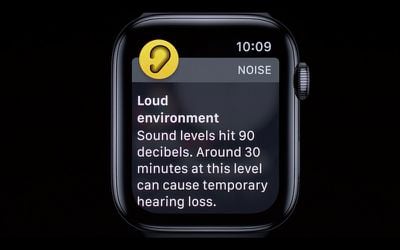
With watchOS 6, Apple introduced a Noise app that uses the Apple Watch microphone to monitor environmental noise. When enabled, users receive a notification if the decibel level is loud enough to damage your hearing.
Whether or not you use the Noise app as a watch face complication, it continuously samples noise levels to give you real-time feedback, and some users have reported noticeable battery drain with the feature enabled. Fortunately, you can disable it in the Watch app by tapping Noise and turning off the switch next to Environmental Sound Measurements.
Walkie-Talkie
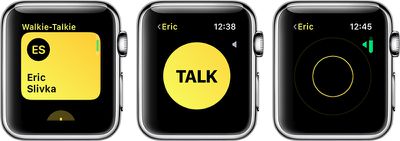
With WatchOS 5, Apple introduced Walkie-Talkie, which allows Apple Watch wearers to send quick voice messages to friends and family members by speaking into their Apple Watch, similar to real Walkie-Talkies. The person on the receiving end of a Walkie-Talkie message hears their Apple Watch beep and then they see a screen that allows them to approve a connection.
If you've used Walkie-Talkie then you may have noticed that the first connection attempt takes a few moments, after which voice messages to and fro are pretty much instant. That's because the feature launches a FaceTime session between the conversing parties. After the last interaction, it retains the active two-way connection for a short amount of time in case another message is recorded, and switches off again when none is forthcoming.
Anecdotally, people have reported an improvement in battery life with Walkie-Talkie off. You can disable it via the Control Center on your Apple Watch – swipe up on a watch face to reveal it, then tap the Walkie Talkie toggle so that it's no longer yellow. Note that if you turn it off and someone tries to speak to you, they'll see a message that you are unavailable, and you'll receive a notification.
Fixing Persistent Battery Issues
Bluetooth, Unpairing, and Hard Reset
If you've had no luck improving the battery life of your Apple Watch using the above tips, there are still a few steps you can take.
It's worth noting at this point that disabling Bluetooth on your iPhone increases the battery drain on your Apple Watch, so keep Bluetooth enabled on your phone and see if that helps.
If your watch battery drains unusually fast, try a hard reset: Hold down both side buttons for about 10 seconds until the display goes off and the device reboots. In addition, some users have found that unpairing and their Apple Watch from their iPhone can smooth out battery issues, especially after a recent software update. Make sure keep your Apple Watch and iPhone close together as you unpair them.
Open the Watch app on your iPhone, go to the My Watch tab, then tap your watch at the top of the screen. Tap next to the watch that you want to unpair, then tap Unpair Apple Watch. Once that's done, you'll need to set up your Apple Watch again and restore from a backup.
If none of the above solutions work for you, it's time to try resetting the watch to factory defaults.
Reset Apple Watch to Factory Default Settings
To do this on your Apple Watch, open Settings and select General -> Reset. (The same option lies at the bottom of the iOS Watch app's General menu.) This action erases everything off your watch, including any media, data, settings, messages, and so on. You'll also need to re-pair the watch with your iPhone after the process is complete, so treat it as a last resort.
Note that after a new pairing or update, your watch may take a few days to learn and adapt to your usage, before smoothing out into a more consistent balance between battery life and performance.
Check for Software Updates
Apple is continually refining its software for Apple Watch, and updates to the operating system sometimes come with bug fixes which can resolve related battery drain issues, so it's important to make sure your device is running the latest software.
As of writing, the latest version of the Apple Watch operating system is watchOS 6, which can be downloaded for free through the dedicated Watch app on the iPhone by tapping the My Watch tab and going to General -> Software Update. To install software updates, your Apple Watch needs to have at least 50 percent battery, it needs to be placed on a charger, and it needs to be in range of your iPhone.
Contact Apple Support
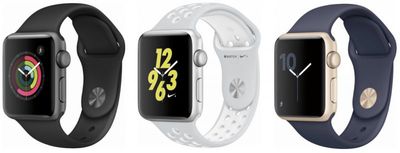
If none of these tips work, check to see if your Apple Watch is still under warranty. A standard one-year warranty is included with every Apple Watch (Stainless Steel, Aluminum, and Nike+) and a two-year warranty is included with Apple Watch Edition and Hermès models. All warranties include service coverage for a defective battery. If your watch is out of warranty, Apple offers a battery service, although prices may vary depending on where you live.
Tim Cook made his first appearance in Canada today as the head of Apple with an unannounced visit to Toronto this morning.
Just before noon local time, Cook made a surprise visit to the company's retail store at the Eaton Centre shopping mall, reports The Globe and Mail. Cook was pictured alongside young students attending an Apple Field Trip, an in-store initiative that introduces kids to coding, podcasting, and other creative skills.
Cook has served as Apple's CEO since August 24, 2011, after the late Steve Jobs resigned from the position for a final time.
Update: After visiting the Eaton Centre Apple Store while in Toronto, Tim Cook attended a Maple Leafs game with hockey analyst and former player Nick Kypreos.
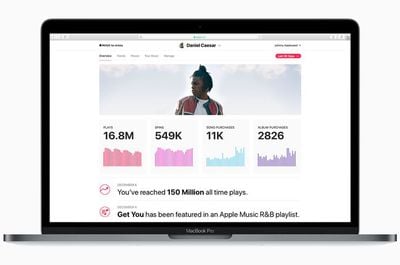
Apple is debuting "Apple Music for Artists," an analytics dashboard aimed specifically at musicians. The new feature, which was outlined by Billboard, is meant to provide artists and bands with insight into the listening and buying habits of their fans.
The dashboard home page offers up an artist's current number of plays, spins, song purchases, and album purchases, with built-in tools able to provide data dating back to June of 2015, which is when Apple Music first launched.
An Insights panel available through the dashboard highlights milestones like all time number of plays, purchases of specific songs, and cumulative purchases, while a global map is designed to allow musicians to click on any of the 115 countries where Apple Music/iTunes is available to see purchase history.
Data for individual cities is included, such as top songs in each city, with further demographic breakdowns available, and another feature lists all of the Apple-curated playlists where an artist's songs appear.
Apple's aim with Apple Music for Artists is to provide more information to independent acts who might not otherwise have access to detailed analytics. Canadian R&B singer Daniel Caesar told Billboard that Apple's analytics dashboard gives smaller artists the tools they need to compete with bigger acts.
"As a truly independent artist with a small team, music analytics is something we can't do without. We don't have the luxury of deep major label market research to rely on to help us make important decisions like where to perform and how to advertise the things that we make. Apple's analytics tool helps to level the playing field for artists like myself."
A few thousand artists have been invited to join Apple Music for Artists as of today as part of a beta test, and later, the feature will be expanded to all artists that have content on the iTunes and Apple Music platforms.





 Within the HomePod's pre-order date and launch


 Under the leadership of Apple CEO Tim Cook, Apple has spearheaded an "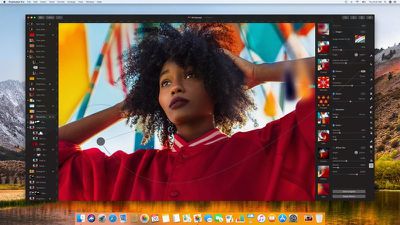
 TestFlight, which is designed to allow developers to provide testers with beta versions of apps ahead of their release, was today updated to version 2.0.1, introducing a handful of new features.