After a years-long wait, Apple Paytoday launched in South Korea, allowing those living in the country to use Apple's payment system to make contactless payments using the iPhone or Apple Watch.
Apple has been working to bring Apple Pay to South Korea since 2017, but Apple was unable to be registered as an electronic financial business operator because regulators were investigating whether Apple Pay violated local regulations and laws. Apple was finally approved by financial regulators back in February.
NFC terminal adoption was also low in retail stores in South Korea around when Apple Pay first launched, which continues to be an issue. There are more NFC terminals than there were six years ago, but The Korea Times suggests Apple Pay will face "significant challenges" in Korea due to the limited number of NFC terminals.
With Apple Pay, credit and debit cards from supported banks in South Korea can be added to the iPhone and Apple Watch to make purchases at stores that have contactless payment options. Apple Pay cards can also be used on iPhone, iPad, and Mac to make Apple Pay purchases on the web.
According to the Apple Pay website in South Korea, a number of stores are accepting Apple Pay including McDonald's, Shake Shack, Lotteria, Krispy Kreme, Gong Cha, Lotte, HomePlus, Hollys, and more.
At the current time, Apple Pay is limited to Hyundai Card users, which could see South Koreans interested in using the service picking up a Hyundai Card. No other card companies are participating in Apple Pay as of yet.
Instead of separate buttons for volume up and volume down, the iPhone 15 Pro models are expected to have a single elongated button for adjusting the volume up or down. Meanwhile, the mute switch that has been present since the original iPhone in 2007 is expected to become a mute button that can be pressed to turn the iPhone's ringer on or off.
Both the volume and mute buttons are rumored to have a solid-state design. Instead of physically moving, the buttons would provide haptic feedback from two additional Taptic Engines inside the iPhone to simulate the feeling of movement, similar to the Home button on the latest iPhone SE or the Force Touch trackpad on modern MacBooks.
The standard iPhone 15 and iPhone 15 Plus models are still expected to have two physical volume buttons and a mute switch, as other CAD images in the video show. Apple should announce the entire iPhone 15 series in September as usual.
In related news, tech reviewer Sonny Dickson has provided an additional look at alleged front glass panels for the iPhone 15 series. Like the original leak, the images show that the Pro models will have thinner bezels around the display, and that the Dynamic Island will be expanded to the standard iPhone 15 models.
Samsung today kicked off a special "Discover Samsung" event, which will be a week-long savings event focusing on Samsung monitors, smartphones, TVs, appliances, and more. While some deals will stick around the entire week (through March 26), others will refresh every day.
Note: MacRumors is an affiliate partner with Samsung. When you click a link and make a purchase, we may receive a small payment, which helps us keep the site running.
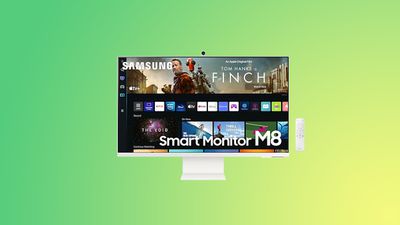
The highlight of the new sale is Samsung's 32-inch Smart Monitor M8 for $449.99 in Warm White, down from $699.99. Samsung's Smart Monitor M8 has a design very similar to the new 24-inch iMacs, and it uses USB-C charging connectivity and includes AirPlay support.
Only the Warm White color is available at this low price, while all others are seeing a $549.99 price tag. Compared to past sales, this is the best price we've seen on the Smart Monitor M8 so far in 2023, and is an overall second-best price when looking at sales from the 2022 holiday season.
The M8 houses a 4K UHD flat LCD panel providing 400 nits of brightness, a 60Hz refresh rate, HDR support, and adaptive picture technology that automatically adjusts display brightness and color temperature for viewing comfort. The M8 chassis is 11.4mm thin, which is 0.1mm thinner than Apple's iMac, and it includes a flat back, thin bezels, and a height adjustable stand with tilt functionality.
Integrated into the display is Wi-Fi 5 and Bluetooth 4.2 wireless connectivity, one micro HDMI port, and two USB-C ports one of which offers 65W of charging output for a phone and notebook.
Besides the Smart Monitor M8, we've rounded up a few other items you can get on sale during the Discover Samsung event. These include savings on memory, monitors, and TVs, and remember that you can check back every day for fresh deals. One of the best deals in this sale is Samsung's curved 55-inch Odyssey Ark 4K monitor for $1,999.99 ($1,000 off).
Microsoft is reportedly preparing to launch an Xbox games store on the iPhone as early as next year, but the plans depend on multiple regulatory measures.
In an interview with the Financial Times, Microsoft's gaming chief Phil Spencer said the app's launch hinges on regulators approving the company's acquisition of video game maker Activision Blizzard, as this would give Microsoft a wider portfolio of mobile games. Second, the app would only be able to launch if the EU's Digital Markets Act and other regulations allowing for alternative app stores on iOS are enforced.
"We want to be in a position to offer Xbox and content from both us and our third-party partners across any screen where somebody would want to play," Spencer told the Financial Times. "Today, we can't do that on mobile devices, but we want to build towards a world that we think will be coming where those devices are opened up."
In December, Bloomberg's Mark Gurman reported that Apple was preparing to allow alternative app stores on the iPhone in order to comply with the Digital Markets Act, which is expected to come into effect in March 2024. Gurman said Apple was aiming to roll out the changes with an iOS 17 update next year for iPhone users in Europe only. This means the Xbox games store would not be available in the U.S., at least initially.
Xbox already offers a cloud gaming service on the iPhone, but games are only playable via the web instead of the App Store. Apple has faced increasing regulatory scrutiny over its tight control of the App Store, leading the company to make changes in some countries, such as allowing alternative payments in South Korea.
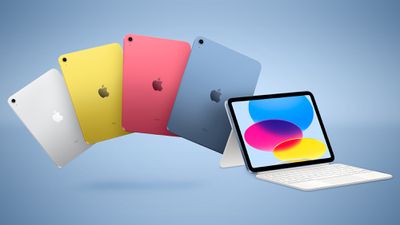
Amazon today has multiple discounts on Apple's 2022 iPad, offering the first markdowns on these tablets since early February. Below you'll find record low deals across both Wi-Fi and cellular models of the 10.9-inch iPad, as well as a new sale on AirTag.
Note: MacRumors is an affiliate partner with some of these vendors. When you click a link and make a purchase, we may receive a small payment, which helps us keep the site running.
iPad
Starting with the 64GB Wi-Fi iPad, you can get this tablet for $399.00, down from $449.00. It's available in Silver at this price, which is the best price we've ever tracked on the 2022 iPad.
The 256GB Wi-Fi iPad is on sale for $549.00, down from $599.00, and it's available in every color except Silver. Just like the 64GB option, this is a match of the all-time low price on this version of the 2022 iPad.
Moving to the cellular options, you'll find the 64GB cellular iPad on sale for $549.00, down from $599.00. Amazon has all four colors of this iPad on sale at this best-ever price, and they're all in stock and ready to ship out today directly from the retailer.
Then there is the 256GB cellular iPad, which Amazon has for $699.00, down from $749.00. This one is also available in all four color options, and has delivery date estimates of March 22 for most places in the United States.
Lastly, we're tracking a fresh deal on Apple's AirTag tracker, with the 4-Pack available for $89.99 on Amazon, down from $99.00. This isn't an all-time low price on the accessory, but it has been months since we've seen any discount on any version of the AirTag, so those who have been waiting for a deal can save a bit of money this week.
Apple will open its flagship India retail store in Mumbai next month, after several delays, soon to be followed by another store in New Delhi, reports The Economic Times, citing industry executives.
Located in the Jio World Drive mall and covering 22,000 square feet, the Mumbai store will be a retail landmark similar to Apple stores in Los Angeles, New York, Beijing, and Singapore.
The second, smaller 10,000 to 12,000-square-feet store in New Delhi's Select CityWalk mall is expected to launch in April-June, potentially just a few days after the Mumbai store opening, according to the paper's sources. Apple stared hiring for the stores in January.
"Fitouts are completed for both the stores," the person said. "In fact, the fitout was completed for the Delhi store ahead of the Mumbai one."
"But since Mumbai will be the flagship Apple Store in India, it will open first next month. The Delhi one will open soon after," said the industry executive.
India has become more important at Apple over the last few years due to the growing demand for Apple products. In 2020 Apple opened its online store in India, offering Indian customers a direct way to purchase products directly from Apple without having to go through an authorized premium reseller.
While most people in India use Android devices, it is the second largest smartphone market in the world and Apple has the potential to make inroads with more affordable product options.
Apple has started producing some iPhone models in India, including the iPhone 14, as it looks to diversify beyond China. Apple supplier Foxconn has invested $500 million in the country to boost production capabilities.
India has been one of the best-performing markets for Apple over the last few years. In the quarter ended December, the company achieved record overall sales in the country. India is also set to be its own sales region within Apple, which will give the country "increased prominence" within the company, according to one report.
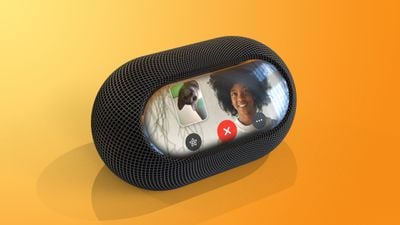
Apple's project to design its first HomePod with a screen has been pushed back until next year at the earliest, as part of a series of cost-cutting measures and belt-tightening efforts to make its operations more efficient.
In his latest Power On newsletter, well-connected Bloomberg journalist Mark Gurman suggested that delaying the device will allow Apple to allocate its research and development budget to more pressing projects, like mixed reality headsets.
The move is part of a strategy to contain costs that should enable the company to maintain an appearance of stability in an unstable economy and avoid the swingeing cutbacks and layoffs that have befallen other tech companies including Meta, Amazon, Microsoft, and Google.
Other moves to avoid layoffs are said to include delaying bonuses for corporate teams, pausing hiring on some teams, reining in budgets, and leaving roles open rather than filling them when people leave their positions.
The revised timing for the rumored HomePod product tallies with Apple analyst Ming-Chi Kuo's recent prediction that a redesigned HomePod with a 7-inch display will arrive in the first half of 2024.
Apple's high-end iPhone models have started at $999 in the U.S. since they first launched back in 2017 with the iPhone X, but could this finally be the year that starting price sees an increase?
This week also saw some more rumors about Apple's upcoming headset and the company's explorations in the booming AI industry as well as the release of a new round of beta updates, so read on for all the details on these stories and more!
iPhone 15 Pro Predicted to See First Price Increase Since iPhone X
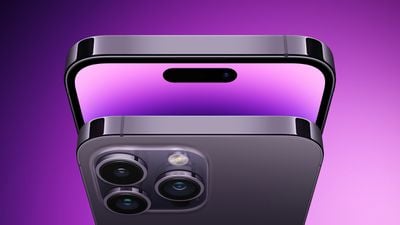
In a research note this week, technology analyst Jeff Pu said he believes the iPhone 15 Pro models will see a price increase due to several rumored hardware upgrades, including a titanium frame, solid-state buttons with additional Taptic Engines for haptic feedback, camera improvements, increased RAM, a USB-C port, and more.
The higher-end/Pro tier of the iPhone has started at $999 since the iPhone X was released in 2017.
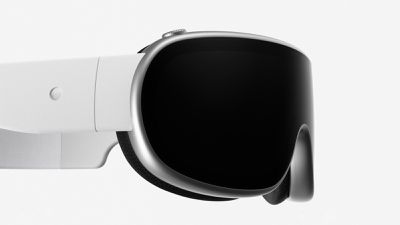
Report: Apple CEO Tim Cook Ordered Headset Launch Despite Designers Wanting to Wait for AR Glasses
Apple is widely expected to announce its long-rumored AR/VR headset at WWDC this June following several years of development.
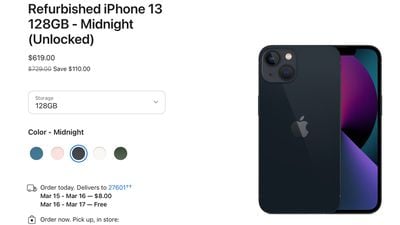
All four models are listed on the refurbished store, including the iPhone 13 mini, iPhone 13, iPhone 13 Pro, and iPhone 13 Pro Max, but availability fluctuates over time. The devices are discounted by over 15% compared to Apple's original brand new pricing.
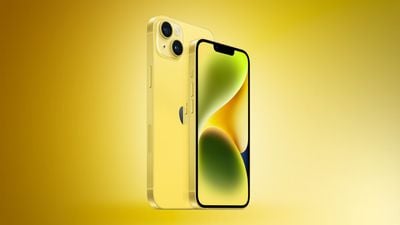
iPhone 14 and iPhone 14 Plus in Yellow Launched This Week
The launch of a new color brings some renewed attention to the iPhone 14 series, which launched in September 2022. There are no other changes to the devices beyond the Yellow finish, so consider waiting for the iPhone 15 later this year if you are interested in new features.
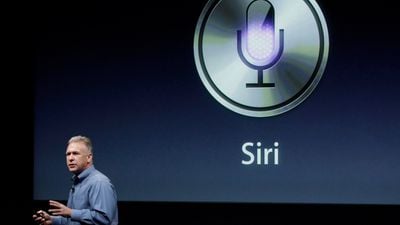
Apple Engineers Reportedly Exploring ChatGPT-Like AI Despite Siri Design Flaws
A separate report from 9to5Mac this week also highlighted Siri-related language-generation code in tvOS for the Apple TV, but it's unclear exactly what Apple's plans are for this quickly-evolving technology.
MacRumors Newsletter
Each week, we publish an email newsletter like this highlighting the top Apple stories, making it a great way to get a bite-sized recap of the week hitting all of the major topics we've covered and tying together related stories for a big-picture view.
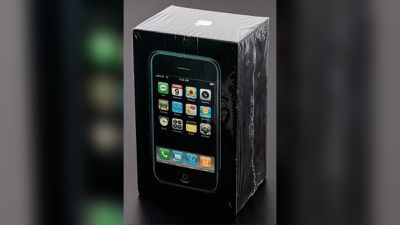
A first-generation iPhone still sealed inside its box sold for $54,904 at auction, which is more than $54,000 over the original $599 price tag of the device when it was released in 2007.
The original iPhone was put up for sale by RR Auction on behalf of a former Apple employee who purchased it back when it first came out. Back in February, an original, sealed iPhone sold for over $63,000, which actually marked a sales record for a first-generation iPhone.
Unopened first generation original Apple iPhone, Model A1203, Order MA712LL/A (8GB). The box features a life-size image of the iPhone with twelve icons on the screen, indicating that it is from the earliest production (2007); a 13th icon, for iTunes, came later in the year. In brand new, factory-sealed condition. Accompanied by an AT&T bag and leaflet regarding rate plans and iPhone activation. The consignor notes that he purchased this phone upon its release in 2007, but also received one through work as an Apple employee; this spare was therefore never opened.
Other unopened original iPhones sold for $35,000 and $39,000 in 2022, so prices have been trending upward.
RR Auction also sold a an "undiscovered" Apple-1 computer for an unspecified sum, with other Apple devices and memorabilia also fetching high prices. A Macintosh Plus from Del Yocam sold for $26,590, while a Macintosh 128K prototype sold for $16,500 and an Apple Lisa sold for $81,251.
An iPhone 11 signed by Apple CEO Tim Cook sold for nearly $4,000, technical instructions annotated by Steve Jobs went for $12,500, and a Steve Jobs business card sold for $6,188.
If you haven't already listened to the previous episode of The MacRumors Show, catch up for our discussion about Apple's Yellow iPhone 14 and iPhone 14 Plus, as well as the range of new Apple Watch bands and AirTag accessories, with TikTok star Frank McShan.
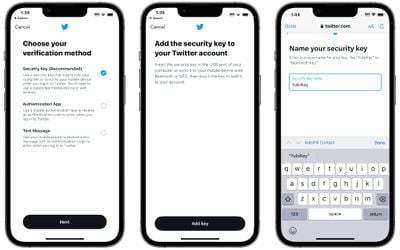
With the launch of iOS 16.3 and macOS 13.2 Ventura, Apple added Security Keys for the Apple ID, offering a more robust way to protect your Apple account and everything associated with your Apple account.
A Security Key is a physical device that works with two-factor authentication. Instead of using a code generated by a secondary Apple device for authentication, when you log into your Apple ID on another device after setting up Security Keys, you need to authenticate through a physical key that's actually plugged in to your device.
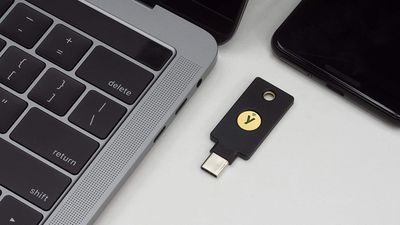
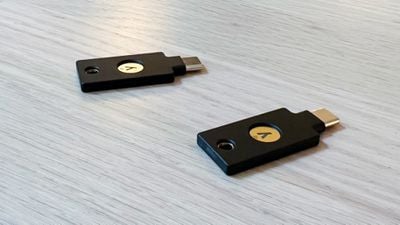
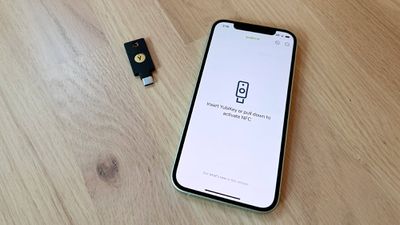
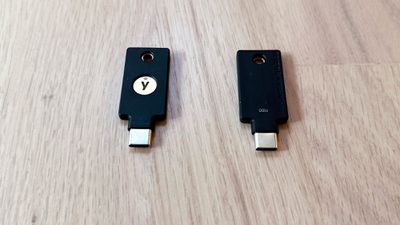
You can use any FIDO Certified security key to activate the feature, and Apple recommends the YubiKey 5C NFC and the YubiKey 5Ci, two devices sold by Yubico. Yubico sent me a pair of its security keys so that I could try them out with Apple's Security Key function.
The YubiKey 5Ci has a USB-C connector and a Lightning connector so that it can be plugged into iPhones, iPads, Macs, and other devices that use these connectors, while the YubiKey 5C NFC has a USB-C connector and the ability to interface with NFC-enabled devices.
With Apple eliminating the Lightning port in the iPhone this year and because I don't own any devices without NFC, I opted for the YubiKey 5C NFC for futureproofing, but if you plan to have an iPhone or an iPad with a Lightning port for an extended period of time, the 5Ci might be the better option if you're interested in using Security Keys.
Security Keys can be set up on the iPhone, iPad, or Mac. Note that whatever security key product you pick, you have to have two, not just one. Apple requires dual security keys for redundancy purposes, and Yubico recommends a pair as well. The reason for this is because if you lose your physical security key, if you don't have another in a safe place, you're going to lose access to your Apple ID. You're going to want to store the Security Keys in two separate locations.
On an iOS device or Mac, Security Keys can be enabled through the Password and Security section of the Settings app. Before you can add a Security Key, you need to sign out of all inactive devices, which includes devices that you have not used in the last 90 days. Older devices won't support Security Keys at all.
I had to go through this process, and I want to note that it didn't quite work properly (which is not the YubiKey's fault). Apple's process signed me out of the unsupported devices or devices I had not logged into, but then the Security Keys setup would not progress. I swapped over to the Mac to continue, and had better luck.
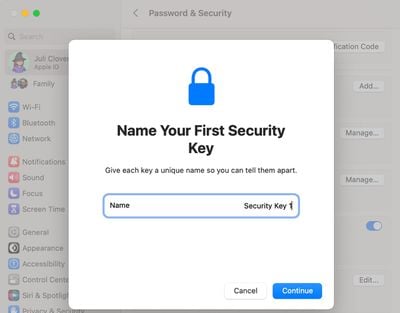
The setup process required me to connect the security key, which I did using USB-C, and then I had to press on the key to get the Mac to recognize it. Apple had me give it a name, and then repeat the process to add the second security key.
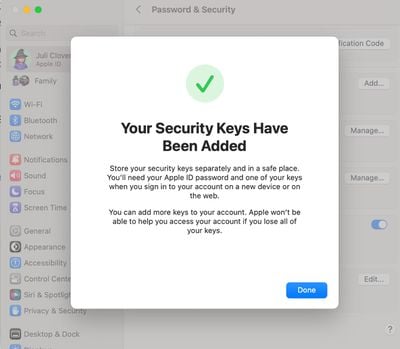
After that, I was instructed to review my list of active devices and choose whether to sign out of any of them. There was an option to stay signed in to everything, which is what I selected. Following the setup process, Apple instructed me to store the keys separately and in a safe place, and clarified that I can add additional keys in the future.
There's also a single line on the bottom of the setup screen that makes it clear Apple has no way to help access an account that is tied to a security key if both keys are lost, a warning that should probably be in bolder text. Apple sends an email about the Security Key setup process, and in both Mac and iOS settings, I can view my connected Security Keys and remove them.
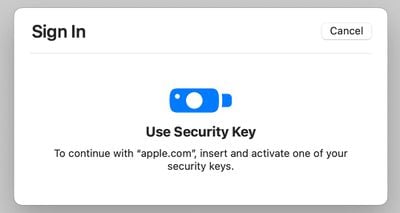
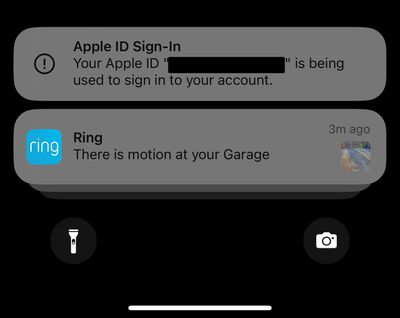
When I attempt to sign into my Apple ID on a device on the Mac, I'm instructed to insert and activate one of my security keys. This process requires inserting the key into a USB-C port and pressing on it to activate it. I receive notifications across all of my devices when a login attempt is made.
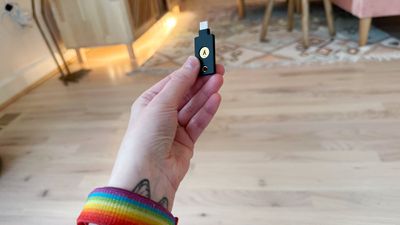
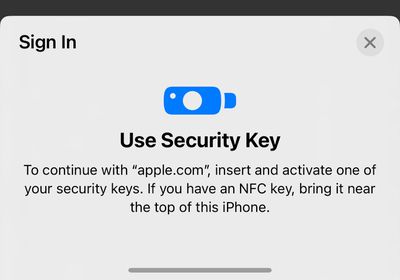
On an iPhone, the login process is similar, but the YubiKey needs to be held near the iPhone's NFC reader (the top of the device) and activated for authentication. In general, it's a simple process on every Mac, iPhone, and iPad I've tested it with. All of my devices are running iOS 16.3 or later or macOS Ventura 13.2 or later, and they all support USB-C or NFC. On devices that are not updated or do not support USB-C/NFC, the process might not be as seamless and could require adapters.
My major worry activating Security Keys is that I'm going to lose one. YubiKeys and other security keys are small, unobtrusive, and easy to lose since they're designed to be kept secret and hidden. The YubiKey has a hole at the top for a keyring, so I'm going to add a keyring to one that will remain in a secure place in my office, and the second will go somewhere safer.
Two-factor authentication with a physical security key is more secure than authentication with a digital code, according to Apple, but it's a little riskier. I can't track my YubiKeys if they're lost, but I can track down all my secondary Apple devices if I should lose one and need it for a code. That said, the authentication process is super easy, and it's even quicker than getting a code from another Apple device.
YubiKeys don't need to charge and seem to be durable so far based on anecdotal reports from YubiKey users, which is good because I'm also worried about breaking one. Ultimately, I think I may add a third key to my account just for another layer of protection, since there's little chance I'll lose or break three at one time. There's an IP68 water resistance rating so it can hold up to liquid immersion, and it has a storage temperature of -4 °F to 185 °F.
You won't need an app to use a YubiKey for some services (like with an Apple ID or Twitter), but for others, the Yubico Authenticator will need to be installed. The Yubico Authenticator is like Google Authenticator or Authy, generating a code that uses the YubiKey.
I was not able to set up the YubiKey with Instagram because Instagram's authentication process plus the Yubico app simply would not work. The app would not recognize the key, so be aware that there may be some troubleshooting involved. There are limitations with the YubiKey in terms of supported accounts. It can store up to 25 FIDO2 credentials for password-free logins, two OTP credentials, 32 OATH credentials for one-time passwords (when paired with the Yubico Authenticator), and an unlimited number of U2F credentials. If you have more than 32 accounts where you need one-time passwords, the YubiKey might not be the best solution because it only works with 32 logins.
In addition to an Apple ID, the YubiKey works with other websites and services with two-factor authentication. Google, Microsoft, 1Password, LastPass, Facebook, Twitter, Instagram, bitcoin wallets, government accounts, and a bunch more are all supported.
Bottom Line
If you're aiming to better secure your Apple ID through physical authentication using the Security Keys feature, the YubiKey series is worth looking at. It offers better protection than you'll get through digital codes, but it is expensive and there are some limitations to be aware of if you want a multi-purpose physical authenticator.
This week saw the arrival of all-time low prices on a selection of Apple products including the new 14-inch and 16-inch MacBook Pro, second generation Apple Watch SE, and AirPods Pro 2. Additionally, we're tracking a few accessory sales celebrating Saint Patrick's Day at places like ZAGG, Casely, Belkin, and more.
Note: MacRumors is an affiliate partner with some of these vendors. When you click a link and make a purchase, we may receive a small payment, which helps us keep the site running.
Saint Patrick's Day Sales
Today is Saint Patrick's Day, and a few Apple-related accessory companies have introduced discounts and offers to celebrate the holiday. We covered a few of these earlier in the week, including ZAGG and Mophie's sitewide discount, and listed some others below.
In regards to Woot's sale, shoppers should remember that the company has the Beats Fit Pro for the all-time low price of $144.95 this weekend, down from $199.95. It's available in the black, white, sage gray, and stone purple color options, and it is in brand new condition.
The year's best price on the AirPods Pro 2 returned to Amazon this week, available for $199.99, down from $249.00. We've seen a few other retailers match this price in 2023, but as of this week only Amazon is offering this sale on the earbuds. Additionally, we're tracking a solid deal on the AirPods 2 at $99.00 on Amazon this week.
2023 MacBook Pro
What's the deal? Take up to $200 off the new MacBook Pro
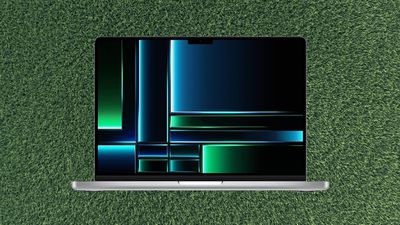
Amazon kicked off the week with record low discounts on Apple's new 14-inch and 16-inch MacBook Pro notebooks. You'll find up to $200 off these computers on Amazon, and B&H Photo is matching a few of the sales.
Apple Watch SE
What's the deal? Take $30 off the Apple Watch SE (gen 2)
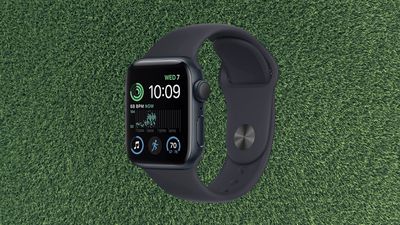
Moving to wearables, Amazon knocked the price of the second generation Apple Watch SE back down to its all-time low of $219.99, from $249.00. The 40mm model is still available in Midnight and Starlight Aluminum at this price.
If you're on the hunt for more discounts, be sure to visit our Apple Deals roundup where we recap the best Apple-related bargains of the past week.
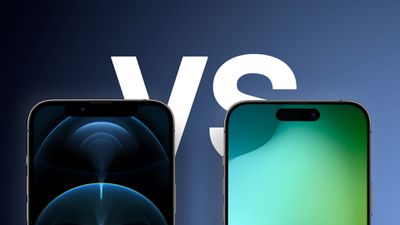
While year-over-year iPhone upgrades are not always groundbreaking, new features can begin to stack up over multiple generations. For example, the iPhone 15 Pro will be a notable upgrade for those who still have a three-year-old iPhone 12 Pro.
If you are still using an iPhone 12 Pro and are considering upgrading to the iPhone 15 Pro when it launches later this year, we have put together a list of features to expect below. The list includes major changes introduced with the iPhone 13 Pro and iPhone 14 Pro, as well as new features rumored for the iPhone 15 Pro.
A17 chip vs. A14 chip: The 5nm-based A16 chip in the iPhone 14 Pro is already up to 36% faster than the A14 chip in the iPhone 12 Pro, according to the Geekbench 6 benchmark. The iPhone 15 Pro will be equipped with the A17 chip, which is expected to be manufactured based on TSMC's latest 3nm process for even faster performance and improved power efficiency over the previous generation.
USB-C port: With the iPhone 15 Pro, Apple is finally expected to switch from Lightning to a USB-C port. This change will provide a more universal charging standard and allow for faster wired data transfer speeds.
Titanium frame: Like the Apple Watch Ultra, the iPhone 15 Pro is rumored to have a titanium frame instead of stainless steel. The back glass and display bezels are also expected to have slightly curved edges.
Dynamic Island: With the iPhone 14 Pro, Apple replaced the notch with the Dynamic Island, a pill-shaped area surrounding the Face ID sensors and front camera. The Dynamic Island displays system alerts and integrates with iOS 16's Live Activities feature to show live NBA scores, the status of an Uber ride, and more.
Always On display option: With the iPhone 14 Pro, Apple introduced an always-on display option that dims the entire Lock Screen, but still shows the time and date, widgets, wallpaper, and notifications. Once you raise the iPhone, tap the screen, or press the side button, the display returns to normal brightness.
Brighter display: The iPhone 14 Pro's display is up to 200 nits brighter indoors compared to the iPhone 12 Pro, and offers up to 2,000 nits of brightness outdoors. The increased brightness should carry over to the iPhone 15 Pro.
ProMotion: Introduced on the iPhone 13 Pro, ProMotion allows for a variable refresh rate up to 120Hz for smoother appearing content and scrolling.
Thinner bezels: Similar to the Apple Watch Series 7 and Series 8, the iPhone 15 Pro is rumored to have even thinner bezels around the display.
Longer battery life: Already, the iPhone 14 Pro lasts up to 23 hours for offline video playback, compared to 17 hours for the iPhone 12 Pro. With components like the A17 chip and the LiDAR Scanner expected to be more power efficient this year, the iPhone 15 Pro could have even longer battery life.
Numerous camera improvements: iPhone 12 Pro users upgrading to the iPhone 15 Pro will get access to a wide range of camera upgrades, including a 48-megapixel Wide lens, an upgraded front camera with autofocus, increased optical zoom, sensor-shift image stabilization, Macro mode, Cinematic mode, Action mode, ProRes video recording, Photographic Styles, and more.
eSIM only in U.S.: Apple removed the physical SIM card tray from all iPhone 14 models sold in the U.S., meaning the devices work with eSIMs only. The devices are still compatible with physical SIM cards in other countries.
Increased RAM: iPhone 15 Pro models are rumored to be equipped with an increased 8GB of RAM, compared to 6GB for the iPhone 12 Pro. Increased RAM can benefit multitasking on the iPhone by allowing more apps to be open in the background simultaneously without reloading.
Wi-Fi 6E: iPhone 15 Pro models are rumored to support Wi-Fi 6E, which supports the 6GHz band for faster wireless speeds, lower latency, and less signal interference compared to standard Wi-Fi 6.
Emergency SOS via Satellite: iPhone 14 models can connect to Globalstar satellites, enabling users to send text messages to emergency services when outside the range of cellular and Wi-Fi coverage. The service is free for two years after activation, and is currently available in the U.S., Canada, France, Germany, Ireland, and the U.K., with more countries to follow later this month.
Crash Detection: New for the iPhone 14 series, Crash Detection is designed to detect severe car crashes and contact emergency services via Emergency SOS if the user does not respond. The feature is enabled by default.
5G improvements: iPhone 15 Pro models are expected to be equipped with Qualcomm's Snapdragon X70 modem for improved 5G performance.
1TB option: Starting with the iPhone 13 Pro, Apple introduced a 1TB storage option.
Apple will likely unveil the iPhone 15 series in September as usual, and the devices could have additional features that have yet to be rumored.
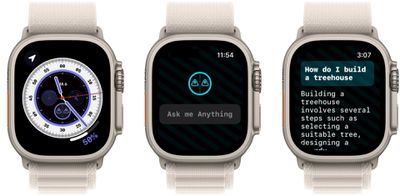
OpenAI's ChatGPT conversational chatbot is taking the tech industry by storm, and now you can ask it things right on your wrist, thanks to a new app for Apple Watch called Petey.
If you haven't been keeping up, ChatGPT is a next-generation language model that understands and generates human-like response to natural language input. The chatbot is trained on a large corpus of text corralled from the internet, so it can answer a wide variety of questions and generate coherent responses to many different types of prompts.
What the Petey app does is that it allows you to query OpenAI's chatbot by either typing questions into your Apple Watch or using voice-to-text input. What's more, it's a conversational experience, so you can continue to interact with the chatbot in the context of the queries you've already put to it.
Petey comes with a watch face complication that makes it very easy to access without having to navigate your apps to open it. That makes it a handy alternative to asking questions of Siri, which nine times out of ten returns a series of web results that get sent to your iPhone anyway.
If you have a query but all you have to hand is your watch, Petey can provide an answer to your question, and the responses are often far more impressive than any digital assistant is capable of. You can even have the answers read out loud with Text to Speech, and you can share the outcome of your interaction via text, email, or social media.
Previously called watchGPT (the name was dropped because of trademark issues) and developed by Hidde van de Ploeg, Petey is currently priced at $4.99 and is available on the App Store. The app requires watchOS 9, so it should work on Apple Watch Series 4 and newer models, and it currently supports 14 different languages, with more set to be added over time.
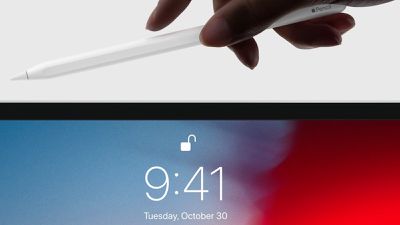
The Apple Pencil 2 is on sale for its all-time low price today on Amazon, priced at $89.00, down from $129.00. The accessory is in stock and available to deliver as soon as March 19 for Prime delivery.
Note: MacRumors is an affiliate partner with Amazon. When you click a link and make a purchase, we may receive a small payment, which helps us keep the site running.
The Apple Pencil 2 is compatible with the following iPads: iPad mini (6th generation), iPad Air (4th generation and later), 12.9-inch iPad Pro (3rd generation and later), and 11-inch iPad Pro (1st generation and later). The second generation Apple Pencil can also magnetically attach and pair to the iPad Pro, iPad mini, and iPad Air.
If you have the newest iPad Pro models, the second-generation Apple Pencil can now be detected while hovering up to 12mm above the display. This allows users to see a preview of their drawing before they make it, and with Scribble, text fields automatically expand when the pencil gets near the screen.
Keep up with all of this week's best discounts on Apple products and related accessories in our dedicated Apple Deals roundup.
The Apple Watch can help treat a key symptom of sickle cell disease and changes to Apple's speech recognition algorithm could help people with a stutter, new studies propose.
According to a study conducted by researchers at Duke University's Day Hospital (via MyHealthyApple), the Apple Watch could help treat vaso-occlusive crises (VOCs), a key complication caused by sickle cell disease that often hospitalizes patients due to severe pain. The research indicates that machine learning using the Apple Watch's collected health data can discover trends to predict pain among people with sickle cell disease, which could provide an early warning signal and enable treatment via painkillers and saline hydration before it becomes more severe.
Researchers enrolled patients with sickle cell disease to Day Hospital for a VOC between July 2021 and September 2021 into the study, providing them with an Apple Watch Series 3 for the duration of their visit. 15,683 data points from the Apple Watch's heart rate, heart rate variability, and activity data were cross-referenced with pain scores and vital signs from the hospital's electronic medical record to create a machine learning model to predict VOCs.
In another newly published study submitted by Colin Lea, a research scientist at Apple who works on machine learning and accessibility related features, it is proposed that changes to Apple's speech recognition algorithm and machine learning could help alleviate problems for people with a stutter, significantly reducing cut-off utterances and word error rates by almost 80 percent.
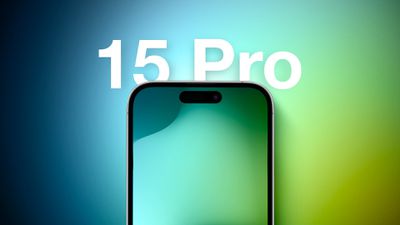
The iPhone 15 Pro Max will have the thinnest bezels of any smartphone, beating the record currently held by the Xiaomi 13. That's according to the leaker known as "Ice Universe," who has divulged accurate information about Apple's plans in the past.
Both iPhone 15 Pro models are expected to have thinner, curved bezels compared to the iPhone 14 Pro, potentially resulting in an Apple Watch-like appearance, but if the leaker is correct, the larger 6.7-inch model will have the most minimal of bezels.
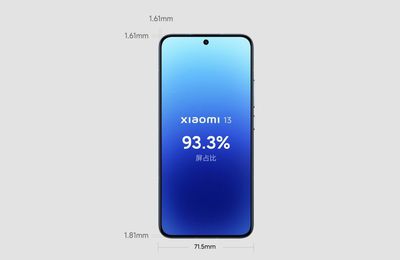
In a tweet, Ice Universe said the iPhone 15 Pro Max will "break the record" of 1.81mm bezels held by the Xiaomi 13, with Apple's upcoming model coming with a black bezel width of just 1.55mm. For comparison, Ice Universe gives measurements for bezels on the iPhone 14 Pro (2.17mm) and the Samsung Galaxy Ultra S23 (1.95mm).
Screen-to-body ratio shown on display (Image: Xiaomi)
Ice Universe could be referring to the chin on the Xiaomi 13 or the leaker meant to say 1.61mm, as per the above image. We've contacted them for confirmation and will update if we hear back. Either way, the bezels on the iPhone 15 Pro Max are still said to be thinner.
According to rumors, the bezels on all four iPhone 15 models are expected to be slightly curved around the edges, similar to the iPhone 11 series, but the width of the bezels on the standard iPhone 15 and iPhone 15 Plus are not expected to diverge from those on iPhone 14 and iPhone 14 Plus. The iPhone 15 lineup is also expected to feature the same display sizes as last year's lineup.
With even thinner bezels around the display, the iPhone 15 Pro models could have a similar appearance as the Apple Watch Series 7 and Series 8. Rumors suggest the Pro models will also feature a titanium frame instead of stainless steel, and solid-state volume, mute, and power buttons that do not physically move when pressed.
iPhone 15 Pro Max will break the record of 1.81mm bezel black edge held by Xiaomi 13, and we measure that its cover plate black bezel width is only 1.55 mm.(S22 and S23 ≈1.95mm,iPhone 14 Pro 2.17mm) pic.twitter.com/9TBrVCGSCo
— Ice universe (@UniverseIce) March 17, 2023
Ice Universe has previously shared CAD renders and dimensions that also suggest the iPhone 15 Pro Max will be unique in featuring a thinner camera bump and smaller footprint.
Apple is expected to announce its next iPhone lineup in September as usual. For the latest rumors, read our iPhone 15 and iPhone 15 Pro roundups.
Apple Maps today expanded its Detailed City Experience to Boston, as noted by content creator Frank McShan. The updated map provides more details and custom-designed 3D models of popular landmarks, such as Fenway Park.
Apple says the updated map provides richer detail for road markings, buildings, commercial districts, marinas, land cover, trees, elevation, public transit routes, and more. Navigation is also improved with the additions of augmented reality walking directions and a road-level "windshield view" when approaching complex interchanges.
Apple started rolling out the Detailed City Experience with iOS 15 in 2021, and the updated map is now available in the cities of Atlanta, Berlin, Chicago, Las Vegas, London, Los Angeles, Melbourne, Miami, Montréal, New York, Philadelphia, San Diego, San Francisco, Seattle, Sydney, Toronto, Vancouver, Washington, and a few others, with more to come.
Apple brought its redesigned Maps experience to Boston (where I’m from!) today, and the level of detail is insane 🤯 pic.twitter.com/zklXftXi4G
— Frank McShan (@frankmcshan) March 16, 2023



 Note: MacRumors is an affiliate partner with Samsung. When you click a link and make a purchase, we may receive a small payment, which helps us keep the site running.
 Note: MacRumors is an affiliate partner with some of these vendors. When you click a link and make a purchase, we may receive a small payment, which helps us keep the site running.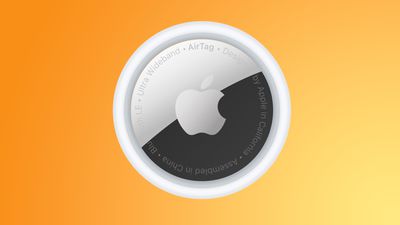
 Apple headset concept by
 Note: MacRumors is an affiliate partner with some of these vendors. When you click a link and make a purchase, we may receive a small payment, which helps us keep the site running.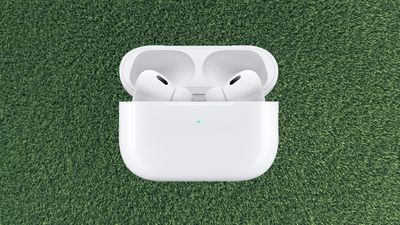
 Note: MacRumors is an affiliate partner with Amazon. When you click a link and make a purchase, we may receive a small payment, which helps us keep the site running.