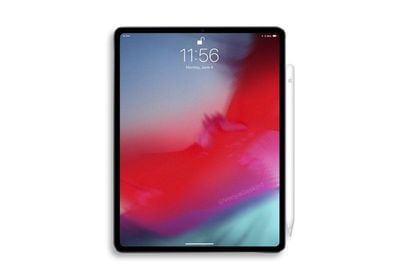
Apple's iPad and Mac-centric event that saw the launch of new iPad Pro models, a refreshed version of the MacBook Air, and a new Mac mini has officially wrapped up, and with the culmination of the event, Apple has posted the full video of the new product unveilings on its website.
For those who were avoiding news of the event because of being unable to watch the video due to work or school, the full event video will offer the chance to catch up on all of the announcements.
Apple will eventually publish the event video on its YouTube channel, but in the meantime, the company has shared several of the videos that were shown on stage, which we've included below.
iPad Pro
Mac mini
MacBook Air
Introductory Mac Video
We'll have plenty more coverage of all of the new iPad and Mac announcements today, including a video of everything that debuted, so make sure to stay tuned to MacRumors for all of the details you need to know.
Prior to today's event, iPad Pro rumors suggested Apple would remove the headphone jack from the updated tablet, and as it turns out, those rumors were accurate.
Apple's newly redesigned 11 and 12.9-inch iPad Pro models do not feature a headphone jack, with the port now officially eliminated from all flagship iPhone and iPad models.
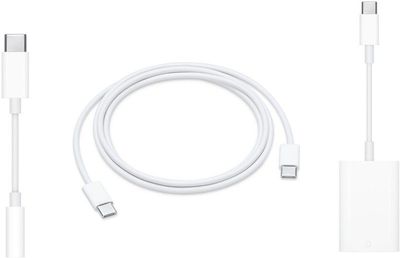
Apple's new tablets are just 5.9mm thick, a slim size that was likely enabled through the removal of the headphone jack. To allow customers to use 3.5mm headphones with their new tablets, Apple is selling a $9 USB-C to 3.5mm headphone jack, which will plug in to the USB-C port on the bottom of the device.
The USB-C to 3.5mm headphone jack is not included with an iPad Pro purchase and must be bought separately if you want to use 3.5mm headphones with the new tablet.
The headphone jack has been missing from the iPhone since the introduction of the iPhone 7, which upset many customers at the time of its removal. Since then, people have become accustomed to using Bluetooth headphones like the AirPods, which may be why Apple felt that it was also time to eliminate the port from its new iPads as well.
Apple's iPad Pro models feature its latest technology with edge-to-edge displays, Face ID, super fast A12X bionic chips, and USB-C connectivity rather than a Lightning port.
Tucked away in a press release, Apple revealed it is bringing AMD Radeon Pro Vega graphics to MacBook Pro for the first time. The company says these new graphic options deliver up to 60 percent faster graphics performance for the most demanding video editing, 3D design and rendering workloads.
The new configurations are set to be custom-order only from Apple's online and retail stores, with availability at Apple Authorized Resellers also expected, from Wednesday, November 14. Apple has yet to release pricing details.
Apple has also introduced a $9 USB-C to 3.5mm Headphone Jack Adapter to allow standard 3.5mm headphones to be connected to the tablet, which no longer features a headphone jack.
Last week, Apple introduced a 0.3m USB-C version of the Apple Watch charger, which will work with the new iPad Pro models. The iPad Pro with USB-C is able to charge an Apple Watch or an iPhone over a USB-C cable.
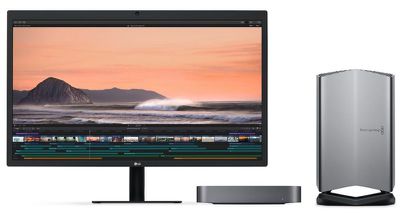
Apple's online store is now listing a new Blackmagic eGPU "Pro", following several major product launches today.
The new Blackmagic eGPU Pro features a Radeon RX Vega 56 graphics processor with 8GB of HBM2 memory, two Thunderbolt 3 ports, four USB 3 ports, an HDMI 2.0 port, and a DisplayPort 1.4 port, allowing for 85W of power to charge a MacBook Pro at the same time.
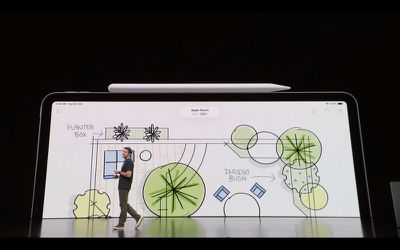
Alongside the new iPad Pro, Apple also announced a new Apple Pencil available for $129 (preorders today, shipping November 7). The second-generation pencil magnetically attaches to the new iPad Pro for both pairing and wireless charging.
The biggest addition to the Pencil, aside from the new magnetic charging feature, is a double-tap gesture — a finger tap on the pencil itself while you hold it — that can do different things depending on the app. In Notes, for example, a double-tap changes the tool. In Photoshop for iPad, a double-tap zooms in or out of the image. Taps are customizable, though, for better personalization. Tap a locked iPad with the pencil, and it wakes up the device and opens right up into the Notes app.
There are no connectors or moving parts now, just the simple pencil itself. Apple also offers engraving through the Apple Store, to personalize it further (helpful for telling Pencils apart in a design studio).
Like the previous pencil, it works with no perceptible lag, is pressure sensitive for drawing and sketching, and is aware of tilt for shading.
The second-generation pencil is available for $129 with free engraving, and is compatible with the new 11-inch and 12.9-inch iPad Pro models. The first-generation pencil sticks around for $99, for owners of older, compatible iPads. (iPad Pro 12.9-inch 1st and 2nd generations, iPad Pro 10.5-inch, iPad Pro 9.7-inch, and the 6th generation iPad)
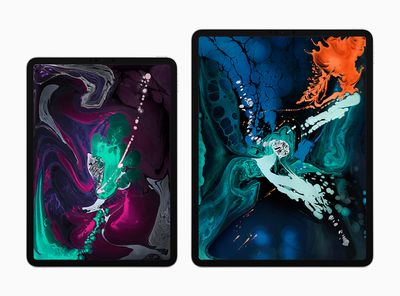
Apple today revealed the all-new iPad Pro, with an edge-to-edge LCD "Liquid Retina" display, slimmer bezels, no Home Button, Face ID, and a magnetic attachment support for the new Apple Pencil. The new 11-inch iPad Pro has the same footprint as the previous 10.5-inch iPad Pro, but now with a bigger display thanks to the slimmer bezels. The 12.9-inch version is actually smaller than the previous 12.9-inch model but with the same screen size.
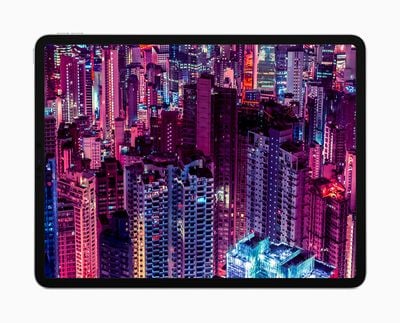
Apple put the same Liquid Retina display in the iPad Pro as the one found in the iPhone XR, using rounded corners that follow the curves of the iPad Pro's unibody enclosure. Apple says the display is its brightest and most color accurate iPad display yet, with wide color support, True Tone, and anti-reflective coating that provides a natural and accurate viewing experience inside and outside.
Both models are 5.9mm thin -- "the thinnest iPad design ever" -- and the 12.9-inch version has seen a total 25 percent reduction in overall volume.
“The new iPad Pro is a huge step forward for powerful, creative, mobile computing; it has an all-new thinner design, speeds through projects with the super-fast A12X Bionic chip and unlocks with a glance using Face ID in any orientation — while you’re sitting or standing, with iPad Pro on your desk or lap, with the new Smart Keyboard Folio and new Apple Pencil,” said Philip Schiller, Apple’s senior vice president of Worldwide Marketing.
“There has never been a mobile device anything like the new iPad Pro; it has a gorgeous edge-to-edge Liquid Retina display that curves into the corners, breakthrough performance that outperforms most laptops, Face ID, support for the new Smart Keyboard Folio and new Apple Pencil, advanced new cameras and sensors for the best AR experiences ever in any device, a high-speed USB-C connector, louder speakers, faster wireless and more, all packed into a thinner device that has all-day battery life and is 25 percent smaller in volume.”
Powering the iPad Pro is a new A12X Bionic chip, which Apple says is its smartest and most powerful tablet chip yet. A12X Bionic has eight total cores (four performance cores and four efficiency cores) that provide up to 35 percent faster single-core performance. There's also a seven-core GPU to deliver up to twice the graphics performance, fueling new AR experiences and console-quality graphics. During the keynote, Apple compared gaming performance on the new iPad Pros to that of the Xbox One S.
iPad Pro comes with Apple's next-generation Neural Engine for advanced machine learning in everything from photography, AR, and Face ID. This marks the first time that Face ID is available outside of an iPhone, and on iPad Pro it's designed to work while holding the tablet in any position or even while seated and attached to the new Smart Keyboard Folio.
Like on iPhone X and newer, Face ID uses the TrueDepth camera system to map and recognize your face and securely unlock iPad Pro, pay with Apple Pay, access secure apps, and more. You'll also now be able to create and interact with Animoji and Memoji on iPad Pro using the front-facing TrueDepth camera. Throughout all of these features and daily use cases, Apple says iPad Pro has a 10-hour battery life.
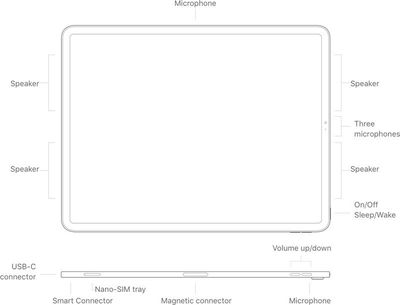
The tablets also have a new USB-C connector that is replacing the old Lightning connector, offering users the chance to charge an iPhone while on-the-go, transfer data between devices, and drive external displays up to 5K.
On the accessory side of things, the second generation Apple Pencil can magnetically attach to iPad Pro for pairing and wireless charging. The new Apple Pencil supports tap-based controls, so you can select a different brush tool in Photoshop, for example, by double tapping on Apple Pencil. Additionally, a new Smart Keyboard Folio protects the front and back of iPad Pro while providing a full-size keyboard
The 11-inch and 12.9-inch are available in Silver and Space Gray in 64GB, 256GB, 512GB, and a new 1TB option. 11-inch models start at $799 (Wi-Fi) and $949 (Wi-Fi + Cellular), while 12.9-inch models start at $999 (Wi-Fi) and $1,149 (Wi-Fi + Cellular). You can pre-order the new iPad Pro, Apple Pencil ($129), and Smart Keyboard Folio ($179 11-inch and $199 12.9-inch) today on Apple.com, and they will launch on Wednesday, November 7.
Apple is also launching a new Smart Folio for iPad Pro in a protective, polyurethane folio design that will be available in a variety of colors for $79 (11-inch) and $99 (12.9-inch).
Countries where the iPad Pro will be available at launch include: the U.S., Australia, Austria, Belgium, Bulgaria, Canada, China, Croatia, Czech Republic, Denmark, Estonia, Finland, France, Germany, Hong Kong, Hungary, Iceland, Ireland, Isle of Man, Italy, Japan, Jersey, Latvia, Lithuania, Luxembourg, Macau, Monaco, Netherlands, New Zealand, Norway, Poland, Portugal, Puerto Rico, Romania, Singapore, Slovakia, Slovenia, Spain, Sweden, Switzerland, the UAE and U.K.
Later this year, the new iPad Pro models will be available in Colombia, Greece, Greenland, Guatemala, India, Israel, Liechtenstein, Malaysia, Macedonia, Mexico, Morocco, Peru, Qatar, Russia, Thailand, Turkey, Saudi Arabia and South Africa.
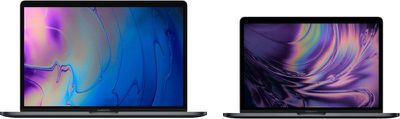
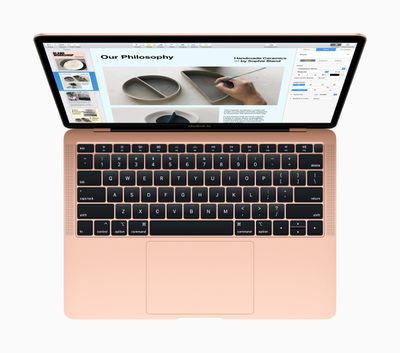
Apple in New York today announced a new Retina Display-equipped MacBook Air, the first major update to the model in several years. The display is the centerpiece of the update, but it also gains a pair of Thunderbolt 3 ports and retains its headphone jack, mirroring other 13-inch notebooks in Apple's lineup. It's available in gold, silver, and space gray.
Pricing starts at $1,199, with preorders beginning today and first deliveries on November 7.
The new Air features 50 percent smaller bezels, allowing for a reduced footprint while retaining the same screen size. The 13.3-inch display has four times the resolution of the previous model at 2560x1600. The screen supports 48 percent more color than before, and the FaceTime HD camera remains tucked away at the top.
It has an 8th-gen Intel Core i5, with Intel UHD Graphics and 2133 MHz system memory up to 16GB (8GB standard), with faster SSDs up to 1.5TB in capacity.
There's a new Touch ID fingerprint sensor at the top right of the keyboard, alongside the physical function keys. Apple's T2 Security Chip is included, brought over from the MacBook Pro and iMac Pro — it protects Touch ID data, while also ensuring that the boot process has not been tampered with. There's an onboard SSD controller with on-the-fly data encryption for the Air's flash storage. It also enables "Hey Siri" support.
It uses the same third-generation keyboard as Apple's recent MacBook Pro models, and the Force Touch trackpad is here as well. Better, louder speakers are here, with 25 percent more volume and twice the bass.
It takes up 17 percent less volume, and is ten percent thinner than before, just 0.61-inches at its thickest point (by the hinge). It weighs 2.75 pounds, a quarter pound lighter than before.
Finally, Apple made much of the environmental impact of both the MacBook Air and the new Mac Mini, with both machines made from a new, custom-designed aluminum alloy that uses 100 percent recycled aluminum. Apple says this alloy helps reduce the Air's carbon footprint by 50 percent, "making it the greenest Mac ever."
In addition to the new $1,199 MacBook Air, the old version sticks around, beginning at $999.
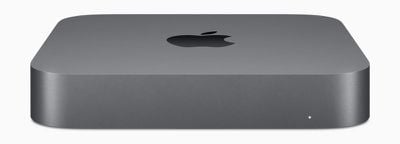
Apple announced a brand new Mac mini with a space gray finish at its "There's more in the making" media event held in Brooklyn, New York today.
The new space gray Mac mini comes with quad- and 6-core 8th-generation Intel Core processors with Turbo Boost Speeds up to 4.6GHz, making it 5 times faster than the previous generation, and up to 64GB of 2,666MHz RAM.
Storage wise, all Mac minis now have all-flash storage up to 2 TB that's 4 times faster than previous storage drives, while also coming with Intel UHD graphics, Apple's new T2 security chip, a Gigabit Ethernet, 4x Thunderbolt ports, HDMI, a headphone jack, and two USB-A ports, along with a 10Gb Ethernet option.
The new Mac mini can connect to high speed storage as well as 4K and 5K Thunderbolt displays, and can output video in three formats. There's also a brand new quiet thermal system with double the airflow installed.
The T2 chip features an SSD controller with on-the-fly data encryption, so everything stored on the SSD is automatically encrypted. The Secure Enclave in T2 ensures that software loaded during the boot process has not been tampered with. T2 also features HEVC video transcoding that’s up to 30 times faster, enabling pro users to work more quickly with higher resolution video throughout their workflow.
For the new space gray finish, every new Mac mini enclosure uses an Apple-designed aluminum alloy made from 100 percent recycled aluminum for the first time, which has the same strength, durability, and finish as the aluminum in all Apple products.
"Mac mini is loved by customers for its ability to be used in incredibly diverse environments — from casual desktop use, to live professional performances, to multiple Mac mini computers powering through video renderings and compiling software code, to racks of thousands in giant app build farms — anywhere a small-but-mighty Mac is needed to get the job done," said Philip Schiller, Apple's senior vice president of Worldwide Marketing.
The Mac mini starts at $799 with the base level model offering 8GB of RAM, a 3.6GHz Intel quad-core Core i3 processor, and 128GB of storage. Orders for the new Mac mini start today, with availability from next week, November 7.
Apple's "There's more in the making" event at the Howard Gilman Opera House in Brooklyn, New York, begins at 10:00 a.m. Eastern Time (7:00 a.m. Pacific Time), and we're expecting to see a number of iPad and Mac announcements today.
Later today will also see the release of iOS 12.1, bringing Group FaceTime, new emoji, live Depth Control in camera previews, and Dual SIM support for Apple's latest iPhones. Additional updates in the form of macOS 10.14.1, watchOS 5.1, and tvOS 12.1 are likely also coming today.
Apple is providing a live video stream on its website and via the Apple Events app on Apple TV.
In addition to Apple's video stream, we will be updating this article with live blog coverage—no need to refresh—and issuing Twitter updates through our @MacRumorsLive account as the keynote unfolds.
Highlights from the event and separate news stories regarding today's announcements will go out through our @MacRumors account.
Sign up for our newsletter to keep up with Apple news and rumors.
Apple's online store is currently down in advance of the event. It should be accessible again shortly after the keynote.
Live blog in chronological order is after the jump.
File sharing service WeTransfer today announced a new version of its mobile app called Collect, billed as "the best way to organize ideas".
The file-sharing app has been redesigned to enable users to build ideas together in a visual way, allowing multiple people to add photos, videos, articles, notes, songs, and links to one unified place.
Users can save any type of media to boards, which can then be edited collaboratively and shared with others. The new app also features instructive illustrations that walk users through all of the app’s features for collecting, sharing, and collaborating.
Essentially, Collect offers the ability to quickly collect and share content in a visual way, while also allowing users to share a quick link to a single large file. Gordon Willoughby, CEO of WeTransfer, offered these comments:
"Collect by WeTransfer solidifies our evolution from a simple file-sharing service to a wider set of beautifully obvious digital tools that encourage creation and collaboration. Following our recent acquisition of Paper & Paste, this couldn't be a better time to introduce the Collect experience to a wider group of users and build on our commitment to creating products that make sharing ideas effortless."
Founded in 2009 and pitched as a file sharing service for the creative community, WeTransfer's products are now used by over 50 million people each month.
Collect by WeTransfer is a free download for iPhone and iPad, available on the App Store. [Direct Link]
Apple has taken down its online store ahead of today's event in New York, scheduled to begin 10:00 a.m. Eastern Time at the Brooklyn Academy of Music, Howard Gilman Opera House.
Apple's October event will focus on products not introduced at the iPhone-centric event in September. On that occasion, Apple failed to take down its sitemap XML leading up to the event, resulting in a raft of major leaks ahead of the keynote. That's not the case this time around.
We're still awaiting multiple product refreshes before the end of 2018, including updates to several Mac models and the iPad Pro, which are likely to see a debut at the event.
2018 iPad Pro models are expected to adopt an iPhone X-style design with no Home button, slimmer bezels, and a TrueDepth camera system that will enable Face ID for biometric authentication. We could also see a redesigned Apple Pencil with new gesture and swipe features.
Along with new iPad Pro models, we're also expecting refreshes to the MacBook line. Refreshed 12-inch MacBooks are said to be in the works, and according to rumors, Apple has developed a low-cost notebook with a Retina display that could be positioned as an updated MacBook Air.
The Mac mini, which has not been updated for 1,475 days, is expected to be refreshed for the first time since 2014. We don't know a lot about what to expect for the Mac mini update, but upgraded internals and faster processors are certain.
Apple typically streams the event live on its website and on Apple TV, but for those who are unable to watch, MacRumors will be providing full event coverage both on MacRumors.com and through our MacRumorsLive Twitter account.
Readers who can't follow the event live and are interested in avoiding all of the announcements until Apple's posts the full video online can bookmark this page, where we'll post a spoiler-free link once it's up.
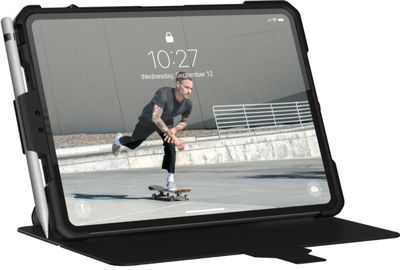
Noted leaker Evan Blass this morning tweeted a render of an iPad Pro that features slimmer bezels, no Home button, and what looks like an inline TrueDepth camera system that does away with the need for a notch.
Blass did not offer any information on the render, apart from the cryptic message "Of course I just bought a Pro not too long ago," which suggests that he received the render from a case maker. Blass typically only shares leaks that he believes are from credible sources.
The new iPads Pros are set to gain a TrueDepth camera system that will replace Touch ID with Face ID for biometric authentication purposes. At first it wasn't clear whether the iPad Pro would have a notch similar to the iPhone XS and XR, but a notch-less design of the iPad Pro has been discovered in several leaked icons discovered in iOS 12.
Face ID on the new iPad Pro will reportedly allow users to unlock a device when it is held at a horizontal angle, rather than limiting unlocking to the vertical orientation. However, initial setup of Face ID is said to be performed in portrait orientation.
The new iPad Pro models should be available in 10.5-inch and 12.9-inch sizes, both powered by Apple's faster A12X Bionic processor. The Lightning port on the devices is expected to make way for USB-C, which would allow for faster charging and new functionality not possible via Lightning such as the ability to drive a 4K monitor.
In addition, rumors suggest Apple could be about to announce a new Apple Pencil 2 with support for tap and swipe gestures, a new design, and a new charging method. It's possible the accessory will charge wirelessly when docked to the iPad Pro, with Apple eliminating the Lightning port, although no further information is available at this time.
It's not long to go before we'll know for sure. Apple's October 30 event takes place today at 10:00 a.m. Eastern Time (that's 7:00 a.m. Pacific Time and 2:00 p.m. Greenwich Mean Time) with Apple planning to live stream the event on its website and through the Events app on the Apple TV.
Apart from new iPad Pros, we'll expecting a new Mac mini, a low-cost Retina Notebook, and possibly more. MacRumors will have live coverage of all of Apple's announcements, both here on the site and on our MacRumorsLive Twitter account.
Update: It appears the "rendering" is a fake photoshopped image of a UAG case marketing shot, as shown here with the original wallpaper.
Apple's "There's more in the making" media event will be kicking off at 10:00 AM Eastern / 7:00 AM Pacific tomorrow, and some MacRumors readers who can't follow the event live are interested in avoiding all of the announcements and waiting until Apple posts the recorded video of the event so as to experience it without already knowing the outcome.
For those individuals, we've posted this news story, which will be updated with a direct link to the presentation once it becomes available from Apple. No other news stories or announcements will be displayed alongside this story.
Apple has become quicker about making event videos available for replay over the past several years, and videos are now frequently available within an hour of an event's conclusion.
Users waiting for the video to be posted are welcome to gather in the thread associated with this news story, and we ask that those who follow the events refrain from making any posts in the thread about Apple's announcements.
The iPhone XR and the iPhone XS models share many similarities, but one major difference is the rear camera setup. While the iPhone XS features a dual-lens camera system with both wide-angle and telephoto lenses, the iPhone XR has a single wide-angle camera lens.
In our latest YouTube video, we compared the cameras of the iPhone XR and the iPhone XS Max to see how much of a difference you're really going to see with the single lens camera vs. the dual-lens camera.
Though the iPhone XR doesn't have two lenses to work with, it still has many of the same features that are available in the iPhone XS, enabled through a bit of software magic.
Smart HDR, the feature that combines multiple images to bring out more detail in the shadows and highlights of photographs, is available on both the iPhone XS and iPhone XR, as are Portrait Mode, Portrait Lighting, and Depth Control, which is an option that lets you adjust the amount of background blur in an image.
iPhone XR vs. iPhone XS Portrait Mode
On the iPhone XR, Portrait Mode, which blurs the background of an image while keeping the foreground sharp, only works when a person is in the frame. That means you can't get Portrait Mode shots of pets, flowers, food, or other objects.
You can do non-person Portrait Mode photos on the iPhone XS and iPhone XS Max because two cameras are used together to calculate depth information. The single camera on the iPhone XR provides less detailed depth information for photographs, so it needs to use person detection to separate the foreground from the background.
On the plus side, because the iPhone XR exclusively uses the f/1.8 wide-angle lens for Portrait Mode photos and does not need to rely on the smaller aperture f/2.4 telephoto lens that's in the iPhone XS, Portrait Mode images taken in low light can turn out better than Portrait Mode photos on the XS because the wider lens lets in more ambient light.
iPhone XR vs. iPhone XS Portrait Mode in low light
With Portrait Mode photos, the iPhone XR struggles a bit with edge detection and the images can be softer than those captured with the iPhone XS due to the lack of a telephoto lens and less depth information to work with. Portrait Mode photos on both devices can be edited with different Depth Control and Portrait Lighting features, though there are two less Portrait Lighting options on the XR.
When taking standard non-Portrait Mode photos, there are few differences between the iPhone XS models and the iPhone XR because the two smartphones are both using the same f/1.8 wide-angle lens. Images taken in standard zoom mode, for example, look the same.
You will, however, see some differences using the iPhone XS telephoto lens for 2x optical zoom in conditions where lighting is good, because this feature isn't available on the iPhone XR. With no second lens, the iPhone XR ls limited to digital zoom that maxes out at 5x. The iPhone XS can do 2x optical zoom and up to 10x digital zoom, but it's only going to be using the optical zoom in ideal lighting conditions.
If you take a 2x photo in a low lighting situation on the iPhone XS, there's a good chance it will look identical to the same photo taken on the iPhone XR because the iPhone XS defaults to digital zoom over optical zoom when the wider lens will produce a better picture. If you take a 2x photo with bright lighting on the iPhone XS, it's going to be sharper than the same 2x photo on the iPhone XR because of the difference between true optical zoom and digital zoom.
4K video using the wide-angle lens looks identical on both the iPhone XS and the iPhone XR, and both phones feature the same video capabilities like 1080p 240fps slo-mo, optical image stabilization, and stereo sound recording. You are, however, limited to 3x digital zoom on the iPhone XR vs. 2x optical zoom or 6x digital zoom on the iPhone XS.
When it comes to the front-facing camera, you won't see differences between the iPhone XR and the iPhone XS models because all three of the smartphones use the same TrueDepth camera system with a 7-megapixel front-facing camera and full support for Portrait Mode images, Portrait Lighting, Depth Control, Memoji, and Animoji.
Front-facing camera on iPhone XR and iPhone XS
All in all, when it comes to camera performance, unless you're someone who takes a lot of Portrait Mode photos or often uses the optical zoom feature on the iPhone, you may not notice much of a difference if you choose the iPhone XR over the iPhone XS.
To get a clearer look at the camera quality of the iPhone XR compared to the iPhone XS Max, make sure to check out our Imgur album, which features full-resolution versions of the photographs that we shared in this article and in the video above.
What do you think of the iPhone XR camera? Do you prefer the iPhone XS camera? Let us know your thoughts on the comparison images in the comments.
Popular Reddit app Apollo was removed from the App Store this afternoon after developer Christian Selig released an update that adds push notifications as a premium feature, Selig explained on Reddit.
After introducing the latest version of the Apollo app, which has a paid feature enabling push notifications, Apple informed Selig that he was in violation of rule 3.2.2 that prohibits apps from monetizing Push Notifications and other iPhone and iPad capabilities provided by the hardware or operating system. The email Selig received from Apple:
Hello, We are writing to let you know about new information regarding your app, Apollo for Reddit, version 1.3, currently live on the App Store. Upon re-evaluation, we found that your app is not in compliance with the App Store Review Guidelines. Specifically, we found:
Business - 3.2.2 We noticed that your in-app purchase auto-renewable subscription product provides access to built-in Push Notification capabilities, which is not appropriate for the App Store. For this reason, your app will be removed from sale on the App Store at this time.
Deliberate disregard of the App Store Review Guidelines and attempts to deceive users or undermine the review process are unacceptable and is a direct violation Section 3.2(f) of the Apple Developer Program License Agreement. Continuing to violate the Terms & Conditions of the Apple Developer Program will result in the termination of your account, as well as any related or linked accounts, and the removal of all your associated apps from the App Store.
Future submissions of this app may require a longer review time, and this app will not be eligible for an expedited review. If you have any questions about this information, please reply to this message to let us know.
Selig said that he's "quite confused" by Apple's decision, as he had worked with Apple on the implementation of the premium service after the app update was previously rejected for the same reason.
For background, several weeks ago, Selig said that the 1.3 update of Apollo had been rejected by Apple because it included the in-app purchase for unlocking push notifications. Selig explained at the time that he needs to charge to add push notifications due to the server costs associated with implementing them.
In an update earlier this month, Selig said he was able to develop a workaround with Apple by bundling the feature with other premium options like app theming and custom icons for an "Apollo Ultra" service, and the update was released on Saturday.
It's not clear why Apple pulled the Apollo app after telling Selig that it was appropriate to implement push notifications as part of a paid bundle of features, but Apple has been known for making confusing App Store decisions in the past. It's likely the issue will be solved quickly, and Selig says he will keep Apollo customers updated on the status of the app.
Update: Apollo is back in the iOS App Store and the app will be able to keep the Apollo Ultra in-app purchase option with push notifications as a paid feature.
Apple today announced that it plans to release iOS 12.1 to the public tomorrow following its Brooklyn event that is expected to see the debut of new iPad Pro models and refreshed Macs.
As we've discovered in the iOS 12.1 betas that have been available since September, iOS 12.1 brings several important new features to the iPhone and the iPad.
The update brings support for Group FaceTime, the feature designed to let users chat with up to 32 people at one time. Group FaceTime was present in the iOS 12 beta, but it was removed from the iOS 12 launch to provide Apple with additional time to develop the feature.
Other FaceTime features are included in iOS 12.1 as well, such as automatic detection of active speakers to surface the icon of the person who is speaking, ringless notification to let you join a call without being disruptive, and Messages integration for starting a Group FaceTime call right from the Messages app from a group chat.
iOS 12.1 will also bring more than 70 new emoji characters, such as cold face, woozy face, hot face, red hair, white hair, leg, foot, teddy bear, llama, raccoon, kangaroo, mango, cupcake, bagel, and tons more. A full list of all of the new emoji is available here.
On iPhone XS, iPhone XS Max, and iPhone XR, iOS 12.1 introduces real-time Depth Control so you can adjust the amount of background blur before a photo is even captured, and support for the digital eSIM, which will allow two SIMs to be used at one time.
iOS 12.1 should be released alongside new updates for tvOS, watchOS, and macOS right around 10:00 a.m. Pacific Time, Apple's typical release time for new software updates.
The second-generation Apple Pencil that Apple is rumored to be working on will feature support for gestures, a new design, and a new charging method, according to leaker Benjamin Geskin.
Geskin, who sometimes provides accurate information on Apple's plans sourced from Chinese social networks, says the upcoming Apple Pencil will feature a design that's "more minimalistic" with no silver band at the top.
Apple Pencil 2018:
- Design is even more minimalistic, the silver rail on top is now gone. - Tap and Swipe gestures along the pencil. - Magnetically attachable to the new iPad. - New charging method. pic.twitter.com/tS1ptCWgnh
— Ben Geskin (@VenyaGeskin1) October 29, 2018
It will attach magnetically to the side of the new iPad Pro models, and it is said to feature a new charging method, though there are no details on what that charging method might be. It's possible the accessory will charge wirelessly when docked to the iPad Pro, with Apple eliminating the Lightning port.
Previous Apple Pencil 2 rumors have suggested the accessory will also feature a new pairing method, connecting to an iPad Pro device wirelessly much like AirPods rather than through a physical connection, which would be in line with the rumors of a new charging method.
Geskin also says that the new Apple Pencil will support tap and swipe gestures, a rumor supported by code in iOS 12.1 shared by 9to5Mac's Guilherme Rambo over the weekend. The gestures are said to allow iPad Pro users to do things like change the size or color of a brush within a sketching app using the sides of the Apple Pencil.
We don't have long to wait for full details on the second-generation Apple Pencil and the new iPad Pro models. Apple's October 30 event takes place tomorrow at 10:00 a.m. Eastern Time or 7:00 a.m. Pacific Time, with Apple planning to live stream the event on its website and through the Events app on the Apple TV.


















 Popular Reddit app Apollo was removed from the App Store this afternoon after developer Christian Selig released an update that adds push notifications as a premium feature, Selig