Apple Maps is getting a visual update in iOS 27, with Apple planning to introduce new aerial imagery that's combined with Visual Intelligence models.
Apple said everything will have sharper detail, from the "shapes of individual trees to the way light reflects off the glass of skyscrapers."
Flyover is an Apple Maps view that lets users see more than 350 cities in 3D with detailed landmarks, roads, trees, parks, buildings, and more. It uses aerial imagery captured by planes, and it is a signature Apple Maps feature.
The more detailed Flyover visuals Apple described at the WWDC 2026 keynote do not appear to be implemented in the iOS 27 beta as of yet.
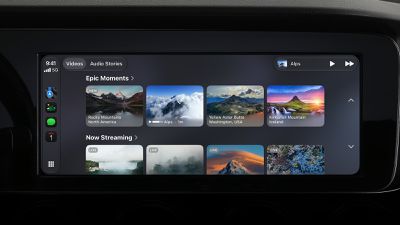
Back at WWDC 2025, Apple revealed that it was planning to allow CarPlay users to watch video via AirPlay in their vehicles while they are not driving, but we did not hear many specific details about this functionality until now.
In a WWDC 2026 video aimed at developers, Apple said the CarPlay video feature is available in new vehicles that support it. When playing a video in an iPhone app that supports AirPlay video streaming, users can select the car's display from the AirPlay menu on iOS and watch the video on a compatible vehicle's screen.
New in iOS 27, Apple is allowing developers to create CarPlay apps with video browsing capabilities, so you can find videos to watch right on CarPlay.
This feature can keep you entertained while you are not driving. For example, Apple said you may use it while waiting in your car at the airport, or charging your electric vehicle. For safety reasons, video playback is only enabled when the vehicle is parked.
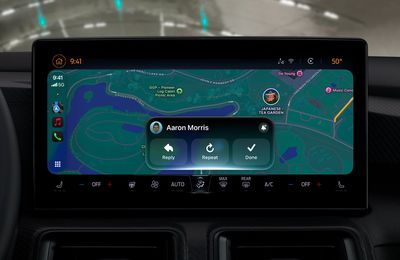
In addition, the more personal and intelligent version of Siri — aka "Siri AI" — will be available on CarPlay when it is used with an iPhone 15 Pro or newer. Apple offered the following example for using Siri AI via CarPlay: "On the road, ask Siri which trailhead your friend suggested and get the answer instantly."
In a slide shown very briefly during the WWDC 2026 keynote, Apple revealed four additional enhancements coming to CarPlay:
Audio scrubbing within CarPlay's Now Playing interface
Improved GPS accuracy and navigation heading
A mini-player for audio within apps
Improved wireless CarPlay reliability
All of the new CarPlay features require an iPhone running iOS 27, which is available in developer beta. A public beta will follow in July, and the software update should be released to all users with a compatible iPhone in September.
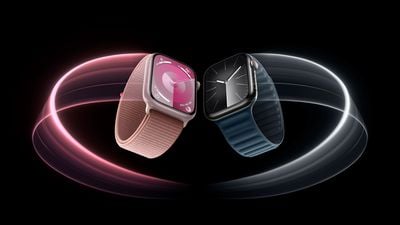
Apple today confirmed that the Apple Watch Series 9 is compatible with watchOS 27, after the device was mistakenly omitted from the software's official compatibility page.
Apple updated its website immediately following its WWDC 2026 keynote, and the watchOS 27 page listed a shorter compatibility list than many users expected: the Apple Watch SE 3, Series 10, Series 11, Ultra 2, and Ultra 3. That would have meant watchOS 27 dropped support for the Apple Watch Series 9, despite both the Series 9 and Ultra 2 containing the same S9 chip.
Shortly after Apple released watchOS 27 developer beta 1, Apple Watch Series 9 owners began reporting that they were able to download, install, and run the beta on their devices. Apple confirmed to MacRumors that the Series 9 omission was an error, and that the device is indeed supported. Apple's website has since been corrected.
watchOS 27 still drops support for the Apple Watch Series 6, Series 7, and Series 8, along with the original Ultra and SE 2, a significant cut that makes it the largest single-year drop in Apple Watch software support to date. The update introduces a new Siri AI app, new workout data insights, Spanish support for Workout Buddy, and more.
Private Cloud Compute is Apple's cloud intelligence system for private AI processing, used to keep Apple Intelligence requests secure while handling processing in the cloud. PCC has been limited to Apple silicon servers in Apple data centers, but Apple is now relying on Google servers to handle some Apple Intelligence processing.
Apple partnered with Google to use the technologies behind Google's Gemini AI models for its own Apple Foundation Models. While some processing is done on-device, agentic tool use and complex reasoning require cloud processing. Apple says it worked with Google and NVIDIA to extend its PCC infrastructure to Google Cloud systems that run NVIDIA GPUs without compromising privacy and security protections.
Our core PCC requirements remain exactly the same: stateless computation, enforceable guarantees, no privileged runtime access, non-targetability, and verifiable transparency. What's new with PCC on Google Cloud is the implementation: NVIDIA Confidential Computing with NVIDIA GPUs, Intel CPUs with TDX, and Google's Titan chip.
All server components and software are part of a trusted computing base subject to verifiable transparency and no-privileged-access guarantees, plus Apple has a cryptographically verifiable ledger of all Google Cloud hardware that is part of the PCC fleet to mitigate the risk of supply chain attacks. PCC on Google Cloud also uses many of the same architectural security patterns as PCC on Apple silicon.
Apple says the efforts it has made to bring PCC to Google Cloud will mean user data continues to be protected by PCC's security and privacy properties even outside of Apple hardware and data centers. Apple maintains control over PCC software and Apple devices will only trust PCC software cryptographically approved by Apple.
PCC on Google Cloud is not fully implemented, and Apple plans to gradually add the full set of protections throughout the beta testing process.
PCC on Google Cloud binaries will be available for public inspection. Apple plans to provide public research tooling and access to live PCC nodes in research mode through its Apple Security Bounty Program.
Apple today announced an update to iCloud Shared Albums to allow friends and family on Android and Windows to join and contribute photos more conveniently, with support for full-resolution images.
The improvement for Android and Windows users removes a notable friction point for mixed-device groups, enabling users outside the Apple ecosystem to participate in shared albums via iCloud.com more easily, as well as add photos at full-resolution with no compression for the first time.
Apple has also introduced new ways to filter and react to photos in shared albums, along with updated tools for inviting others to contribute.
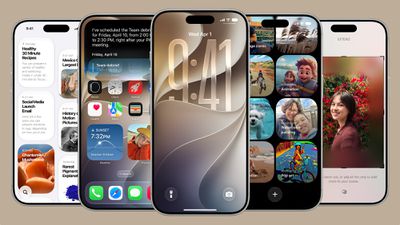
During WWDC 2026, Apple detailed iOS 27 changes like Siri AI with a dedicated Siri app and Apple Intelligence features across multiple apps, but there are dozens of smaller but still important changes that Apple didn't have time to go through.
Apple shared an image summarizing some of the bug fixes and optimizations it made in iOS 27, iPadOS 27, and macOS 27, and there are some interesting changes.
Dual Phone Numbers
iPhone Handoff is a paid carrier feature that not all carriers are supporting yet. You can use it on T-Mobile and Deutsche Telekom, with other carriers planning to add support in the future. In the U.S., T-Mobile charges $5 per month for the option.
When you switch between two iPhones with iPhone Handoff, calls, voicemail, messages, and Find My location move to the active iPhone, and you'll see a "Switched to this iPhone" message confirming the transition.
Data synced with iCloud will update across both devices, and third-party apps will work across devices. Some banking apps may only work on the primary iPhone, which is the iPhone you set up first and set as your main iPhone.
iOS 27 or later is required for iPhone Handoff. You'll also need both devices connected to Wi-Fi, both devices on the same Apple Account, and Messages in iCloud needs to be turned on. You're also required to sign into FaceTime and iMessage with the same account. Paired Apple Watches will not switch between iPhones, and features like Call Forwarding and Caller ID are limited to the main iPhone.
iPhone Handoff can be set up in Settings > Cellular > Set Up Cellular or Add eSIM.
Two FaceTime Cameras
Dual camera in FaceTime lets you use the front and back cameras at the same time while on a FaceTime call.
Faster AirPlay and AirDrop
AirPlaying content to the HomePod and Apple TV is faster than before thanks to multiple system improvements. AirDrop transfers from the iPhone to other devices are also faster, and it's quicker for an iPhone to find nearby AirDrop recipients.
Messages Drawing App
There's a drawing app in Messages where you can handwrite a message or draw a picture. It uses the same drawing tools that are available in the Notes app or when annotating images.
Extra Large Widgets
There's a new extra large widget size you can select on the iPhone's Home Screen. The extra large size takes up an entire app page and displays more information from an app.
Shared Album Expirations
You can now set a shared photo album to expire after a set time, so it doesn't exist indefinitely.
Independent Alarm Volume
Alarm volume can be controlled separately from system volume, as can alerts and system sounds. In Settings > Sounds & Haptics, there are toggles to match Alarms, Timers, Alerts, and System Sounds to Ringtone Volume or to decouple them. Toggling off the match option lets you select a preferred volume level for alarms and system sounds.
Markdown in Notes
You can now copy and paste Markdown in the Notes app.
Save a Video Frame
There's a new option to save a video frame as a photo in the Photos app.
Weather
The Weather app has a "Highlights" view with at-a-glance information, plus it includes updated hourly and 10-day views for precipitation and wind speed.
Anyone with an Apple Developer account is able to install the iOS 27 developer beta for free, with Apple Developer Program membership for $99 per year no longer required in recent years. After registering, restart your iPhone and open the Settings app. Next, tap on General → Software Update → Beta Updates and select the iOS 27 Developer Beta option. From there, you can install the beta on your iPhone.
Apple said the first iOS 27 public beta will follow in July.
To install a public beta, first sign up at beta.apple.com. After enrolling, restart your iPhone and open the Settings app. Next, tap on General → Software Update → Beta Updates and select the iOS 27 Public Beta once it is available.
Keep in mind that the revamped version of Siri — aka "Siri AI" — has a waitlist.
iOS beta versions can have bugs and performance issues. Backing up your iPhone before installing beta software is highly recommended.
Tim Cook closed out what is expected to be his last keynote as Apple's chief executive officer today with some emotive final remarks.
Wrapping up a pre-recorded video message, Cook reflected on his tenure at the company. "Some of the highlights of my time as CEO have been events like this, sharing powerful new tools with all of you," he said, adding that what developers create with Apple's platforms has been "a constant reminder that imagination has no limits."
One of the greatest highlights of my time as CEO have been events like this, sharing powerful new tools with all of you and what you create with them has been a constant reminder that imagination has no limits.
Over the years, you have helped people create, learn, and experience the world in explain ways, and with the incredible capabilities we introduced today, I truly believe the best is still ahead.
Cook said it had been "an honor" to lead the company, describing Apple's north star as always creating products that serve people's needs. "I truly believe the best is still ahead," he said, before thanking the audience.
Cook has served as CEO since 2011, succeeding Steve Jobs. John Ternus, Apple's SVP of Hardware Engineering, will takeover from Cook in September, just in time for the announcement of new iPhone models.
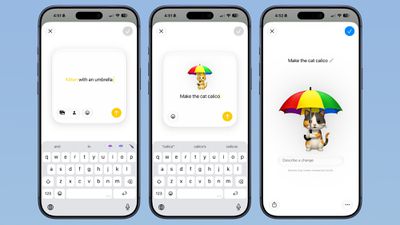
iOS 27 includes an entirely revamped Genmoji creation experience. There's an updated interface that supports describing an emoji that you want to create, with options to start from existing emoji, choose an image from Photos, or select a person.
After uploading an image or using a text phrase to create a Genmoji, there's now a "Describe a change" interface for making updates to what you've already created. You can iterate on designs and change specific elements of a Genmoji, tweaking colors and objects.
Apple's AI is smarter than before and it is able to successfully make iterative updates for better Genmoji customization. Each change uses the old base rather than regenerating a new Genmoji with every request. With a series of requests, it is possible to make a complicated, multi-element Genmoji. Along with describing changes, you can also add in additional emoji, and the interface makes suggestions on what to do next.
Genmoji output is also more consistent, and Genmoji look more like real emoji with a 3D, cartoonish style by default. There is now an option to change style, so if you don't want the cartoonish look, you can ask for something else like a drawing or a sketch.
Generating a Genmoji does not take as long, and it appears to be less system intensive with less battery drain.
Apple also overhauled Image Playground in iOS 27, and both Image Playground and Genmoji use updated Apple Foundation Models. Image Playground now supports generating photorealistic images and adding AI elements to just parts of photos.
Apple appears to be laying the groundwork for a foldable iPhone in iOS 27, with new references discovered in the operating system's frameworks and a notable emphasis on flexible app layouts at this year's Platforms State of the Union.
During the Platforms State of the Union session, Apple told developers to move away from designing apps for specific devices and fixed orientations, and to instead target what it described as "a dynamic range of sizes and aspect ratios." The framing appears to go beyond the stated context of iPhone Mirroring and the iPad.
Apple used the session to introduce support for resizable iOS apps in iPhone Mirroring and on the iPad. Developers who rebuild against the latest SDK will have their apps automatically opted in to resizability, Apple said, with SwiftUI apps that already use scene lifecycle and standard framework support for basic resizability considered "well on your way to supporting full resizability."
A new resizable iOS simulator and Previews in Xcode were also announced, allowing developers to test layouts across a range of screen sizes and aspect ratios. Apple said it is also providing a skill for coding agents to help identify and fix common resizability issues.
The guidance effectively asks developers to treat every iOS app as something that may need to reflow across a wide variety of form factors, which is a requirement that makes considerably more sense if a future iPhone is capable of folding open to a substantially larger inner display.
As if that wasn't enough evidence for the upcoming foldable iPhone, X user @samhenrigold spotted two strings within iOS 27's frameworks that point directly toward foldable hardware: "foldState" and "angleDegrees." A third discovery, a new key that returns the total count of built-in displays on a device, is a further indication that Apple is preparing the software stack for a device capable of presenting more than one integrated screen.
The foldable iPhone, widely expected to be called the "iPhone Ultra," is anticipated to be announced in September 2026 alongside the iPhone 18 Pro and iPhone 18 Pro Max, with a book-style design featuring a roughly 7.8-inch inner display and a 5.5-inch cover display. Other rumored key features include Touch ID instead of Face ID, a titanium frame and Liquid Metal hinge, dual rear cameras, the A20 chip, and the C2 modem. The device is expected to start at over $2,000, making it the most expensive iPhone ever.
The upcoming tvOS 27 update drops support for two Apple TV models.
The two Apple TV models that are compatible with tvOS 26 but not tvOS 27 are the Apple TV HD from 2015 and the Apple TV 4K (1st generation) from 2017.
tvOS 27 is compatible with the Apple TV 4K (2nd generation) and newer, according to Apple's documentation.
tvOS 27 features a redesigned Podcasts app, smoother app launches and animations, support for larger text across the interface, and more.
tvOS 26 Compatibility
Apple TV HD (2015)
Apple TV 4K (1st generation, 2017)
Apple TV 4K (2nd generation, 2021)
Apple TV 4K (3rd generation, 2022)
tvOS 27 Compatibility
Apple TV 4K (2nd generation, 2021)
Apple TV 4K (3rd generation, 2022)
The first tvOS 27 developer beta is available now, and a public beta will follow in July. The update will be released later this year — likely in September.
A new Apple TV 4K (4th generation) is expected to launch later this year.
Apple's most advanced on-device AI model in iOS 27 requires a minimum of 12GB of unified memory, meaning the standard iPhone 17 is excluded.
The next generation of Apple Intelligence introduces a new on-device model more powerful than anything Apple has shipped before. While most iOS 27 AI features run on the same hardware supported today, including iPhone 15 Pro, the most capable model carries stricter requirements. To run Apple's most powerful on-device model, users will need one of the following devices:
iPhone: iPhone Air, iPhone 17 Pro, or iPhone 17 Pro Max
iPad: iPad with M4 or later with at least 12GB of unified memory
Mac: Mac with M3 or later with at least 12GB of unified memory
The base iPhone 17 is excluded because it ships with 8GB of memory, falling short of the 12GB threshold. The standard memory requirement for Apple Intelligence has been 8GB since its introduction, so this marks the first time Apple has raised the bar for its most capable on-device features.
According to Apple's press release, the new model specifically enables features including expressive voices and more advanced dictation.
Apple barely touched on tvOS 27 during its WWDC 2026 keynote today, but the update exists, and it adds some new features to the Apple TV.
In a slide that was shown very briefly during the keynote, Apple revealed some of tvOS 27's new features and enhancements:
A redesigned Podcasts app
Smoother app launches and animations
Faster AirPlay connectivity with other Apple devices
Smart downloads
A new Larger Text accessibility option in the Settings app, which increases the size of text across the tvOS interface
AppleCare coverage details in the Settings app
Control Center is more responsive
Apple's website does not offer a tvOS 27 preview page like it does for iOS 27 and the other new software updates, and the "what's new in tvOS" page on Apple's developer website has yet to be updated, so no further details about these features are available right now. Stay tuned for more tvOS 27 information over the coming days.
The first tvOS 27 developer beta is available today, and a public beta will follow in July. The update will be released later this year — likely in September.
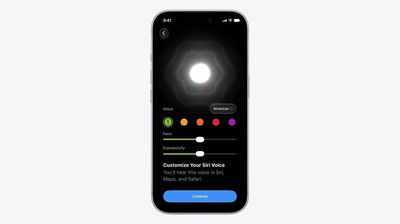
Apple today announced that Siri AI will offer a "brand new voice experience," giving users the ability to customize how the voice assistant sounds.
On devices that support Apple's most advanced on-device model, Siri AI will deliver more expressive voices alongside a significant improvement to systemwide dictation accuracy. Users will be able to adjust both the expressiveness and pace of Siri's voice to their preference via a new UI with sliders. As of developer beta 1, American is the sole voice option.
The updated dictation engine will capture speech as polished text, automatically handling capitalization, punctuation, and formatting in real time. Apple says improved speech understanding means users can speak naturally and trust that their words will appear accurately and as intended.
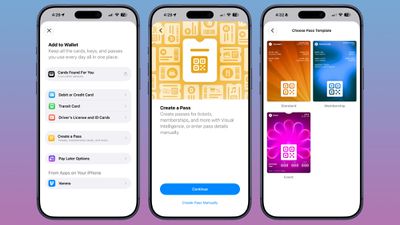
The Wallet app in iOS 27 has a new "Create a Pass" option that's designed to let you add passes for tickets, memberships, and more using Visual Intelligence. If you have a ticket for an event and there's not a digital version available in the Wallet app already, you can create one using the physical pass.
By default, the Wallet app uses Visual Intelligence to scan a pass and add it, but there's also a "Create Pass Manually" option. Pass templates include Standard, Membership, and Event.
Each type includes relevant information like name, location, or admission type, along with a scannable code drawn from an included barcode or QR code that you take a photo of. There are 12 background colors to choose from, or seven custom backgrounds for categories like theater, music, sports, and movies.
Fields can be added or removed as needed when creating a custom pass, with options like label, date, membership, contact, coupon code, VIN, insurance, and more, so most physical cards should be able to be stored digitally.
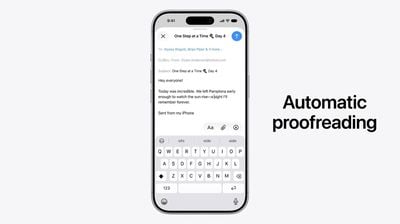
Apple today announced a series of Apple Intelligence improvements coming to Mail, Messages, Files, and system-wide text input as part of iOS 27 and its other major platform updates.
The updates include automatic proofreading, which surfaces spelling and grammar suggestions as users type across the system. Apple is also introducing intelligent file and folder naming suggestions based on content.
Two enhancements come specifically to Mail and Messages. Apple's composition assistant will now adapt to how a user typically communicates with different contacts, tailoring its suggestions to match individual conversational styles. Smart Reply, which proposes quick responses to incoming messages, has also been updated to draw on a user's personalized writing style rather than offering generic reply options.
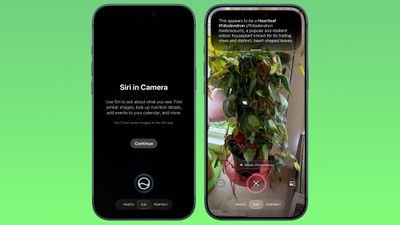
The iOS 27 Camera app has a new "Siri" mode that is available in addition to the video, photo, and other camera modes. You can get to Siri mode by swiping over to it at the bottom of the Camera app in the iOS 27 developer beta.
Siri mode integrates Visual Intelligence, so you can take a photo of something and ask Siri about it. Siri can answer questions about whatever you're taking a photo of, identifying plants, animals, landmarks, and more.
Visual Intelligence is expanding to new categories in iOS 27, and it can help you determine the calories in a plate of food or split a bill with friends by calculating what each person owes.
In Siri mode, the main Camera button captures an image and Siri will give information about what's in the shot. A button on the right lets you search Google Images, and a button on the left lets you ask a specific question.
In other Camera modes, there are minor interface updates. Quick access tools for turning on Night Mode, turning off Live Photo, and activating Flash are at the top center of the interface, and the full set of tools can be accessed from the bottom right instead of the top right.
While there were rumors of a Camera app widget section for customizing the available camera controls, that's not a feature that's available yet.
Using Siri mode in the Camera app requires access to the Siri waitlist. The iOS 27 beta is only available to developers right now, but Apple plans to make a public beta available in July. iOS 27 will launch this fall.
Apple today unveiled a raft of Safari upgrades powered by Apple Intelligence, including automatic tab organization, AI-generated custom extensions, and new privacy-first browsing tools.
The centerpiece feature is automatic tab organization, which uses Apple Intelligence to group a user's open tabs into relevant topics without any manual intervention. If someone is planning a weekend trip, for example, Safari can pull all of their travel-related tabs into a single topic. As browsing continues, Safari will slot new tabs into existing topics or create fresh ones as needed.
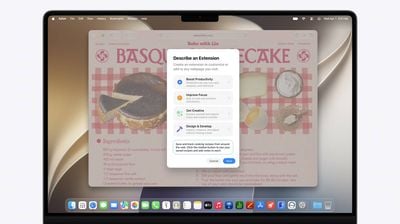
Apple is also introducing a way for users to create custom Safari extensions using natural language. The company described the feature as "describe an extension," letting users specify what they want in plain English and having Safari generate an extension that adapts web pages accordingly. Apple's example was adding a toolbar button that saves and rates recipes from cooking sites.
A new "Notify Me" feature lets users ask Safari to watch a specific web page for changes and alert them when something relevant happens, such as a product restocking or a price drop. Users tell Safari in natural language what they are looking for, and Safari sends a notification when it detects a matching change on that page.
Apple is bringing a background agentic password-updating tool to the browser. Working alongside the Passwords app, Apple Intelligence can automatically navigate to eligible websites, sign in, and update weak or compromised passwords to strong ones with a single tap.
Apple says all of these capabilities are built with privacy in mind, and that no personal browsing data is exposed to Apple or anyone else in the process.