When you're using iPhone Duo unfolded in landscape orientation, you can split the onscreen keyboard into two halves in order to bring the keys closer to your thumbs. It's a longtime iPad option that has now come over to the Duo as an exclusive feature among iPhones.

How to Split the Keyboard on iPhone Duo
It's easy when you know how. Just follow these steps in landscape:
- Open an app that accepts text input, then tap a text field to bring up the keyboard.
- Tap the More button (...) at the top-left of the keyboard, then tap Split.
- To rejoin the two halves, simply tap More again, then tap Full.
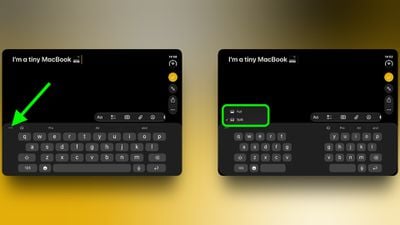
Note that the option only appears when iPhone Duo is open and in landscape mode. You won't see it when the device is closed, but what you can do instead is shift the keyboard toward one side of the screen for easier one-handed typing. To do so, long press the globe or emoji key, then tap the left or right layout.
Related Roundup: iPhone Duo
Buyer's Guide: iPhone Duo (Buy Now)
Related Forum: iPhone