Although HomePod is available in Apple's Home app, the company's smart home speaker as of yet can't be integrated into HomeKit scenes and automations. With such a feature, users would be able to activate their favorite ‌HomeKit‌ scenes, alongside a specific Apple Music playlist, album, or song from their ‌HomePod‌.

how to homepod shorcuts pic
Reddit user Running_In_Space on r/HomeKit explained recently that this is actually possible today, thanks to a helpful (and super simple to create) Siri Shortcut. With the Shortcut, you can tie any Home scene together with any ‌Apple Music‌ playlist. While the Shortcut is limited to playlists, you can choose from your own playlists or those created by ‌Apple Music‌.

In the example below, we created a holiday themed ‌Siri‌ Shortcut that turns on Christmas tree lights (connected to an iDevices Switch) and shuffles a holiday playlist any time we say, "Hey ‌Siri‌, Merry Christmas." Also remember that you'll need an ‌Apple Music‌ subscription, HomeKit-enabled lights or other devices of some kind, and the updated ‌Siri‌ Shortcuts iOS app.

How to Create the Siri Shortcut

  1. Open the iOS "Shortcuts" app
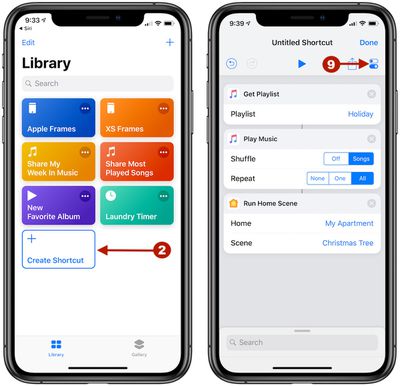
  2. Tap "Create Shortcut"
  3. homepod how to shortcut 5

  4. In the search bar, type "Get Playlist" and add it into your Shortcut
  5. Next to Playlist, tap "Choose" and pick your desired playlist
  6. Search for "Play Music" and add it (here you can also edit settings for shuffling and/or repeating the playlist)
  7. Search for "Run Home Scene" and add it
  8. Next to Home, tap "Choose" and select your home
  9. Next to Scene, tap "Choose" and select your desired scene
  10. Before you tap "Done," select the toggle icon under the Done button at the top right corner of the screen
  11. siri shortcuts homepod how to 2

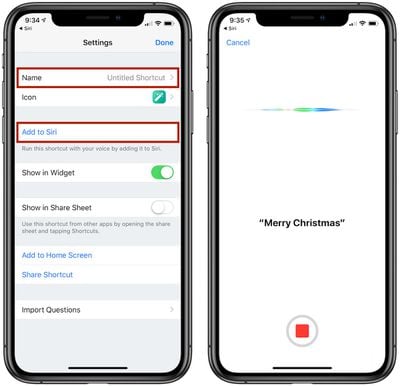
  12. Name the Shortcut, and tap "Add to ‌Siri‌" to record your preferred trigger phrase
  13. Tap "Done" until you're back on the Library screen of the app

Now you will be able to say, "Hey ‌Siri‌, [Trigger Phrase]" to your ‌HomePod‌ and have the selected Home scene activate along with the chosen ‌Apple Music‌ playlist, connected via AirPlay on your iPhone. ‌Siri‌ typically responds with, "Okay, running your shortcut," and it can take a bit longer than a normal scene activation in ‌HomeKit‌ due to the multiple actions.

There are numerous versions of this ‌Siri‌ Shortcut that could be created, like having a nighttime scene in ‌HomeKit‌ tied to a mellow ‌Apple Music‌ playlist that's triggered when you say, "Hey ‌Siri‌, goodnight." We tried testing out Home scenes that are activated via geofences, but in the few times we tried we could not get ‌HomePod‌ to turn on and play the specified ‌Apple Music‌ playlist when the arriving home scene in ‌HomeKit‌ was activated.

It's also worth noting that the desired ‌Apple Music‌ playlist will play on whatever device you are talking to ‌Siri‌ with, so in our example if we said, "Hey ‌Siri‌, Merry Christmas" and ‌HomePod‌ picked it up, then the holiday playlist played on ‌HomePod‌. If we said the same phrase to our ‌iPhone‌, the playlist would play there instead. In both scenarios, the Christmas tree lights were still activated regardless of the Apple device used.

Apple introduced ‌Siri‌ Shortcuts as an update to its Workflow iOS app back in September, and although creating Shortcuts can be an arduous task in some cases, there are a few super useful actions that have been shared over the past few months. Do you use ‌Siri‌ Shortcuts and have a favorite one to share? Give us the details in the comments below or Tweet us @MacRumors to let us know your most-used Shortcuts.

Related Roundup: HomePod
Buyer's Guide: HomePod (Neutral)

Top Rated Comments

benroberts3 Avatar
92 months ago
Very cool hack, but way too many compromises.

Set up myself and ran into a number of issues. With trial and error I finally got it right. Ultimately it’s party trick that’s cool, but flawed mostly because of where the music comes from depending on which device picks up the request.

+1 for the guy who said in the comments Apple needs to allow HomePod in HomeKit automation scenes
Score: 3 Votes (Like | Disagree)
mrderik Avatar
92 months ago
I really thought they would have 'fixed' this by now It's not tough Apple. Just put the homepod icon in the 'Scene' menu. I'd be perfectly happy just having it turn 'on' like any other device and have it continue playing where I 'paused' it. duhhh.
Score: 2 Votes (Like | Disagree)
ryannealcordwell Avatar
89 months ago
Very cool hack, but way too many compromises.

Set up myself and ran into a number of issues. With trial and error I finally got it right. Ultimately it’s party trick that’s cool, but flawed mostly because of where the music comes from depending on which device picks up the request.

+1 for the guy who said in the comments Apple needs to allow HomePod in HomeKit automation scenes
Likewise!

This seems like one of those blatantly obvious launch-features Apple would’ve worn on their sleeve, but we somehow won’t end up seeing for another long span of time.
Score: 1 Votes (Like | Disagree)
d5aqoëp Avatar
92 months ago
This is the new age of doing simple things in complicated way.
A small software update can make you re-learn to do same things differently.... again.
Score: 1 Votes (Like | Disagree)
travoose Avatar
92 months ago
This is neat. This is exactly how I have mine setup. However, the problem still is that you can't execute this without an iPhone to get the music from...which you would think since the HomePod has access to your entire Apple Music collection and it can execute running the HomeKit scenes along with playing a separate playlist individually, that there should be no problem in creating a Siri Shortcut that allows you to do both at the same time with one voice command. This is where Apple has dropped the ball.
Score: 1 Votes (Like | Disagree)
apendergast Avatar
92 months ago
('https://www.macrumors.com/how-to/homepod-homekit-siri-shortcuts/')


Although HomePod is available in Apple's Home app, the company's smart home speaker as of yet can't be integrated into HomeKit scenes and automations. With such a feature, users would be able to activate their favorite HomeKit scenes, alongside a specific Apple Music playlist, album, or song from their HomePod.
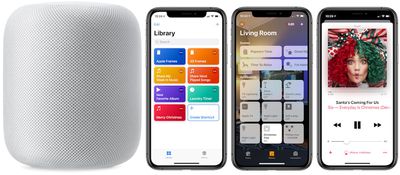


Reddit user Running_In_Space ('https://www.reddit.com/r/HomeKit/comments/a18ngb/play_music_on_homepod_via_scene/eanom8p/') on r/HomeKit ('https://www.reddit.com/r/HomeKit/comments/a18ngb/play_music_on_homepod_via_scene/') explained recently that this is actually possible today, thanks to a helpful (and super simple to create) Siri Shortcut. With the Shortcut, you can tie any Home scene together with any Apple Music playlist. While the Shortcut is limited to playlists, you can choose from your own playlists or those created by Apple Music.

In the example below, we created a holiday themed Siri Shortcut that turns on Christmas tree lights (connected to an iDevices Switch) and shuffles a holiday playlist any time we say, "Hey Siri, Merry Christmas." Also remember that you'll need an Apple Music subscription, HomeKit-enabled lights or other devices of some kind, and the updated Siri Shortcuts iOS app.

How to Create the Siri Shortcut

[LIST=1]
* Open the iOS "Shortcuts" app


* Tap "Create Shortcut"


* In the search bar, type "Get Playlist" and add it into your Shortcut


* Next to Playlist, tap "Choose" and pick your desired playlist


* Search for "Play Music" and add it (here you can also edit settings for shuffling and/or repeating the playlist)


* Search for "Run Home Scene" and add it


* Next to Home, tap "Choose" and select your home


* Next to Scene, tap "Choose" and select your desired scene


* Before you tap "Done," select the toggle icon under the Done button at the top right corner of the screen


* Name the Shortcut, and tap "Add to Siri" to record your preferred trigger phrase

* Tap "Done" until you're back on the Library screen of the app
Now you will be able to say, "Hey Siri, [Trigger Phrase]" to your HomePod and have the selected Home scene activate along with the chosen Apple Music playlist, connected via AirPlay on your iPhone. Siri typically responds with, "Okay, running your shortcut," and it can take a bit longer than a normal scene activation in HomeKit due to the multiple actions.

There are numerous versions of this Siri Shortcut that could be created, like having a nighttime scene in HomeKit tied to a mellow Apple Music playlist that's triggered when you say, "Hey Siri, goodnight." We tried testing out Home scenes that are activated via geofences, but in the few times we tried we could not get HomePod to turn on and play the specified Apple Music playlist when the arriving home scene in HomeKit was activated.

It's also worth noting that the desired Apple Music playlist will play on whatever device you are talking to Siri with, so in our example if we said, "Hey Siri, Merry Christmas" and HomePod picked it up, then the holiday playlist played on HomePod. If we said the same phrase to our iPhone, the playlist would play there instead. In both scenarios, the Christmas tree lights were still activated regardless of the Apple device used.

Apple introduced ('https://www.macrumors.com/2018/09/17/apple-releases-ios-12-shortcuts-app-for-all-users/') Siri Shortcuts as an update to its Workflow iOS app back in September, and although creating Shortcuts can be an arduous task in some cases, there are a few super useful actions that have been shared over the past few months. Do you use Siri Shortcuts and have a favorite one to share? Give us the details in the comments below or Tweet us @MacRumors ('https://twitter.com/MacRumors') to let us know your most-used Shortcuts.

Article Link: How To Play Music on HomePod When Activating HomeKit Scenes Using Siri Shortcuts ('https://www.macrumors.com/how-to/homepod-homekit-siri-shortcuts/')
Do I
('https://www.macrumors.com/how-to/homepod-homekit-siri-shortcuts/')


Although HomePod is available in Apple's Home app, the company's smart home speaker as of yet can't be integrated into HomeKit scenes and automations. With such a feature, users would be able to activate their favorite HomeKit scenes, alongside a specific Apple Music playlist, album, or song from their HomePod.


Reddit user Running_In_Space ('https://www.reddit.com/r/HomeKit/comments/a18ngb/play_music_on_homepod_via_scene/eanom8p/') on r/HomeKit ('https://www.reddit.com/r/HomeKit/comments/a18ngb/play_music_on_homepod_via_scene/') explained recently that this is actually possible today, thanks to a helpful (and super simple to create) Siri Shortcut. With the Shortcut, you can tie any Home scene together with any Apple Music playlist. While the Shortcut is limited to playlists, you can choose from your own playlists or those created by Apple Music.

In the example below, we created a holiday themed Siri Shortcut that turns on Christmas tree lights (connected to an iDevices Switch) and shuffles a holiday playlist any time we say, "Hey Siri, Merry Christmas." Also remember that you'll need an Apple Music subscription, HomeKit-enabled lights or other devices of some kind, and the updated Siri Shortcuts iOS app.

How to Create the Siri Shortcut

[LIST=1]
* Open the iOS "Shortcuts" app


* Tap "Create Shortcut"


* In the search bar, type "Get Playlist" and add it into your Shortcut


* Next to Playlist, tap "Choose" and pick your desired playlist


* Search for "Play Music" and add it (here you can also edit settings for shuffling and/or repeating the playlist)


* Search for "Run Home Scene" and add it


* Next to Home, tap "Choose" and select your home


* Next to Scene, tap "Choose" and select your desired scene


* Before you tap "Done," select the toggle icon under the Done button at the top right corner of the screen


* Name the Shortcut, and tap "Add to Siri" to record your preferred trigger phrase

* Tap "Done" until you're back on the Library screen of the app
Now you will be able to say, "Hey Siri, [Trigger Phrase]" to your HomePod and have the selected Home scene activate along with the chosen Apple Music playlist, connected via AirPlay on your iPhone. Siri typically responds with, "Okay, running your shortcut," and it can take a bit longer than a normal scene activation in HomeKit due to the multiple actions.

There are numerous versions of this Siri Shortcut that could be created, like having a nighttime scene in HomeKit tied to a mellow Apple Music playlist that's triggered when you say, "Hey Siri, goodnight." We tried testing out Home scenes that are activated via geofences, but in the few times we tried we could not get HomePod to turn on and play the specified Apple Music playlist when the arriving home scene in HomeKit was activated.

It's also worth noting that the desired Apple Music playlist will play on whatever device you are talking to Siri with, so in our example if we said, "Hey Siri, Merry Christmas" and HomePod picked it up, then the holiday playlist played on HomePod. If we said the same phrase to our iPhone, the playlist would play there instead. In both scenarios, the Christmas tree lights were still activated regardless of the Apple device used.

Apple introduced ('https://www.macrumors.com/2018/09/17/apple-releases-ios-12-shortcuts-app-for-all-users/') Siri Shortcuts as an update to its Workflow iOS app back in September, and although creating Shortcuts can be an arduous task in some cases, there are a few super useful actions that have been shared over the past few months. Do you use Siri Shortcuts and have a favorite one to share? Give us the details in the comments below or Tweet us @MacRumors ('https://twitter.com/MacRumors') to let us know your most-used Shortcuts.
Article Link: How To Play Music on HomePod When Activating HomeKit Scenes Using Siri Shortcuts ('https://www.macrumors.com/how-to/homepod-homekit-siri-shortcuts/')
Do I have to select an accessory to get it to play the playlist? I set up the shortcuts but the HomePod doesn’t respond. Do I have to tell it the specific ‘scene’ if so, I can’t create a scene without selecting an accessory. I don’t want to have to turn lights on just for music.
Score: 1 Votes (Like | Disagree)

Popular Stories

Google maps feaure

Google Maps Quietly Added This Long-Overdue Feature for Drivers

Wednesday December 10, 2025 2:52 am PST by
Google Maps on iOS quietly gained a new feature recently that automatically recognizes where you've parked your vehicle and saves the location for you. Announced on LinkedIn by Rio Akasaka, Google Maps' senior product manager, the new feature auto-detects your parked location even if you don't use the parking pin function, saves it for up to 48 hours, and then automatically removes it once...
Foldable iPhone 2023 Feature 1

Apple to Make More Foldable iPhones Than Expected [Updated]

Tuesday December 9, 2025 9:59 am PST by
Apple has ordered 22 million OLED panels from Samsung Display for the first foldable iPhone, signaling a significantly larger production target than the display industry had previously anticipated, ET News reports. In the now-seemingly deleted report, ET News claimed that Samsung plans to mass-produce 11 million inward-folding OLED displays for Apple next year, as well as 11 million...
iOS 26

iOS 26.2 Coming Soon With These 8 New Features on Your iPhone

Thursday December 11, 2025 8:49 am PST by
Apple seeded the second iOS 26.2 Release Candidate to developers earlier this week, meaning the update will be released to the general public very soon. Apple confirmed iOS 26.2 would be released in December, but it did not provide a specific date. We expect the update to be released by early next week. iOS 26.2 includes a handful of new features and changes on the iPhone, such as a new...
iOS 26

15 New Things Your iPhone Can Do in iOS 26.2

Friday December 5, 2025 9:40 am PST by
Apple is about to release iOS 26.2, the second major point update for iPhones since iOS 26 was rolled out in September, and there are at least 15 notable changes and improvements worth checking out. We've rounded them up below. Apple is expected to roll out iOS 26.2 to compatible devices sometime between December 8 and December 16. When the update drops, you can check Apple's servers for the ...
iOS 26

Apple Seeds Second iOS 26.2 Release Candidate to Developers and Public Beta Testers

Monday December 8, 2025 10:18 am PST by
Apple today seeded the second release candidate version of iOS 26.2 to developers and public beta testers, with the software coming one week after Apple seeded the first RC. The release candidate represents the final version iOS 26.2 that will be provided to the public if no further bugs are found. Registered developers and public beta testers can download the betas from the Settings app on...
AirPods Pro Firmware Feature

Apple Releases New Firmware for AirPods Pro 2 and AirPods Pro 3

Thursday December 11, 2025 11:28 am PST by
Apple today released new firmware designed for the AirPods Pro 3 and the prior-generation AirPods Pro 2. The AirPods Pro 3 firmware is 8B30, up from 8B25, while the AirPods Pro 2 firmware is 8B28, up from 8B21. There's no word on what's include in the updated firmware, but the AirPods Pro 2 and AirPods Pro 3 are getting expanded support for Live Translation in the European Union in iOS...
iPhone 14 Pro Dynamic Island

iPhone 18 Pro Leak Adds New Evidence for Under-Display Face ID

Monday December 8, 2025 4:54 am PST by
Apple is actively testing under-screen Face ID for next year's iPhone 18 Pro models using a special "spliced micro-transparent glass" window built into the display, claims a Chinese leaker. According to "Smart Pikachu," a Weibo account that has previously shared accurate supply-chain details on Chinese Android hardware, Apple is testing the special glass as a way to let the TrueDepth...
ipad blue prime day

iPad 12 Rumored to Get iPhone 17's A19 Chip, Breaking Apple Tradition

Wednesday December 10, 2025 12:22 pm PST by
The next-generation low-cost iPad will use Apple's A19 chip, according to a report from Macworld. Macworld claims to have seen an "internal Apple code document" with information about the 2026 iPad lineup. Prior documentation discovered by MacRumors suggested that the iPad 12 would be equipped with an A18 chip, not an A19 chip. The A19 chip was just released this year in the iPhone 17, and...
iPhone 17 Pro Cosmic Orange

10 Reasons to Wait for Next Year's iPhone 18 Pro

Monday December 1, 2025 2:40 am PST by
Apple's iPhone development roadmap runs several years into the future and the company is continually working with suppliers on several successive iPhone models at the same time, which is why we often get rumored features months ahead of launch. The iPhone 18 series is no different, and we already have a good idea of what to expect for the iPhone 18 Pro and iPhone 18 Pro Max. One thing worth...
studio display purple

Apple Studio Display 2 Code Hints at 120Hz ProMotion, HDR, A19 Chip

Thursday December 11, 2025 4:19 am PST by
Apple's next-generation Studio Display is expected to arrive early next year, and a new report allegedly provides a couple more details on the external monitor's capabilities. According to internal Apple code seen by Macworld, the new external display will feature a variable refresh rate capable of up to 120Hz – aka ProMotion – as well as support for HDR content. The current Studio...