How to Transfer Your Spotify Playlists to Apple Music - MacRumors
Skip to Content

How to Transfer Your Spotify Playlists to Apple Music

by

If you switch from Spotify to Apple Music, you can transfer your playlists from one streaming service to the other using one of several third-party apps available on the App Store.
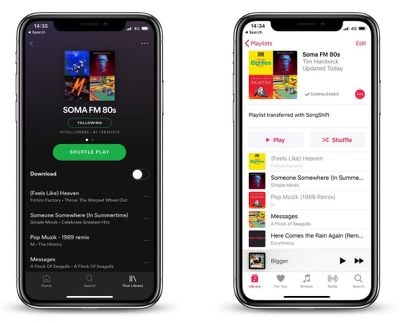
transfer spotify playlists to apple music
In this article, we're going to use one such app called SongShift to do exactly that, as it's easy to set up and you can test it for free before paying the $3.99 in-app purchase that lets you batch process more than five playlists.

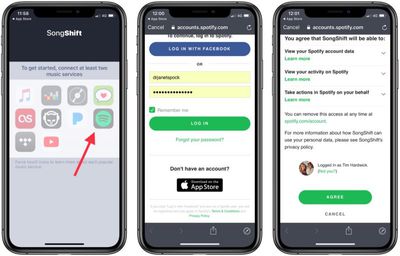
  1. Launch the SongShift app on your iPhone.
  2. Tap Get Started.
  3. Tap the Spotify icon (you can Force touch icons to identify them).
    transfer spotify playlist to apple music 1

  4. Enter your Spotify username and password and then tap Log in.
  5. Tap Agree at the bottom of the next screen to grant the app access to your Spotify library.

  6. Next, tap the ‌Apple Music‌ icon and then tap Authorize to grant the app access to your ‌Apple Music‌ library and set a token.
  7. Tap OK to confirm.
  8. Tap Continue.
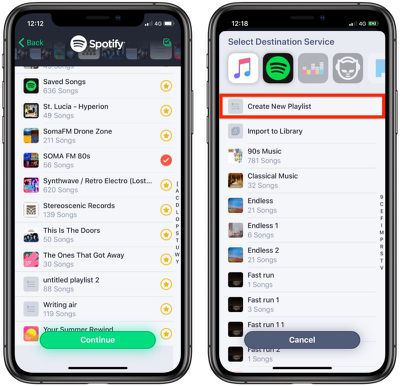
  9. Next, tap the Spotify icon and select a playlist to transfer, then tap Continue.
    transfer spotify playlist to apple music 3

  10. Tap Destination and then select the ‌Apple Music‌ icon.
  11. Tap Create New Playlist.
  12. In the Configuration screen, tap Destination and enter a custom name for the playlist as you'd like it to appear in your ‌Apple Music‌ library, then tap OK.

  13. Tap Process and wait while the transfer or "shift" completes.
The "shift" process may take some time and depends on how many songs are in your playlist, but you can start queuing multiple transfers and even close app and they will continue in the background. You can also allow SongShift to notify you when a transfer is complete.

Note: You can keep tabs on a playlist transfer by checking the colored dots next it. Green means processing is complete, blue means songs are pending processing, purple means currently processing, and orange means a song failed to match.


Popular Stories

General Spotify Feature

Spotify to Adopt Apple's Technology for Video Podcasts

Thursday May 14, 2026 9:02 am PDT by
Spotify today announced plans to adopt Apple's HTTP Live Streaming (HLS) technology for video podcasts, a move that will allow creators to distribute video shows across both platforms without changing their existing setup. Apple introduced an enhanced HLS-based video podcast experience for the iPhone, iPad, Apple Vision Pro, and the web at the end of March. The upgrade significantly improves ...


wigmore hall

Apple Music Classical Announces New Partnership With London's Wigmore Hall

Wednesday June 3, 2026 4:59 am PDT by
Wigmore Hall Live today relaunches as a digital-only platform in partnership with Apple Music Classical, with all recording royalties passed directly to artists, Gramophone reports. Wigmore Hall is a prestigious 550-seat concert hall on Wigmore Street in London's Marylebone, widely regarded as one of the world's foremost venues for chamber music, early music, and vocal recitals. Opened in...
iOS 26 Music Glass Feature

Apple Music Gains AutoMix Upgrades and More in iOS 27

Tuesday June 9, 2026 5:49 am PDT by
Apple yesterday detailed several updates coming to Apple Music in iOS 27, including redesigned artist and album pages, an upgraded AutoMix feature, and a suite of performance improvements. The most immediately visible change is a refreshed artist page, which now features a prominent shuffle play button, a new artist name display, and various other layout adjustments. Apple also says album...