iOS 17: How to Force Siri to Listen for 'Hey Siri' Instead of Just 'Siri' - MacRumors
Skip to Content

iOS 17: How to Force Siri to Listen for 'Hey Siri' Instead of Just 'Siri'

by

With the release of iOS 17 and iPadOS 17, Apple is simplifying the voice command to invoke Siri on iPhone, iPad, and connected AirPods Pro‌.

hey siri banner apple
Instead of "Hey ‌Siri‌," you can simply say "‌Siri‌" to activate the voice assistant on your device. Not only that, you can now also issue multiple queries and commands in succession without having to say "‌Siri‌" again.

On devices that are updated with Apple's latest mobile software, the voice assistant will respond to both "Siri" and "Hey Siri" by default, so you don't have to do anything to shorten the voice command.

Hey Siri vs Siri
However if the single word "Siri" is unintentionally invoking Siri in your experience where the full phrase does not, you can limit your device to listen only for the full "Hey Siri" command by following the steps below.

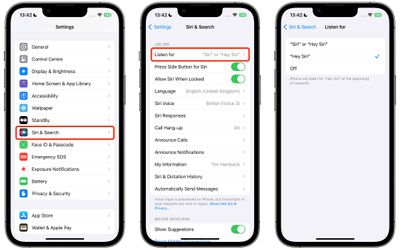
  1. Open Settings on your iPhone or iPad.
  2. Tap Siri & Search.
  3. Under "Ask Siri," tap Listen for.
  4. Select Hey Siri.

settings

That's all there is to it. Your device, and any AirPods Pro connected to it, will no longer respond to "Siri" whenever you say it.


Popular Stories

macOS iOS 27 Siri App Feature

Apple's Siri AI Can Be Swapped Out for Claude, ChatGPT, Code Shows

Monday September 14, 2026 4:37 am PDT by
Code sleuth "pdfu" has uncovered iOS 27 and macOS Golden Gate private frameworks that show Apple has designed its new Siri architecture to work with third-party AI models at what appears to be a surprisingly deep level. One mechanism called Model Delegation allows Claude to appear as a Siri extension in the same way as the existing built-in ChatGPT extension. In pdfu's video, shared on X,...

iOS 27 Out Now Thumb

Apple Releases iOS 27 and iPadOS 27 With Siri AI and Liquid Glass Update

Monday September 14, 2026 10:04 am PDT by
Apple today released iOS 27 and iPadOS 27, the newest operating system updates for the iPhone and iPad. The software is available for free on all compatible devices, and can be downloaded over the air by going to Settings > General > Software Update. Subscribe to the MacRumors YouTube channel for more videos. It can take several minutes for the updates to propagate to all users due to high...
apple watch series 12 siri recap

Apple Explains What Happens to Conversations Siri Recap Hears

Thursday September 10, 2026 4:38 pm PDT by
The Apple Watch Series 12 and Ultra 4 have new Audio Intelligence features that include Sound Recognition, Music Recognition, Live Rewind, and Siri Recap. When these features are activated, the new Apple Watches are always listening to what's going on around the wearer. With Siri Recap, the Apple Watch listens to your conversations throughout the day and takes notes. It uses Apple...