In a lighthearted walk-and-talk around New York City, The Tonight Show's Jimmy Fallon caught up with Apple CEO Tim Cook on Friday to chat about the new iPhone 16 and Cook's love for the iconic Fifth Avenue Apple Store. Fallon – wearing Apple Vision Pro – met Cook with mock disbelief while picking up his new iPhone, with Cook personally handing him the device.
As they strolled to Apple's Upper East Side store, Cook explained that he tries to visit the Fifth Avenue location during every major launch. Fallon joked about Cook's rockstar-like reception from fans, but Cook humbly attributed it to people's love for Apple.
The two discussed Cook's 27-year journey at Apple, during which Cook admitted he never expected to become CEO. On the tech front, Cook expressed excitement about Apple Intelligence, which is set to begin rolling out next month. Cook talked up upcoming features like automatic email summarization and fun new creative tools such as Genmoji and Image Playground.
The chat ended on a playful note, with Fallon showing off his "psychic" skills by guessing Cook's mustard preference on hot dogs, before gifting him some New York-themed swag — though not all of it made the cut for Cook's local look. You can watch the five-minute walk-and-talk in the video embedded above.
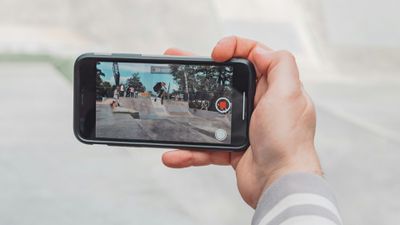
In iOS 18, Apple has introduced a new feature that allows you to continue playing audio from your iPhone's speakers while recording video in the Camera app. Whether you're creating a music video or simply want background music for your recordings, this new option offers you greater creative control over your iPhone videos.
Previously in iOS 17, starting a video recording would automatically pause any audio playback on your iPhone. However, iOS 18 allows you to change this behavior, thanks to a new Camera setting.
Here's how to enable audio playback during video recording in iOS 18:
Open the Settings app on your iPhone.
Scroll down and tap Camera.
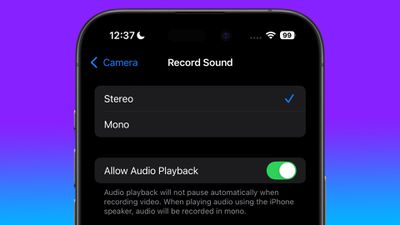
Tap Record Sound.
Toggle on the Allow Audio Playback option.
Once enabled, your iPhone will no longer automatically pause audio when you start recording video in the Camera app. Bear in mind that when playing audio through your iPhone's speaker while recording, the audio will be captured in mono.
This new option provides more flexibility than the previous workaround of using QuickTake in Photo mode, which allowed for continued audio playback but at a lower video quality. With iOS 18, however, you can now enjoy full Video mode quality while maintaining your desired audio playback.
Apple's latest iPhone 16 models feature a second-generation Ceramic Shield material, which Apple says is even tougher than the prior-generation Ceramic Shield. Device insurance provider Allstate Protection Plans today published the results of its annual device drop test, giving us insight into the durability of the new iPhones.
Allstate tested the iPhone 16 Pro Max, which is Apple's largest iPhone to date at 6.9 inches. It continues to have a glass front and back, and though Apple has introduced better Ceramic Shield material that's infused with ceramic for durability, it's still no match for a concrete sidewalk.
Using a "DropBot" to simulate drops from a height of six feet, Allstate conducted several tests. In the front-down drop test, the iPhone 16 Pro Max display shattered and there were visible scuffs along the titanium frame. This drop rendered the iPhone 16 Pro Max unusable, though haptic responses were still felt so it could be repaired.
In the back-down drop test, the iPhone 16 Pro Max's rear glass shattered after one drop and suffered damage to the camera housing. It did remain functional, including the camera, but it was not safe to handle with bare hands due to the broken glass.
No smartphones that have glass have survived Allstate's DropBot, so it is not surprising to see the iPhone 16 Pro Max fail. Glass and hard surfaces do not mix, so it is a good idea to have a protection plan of some kind like AppleCare+ or a protective case. Drop tests of all kinds are hard to use to determine durability in a real world situation, as the angle of the drop, the height, and the surface that an iPhone is falling on are always going to vary.
Allstate has stopped doing dunk tests because iPhone models now have such solid water resistance, and the iPhone 16 models continue to offer the same IP67 water resistance as prior models. Other YouTube videos have tested the iPhone 16 models with drops, hammering, scratches, and other damage for those interested.
AppleCare+ for the iPhone 16 and 16 Plus is $179 for two years or $8.99 per month, and for the iPhone 16 Pro and Pro Max, it's $199 or $9.99. With AppleCare+, an iPhone 16 Pro Max display replacement costs $29, and without, it's $379. Cracked back glass replacement is $29 with AppleCare+ and $199 without, and if both the front and back are cracked, it's $499 ($58 with AppleCare+).
Back in May, Sonos launched a new version of its mobile app, and it's been wildly unpopular with Sonos customers because of ongoing bugs and the removal of several features. Today, Bloomberg delved into what went wrong at Sonos ahead of when the app launched, and why it came out anyway.
Sonos had to come out with a new app when it launched the Sonos Ace headphones because of "technical debt." The company basically spent time working on new features instead of updating outdated code written in obsolete languages, leading to infrastructure issues. Sonos put off addressing the underlying technical debt, but introducing the headphones required the Sonos app and the cloud setup behind it to be overhauled.
At the time the app was in development, Sonos laid off some of its employees to cut costs and also did some internal restructuring that was "causing chaos" by separating people who had worked together for years. As the app's launch approached, employees protested "forcefully," even resorting to yelling and screaming, because it was clear the app wasn't ready to launch.
Former Sonos employees told Bloomberg that Sonos was prioritizing promises to investors and attracting new customers rather than ensuring equipment owned by longtime Sonos customers continued to work. One employee said they were afraid to push back further on the app's launch because it could lead to them losing their job.
Sonos' lead counsel Eddie Lazarus did an internal investigation into the app's development and told Bloomberg that the app was delayed, from early 2024 to May 2024, and that there had been no "yelling" or "screaming" in meetings. Sonos apparently had a list of what it considered "essential" bugs that needed to be fixed pre-launch, but it decided that less critical bugs could wait until the app was released. "Our list of essential bugs, obviously, was not comprehensive enough," Lazarus told Bloomberg.
Sonos expects to miss its annual revenue target by $200 million after the app debacle. In August, it laid off some employees, and it told others that yearly bonuses and merit-based pay raises have been canceled.
Sonos CEO Patrick Spence apologized to Sonos customers in July and committed to regular updates to address bugs and add missing features. The company considered bringing back the old app as it worked on the new version, but it turned out that wasn't possible because of the updates made to the cloud servers.
Sonos also decided to delay two upcoming product launches in 2024 to instead focus on improving the Sonos app, and the company has "pulled together the very best and most experienced engineers" that it has to work on the app until it is fixed.
In macOS Sequoia, Apple requires users to regularly reauthorize permissions for screen recording apps, a change that has not been popular with some Mac app users. During the beta testing process, these reminders came up weekly, but later in the beta, Apple changed those reminders to monthly.
If you're someone who prefers not to get these reminders for screen recording apps at all, you can use the Amnesia app for the Mac to get rid of them. The app basically changes the .plist file for the screen capture app access feature, and it's a pay what you want situation.
Those comfortable with tweaking plists themselves using the Terminal app can follow instructions shared by Jeff Johnson, known for Stop The Madness. Both Amnesia and the command line version of the fix require disabling reminders on an app by app basis, but it's a little more straightforward to do with the Amnesia app.
Note that Amnesia works on macOS Sequoia 15, but there is not yet a version for macOS Sequoia 15.1, so if you're running the beta, you'll need to wait for an update. The update is expected later today.
YouTube is raising the cost of its Premium plan in multiple countries around the world, with the new pricing surfacing over the weekend (via Android Authority). Prices are up in Europe, South America, and and some countries in Asia and the Middle East.
Price hikes are being tracked over on Reddit, and so far customers in the following countries are being warned about higher prices: Belgium, Colombia, the Czech Republic, Denmark, Indonesia, Ireland, Italy, Malaysia, the Netherlands, Norway, Saudi Arabia, Singapore, Sweden, Switzerland, Thailand, and the United Arab Emirates.
The biggest single plan price increase is in Norway, where prices are up 42 percent. YouTube Premium in Norway used to cost approximately $11.33 per month, but now it is just over $16. In Sweden, the family plan now costs $27.38 per month, up from $17.57. On average, single person plans have increased 18 percent, while family plans are up 43 percent.
Many YouTube Premium customers affected by the price changes have said on Reddit that they plan to cancel given the significant increases to family plans.
YouTube Premium pricing has not increased in the United States, Canada, or other countries. In the U.S., the standard plan is $13.99 per month, and a family plan is $22.99 per month.
Apple today stopped signing iOS 17.6.1 and iPadOS 17.6.1 for all devices except the latest-generation iPad Pro models with the M4 chip.
Apple routinely stops signing older iOS releases over time in order to prevent users from downgrading to an outdated software version. iOS 17.6.1 no longer being signed comes one week after Apple released iOS 18 to the public.
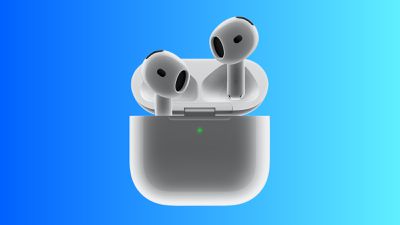
Just three days after their official launch, Apple's AirPods 4 earbuds both with and without Active Noise Cancellation (ANC) have received their first discounts at Amazon, knocking $10 off their regular prices. The higher-tier model with ANC is down to $169.00, while the cheaper model without ANC is now available for $118.00.
Note: MacRumors is an affiliate partner with Amazon. When you click a link and make a purchase, we may receive a small payment, which helps us keep the site running.
In addition to ANC-related features like Adaptive Audio, Transparency, and Conversation Awareness, the higher-tier AirPods 4 also add wireless charging capabilities and a speaker for Find My to the AirPods case.
The two models of the AirPods 4 launched this month as successors to the AirPods 2 and AirPods 3, offering a more comfortable fit, an H2 chip supporting improved audio capabilities, dust resistance, and more.
Amazon also still has the AirPods Pro 2 at a heavily discounted price of $189.99, but if you prefer the open-ear design of the regular AirPods, this is your first opportunity to save a few dollars. The higher-tier model represents the first time ANC has been offered outside of the AirPods Pro and AirPods Max options, making them an appealing option for some customers.
Update 5:10 pm: In addition to the higher-tier model, Amazon has now also discounted the lower-tier AirPods 4 model.
Apple is working behind the scenes to get ready to introduce Hearing Assistance functionality to the AirPods Pro 2. The latest iOS 18.1 beta does not have the feature enabled at the current time, but it is hidden in the update and Apple could potentially activate it in a future iOS 18.1 beta.
We were able to access the hidden AirPods Pro 2 Hearing Assistance feature set in the fifth iOS 18.1 and iPadOS 18.1 betas, and we tested it out.
When Hearing Assistance launches, users will be prompted to take a hearing test or upload an audiogram from an audiologist. Apple says the results will be used to turn on a hearing aid feature for those with mild to moderate hearing loss, but for all users, it can be used to make sound adjustments to improve music, video, and call clarity.
The test takes approximately five minutes to complete, and it prompts users to tap the screen each time they hear a tone. The AirPods Pro 2 are only recommended for mild to moderate hearing loss, and those with more serious hearing loss likely won't be able to use the Hearing Aid feature.
After the hearing test, users will have the option to turn on the Hearing Aid option if it is required. Hearing Aid adjusts the voices and sounds around the user to account for the tones and frequencies that are not able to be heard.
Apple has already received FDA authorization for the AirPods Pro 2 to function as an over-the-counter hearing aid, and it could be rolled out at any time. Apple has said the feature will come out this fall, so it would make sense for it to be introduced in a future iOS 18.1 beta.
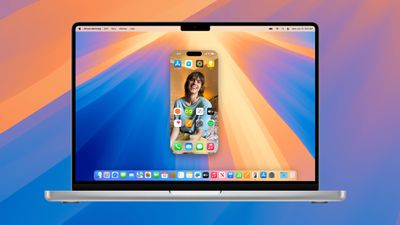
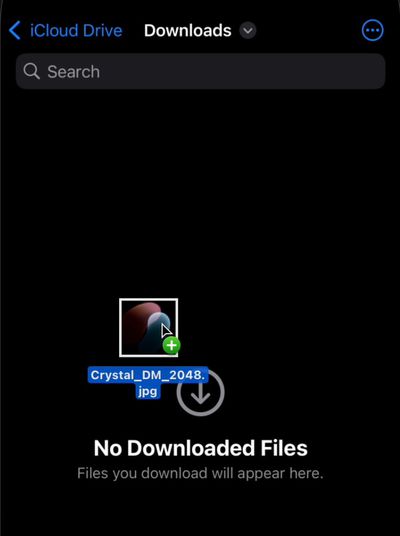
With macOS 15.1 and iOS 18.1 beta 5, Apple has enabled drag and drop, a much anticipated iPhone Mirroring feature. After updating to the new software, you can drag files from an iPhone to a Mac and vice versa.
iPhone Mirroring makes it simple to move files from one device to another because it works even when the iPhone is locked and charging. To use the feature, update to the fifth macOS 15.1 and iOS 18.1 betas and then activate iPhone Mirroring.
From there, if you drag a file like a photo from Mac to the open Photos app on the iPhone, it'll transfer over. If you want to transfer a PDF, just open the Files app and then drag the PDF from the Mac to the iPhone. Dragging a file from iPhone to Mac works in much the same way, you simply drag it over where you want it.
The new iPhone Mirroring feature is active in the developer beta now, and public beta testers should be able to try it out later this week. iOS 18.1 and macOS Sequoia 15.1 are expected to see a public launch in October.
With the fifth beta of iOS 18.1, Apple has made a small tweak to the Camera Control button that was introduced on the iPhone 16, iPhone 16 Plus, iPhone 16 Pro, and iPhone 16 Pro Max.
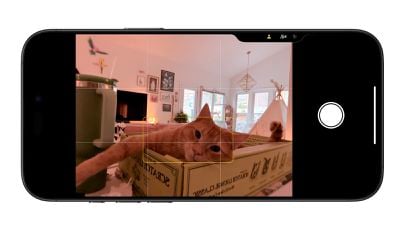
When you dig into the Camera Control settings, there is now a way to set it to the front-facing camera without having to interact with the iPhone's display.
To get to the selfie camera, open up the Camera app with a press on the Camera Control button, and then use a swipe gesture on the button to scroll through the lenses. The person icon at the very top swaps to the front-facing selfie camera.
Note that if you have Camera Control set to a different setting, you will need to open up the Camera app, activate Camera Control, and then tap on the screen to swap tools. The selfie camera and lens options are under the "Cameras" heading. The last tool you used will be the tool Camera Control opens with.
Prior to iOS 18.1, you could use this gesture to swipe through the different lens options, like 0.5x, 1x, 2x, and 5x (Pro only), but now it also includes the selfie camera to make it easier to get to all of the available lens options.
In the fifth beta of iOS 18.1, Apple has made some changes to the new customizable Control Center, refining it ahead of when iOS 18.1 is set to come out in October.
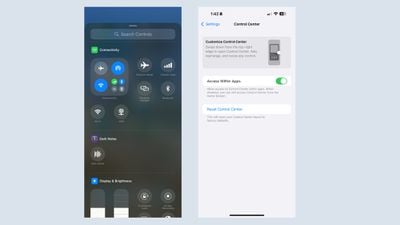
In the Control Center section of the Settings app, there is now an option to return to the default setup. If you make a bunch of confusing changes to Control Center and don't want to go through the trouble of moving everything around, you can now use the reset option to get back to the default options that Apple provides when installing iOS 18.
Apple has also added separate Control Center connectivity controls for Wi-Fi and VPN connectivity. In prior versions of iOS 18, these controls were baked into an all-in-one connectivity button, but now they can be added to the Control Center. The new Wi-Fi and VPN options cannot be added to the Lock Screen or the Action Button.
Almost all connectivity controls can now be added individually, including Airplane Mode, Cellular Data, Personal Hotspot, Bluetooth, Wi-Fi, and VPN. AirDrop and Satellite are not available as standalone controls.
Apple today provided developers with the fourth betas of iOS 18.1 and iPadOS 18.1 to continue testing Apple Intelligence features. The fifth betas come a week after Apple seeded the fourth iOS 18.1 and iPadOS 18.1 betas.
The updates can be downloaded from the Settings app on a compatible device by going to General > Software Update. Note that Apple Intelligence features still an iPhone 15 Pro or iPhone 16 to run.
Apple Intelligence includes Writing Tools that are available wherever text can be selected and edited, and it can be used for spell checking, fixing grammar, rewriting with a new tone, and summarizing text.
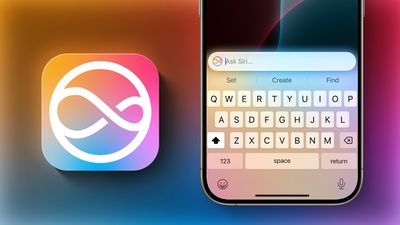
Siri has a new design with a subtle glow around the display, and there is a Type to Siri feature so you don't have to speak to Siri. Siri can follow along if you stumble over your words, and can maintain context between requests. Safari can summarize articles, and there's a new Reduce Interruptions Focus Mode.
Smart replies are available in Messages and Mail, plus the Mail app surfaces time sensitive messages and puts them at the top of your inbox. Photos has a Memory Movie feature for creating slideshows based on text descriptions, and you can record, transcribe, and summarize phone calls. Transcription and summarization are also available for any audio recording.
The update also includes phone call recording and transcription on all devices, plus it adds the option to take spatial photos on the iPhone 15 Pro models.
Apple today provided developers with the fifth beta of an upcoming macOS Sequoia 15.1 beta, with the new update coming a week after Apple released the fourth beta.
Registered developers can opt-in to the macOS Sequoia beta through the Software Update section of the System Settings app. An Apple ID associated with an Apple Developer account is required to get the beta.
macOS Sequoia 15.1 introduces the first Apple Intelligence features, adding support for Writing Tools, new Siri features, Smart Replies in Mail and Messages, Priority messages in the Mail app, Memory Movie and Clean Up in Photos, and more.
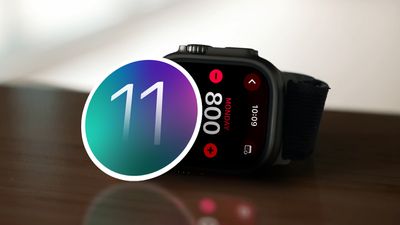
Apple today seeded the second beta of an upcoming watchOS 11.1 update to developers for testing purposes. The second beta comes a week after Apple released the first watchOS 11.1 beta alongside iOS 18.1 and iPadOS 18.1 betas.
To install the watchOS 11.1 update, developers need to open the Apple Watch app, go to the Software Update section under "General" in Settings, and toggle on the watchOS 11 Developer Beta. An Apple ID linked to a developer account is required.
Once beta updates have been activated, watchOS 11.1 can be downloaded under the same Software Update section. To install software, an Apple Watch needs to have 50 percent battery life and it must be placed on an Apple Watch charger.
It's not yet clear what new features are included in the watchOS 11.1 update at this time, as the update primarily focuses on Apple Intelligence, and Apple Intelligence features are not available on watchOS.
Apple today seeded the second beta of an upcoming visionOS 2.1 update to developers for testing purposes, with the new software coming a week after Apple seeded the first visionOS 2.1 beta.
Registered developers are able to opt into the betas by opening up the Settings app on their device, going to the Software Update Section, tapping on the "Beta Updates" option, and toggling on the Developer Beta. Note that an Apple ID associated with a developer account is required to download and install the beta.
There's no word yet on what's included in visionOS 2.1, but there are visionOS 2 features that Apple has not yet released, such as the option to use a larger ultrawide screen for the Mac Virtual Display and support for Multiview for MLS and MLB games.
Apple today seeded the second beta of an upcoming tvOS 18.1 beta to developers for testing purposes, with the new software coming a week after Apple seeded the first tvOS 18.1 beta.
Registered developers are able to download the tvOS 18.1 update by opting in to the beta through the Settings app on the Apple TV. A registered developer account is required.
tvOS software releases are usually minor in scale compared to other operating system updates, focusing primarily on smaller improvements rather than outward-facing changes. We don't know what's included in tvOS 18.1
Apple shares some information on tvOS releases in its tvOS support document, which is updated after each tvOS launch, but Apple does not provide notes during beta testing.
Though we don't always know what's new in tvOS betas, we let MacRumors readers know when new updates are available so those who are developers can download new software upon release.






 Note: MacRumors is an affiliate partner with Amazon. When you click a link and make a purchase, we may receive a small payment, which helps us keep the site running.