A U.S. appeals court has upheld a temporary restraining order that prevents OpenAI and Jony Ive's new hardware venture from using the name "io" for products similar to those planned by AI audio startup iyO, Bloomberg Law reports.
iyO sued OpenAI earlier this year after the latter announced its partnership with Ive's new firm, arguing that OpenAI's planned "io" branding was too close to its own name and related to similar AI-driven hardware. Court filings later showed that Ive and Sam Altman chose the name io in mid-2023, and that iyO CEO Jason Rugolo had approached Altman in early 2025 seeking funding for a project about "the future of human-computer interface." Altman declined, saying he was already working on "something competitive."
OpenAI countered that io's first product would not be a wearable device, and that Rugolo had voluntarily disclosed details about iyO while suggesting OpenAI acquire his company for $200 million. Despite this, a district court issued a temporary restraining order blocking OpenAI, Altman, Ive, and IO Products, Inc. from using the io mark in connection with products deemed sufficiently similar to iyO's planned AI-audio computer. OpenAI removed its io branding shortly after.
The Ninth Circuit affirmed the order earlier this week. The court agreed there was a likelihood of confusion between "IO" and "iyO," that reverse confusion was a significant risk given OpenAI's size, and that iyO could face irreparable harm to its brand and fundraising. However, the ruling does not bar all uses of the io name, only marketing and selling hardware similar to iyO's.
The case now returns to the district court for a preliminary injunction hearing in April 2026, with the broader litigation expected to extend into 2027 and 2028. OpenAI's first hardware device is expected to launch next year.
Netflix today announced that it will acquire Warner Bros. Discovery's vast studios and streaming operations for $82.7 billion.
The transaction will see Netflix acquire Warner Bros., HBO, and HBO Max in a cash-and-stock deal valued at $72 billion in equity and $82.7 billion, including debt (via Reuters). The acquisition gives it control of major franchises, including DC, Game of Thrones, Harry Potter, Looney Tunes, and the Warner Bros. film library, dramatically expanding the volume and diversity of content available under one streaming umbrella. The acquisition also gives Netflix the established HBO brand and its library of prestige television series such as The Sopranos, Succession, and The Wire.
Netflix said that it intends to maintain Warner Bros.' theatrical distribution, preserve HBO Max as a discrete service in the near term, and integrate HBO and Warner Bros. content into its own catalog.
Today, Netflix announced our acquisition of Warner Bros. Together, we’ll define the next century of storytelling, creating an extraordinary entertainment offering for audiences everywhere. https://t.co/rXPFMNIs1Apic.twitter.com/0pdsMUEob8
— Netflix (@netflix) December 5, 2025
Netflix confirmed that each Warner Bros. Discovery shareholder will receive $23.25 in cash and $4.50 in Netflix stock per share. The deal is contingent on Warner Bros. Discovery completing the previously announced separation of Discovery Global into a standalone company in the third quarter of 2026, as well as regulatory approval. The transaction is expected to take 12 to 18 months to complete.
Reports in October claimed that Apple was interested in acquiring Warner Bros. Discovery's extensive back catalog of content for Apple TV. With that prospect now firmly ruled out, Apple TV is highly likely to face heightened competition from Netflix in the years to come.
Apple's first foldable iPhone will reportedly drop the physical SIM card slot in favor of eSIM technology, according to a well-known Chinese leaker posting on Weibo today.
Apple is expected to introduce the device late next year or in early 2027, based on multiple reports. The so-called "iPhone Fold" is rumored to feature a 5.5-inch outer display and a book-style design that opens to reveal a roughly 7.8-inch inner screen reminiscent of an iPad mini.
Bloomberg's Mark Gurman has described the foldable as "super thin and a design achievement," comparing it to "two titanium iPhone Airs side by side." Internal volume will therefore be tightly constrained.
"It's highly likely that the foldable iPhone will come without a SIM card slot, supporting eSIM only," said leaker Instant Digital, echoing earlier expectations from Gurman and analyst Ming-Chi Kuo.
Instant Digital also highlighted the current shortcomings of eSIM in mainland China, where users strongly prefer physical SIM activation and dual-SIM slots. China's fast-moving resale and device-trial culture makes quick SIM transfers essential, meaning an eSIM-only foldable would rely heavily on seamless carrier provisioning.
Apple is aware of the hurdles. The iPhone Air, which adopted an eSIM-only design for similar space-driven reasons, depends on dedicated support from China Mobile, China Telecom, and China Unicom. It allows up to two active eSIMs, but activation still requires an in-store visit.
Globally, iPhone Air sales have undershot expectations, to say the least. Many consumers have focused less on its thin profile and more on the trade-offs it introduced, such as reduced battery life and a single rear camera. In China, the eSIM limitation will have surely added another layer of hesitation.
The foldable iPhone is rumored to introduce several new technologies, including a 24-megapixel under-display camera and a crease-free inner panel. Apple will be banking on these advances to overcome concerns about usability, especially in markets where eSIM adoption lags.
The Ceramic Shield 2 material that Apple uses for the iPhone 17 display includes an anti-reflective coating that's designed to cut down on glare. It's a coating that prior-generation iPhone models didn't have, and it can make a difference in bright lighting conditions.
If you're someone who likes to use a screen protector with your iPhone, you might be nullifying the anti-reflective property of the iPhone 17 display, based on testing done by Astropad.
Compared to the iPhone 17, Astropad found that the anti-reflective coating reduces reflections by approximately 50 percent when compared to the iPhone 16, but applying a screen protector without an anti-reflective coating of its own makes the anti-reflective Ceramic Shield 2 coating less effective. According to Astropad, this is because AR coatings are created for direct contact with air, and covering them with an extra layer of material cancels the effect.
Astropad did screen protector testing because it sells Fresh Coat, a screen protector with an anti-reflective coating, and it is promoting Fresh Coat through its testing and report. Astropad says that Fresh Coat and other screen protectors with an anti-reflective coating can replace or even outperform the anti-reflective properties of the iPhone 17's display.
Fresh Coat by Astropad enhances AR clarity on any iPhone, creating a surface nearly 4x less reflective than the display on an iPhone 16 and 2x less reflective than iPhone 17's Ceramic Shield 2.
Two senior Apple executives are leaving the company, Apple announced today. Apple's Senior Vice President and General Counsel Kate Adams and Lisa Jackson, Vice President of Environment, Policy and Social Initiatives, are both retiring in 2026.
Adams will be replaced with Jennifer Newstead, who will join Apple as a senior vice president on January 1, and will become Apple's general counsel on March 1, 2026. Newstead is currently Meta's chief legal officer, and she was previously the Legal Adviser to the United States Department of State.
When Newstead takes over as general counsel, Adams will not immediately leave. She will instead oversee the Government Affairs organization after Jackson retires in late January 2026. Adams will remain at Apple until late 2026, at which point Newstead will take over. Newstead will ultimately oversee both Apple's Legal and Government Affairs organizations as Senior Vice President, General Counsel and Government Affairs.
In a statement, Apple CEO Tim Cook said that he is pleased to merge Legal and Government Affairs because of increasing overlap between the two teams.
We couldn't be more pleased to have Jennifer join our team," said Cook. "She brings an extraordinary depth of experience and skill to the role, and will advance Apple's important work all over the world. We are also pleased that Jennifer will be overseeing both the Legal and Government Affairs organizations, given the increasing overlap between the work of both teams and her substantial background in international affairs. I know she will be an excellent leader going forward.
Jackson's other responsibilities, which include Environment and Social Initiatives, will be taken over by Chief Operating Officer Sabih Khan. Cook said that Jackson played an important role in helping Apple achieve its environmental goals.
I am deeply appreciative of Lisa's contributions. She has been instrumental in helping us reduce our global greenhouse emissions by more than 60 percent compared to 2015 levels," said Cook. "She has also been a critical strategic partner in engaging governments around the world, advocating for the best interests of our users on a myriad of topics, as well as advancing our values, from education and accessibility to privacy and security.
Adams has been with Apple since 2017, and before that, she worked for Honeywell. Jackson joined Apple in 2013 after serving as Administrator of the U.S. Environmental Protection Agency, and she has been the face of Apple's environmental messaging since then.
Apple today provided developers and public beta testers with a second release candidate version of tvOS 26.2 and HomePod Software 26.2, which is based on tvOS. The second RC comes one day after the first RC and has a build number of 23K53, up from 23K51.
tvOS 26.2 can be downloaded through the Software Update section of the Apple TV settings app.
With tvOS 26.2, Apple is adding support for creating a profile without an Apple Account, and there is a dedicated Apple TV app kids mode that's available for children's profiles.
Apple doesn't provide beta release notes, so it's not clear what's changed between the first RC and the second RC. Typically, release candidates are updated if there is a major bug discovered during the testing period. RCs represent the final version of the software that will be released to the public.
We're expecting tvOS 26.2 and HomePod Software 26.2 to come out next week.
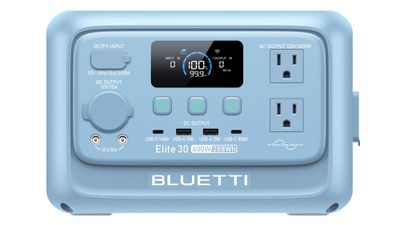
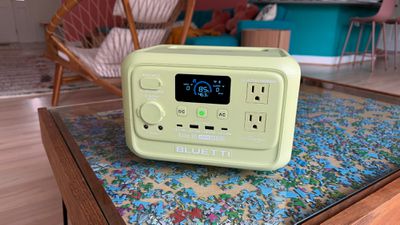
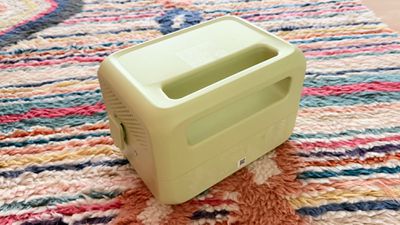
Bluetti's Elite 30 V2 that came out earlier this year is a portable power station that's ideal for short trips, plus it works well as a temporary backup for powering small electronics in a power outage.
The Elite 30 V2 is one of many power stations that Bluetti offers, and it is on the smaller, more compact side with a 288-watt-hour capacity. This is the first Bluetti power station that I've reviewed, but I have experience with larger power banks from Jackery, DJI, Anker, and other companies. The Elite 30 V2 has a LiFePO4 battery, which Bluetti says will last for over 3,000 charging cycles and 10 years. There's a five-year warranty, which is solid.
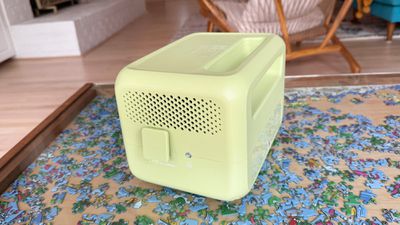
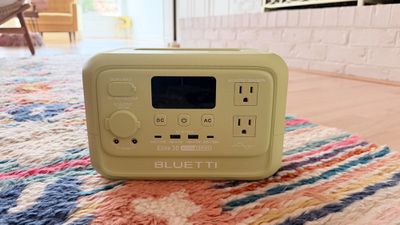
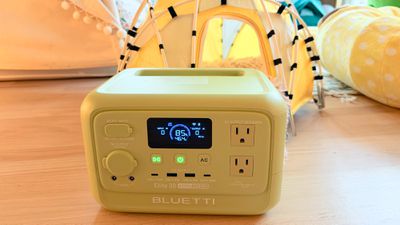
Most power stations are utilitarian, with a black or gray plastic design, but the Elite 30 V2 comes in several fun colors. There's nothing wrong with a simple design for battery equipment, but colors make Bluetti's little power station stand out. The model I tested is green, but it also comes in blue, purple, pink, light gray, and dark gray.
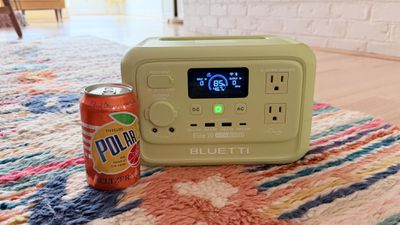
Appearance isn't going to matter to most, but if you're going to have a battery out for people to use at the beach, on a camping trip, at the park, or during some other activity, it might as well have some pizazz. The power station is just about 9.5 pounds, and it measures 9.8 inches long, 7 inches wide and 6.6 inches tall. There's a handle for carrying it, and an LCD display shows you input, output, charge level, and an estimate of how long the power will last based on what's plugged in.
The Elite 30 V2 supports 600W charging, though it can handle up to 1500W temporarily as part of a Power Lifting mode. The Elite 30 V2 has more ports than you might even need on a power station this size, and it can charge up multiple devices at a time. There's a 140W USB-C port, a 100W USB-C port, two 15W USB-A ports, and two AC outlets. There are also AC and DC inputs for charging, a cigarette lighter port, a grounding terminal, and a pair of 12V/8A barrel ports. Both USB-C ports can be used at full power at the same time.
There's a power button, a button to turn on DC power to the USB-C/USB-A ports, and an AC button to turn on power to the AC outlets. When you plug something in, you have to turn on power to the appropriate port before charging will begin. It's also a good idea to turn it off when you're done to ensure there's no power drain when you're not charging anything. The power stations that I've tested in the past haven't had separate buttons for DC power (just AC power), but that's the way Bluetti's power stations are designed.
I've been using the Elite 30 V2 to charge my Apple devices for the last several weeks to get an idea of what it's useful for. Charging my iPhone 17 Pro Max from 0 to 80 percent drains the power station from 100 percent to 90 percent, and it's about the same for an iPhone 16 Pro Max and an iPhone 15 Pro Max.
I can charge my iPhone's battery between 9 and 10 times, though I do limit my charging to 80 percent. The variation is because the power station's battery level can drop slightly with nothing plugged in unless it's turned off. Over a four-hour period, the battery dropped around 10 percent with DC power on.
It charges my MacBook Air three and a half times. It was able to run my MacBook Pro, Studio Display, and two lights (my desk setup) for half of my work day (12:51 p.m. to right around 5:00 p.m.). It ranged from 60W to 110W depending on workload. Charging takes around an hour and 20 minutes to get to full, though it can get to an 85 percent charge in around 50 minutes. It can charge through a cigarette lighter port in a car, or with solar panels for off-grid connectivity.
The Elite 30 V2 isn't the power station you want to get to run something that's power hungry like an electric heater, but it's good for smaller things like computers, lights, speakers, and consoles. You could run a mini refrigerator for a few hours, a hair dryer or flat iron long enough to do your hair, or a lower power electric kettle or coffee maker. It is able to run my entire computer setup, plus it can power my Wi-Fi for a full work day. Some people use power stations as backups for medical devices. The Elite 30 V2 may be able to run a CPAP machine for a night's sleep, but that will depend on the individual machine. I wouldn't recommend this one for other devices like an oxygen concentrator, which would draw too much power and require a much larger battery for an extended power outage.
You can use the Elite 30 V2 as a backup in case of a power outage, plugging a device into it and then plugging the power station into an outlet. In that situation, the power station will kick on automatically in a power outage with no interruption in function (Bluetti says there's a super fast 10ms response time). It actually supports up to 980W of passthrough power.
Since the Elite 30 V2 is a smaller power station, it runs and charges quietly. It is nearly silent when charging and when powering things like iPhones and Macs. The fan inside will kick on under higher loads, but it's still not unreasonably loud. I can hear it, but it's a noise I could sleep through.
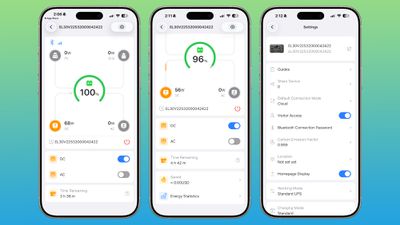
There is a Bluetti app, and you can connect to the power station via Bluetooth or Wi-Fi to monitor it remotely. The app tells you what's drawing power and how much, how long the battery will last under the current load, and your energy usage statistics. You can also remotely turn the AC/DC power on or off, choose power modes, and enable the 1500W Power Lifting feature. You should also be able to upgrade the firmware, but it wasn't working properly for me in the app (the button to actually install firmware was blank).
Bottom Line
I'm a fan of the Elite 30 V2. It provides enough power to charge multiple phones, tablets, portable gaming systems, or computers, but it's not too heavy to carry around. For an active use power station that you're using for day or weekend trips where portability is an issue, this is one of the better power stations that you can get.
I am petite and can struggle to haul around some of the bigger power 20lb+ stations that I've tested, but this one is the perfect size. I'm more likely to use a power station that is convenient for me to carry and take places.
This would be ideal as a backup battery if you just wanted to power smaller devices like smartphones and your router in a power outage. For medical devices or appliances that draw a lot of power, a bigger battery would be better.
Some power stations can cost over $1,000, but the Elite 30 V2 is much more affordable. The MSRP is $304, but it's often on sale.
Russia has blocked Apple's FaceTime video calling app in an ongoing effort to eliminate private communication methods, reports Reuters. Russia claims FaceTime is being used for criminal activity, and that blocking the app is a legitimate law enforcement measure. Social network Snapchat and multiplayer gaming platform Roblox were also banned this week.
Multiple other apps and services have been blocked in Russia previously. Facebook, Instagram, Twitter, Discord, and LinkedIn are unavailable and can't be accessed without a VPN. Russia throttles YouTube heavily to make it almost unusable, and since 2022, TikTok has had a Russia-only feed that does not include content from other countries.
Viber and Signal are banned in the country, and Russians are not able to make calls through WhatsApp or Telegram as of earlier this year. Messaging on those apps is also restricted.
In a statement to Reuters, Russia's media regulator Roskomnadzor said the following:
According to law enforcement agencies, FaceTime is being used to organise and carry out terrorist attacks in the country, recruit perpetrators, and commit fraud and other crimes against Russian citizens.
FaceTime is now restricted nationwide, and has likely been blocked at the network level, so it may still be accessible through a VPN. Moscow residents are seeing a "User unavailable" message when attempting to use FaceTime, which is the error displayed when a FaceTime call is unable to connect. The app still opens and activates, so Apple hasn't removed it.
Russia claims that the app is used for coordinating illegal activity, with no option for the Federal Security Service (FSB) to monitor calls. Apple has declined to allow the FSB to access FaceTime traffic, and the company has not budged on end-to-end encryption.
FaceTime likely wasn't banned earlier because Russia initially focused on more widely used apps like WhatsApp and Telegram. When voice and video calling were banned in those apps, Russians transitioned to FaceTime as an alternative, making it a government target.
Note: Due to the political or social nature of the discussion regarding this topic, the discussion thread is located in our Political News forum. All forum members and site visitors are welcome to read and follow the thread, but posting is limited to forum members with at least 100 posts.
In a statement shared with Bloomberg on Wednesday, Apple confirmed that its software design chief Alan Dye will be leaving. Apple said Dye will be succeeded by Stephen Lemay, who has been a software designer at the company since 1999.
Meta CEO Mark Zuckerberg announced that Dye will lead a new creative studio within the company's AR/VR division Reality Labs.
On his blog Daring Fireball, longtime Apple commentator John Gruber has since reacted to the news with some scathing commentary about Dye.
Foremost, Gruber said Dye does not care about design.
"If you care about design, there's nowhere to go but down after leaving Apple," said Gruber, in a lengthy post citing conversations with Apple employees. "What people overlooked is the obvious: Alan Dye doesn't actually care about design."
Gruber said that everyone he spoke to inside and outside of Apple was "happy" — if not downright "giddy" — to learn that Lemay is replacing Dye.
"Lemay is well-liked personally and deeply respected talent-wise," he said.
"He has always set an extraordinarily high bar for excellence and embodies Apple's culture of collaboration and creativity," Apple CEO Tim Cook said of Lemay, in his statement to Bloomberg that confirmed Dye is leaving the company.
Dye was promoted to Vice President of Human Interface Design at Apple in 2015, at the same time as Jony Ive became Chief Design Officer at the company. Gruber said this was a "big mistake," as Dye had no background in user interface design.
Lemay, on the other hand, is described as being a "career" interface designer with a particular "attention to detail and craftsmanship."
The move from Dye to Lemay could be the best thing to happen to Apple's human interface design "in the entire stretch since Steve Jobs's passing and Scott Forstall's ouster," according to Gruber. At the very least, he expects the move to "stop the bleeding" at Apple, both in terms of quality of work and talent retention.
Dye is expected to begin his role at Meta at the end of December.
Gruber's full post on Daring Fireball: "Bad Dye Job"
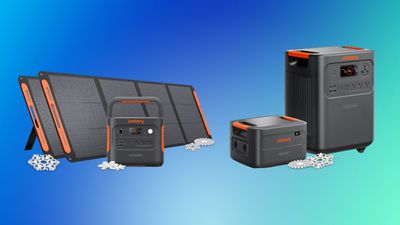
Black Friday and Cyber Monday may be over, but you can still find up to 65 percent off Anker and Jackery's best portable power stations this week. Each retailer is hosting a last call sale for its most popular charging accessories, with major savings on these high-priced power stations.
Jackery
Note: MacRumors is an affiliate partner with Jackery and Anker. When you click a link and make a purchase, we may receive a small payment, which helps us keep the site running.
Jackery's "Black Friday Encore" event has up to 65 percent off select portable power stations this week. This includes everything from the smaller Explorer 500 to Jackery's line of HomePower Solar Generators that can power essential home electronics for as long as 30 days.
Similar to Jackery, Anker SOLIX is hosting a "Cyber Monday Last Call" sale that has up to 65 percent off select portable power stations. Overall, Anker SOLIX has a few more affordable options coming in under $500, as well as numerous high-end stations with various accessories like solar panels and expandable batteries.
If you're on the hunt for more discounts, be sure to visit our Apple Deals roundup where we recap the best Apple-related bargains of the past week.
Deals Newsletter
Interested in hearing more about the best deals you can find this holiday season? Sign up for our Deals Newsletter and we'll keep you updated so you don't miss the biggest deals of the season!
Apple today announced that The Rest Is History has received the 2025 Apple Podcasts Award for Show of the Year for its high quality and cultural impact.
Launched in 2020, The Rest Is History is a history podcast hosted by witty British historians Tom Holland and Dominic Sandbrook. It explores historical events, ranging from the rise and fall of the Roman Empire to the sinking of the Titanic.
"The Rest Is History does a phenomenal job in taking a subject as vast as human history and captivating a global audience," said Oliver Schusser, vice president of Apple Podcasts, Apple Music, Apple Sports, and Beats. "Tom and Dominic have created something special that represents the very best of what's possible with podcasting — it's educational, it's hilarious, and it has fostered a true sense of community."
"We don't moralize, we don't judge the past, and we approach it in a spirit of real enthusiasm," said Sandbrook. "We don't look down on people in the past. We just try to enjoy it, to relish the madness, the bonkers-ness of people."
Apple Arcade received five more games today, including endless runner Subway Surfers, the world's most downloaded mobile game. Since its launch in 2012, the game has received billions of downloads across all platforms.
The premium Subway Surfers+ edition on Apple Arcade offers the same run as the classic game, but without in-app purchases and ads. As a result, there are new ways to revive your character, collect items, and progress.
A spin-off game Subway Surfers Tag was already released on Apple Arcade in 2022.
Apple Arcade is a subscription service that provides access to hundreds of games across the iPhone, iPad, Mac, Apple TV, and Apple Vision Pro. All of the games are free of ads and in-app purchases. In the U.S., Apple Arcade costs $6.99 per month, and it is also bundled with other Apple services in all Apple One plans.
Apple Arcade can be accessed through the App Store and Apple Games apps.
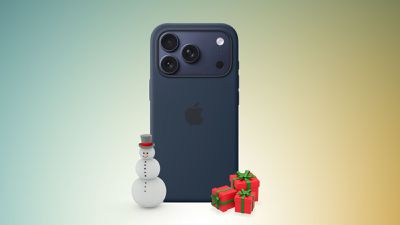
Amazon this week has big discounts across Apple's Clear, Silicone, and TechWoven Cases for the iPhone 17 and iPhone Air lineup. Items on sale include Clear, Silicone, and TechWoven Cases for the iPhone 17, iPhone 17 Pro, iPhone 17 Pro Max, and iPhone Air. We're also tracking a few discounts on other accessories like the FineWoven Wallet with MagSafe and Beats cases.
Note: MacRumors is an affiliate partner with some of these vendors. When you click a link and make a purchase, we may receive a small payment, which helps us keep the site running.
Apple's official cases are reaching up to 50 percent off in this sale, with many priced at $25.00, down from their original $49.00 price tags. In terms of the Beats deals, you'll find steep markdowns on the Beats Woven Charging Cables during this event, as well as Beats Cases for the iPhone 17 lineup.
If you're on the hunt for more discounts, be sure to visit our Apple Deals roundup where we recap the best Apple-related bargains of the past week.
Deals Newsletter
Interested in hearing more about the best deals you can find this holiday season? Sign up for our Deals Newsletter and we'll keep you updated so you don't miss the biggest deals of the season!
17 winning apps and games were selected by Apple's team of App Store editors, for showing exceptional innovation, user experience, and design. The developers of each app and game will receive a physical App Store Award.
"Every year, we're inspired by the ways developers turn their best ideas into innovative experiences that enrich people's lives," said Apple CEO Tim Cook. "This year's winners represent the creativity and excellence that define the App Store, and they demonstrate the meaningful impact that world-class apps and games have on people everywhere."
The iPhone Air has recorded the steepest early resale value drop of any iPhone model in years, with new data showing that several configurations have lost almost 50% of their value within ten weeks of launch.
According to a ten-week analysis published by SellCell, Apple's latest lineup is showing a pronounced split in resale performance between the iPhone 17 models and the iPhone Air. SellCell examined real-time trade-in pricing from more than 40 U.S. buyback companies, comparing average values across weeks since launch against each model's original MSRP. All devices in the study were assessed in good condition for consistent comparisons.
The data shows that the iPhone 17 series has averaged 34.6% depreciation after ten weeks, outperforming the iPhone 16 range at the same point last year, which saw a 39% decline. The iPhone 15 series remains the strongest performer over the past several cycles, retaining more value at the ten-week mark with an average depreciation of 31.9%. The iPhone 14 range sits at 36.6% over the same period.
By contrast, the iPhone Air shows significantly weaker retention, averaging 44.3% depreciation across all storage configurations. The Air's declines range from 40.3% to 47.7%, making it the weakest-performing iPhone range since the iPhone 14 Plus and certain iPhone 13 mini configurations registered similar drops in 2022. The steepest fall is attributed to the 1TB iPhone Air model, which SellCell identifies as the worst performer in the entire dataset.
SellCell's model-level breakdown shows a sharp divergence between the Pro segment and the Air. The best-performing model, the 256GB iPhone 17 Pro Max, has declined 26.1% after ten weeks, while the 512GB iPhone 17 Pro Max has fallen 30.3%. All Pro and Pro Max configurations remain below 40% depreciation, which points to sustained demand in the secondary market. The standard iPhone 17 fell between 32.9% and 40.8%, placing it roughly in line with the performance of recent non-Pro tiers. The iPhone 17 lineup as a whole collectively retains 9.7% more value than the Air after ten weeks.
The iPhone Air occupies the entire bottom of the ten-week rankings. Depreciation among the iPhone 17 models appears to stabilize by week ten, mirroring patterns observed for the iPhone 15 and iPhone 16 generations. The iPhone Air, on the other hand, continued to decline through week ten, which SellCell suggests could indicate longer-term uncertainty in the secondary market. The comparisons underscore how unusual the iPhone Air's trajectory is relative to other iPhone models.
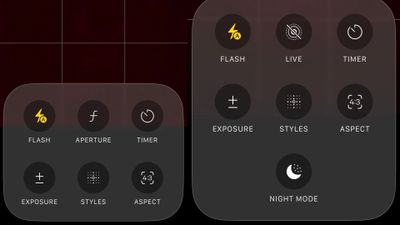
iPhone 17 Pro models, it turns out, can't take photos in Night mode when Portrait mode is selected in the Camera app – a capability that's been available on Apple's Pro devices since the iPhone 12 Pro in 2020.
If you're an iPhone 17 Pro or iPhone 17 Pro Max owner, try it for yourself: Open the Camera app with Photo selected in the carousel, then cover the rear lenses with your hand to simulate a low-light environment. The Night mode crescent moon symbol should appear in the top-right corner of the UI, and if you tap the six-dots icon in the same corner, you should see the Night mode button in the options panel.
Now choose Portrait in the carousel and perform the same low-light simulation with your hand – no crescent symbol will appear, and you won't see any Night mode toggle in the options panel when you open it.
Owners of iPhone 16 Pro and other recent Pro models who perform this test won't see Night mode disappear in Portrait mode, and apparently this is all by design, according to Apple's own iOS 26 iPhone User Guide. As spotted by Macworld, the support document says you can only take portraits when Night mode is engaged on the following models:
iPhone 12 Pro
iPhone 12 Pro Max
iPhone 13 Pro
iPhone 13 Pro Max
iPhone 14 Pro
iPhone 14 Pro Max
iPhone 15 Pro
iPhone 15 Pro Max
iPhone 16 Pro
iPhone 16 Pro Max
Users on Reddit and Apple's own discussion forums noticed the omission on iPhone 17 Pro models at least a couple of months ago, but it seems that the change was not widely known (though a DXOMARK Camera test conducted in September does appear to reference the limitation).
Missing Night Mode option in Camera app's Portrait mode (left) vs. Photo mode
The omission is puzzling, since the iPhone 17 Pro's camera hardware should be capable of combining the two modes. It could be that photos taken with Night mode are limited to 12 megapixels, whereas Portrait photos can be captured at 24 megapixels.
Still, Apple has not officially explained why the feature is not available on its latest premium models, nor has it said whether the feature will arrive later as part of a coming software update. Either way, we expect Apple will provide some commentary soon.
Until then, for users who relied on Night Mode portraits on earlier Pro models, it probably feels like a downgrade.
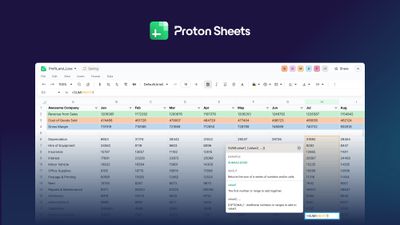
Proton today announced the launch of Proton Sheets, its end-to-end encrypted spreadsheet web application designed to offer a privacy-focused alternative to Google Sheets and Microsoft Excel.
Unlike traditional spreadsheet tools, Proton Sheets encrypts all user data by default, including filenames and metadata. That means no one, not even Proton, can access the contents of users' spreadsheets. The company says the new tool is a response to growing concerns about Big Tech's data collection practices and the integration of AI features that may use proprietary business information for training purposes.
Proton Sheets supports commonly used formulas, data visualization through charts and graphs, and real-time collaboration features. Users can import existing CSV and XLS files, which are then protected with encryption. The application includes access controls that let users manage who can view or edit files.
"With the launch of Proton Sheets, we are not just closing the productivity gap – we are reclaiming data sovereignty for businesses and individuals alike," said Anant Vijay Singh, head of product at Proton Drive. "The reality today is that most spreadsheet tools come from Big Tech giants whose entire business models are built on exploiting user data. Now, with AI woven deeply into these platforms, the risks have escalated exponentially. Every keystroke, every formula you enter can feed into their AI training pipelines. This is an unacceptable trade-off. Users deserve a future free from hidden surveillance and invasive data mining. That's why we built Proton Sheets: a robust, privacy-first alternative that puts control, security, and trust back where they belong – firmly in users hands."
The spreadsheet tool is available through web browsers and within the Proton Drive app. Following the release, Proton Drive now offers a range of productivity tools that includes email, calendar, documents, and spreadsheets, all with built-in encryption.
More information about Proton Sheets is available on the Proton website.
Apple is today celebrating the winners of Your Tree on Battersea, its festive UK competition that invited people to design digital Christmas trees on iPad.
The 24 winning submissions are set to be projected onto Battersea Power Station beginning today, from 5 p.m. to 10:30 p.m. every day until 24 December.
The winning submissions will be featured on the building's chimneys alongside trees drawn by established artists and notable figures such as Kylie Minogue, Sir Stephen Fry, Maro Itoje, Oliver Jeffers, David Shrigley OBE, and Chawawa.
Apple says the competition carries on the company's tradition of celebrating festive creativity, and it's the first time it has opened the opportunity to the public.
In 2023, artist David Hockney created Bigger Christmas Trees on iPad Pro, and last year, Aardman – creator of Wallace & Gromit – used iPhone 16 Pro Max to create a short animation. Both installations transformed the iconic 101-metre-high chimneys and wash towers that soar above the River Thames.
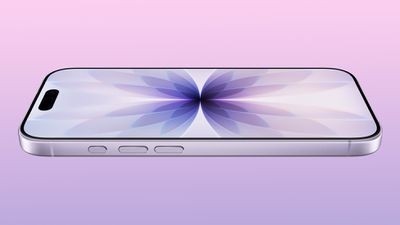
Apple's first foldable iPhone, with a book-style design featuring a 5.4-inch outer display and a 7.6-inch inner display with a minimal crease down the middle.








 Note: MacRumors is an affiliate partner with Jackery and Anker. When you click a link and make a purchase, we may receive a small payment, which helps us keep the site running.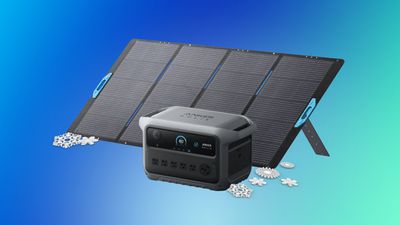


 Note: MacRumors is an affiliate partner with some of these vendors. When you click a link and make a purchase, we may receive a small payment, which helps us keep the site running.