iWork for iCloud Updated With Retina Support and Design Improvements, iOS and Mac Updates to Follow - MacRumors
Skip to Content

iWork for iCloud Updated With Retina Support and Design Improvements, iOS and Mac Updates to Follow

Following the launch of Microsoft's Office apps for iOS, Apple is updating its iWork apps for iCloud, Mac, and iOS, adding some major improvements to compete with Microsoft's Excel, PowerPoint, and Word.

As noted by 9to5Mac, Pages, Numbers, and Keynote for iCloud have gained updated designs for their document, spreadsheet, and presentation editors along with support for Retina displays. All three apps have also been updated with the ability to share view-only documents and to open documents directly from iCloud Mail.

Individually, Pages has also been updated with new templates, the ability to edit charts in imported documents, and improved text wrap. Numbers now has improved pop-up menu support, and Keynote also allows charts to be edited in imported documents.

A pop-up within the iWork for iCloud apps indicates that Apple also has plans to update Pages, Numbers, and Keynote for both iOS and Mac, with the updates being required to open documents edited in iCloud.
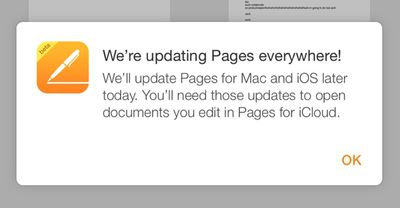
iworkupdates
Apple last updated its iWork suite of apps across all platforms in January, adding several new features to improve the software and return functionality that was removed when the new iWork apps were introduced back in September. Apple pledged to improve the apps back in November after facing significant user criticism from power users.

Pages for Mac - [Mac App Store]
Numbers for Mac - [Mac App Store]
Keynote for Mac [Mac App Store]

Pages for iOS - [App Store]
Numbers for iOS - [App Store]
Keynote for iOS - [App Store]

Update 2:00 PM PT: Keynote, Numbers, and Pages for Mac are all available for download, with each update adding a slew of new features to the apps, including a new "view only" setting that allows users to share documents that can be viewed but not edited. The updated versions of all three apps contain a slew of new features.

Keynote, for example, has gained improved Presenter Display layouts and labels along with new transitions and builds, among other features, while Numbers has new printing options, custom data formats, and custom table styles. Pages has copy-paste style improvements, improved AppleScript support, and better placement of inserted and pasted objects. All of the updates can be found in the Mac App Store.

Updated versions of Pages, Numbers, and Keynote for iOS are also available for download from the App Store, adding the same "view only" setting that lets users share documents that can be viewed but not edited, along with many other new features.


Popular Stories

Apple iCloud Plus expansion hero

iCloud+ Now Includes Apple TV, Apple Arcade, and Curated Apple Music Stations in Over 100 Countries

Tuesday September 15, 2026 1:43 am PDT by
Apple today announced a new subscription initiative that turns paid iCloud+ subscriptions into a broader services bundle in more than 100 countries. In select countries, Apple says every paid iCloud+ plan, including the cheapest 50GB tier, now includes Apple TV and Apple Arcade "at no additional cost," while family sharing extends the storage, TV and Arcade access to up to five people....

Everything New Your iPhone Can Do on iOS 27 Feature 1

50 New Things Your iPhone Can Do in iOS 27 - Out Now!

Monday September 14, 2026 10:48 pm PDT by
Apple released iOS 27 this week, and despite the company's focus this year on refining its flagship operating system and nixing bugs, there are still many additional features to explore, not least of which is Apple's new context-aware Siri, re-tooled for the generative AI era. Which iPhones Support Every iOS 27 Feature? This year's major iPhone software update isn't all about AI, though,...
iOS 27 Icon iPhone

iOS 27 Available Now With These 8 New Features

Monday September 14, 2026 9:00 am PDT by
Update — 10 a.m. Pacific Time: Apple has released iOS 27. During its iPhone 18 Pro and iPhone Duo event last week, Apple announced that iOS 27 will be released widely on Monday, September 14. iOS 27 should be available around 10 a.m. Pacific Time / 1 p.m. Eastern Time today via the Settings app, under General → Software Update. Below, we have highlighted eight new features and...

Top Rated Comments

ra4oasis Avatar
163 months ago
iWork has a loooonnnnggggg way to go before people can ditch Microsoft Office.

That isn't necessarily true. For many people, all they use is the basic functions of Word, PowerPoint, or Excel. And although I can' stay I'm a heavy iWork user, from my limited experience, it does just fine for the basics. I fit into the category of I don't use "office" products enough to pay 100 bucks a year, so iWork will do just fine.


Score: 22 Votes (Like | Disagree)
jrswizzle Avatar
163 months ago
Free iWork >>>>> subscription based Microsoft Office.

Welcome the improvements!
Score: 20 Votes (Like | Disagree)
iBlazed Avatar
163 months ago
iWork has a loooonnnnggggg way to go before people can ditch Microsoft Office.
Score: 17 Votes (Like | Disagree)
163 months ago
Improvements to the iCloud website are always welcome. Really wish Apple would take the iCloud website to the next level and add things like iMessages and 3rd party apps. It would be great if developers could utilize iCloud web based API so that iOS app users could work with iOS app data through the iCloud website.
Score: 14 Votes (Like | Disagree)
CrazyForApple Avatar
163 months ago
Apple showing Microsoft who's boss
Score: 12 Votes (Like | Disagree)
163 months ago
So does this mean we get to leave beta now?

Beta? I'd be happy to make it out of proof of concept to alpha..
Score: 10 Votes (Like | Disagree)