OS X Mavericks Taps Ambient Light Sensors to Detect Motion and Prevent System Sleep
 OS X Mavericks includes a new feature that leverages the light sensors included in many Macs to detect movement in front of the machine and prevent the system's Energy Saver sleep functions from activating even when the user is not actively using the machine, notes The Verge.
First highlighted by Moshen Chen of Radiantlabs and confirmed by developer Jonathan Wight, the feature was initially thought to use the iSight camera to monitor movements but was quickly discovered to actually be tapping into light sensors.
The sensor is already used to adjust screen brightness to ambient light, but the new OS puts it to a different purpose, tracking changes in the light as "movement," and resetting idle time accordingly. Verge tests confirmed this on two separate Mavericks laptops: after covering the camera but not the light sensor, we were able to delay sleep mode by changing the ambient lighting conditions.
Users have long been able to set separate thresholds for display and system sleep based on lack of interaction with their Macs, but under Mavericks, many Macs have now become smarter about being able to detect whether or not the user is sitting in front of the machine.
Popular Stories
In iOS 27, available now, CarPlay gets its biggest update in years, but some features depend on what type of car you have rather than your iPhone model. Some of the biggest additions won't do anything in the vast majority of vehicles on the road today. Here's how the new features pan out.
Works in Any CarPlay Vehicle
Custom widgets: In iOS 27, CarPlay is no longer limited to Apple's handful ...
The new Apple Watch Series 12 and Apple Watch Ultra 4 have hardware changes that allow for faster charging, but you will need to use the new version of the Apple Watch Magnetic Fast Charger included in the box in order to achieve this boost. If you need extra ones for your own charging stands or travel or so forth, Apple released the new version of the charger on its online store last week, with...
Wednesday September 16, 2026 1:32 pm PDT by
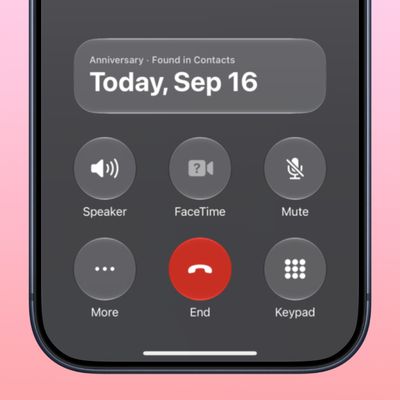
Juli CloverThe iOS 27.2 beta that Apple released today adds a feature that reminds you it's your anniversary when you call someone, as long as you've added the date in the Contacts app.
On the date of your anniversary, when you go to call the person, you'll see a reminder that it's an important day so you don't forget to say something. The anniversary alert uses Call Context, a feature Apple added in...