Got a tip for us? Share it...

Another Hidden iOS 5 Feature: Autocorrect Keyboard Bar


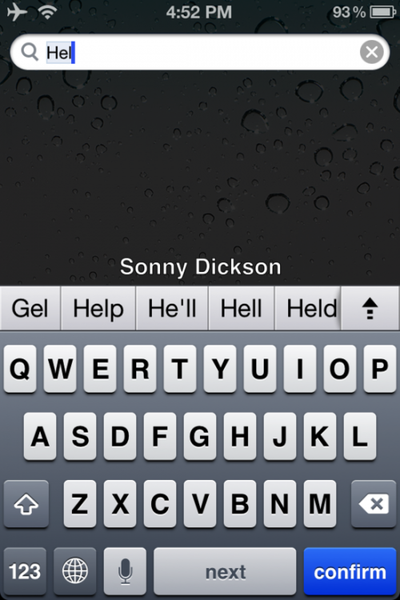
Beyond the Panorama view, it seems Apple left out another small feature in the final version of iOS 5. The bar appears while typing into the field as shown above, giving you a number of autocorrection options. Per 9to5mac, the feature can reportedly be enabled on a non-jailbroken phone with the following procedure :

1. Download iBackupBot
2. Backup your iPhone/iPod in iTunes
3. Open iBackupBot and find the backup, then load it.
4. Find Library/Preferences/com.apple.keyboard.plist and open the file. (if your software isn’t registered you’ll have to press cancel and then it will open)
5. Add in the following code: KeyboardAutocorrectionListsYES
6. Save your modifications, and then restore from backup from within iBackupbot.
Based on comments, it seems a little unstable, so it seems there are reasons that this was never enabled for the final version. Still, it's interesting to see what other features Apple explored.


Top Rated Comments

(View all)

Posted: 21 months ago
Hmmm....
Rating: 13 Positives
Posted: 21 months ago

I have a feeling these left out features will be released with iOS 5.1


Don't you mean "Just a few of the hundreds of new features in iOS 6"

Haha ;)
Rating: 10 Positives
Posted: 21 months ago
What's up with the hidden features?

Oh, it seems to work a bit like the autocorrection bar in Android.
Rating: 9 Positives
Posted: 21 months ago
Apple isn't copying android. Apple's clearly been working on this for a long time and just hasn't enabled it. And when it does - this new killer feature will be far superior than anything on Android.

Did I type that correctly? It was hard since my eyes were rolled so far off to the side...
Rating: 8 Positives
Posted: 21 months ago

Hmmm....


*sigh* well before Android, the inventor of all things.

/s

Rating: 7 Positives
Posted: 21 months ago

What's up with the hidden features?

Oh, it seems to work a bit like the autocorrection bar in Android.


Google obviously stole it with their time machine! :D
Rating: 7 Positives
Posted: 21 months ago
This is the autocorrect bar Japanese input now uses (without a hack) to suggest words or to convert kana into kanji. I don't like it. I think the old system was much, much better and allowed there to be more screen space.
Rating: 5 Positives
Posted: 21 months ago

Several places, including the Wii on screen keyboard.
Image (http://media.wiley.com/Lux/20/162720.image9.jpg)
(not a great image, but it's what I could find with a google search)


That keyboard is ugly as sin... I'm sorry, but I just had to point that out. What on earth were they thinking? I wouldn't be shocked if that keyboard alone tanks the company. It's an eyesore.
Rating: 5 Positives
Posted: 21 months ago

Hmmm....


I guess that's the only obvious place to put suggested words. Surprisingly, that's the thing about Android that always irked me when I see the screenshots. It looks like it takes up too much space.

Does it actually help in your experience? I seems just typing words like normal is more efficient than typing a part of the word and slowing down to select if from a list.
Rating: 4 Positives
Posted: 21 months ago

Google obviously stole it with their time machine! :D


time machine is macintosh only :rolleyes:
Rating: 3 Positives

[ Read All Comments ]