With Apple having pushed out a new update to the Mac OS X Lion developer preview program, those with access to the new build have been looking for changes in an attempt to see what Apple has been working on over the past few weeks.
One minor point that caught our eye is a change in the user interface elements for selecting subpanes within System Preferences. In this latest build, the active subpane is denoted by a sunken, darker button that appears as if it has been pushed, as shown in the Expos & Spaces preference pane.
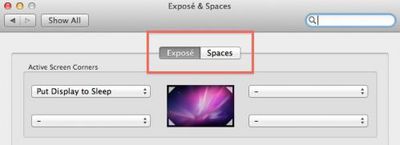
Current "button" style subpane selector with Expos active
Earlier builds of Mac OS X Lion had used a sort of slider animation where the active subpane was represented by a lighter colored button that confused many users when simply glancing at the pane without attempting to move the slider and thus having the animation to key on.

Earlier "slider" style subpane selector with Spaces active
In the face of that criticism, Apple appears to have rethought its mechanism for switching between subpanes and reverted back to a button style that appears more intuitive.
A similar change has been made in iCal, where an earlier slider-style navigator was rolled out to select among day/week/month/year views but has now been replaced by more traditional button-style selectors.

iCal selector buttons in latest Mac OS X Lion build




/https://forums.macrumors.com/proxy.php%3Fimage=http://i.imgur.com/b0Qlw.png&hash=3205d0ec475dc6f4d64332180bb9695f)