Got a tip for us? Share it...

Installing iMovie on the Original iPad

Earlier today, Apple released a update for iMovie that brought support to the iPad 2 alongside the iPhone 4 and 4th generation iPod touch. Support for the original iPad was notably absent. Fscklog has posted instructions on how to install iMovie on the original iPad using only the iPhone Configuration Utility 3.3 from Apple. The Configuration Utility was created for developers to manage provisioning profiles and installing ad-hoc applications, but in this case, can also be used to force the installation of iMovie onto unsupported hardware.


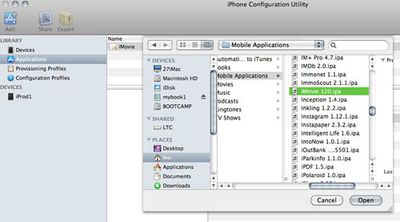
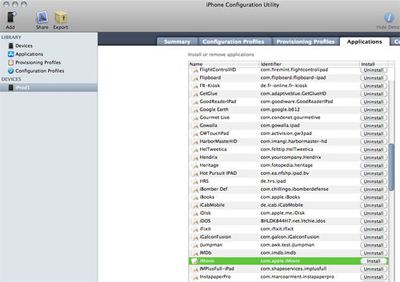
Once you've downloaded the iPhone Configuration Utility 3.3 (and iMovie 1.2), you must click "Add" and add "iMovie" to the application list (first screenshot). Then select your original iPad, and simply choose "Install" on iMovie from the Application list (second screenshot). This should install iMovie onto your original iPad.

Note that your iPad will need to be updated to iOS 4.3 first for this to work.

Top Rated Comments

(View all)

16 months ago
If only I hadn't sold my original iPad... ;)
Rating: 0 Positives / 0 Negatives
16 months ago
Thanks for the tip! I'm not sure why Apple is imposing this artificial limitation (greed?). iPod Touch 4G runs iMovie and it only has 256mb ram like the iPad.

I'll be installing this later this evening. A nice addition alongside GarageBand for iPad! Talk about an amazing iOS app. By far Apple's best! I can't stop playing with it.
Rating: 0 Positives / 0 Negatives
16 months ago

Thanks for the tip! I'm not sure why Apple is imposing this artificial limitation (greed?). iPod Touch 4G runs iMovie and it only has 256mb ram like the iPad.

I'll be installing this later this evening. A nice addition alongside GarageBand for iPad! Talk about an amazing iOS app. By far Apple's best! I can't stop playing with it.


You're asking why Apple imposes artificial limitations? Surely you know the answer by now.
Rating: 0 Positives / 0 Negatives
16 months ago

Thanks for the tip! I'm not sure why Apple is imposing this artificial limitation (greed?). iPod Touch 4G runs iMovie and it only has 256mb ram like the iPad. [...]


Although this wouldn't be the first artificial limitation Apple has issued (4GB RAM max on late '08 notebooks until the 'secret' firmware unlock, '06 Mac mini limited to 2GB RAM, iPhone 2G having no MMS) - This is also a different version (more 'feature' packed, if you can call them features that is) of iMovie which probably taxes the processor and hogs a bit more RAM

I would be interested in seeing the original iPad running iMovie side by side w/the iPad 2.
Rating: 0 Positives / 0 Negatives
16 months ago
If someone who has done this could give a quick review, I'd appreciate it. Also, how would you get movies on it? Can you import AVCHD movies from an SD card via the Camera Connection Kit? (From a still or video camera that records in that format, obviously.)

If so, then I've found my new mobile movie editing solution!
Rating: 0 Positives / 0 Negatives
16 months ago
just tried and succeeded to get it running on my 3G S. It works great.
Rating: 0 Positives / 0 Negatives
16 months ago
I think storage space is a bigger problem than 256MB RAM vs 512MB RAM for iMovie on iDevices :(


I've installed GarageBand on the iPad 1. It's truly a killer app, I love it so much!! Can't wait to compose a song with that :D
Rating: 0 Positives / 0 Negatives
16 months ago
Oh. So if you are a Windows iPad1 user you have no options except to fork over $499 for a model it works on.

No wonder Apple has a great "return buyer" rating. The only way to get what you want working is to open your wallet.
Rating: 0 Positives / 0 Negatives
16 months ago

Oh. So if you are a Windows iPad1 user you have no options except to fork over $499 for a model it works on.

No wonder Apple has a great "return buyer" rating. The only way to get what you want working is to open your wallet.


iPhone Configuration Utility for Windows exists, l2google.

Not that it matters, upon syncing with iTunes it'll try to authorize the app, fail, and delete it.
Rating: 0 Positives / 0 Negatives
16 months ago
It doesn't really make sense to run iMovie on the 1st gen iPad since it does not have any cameras. iPhone 4 and iPod Touch both have cameras, so it makes sense for iMovie to be supported there since it allows you to quickly edit the videos you capture with those device.
Rating: 0 Positives / 0 Negatives

[ Read All Comments ]