

Mac OS X Lion Notes: iOS Scroll Bars, Any Corner Resizing, Dock Changes - MacRumors
Skip to Content

Mac OS X Lion Notes: iOS Scroll Bars, Any Corner Resizing, Dock Changes

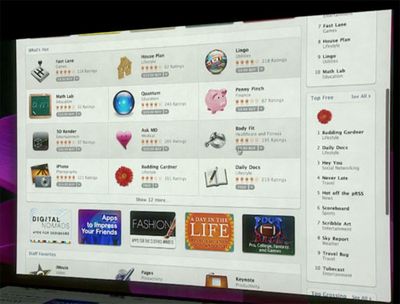
During last week's media event, Apple demoed a few early features of Mac OS X Lion which will be released in 2011. While Apple focused on a few particular features (Mac App Store, LaunchPad, and Full Screen Apps), readers have noticed a few other user interface changes coming to Apple's next operating system.
030119 scrollbar

One rumor that was posted ahead of the event predicted that Mac OS X 10.7 would be getting iOS-inspired scroll bars. During the event, Apple showed off new versions of their Apps with these new scroll bars in place. Like iOS, the scroll bars disappear when not in use, but reappear during scrolling or with mouse movement.

Meanwhile, one reader who had accurately predicted these changes also reveals that in Mac OS X 10.7, users will be able to resize windows from any corner.

ALSO you can now resize the windows from any corner, again, works nicely.

Currently, windows are only resizable on the bottom-right corner of the windows.
030726 resume

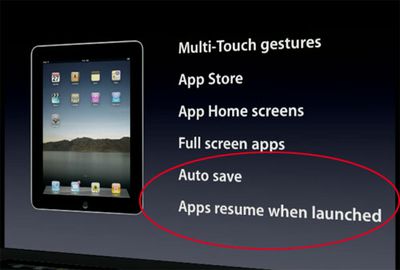
A couple of other new features that Apple glossed over during the presentation was "Auto Save" and "Apps resume when launched". As a result of these new features, it appears that Mac applications are no longer depicted as launched or unlaunched in the Mac OS X Dock:


031902 dock

032509 snow
Top: Lion; Bottom: Snow Leopard

This actually represents a big shift in Mac OS X's representation of apps. The typical "light" indicator under each launched application is gone from the Mac OS X Lion dock. Apple's implementation of instantly resuming applications when launched may blur the lines between launched/unlaunched, though the distinction still remains important when talking about multitasking.


Popular Stories

iOS 27 Next to iPhone

Here's When iOS 27 Rolls Out Today in Every Time Zone [Update: It's Out]

Sunday September 13, 2026 3:00 am PDT by
Update 10:04 a.m.: iOS 27 is rolling out now, though it may take a bit for all users to see it, so keep checking! Apple is about to release iOS 27, which will finally deliver more advanced Siri AI capabilities as well as a variety of other refinements, improvements, and new features to iPhones. It's Apple's biggest software update of the year, and Apple announced at Wednesday's iPhone event...

iOS 27 Icon iPhone

iOS 27 Available Now With These 8 New Features

Monday September 14, 2026 9:00 am PDT by
Update — 10 a.m. Pacific Time: Apple has released iOS 27. During its iPhone 18 Pro and iPhone Duo event last week, Apple announced that iOS 27 will be released widely on Monday, September 14. iOS 27 should be available around 10 a.m. Pacific Time / 1 p.m. Eastern Time today via the Settings app, under General → Software Update. Below, we have highlighted eight new features and...
Apple iCloud Plus expansion hero

iCloud+ Now Includes Apple TV, Apple Arcade, and Curated Apple Music Stations in Over 100 Countries

Tuesday September 15, 2026 1:43 am PDT by
Apple today announced a new subscription initiative that turns paid iCloud+ subscriptions into a broader services bundle in more than 100 countries. In select countries, Apple says every paid iCloud+ plan, including the cheapest 50GB tier, now includes Apple TV and Apple Arcade "at no additional cost," while family sharing extends the storage, TV and Arcade access to up to five people....

Top Rated Comments

207 months ago
wouldn't that be confusing? Not knowing what's running at a glance?
Score: 2 Votes (Like | Disagree)
KnightWRX Avatar
198 months ago
no.
Historically : yes. Otherwise : Citation needed.
Score: 1 Votes (Like | Disagree)
207 months ago
Removing the light represents a fundamental shift: Apple doesn't want you to think about what's "open" or "closed," just like an application being open or closed shouldn't be an issue on iOS. But honestly it's not the same -- the amount of RAM that, say, Photoshop eats up when in the background is not the same as a piddly iOS app, so unless Apple begins restricting what OS X apps can do in the background I don't see this as exactly a great feature.
Score: 1 Votes (Like | Disagree)
207 months ago
What was wrong with the light indicator? If it ain't broke....
Score: 1 Votes (Like | Disagree)











































