

Got a tip for us? Share it...

Apple Removes Custom Ringtone Creation in iTunes 10


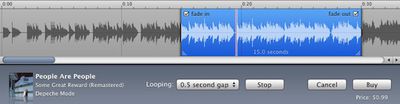
Apple's former custom ringtone editor, no longer present in iTunes 10

As noted by Mac|Life, iTunes 10 appears to be lacking the ability to create ringtones from songs purchased from the iTunes Store. The feature had allowed users to select iTunes-purchased songs from their libraries, trim them down to desired ringtone lengths, and purchase the resulting custom ringtones for $0.99 each.

After looking around in the application, it seems that ringtone creation has been pulled from iTunes 10. We checked iTunes and were met with only information on how to sync ringtones from iTunes.

A support document outlining the process for creating a custom ringtone in iTunes is still posted on Apple's site despite the fact that the feature no longer exists in the updated iTunes.

You can create iPhone ringtones from many songs purchased from the iTunes Store on your computer. Personalize your ringtone by choosing up to 30 seconds of your favorite song with the easy-to-use iTunes ringtone editor. You can also fade the ringtone in and out, and choose how long to wait before looping the ringtone.

Created ringtones are only available for purchase from the U.S. iTunes Store on your computer.

Custom ringtone creation was added to iTunes in September 2007.

Top Rated Comments

(View all)

19 months ago
Haha that's funny.
Rating: 0 Positives / 0 Negatives
19 months ago
Ah well, there's still GarageBand which is easy to use... and you don't have to pay .99 to make it.
Rating: 0 Positives / 0 Negatives
19 months ago
Wait... You had to pay to do this?
Rating: 0 Positives / 0 Negatives
19 months ago
Exactly, why would someone pay 99 cents to use this rather than GarageBand... I'd be very surprised if it ever got many users...
Rating: 0 Positives / 0 Negatives
19 months ago
I wasn't aware iTunes had a ringtone editor. Also, why would I pay for a ringtone of a song I had already purchased?

I guess I'll just keep using Amadeus Pro to make my ringtones.
Rating: 0 Positives / 0 Negatives
19 months ago
who was using this anyway?
Rating: 0 Positives / 0 Negatives
19 months ago

who was using this anyway?


Nobody. That's why they removed it.
Rating: 0 Positives / 0 Negatives
19 months ago
Step 1: Choose the song in your library you want to turn in a ringtone, and select get info.

Step 2: Set the start time and stop time to match the section of the song you want to use as your ringtone.

Step 3: Convert selection to AAC.

Step 4. Drag the AAC version to your desktop.

Step 5: Get info, convert extension to .m4r

Step 6: Drag back into iTunes, and BAM! Custom ringtone, made for free.
Rating: 0 Positives / 0 Negatives
19 months ago
People over 15 have ringtones? Holy crap.
Rating: 0 Positives / 0 Negatives
19 months ago
I always wondered if Apple included the functionality in GarageBand as a purposeful middle finger to AT&T, who had stipulated that ringtones had to cost money. I never knew where the profit was went ... Apple or AT&T? Both?

At least GarageBand still works!
Rating: 0 Positives / 0 Negatives

[ Read All Comments ]














