With the absence of major new user interface features in Snow Leopard, we're left discussing some rather minor (though frequently requested) tweaks found in the latest developer builds of Mac OS X 10.6.
Put Back - Under Mac OS 9, users had the option to restore any "Trash"ed files (before the Trash is emptied) back to their original locations with a simple "Put Away" command. For some reason, this capability was lost in the transition to Mac OS X. In the latest Snow Leopard builds, it's back (as "Put Back"). So any accidental disposals can now easily be restored with a simple click. Again, this only works for files that have been moved to the Trash but not yet "emptied" (deleted).
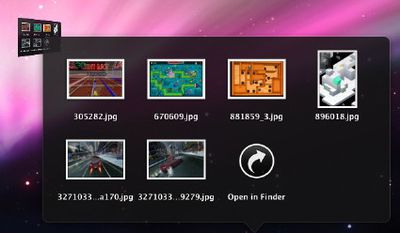
Stacks Folder Navigation - The introduction of the "Stacks" metaphor in Mac OS 10.5 was met with mixed reactions. One issue with Stacks has been the inability to "drill down" into additional folders. In Leopard, clicking on a folder in Stacks simply opened that folder in the Finder.
Photoshopped Mockup
According to those familiar with the latest developer build, clicking on a folder in Stacks smoothly opens the new folder in Stacks while shrinking the parent window as a small icon on the top left. This allows you to quickly navigate in and out of folders in Stacks.
Snow Leopard is Apple's next major revision to Mac OS X. It is officially due sometime in 2009 and is said to be focusing on stability and performance enhancements.
Wednesday April 24, 2024 2:05 pm PDT by Joe Rossignol
Apple is set to unveil iOS 18 during its WWDC keynote on June 10, so the software update is a little over six weeks away from being announced. Below, we recap rumored features and changes planned for the iPhone with iOS 18. iOS 18 will reportedly be the "biggest" update in the iPhone's history, with new ChatGPT-inspired generative AI features, a more customizable Home Screen, and much more....
Wednesday April 24, 2024 3:39 pm PDT by Juli Clover
Apple today released several open source large language models (LLMs) that are designed to run on-device rather than through cloud servers. Called OpenELM (Open-source Efficient Language Models), the LLMs are available on the Hugging Face Hub, a community for sharing AI code. As outlined in a white paper [PDF], there are eight total OpenELM models, four of which were pre-trained using the...
Apple has announced it will be holding a special event on Tuesday, May 7 at 7 a.m. Pacific Time (10 a.m. Eastern Time), with a live stream to be available on Apple.com and on YouTube as usual. The event invitation has a tagline of "Let Loose" and shows an artistic render of an Apple Pencil, suggesting that iPads will be a focus of the event. Subscribe to the MacRumors YouTube channel for more ...
Best Buy is discounting a collection of M3 MacBook Pro computers today, this time focusing on the 14-inch version of the laptop. Every deal in this sale requires you to have a My Best Buy Plus or Total membership, although non-members can still get solid second-best prices on these MacBook Pro models. Note: MacRumors is an affiliate partner with Best Buy. When you click a link and make a...
Saturday April 27, 2024 12:41 am PDT by Tim Hardwick
There are widespread reports of Apple users being locked out of their Apple ID overnight for no apparent reason, requiring a password reset before they can log in again. Users say the sudden inexplicable Apple ID sign-out is occurring across multiple devices. When they attempt to sign in again they are locked out of their account and asked to reset their password in order to regain access. ...
Apple used to regularly increase the base memory of its Macs up until 2011, the same year Tim Cook was appointed CEO, charts posted on Mastodon by David Schaub show. Earlier this year, Schaub generated two charts: One showing the base memory capacities of Apple's all-in-one Macs from 1984 onwards, and a second depicting Apple's consumer laptop base RAM from 1999 onwards. Both charts were...