

Got a tip for us? Share it...

Proximity Sensors to Assist Multi-Touch Interface?


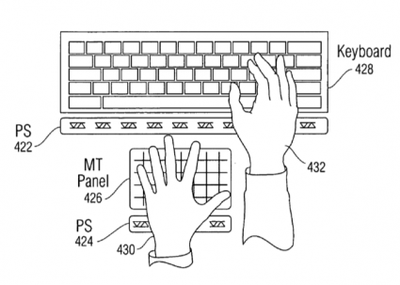
A newly published patent application discusses the possibility of incorporating additional proximity sensors (PS) around multi-touch panels to detect body parts.

This relates to the use of one or more proximity sensors in combination with one or more touch sensors in a multi-touch panel. The combination of these two different types of sensors can be used to detect the presence of one or more fingers, body parts or other objects hovering above a touch-sensitive surface or touching the touch-sensitive surface

Apple already incorporates a proximity sensor in the iPhone to turn the iPhone's display off, but the patent application explores the concept in desktop and laptop settings. One example given is the automatic display of on-screen buttons when a finger hovers above the screen. Apple might accomplish this by embedding IR sensors within the display itself:
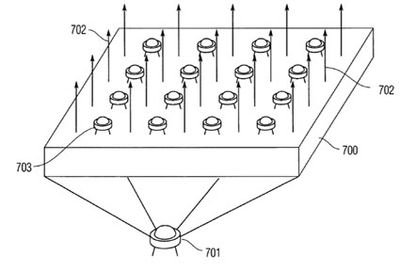
For example, a grid of IR receivers can be placed on the panel, allowing each IR receiver to server as a "proximity pixel" indicating the presences or absence of an object in its vicinity.

The concept is similar to an old patent from 2004 which described the integration of grid of small cameras throughout the display. That configuration had the additional advantage of capturing video. Apple use of proximity detectors could also assist in more advanced concepts they've explored including the detection of specific fingers used in a gesture.

The patent application is an extension of one from 2007, so doesn't represent many new ideas, but continues to show Apple's interest in mixing modes of input to produce a richer experience.


Top Rated Comments

(View all)

42 months ago
I guess all that's missing now is some sensors for smell and taste.

It's got ear(s), isight, and now touch. And it can verse you in Chess. It's basically human.
Rating: 0 Positives / 0 Negatives
42 months ago
I wonder if this will just prevent accidental input or whether it could be the first step in adding gestures alongside multi touch.
Rating: 0 Positives / 0 Negatives
42 months ago
Sounds awesome. I wonder how long it will be until we actually see products using the patents that Apple has had come out in the past year.

I wonder why this is on Page 2 and not the main page? [edit: moved - arn]
Rating: 0 Positives / 0 Negatives
42 months ago
The new iTouch :cool:

This might be a good step forward to help blind people with working better and faster on computers :o:apple:
Rating: 0 Positives / 0 Negatives
42 months ago
I'm not expecting anything too soon, but I bet we'll see a lot of these patents come into play by MacWorld 2010.
Rating: 0 Positives / 0 Negatives
42 months ago

The new iTouch :cool:

This might be a good step forward to help blind people with working better and faster on computers :o:apple:


I wonder if apple patented the copy paste30 years ago ... the present world would be inthikable or would I say with a think different aproach?
Rating: 0 Positives / 0 Negatives
42 months ago
I think the mighty mouse will die and we will get multitouch on the keyboards which are being presented at Macworld, this will be for the desktops.
Rating: 0 Positives / 0 Negatives
42 months ago

I think the mighty mouse will die and we will get multitouch on the keyboards which are being presented at Macworld, this will be for the desktops.


Suprisingly the mouse is not dead yet....

1. Most laptops have Track pads, and we are moving more toward a portable on-the-go world rather than being tied to desks.

2. HP has their new touch smart desk top unit.

3. A lot of people are adopting wacoms or some sort of other tablet type entry.

4. trackpads have appeared on desktop keyboards (but I see the availability of that and ergonomic keyboards have slowed). I miss my old ergonomic keyboard.


I think people are just used to old school. however sometimes a mouse can be quicker and more precise. and if you do not have room on your desk for a wacom.

What I would like to see, is an ergonomic Apple Keyboard with a built in track pad that accepts multi-touch, and can act like my wacom bamboo (use a pen for precise drawing, hand-writing recognition, etc). If my wacom can recognize when I hit it with anything but the specialized pen, then why can't apple make a trackpad that accepts a pen and "body parts" (as the article puts it).

Still say we are moving closer and closer to this concept which may be in production in 2010 - 2012.

Google Canova Dual touch screen laptop. It is supposed to be the laptop of the future.


Here is a screen shot of some of the images (sorry for the browser, I am on my work PC). I think apple can come out with one of these sooner and works better, but this just shows the possibilities.
Rating: 0 Positives / 0 Negatives
42 months ago
As trackpads or other touch-screen devices get larger, there will be more opportunity for them to have "zones" for buttons, menus, etc., which could appear as you hover over them.

Maybe we won't have to touch the touch-screen at all, but merely hover over it with fingers in different positions, like speaking sign language to our computers.

But why stop at the trackpad?

Perhaps keyboard illumination shouldn't depend only on a light sensor but on whether or not your hands are over the keyboard.

Maybe my MacBook Pro should open its lid as I walk into the room and close it when I leave.
Rating: 0 Positives / 0 Negatives
42 months ago

As trackpads or other touch-screen devices get larger, there will be more opportunity for them to have "zones" for buttons, menus, etc., which could appear as you hover over them.

Maybe we won't have to touch the touch-screen at all, but merely hover over it with fingers in different positions, like speaking sign language to our computers.

But why stop at the trackpad?

Perhaps keyboard illumination shouldn't depend only on a light sensor but on whether or not your hands are over the keyboard.

Maybe my MacBook Pro should open its lid as I walk into the room and close it when I leave.


could be possible, the wacom pen does not have to touch the tablet to mouse around and click. It just has to be a few cm from it. you only have to touch to draw or write.


Maybe my MacBook Pro should open its lid as I walk into the room and close it when I leave. - LOL - Love that line. But add, power on/off. upon power on, launch my email and display MyDay automatically.
Rating: 0 Positives / 0 Negatives

[ Read All Comments ]













