Got a tip for us? Share it...

Demo of iPad's AirPlay Mirroring in iOS 5


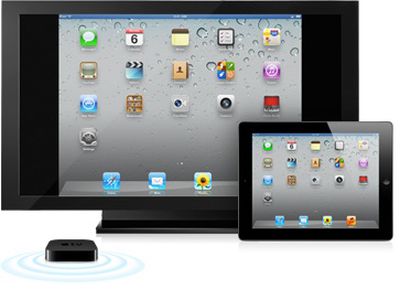
One of the new iOS 5 features quickly touched on by Apple yesterday in its iOS 5 introduction was AirPlay Mirroring for the iPad 2, enabling users to wirelessly transmit the on-screen content of the device to an Apple TV for display on a television. The iPad 2 currently supports display mirroring via a Digital AV Adapter that provides a wired connection to a TV via HDMI.

One of the criticisms of the wired mirroring has been the cumbersome nature of the dongle and cable hanging off of the end of the device, particularly when it comes to games and other apps that require movement of the device for input purposes. Consequently, AirPlay Mirroring should be a significant boon to those looking to display their iPad content on the larger screen, especially if lag is minimal.

While the AirPlay Mirroring is a fairly basic concept in principle, this YouTube video is still an interesting look at the functionality:

">

And while the video does not directly address how much lag there is, the poster notes that the feature "works beautifully".

Update: And here is another video:
Top Rated Comments

(View all)

Posted: 13 months ago



Now it's perfectly clear why 4:3 was a bad idea for the iPhone/iPad!

Yes, because airplay mirroring is the most case scenario for both devices.
Rating: 1 Positives / 0 Negatives
Posted: 13 months ago
Meh...

Its cool, but i was hoping for more interaction. i have to look down at my ipad the entire time.. ..

I guess i don't want mirroring, i want it to be my controller and watch/play via tv screen.
Rating: 1 Positives / 0 Negatives
Posted: 13 months ago
Is this via AppleTV only? Or can it be done on a PC via iTunes?

I could see some potential applications for this in teaching - using a projector on the classroom computer - and being able to wirelessly show what I am doing on my iPad.
Rating: 1 Positives / 1 Negatives
Posted: 13 months ago

[url=http://cdn.macrumors.com/im/macrumorsthreadlogo.gif]Image[/url]


Image


One of the new iOS 5 features quickly touched on by Apple yesterday in its iOS 5 introduction was AirPlay Mirroring for the iPad 2, enabling users to wirelessly transmit the on-screen content of the device to an Apple TV for display on a television. The iPad 2 currently supports display mirroring via a Digital AV Adapter that provides a wired connection to a TV via HDMI.

One of the criticisms of the wired mirroring has been the cumbersome nature of the dongle and cable hanging off of the end of the device, particularly when it comes to games and other apps that require movement of the device for input purposes. Consequently, AirPlay Mirroring should be a significant boon to those looking to display their iPad content on the larger screen, especially if lag is minimal.

While the AirPlay Mirroring is a fairly basic concept in principle, this YouTube video is still an interesting look at the functionality:

YouTube: video">
And while the video does not directly address how much lag there is, the poster notes that the feature "works beautifully".

Article Link: Demo of iPad's AirPlay Mirroring in iOS 5

This is so cool. Wonder why it's iPad specific? Resolution?
Rating: 0 Positives / 0 Negatives
Posted: 13 months ago
Just iPad 2? No iPad 1 or iphone 4 support? Really hoping to hold out till iPad 3 for an upgrade but this might change that plan.
Rating: 0 Positives / 0 Negatives
Posted: 13 months ago

Just iPad 2? No iPad 1 or iphone 4 support? Really hoping to hold out till iPad 3 for an upgrade but this might change that plan.

That too. Maybe it's proc AND resolution based...
Rating: 0 Positives / 0 Negatives
Posted: 13 months ago
sounded like apple tv only during the keynote yesterday
Rating: 0 Positives / 0 Negatives
Posted: 13 months ago
I never expected this. Video is one thing—it’s already compressed, so I might have guessed it could be transmitted a lot more easily than asking the iPad to compress its own live image on the fly, while using its RAM and CPU to run the app as well!

There has to be at least some lag, and some processor overhead. It’s like VNC essentially. I doubt fast games would work well (maybe puzzle games and turn-based strategy?) but lots of uses don’t demand lightning speed.

This sounds great! I’d use it to show web pages, for sure, and maybe for design sketching with Procreate or whatever.


sounded like apple tv only during the keynote yesterday


Yes. Still, some enterprising hacker might figure out how to receive the transmission on a Mac/PC which would be awesome! Especially since my main TV is an iMac.
Rating: 0 Positives / 0 Negatives
Posted: 13 months ago
does the atv2 need to be updated to a beta, or just the ipad2?
Rating: 0 Positives / 0 Negatives
Posted: 13 months ago
Looks like this will work with slingplayer and the cablevision app. Now I don't need a DVR for my bedroom.
Rating: 0 Positives / 0 Negatives

[ Read All Comments ]