

With today's launch of iPad pre-orders in the U.S., Apple has also released additional information about the device and associated services. While 3G-capable models of the iPad will not be available until late April, Apple has provided an overview of how customers will sign up for and manage their 3G data service on the device.
As previously revealed, customers can choose from either of two contract-free data plans in the U.S. through AT&T: $14.99 per month for 250 MB or $29.99 for unlimited data. Customers can sign up for service directly on the iPad and can cancel or re-enroll at any time.
So if you have a business trip or vacation approaching, just sign up for the month you'll be traveling and cancel when you get back. You don't need to visit a store to get 3G service. You can sign up, check your data usage, manage your account, or cancel your service -- all from your iPad.
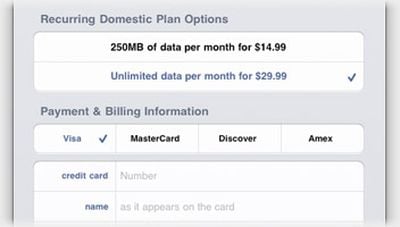
Data service is activated on the iPad through its Settings application, offering a simple screen allowing the user to select a plan and a credit card payment method.
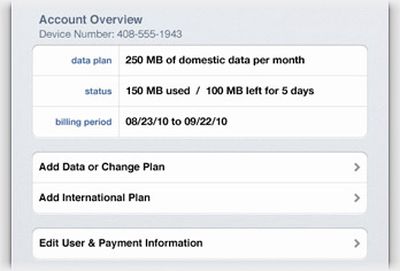
Once access is activated, the application offers a clear overview of the customer's service details, including active dates of service and amount of data used and amount/time remaining for customers on the 250 MB plan. Apple also notes that customers on the 250 MB plan will received three alerts (20%, 10%, and 0% remaining) to keep them apprised of their remaining data limits.
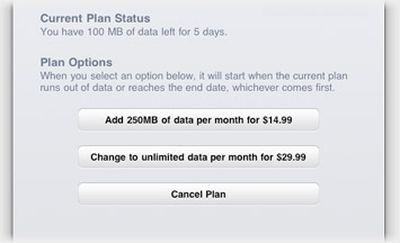
Users can also easily manage their service through the Settings application, allowing them to change plans or cancel service automatically at the end of any billing period. Users on the 250 MB service plan can also select to automatically boost their plan to unlimited service once they reach their limit.
AT&T's 3G service plans for the iPad also provide users with access to over 20,000 Wi-Fi hotspots. And all iPad models support 802.11n Wi-Fi for optimum performance.













































