Got a tip for us? Share it...

Zingersoft's iSSH Client Now Available


There's been an influx of SSH clients coming out for the iPhone, but the one many have been waiting for has just arrived. Zingersoft's iSSH [$4.99, App Store] client was released to the App Store last night.

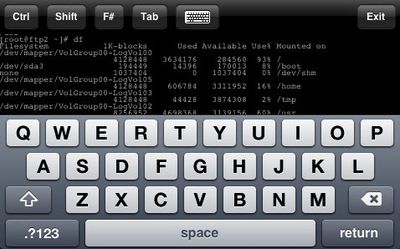
iSSH is a VT100, VT102, VT220, ANSI, xterm, and xterm-color terminal emulator over SSH and provides the following features:

- Portrait and landscape mode
- 60x24 in portait mode, 80x24 in landscape mode
- Scroll-back buffer (by swiping in right 1/3rd of screen)
- Arrow keys (by swiping in left 2/3rd of screen).
- Ctrl, tab, shift, and Fn keys, all in combination.
- Store any number of connections and configurations
- Command execution on connection
- Can dismiss keyboard by tapping keyboard icon
- Via EDGE, WiFi or 3G

Due to the influx of SSH apps, the developer reports he temporarily cut some features to deliver this build earlier.

I created a build I considered stable, not feature-packed. That means no X Server or multiple connections. Neither are quite ready yet. Just the same, what Apple had submitted to them has exactly what you have seen in the screenshots. Landscape and portrait, a keyboard that's removable in landscape mode; scrollback via swiping; arrow keys via swipping; crtl, Fn, tab and shift (and combinations there-in) as well as a command on connection.

The developer promises that the 1.1 build was submitted last night and should include the following features:

- Key generation storage and exchange
- Additional keys in landscape mode, specifically "ESC" and "|"
- Multiple concurrent connections
- Active connection list
- Option to store password and server port
- Misc bug fixes

Unlike the other SSH clients, iSSH is also available internationally. iSSH is available in the App Store.


Top Rated Comments

(View all)

Posted: 49 months ago
Its worth noting that TouchTerm now also supports terminal emulation with v1.1, and is cheaper than iSSH.
Rating: 0 Positives / 0 Negatives
Posted: 49 months ago
Does either iSSH or TouchTerm allow you to change the SSH port? I don't use 22...
Rating: 0 Positives / 0 Negatives
Posted: 49 months ago
This doesn't allow terminal access to the iPhone itself, does it? That is one thing I really miss from JB 1.1.4, a good old fashioned UNIX terminal program. The JB procedure for 2.0.1 is way too unreliable (that Pwnage app has never worked for me--all it ends up doing is necessitating a full restore to the most recent official FW) to be a workable solution right now, so that is not an option.
Rating: 0 Positives / 0 Negatives
Posted: 49 months ago
Dev says customs ports will be in the 1.1 version which he has submitted to the app store.
Rating: 0 Positives / 0 Negatives
Posted: 49 months ago
Right now you can't change the port in build 1.0, but as noted above you will in the next release.


I just bought it and tested it out, great terminal emulation and other various tools. Can't wait for the new features because without | key doing major stuff via the command line just sucks right now.
Rating: 0 Positives / 0 Negatives
Posted: 49 months ago
Brett3rThanU - The 1.1 update to Touch Term lets you set the port as well. No 22 for me either.
Rating: 0 Positives / 0 Negatives
Posted: 49 months ago

This doesn't allow terminal access to the iPhone itself, does it? That is one thing I really miss from JB 1.1.4, a good old fashioned UNIX terminal program. The JB procedure for 2.0.1 is way too unreliable (that Pwnage app has never worked for me--all it ends up doing is necessitating a full restore to the most recent official FW) to be a workable solution right now, so that is not an option.


No this is merely a client to allow people to connect to remote machines, great for admins who VPN into work and want to do ssh functions on a server.
Rating: 0 Positives / 0 Negatives
Posted: 49 months ago
Well I'm looking forward to 1.1 then. I'll wait for that as it's no use to me at the moment :(
Rating: 0 Positives / 0 Negatives
Posted: 49 months ago

Does either iSSH or TouchTerm allow you to change the SSH port? I don't use 22...

TouchTerm does allow you to change the port number.
Rating: 0 Positives / 0 Negatives
Posted: 49 months ago
I really do want to buy this but it is useless to me if it can only connect on port 22.

Also, does anyone know if this is a full-featured SSH implementation (port forwarding and SOCKS works?)
Rating: 0 Positives / 0 Negatives

[ Read All Comments ]