How to Make Siri Listen to You for Longer - MacRumors
Skip to Content

How to Make Siri Listen to You for Longer

by

If Siri tends to cut you off before you can finish a spoken query or command, there are a couple of ways you can make it listen longer on iPhone and iPad. Keep reading to learn how.
hey siri banner apple
Have you ever had trouble getting ‌Siri‌ to listen long enough to receive your spoken query or request? If you press the Side or Home button on your Apple device to invoke the virtual assistant, you can easily fix this.

All you have to do is hold down the button for as long as it takes for you to complete your sentence, and ‌Siri‌ will continue listening until you release your finger.

But what if you mainly use the handsfree "Hey ‌Siri‌" spoken command to invoke the virtual assistant? If you're not physically pressing a button, how do you get it to keep the microphone active for as long as you need? Fortunately, there is a solution hidden in your device's settings.

How to Set Siri's Pause Time on iPhone and iPad

In iOS, Apple includes an option that lets you manually set how long ‌Siri‌ waits for you to finish speaking. The steps below show you how it's done.

  1. Open the Settings app on your iPhone or ‌iPad‌.
  2. Scroll down and tap Accessibility.
  3. Under the "General" section, tap Siri.
  4. Under "‌Siri‌ Pause Time," change the Default to Longer or Longest.
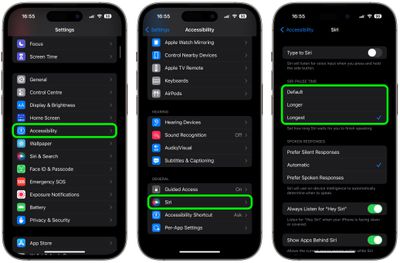
settings

That's all there is to it. Next time you invoke ‌Siri‌ using the Side or Home button, or with the "Hey ‌Siri‌" spoken command, the virtual assistant will wait longer than usual to listen to you, even if you don't say anything at first. To change the wait duration again, simply return to the accessibility menu described above and choose a different ‌Siri‌ pause time.

Popular Stories

homepod top

Apple Cut Frequencies in WWDC Keynote to Prevent Siri Activations

Friday June 12, 2026 6:23 am PDT by
Apple appears to have modified the audio of this week's WWDC 2026 keynote video whenever "Siri" was mentioned, apparently in an effort to prevent viewers' nearby devices from waking inadvertently during the presentation. The technique was spotted by observers on X, who shared spectrogram screenshots showing clear gaps in those specific frequency ranges coinciding precisely with instances of...

iphone 17 ceramic shield

iPhone 18 to Pack 12GB of RAM for Smarter Siri Features

Tuesday June 16, 2026 3:34 am PDT by
Next year's regular iPhone 18 will come with 12GB of RAM to support Apple's most powerful on-device AI model and related Siri features, according to South Korea's KB Securities (via DigiTimes). In its Siri AI announcement during WWDC 2026, Apple confirmed that its most powerful model enables more expressive Siri voices and major accuracy improvements for systemwide dictation. Both features...
ios 27 siri animation

Siri Uses Pill Shape to Hide the Dynamic Island in iOS 27, But iPhone 18 Could Make It a Circle

Tuesday June 16, 2026 5:10 am PDT by
In iOS 27, Siri now appears as a glowing pill-shaped orb that expands directly from the Dynamic Island, but may give way to a circle on next-generation iPhones. Instead of the glowing light effect that previously traced the edges of the display, a swirling Siri orb expands from the Dynamic Island in iOS 27, with the design hiding its true cutouts, just like other Dynamic Island animations. ...