

 In the latest version of Apple Maps that comes with iOS 13, Apple has added a Share ETA feature that lets you share your estimated time of arrival at a location with a friend or family member, allowing them to follow your progress in real-time for the duration of the trip.
The following steps explain how to use the Share ETA feature in Apple Maps on iPhone and iPad. Note that Apple nixed the feature for the initial public release of iOS 13, but reintroduced it in the iOS 13.1 update, so make sure your device is up to date (Settings -> General -> Software Update).
- Launch Apple Maps on your iPhone or iPad.
- Use the search field to input your destination address.

- Tap the blue Directions button.
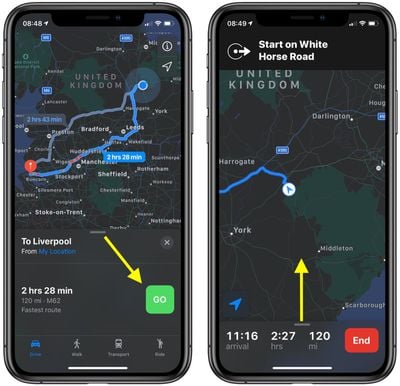
- Tap the green Go button to start your turn-by-turn directions.
- Using the pill-shaped drag handle, drag the card up from the bottom of the screen to reveal further options.
- Tap the Share ETA button.
- Select a person from the suggestions to share your time of arrival with a friend, or tap the Contacts button to choose another contact.
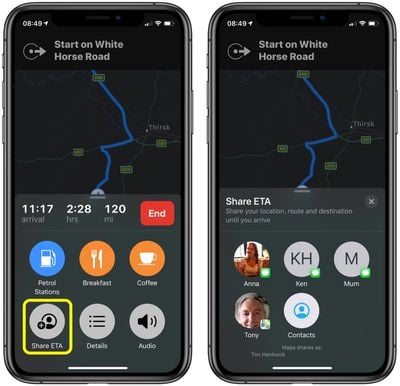
Note that Apple Maps keeps you informed about how many people you're sharing your journey with at the bottom of the directions screen.
Tag: Apple Maps
















































